
1. Réamhrá
Thank you for choosing the techno line WT2600 Digital Calendar. This device provides accurate time, date, indoor temperature, and humidity readings, along with alarm functions. This manual will guide you through the setup, operation, and maintenance of your new digital calendar.
2. Faisnéis Sábháilteachta
- Ná nochtaigh an gléas do theocht mhór, do sholas díreach na gréine, ná do thaise ard.
- Seachain an gléas a scaoileadh nó a chur faoi réir tionchair láidre.
- Ná déan iarracht an t-aonad a dhíchóimeáil ná a dheisiú leat féin. Téigh i gcomhairle le pearsanra seirbhíse cáilithe.
- Déan cadhnraí úsáidte a dhiúscairt go freagrach de réir rialacháin áitiúla.
- Coinnigh an gléas as aimsiú leanaí.
3. Ábhar Pacáiste
Seiceáil le do thoil go bhfuil na hearraí go léir i do phacáiste:
- techno line WT2600 Digital Calendar Unit
- Lámhleabhar Úsáideora (an doiciméad seo)
- Batteries (may be included depending on region)
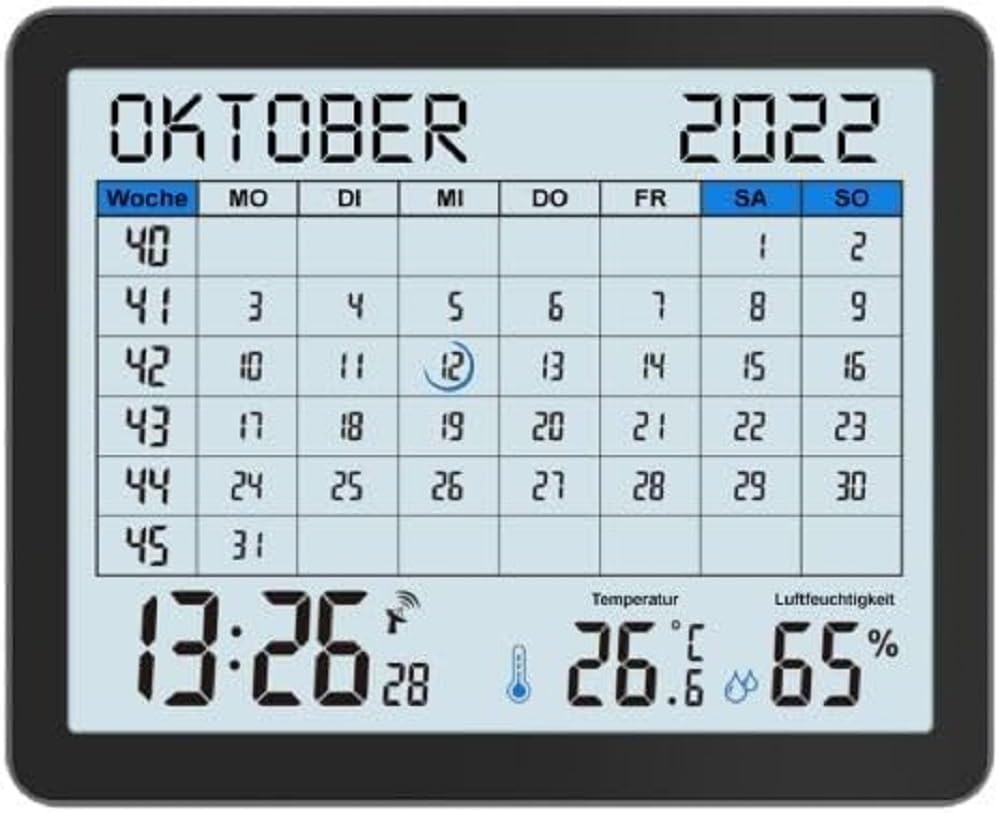
Image of the techno line WT2600 Digital Calendar packaging, showing the device and its key features.
4. Gnéithe Táirgí
The techno line WT2600 Digital Calendar offers the following key features:
- DCF-77 Radio-Controlled Clock: Automatic time synchronization for precise timekeeping, with an option for manual setting.
- 12/24 Hour Time Display: Select your preferred time format.
- Taispeántas Féilire: Shows the current date, day of the week, and month.
- 7-Language Month Display: Choose from seven languages for the month display.
- Taispeáint Teochta Laistigh: Shows indoor temperature in Celsius (°C) or Fahrenheit (°F).
- Indoor Humidity Display: Displays the current indoor humidity level.
- MIN/MAX Display: Records and displays the minimum and maximum temperature and humidity values.
- Aláraim Dhúbailte le Snooze: Socraigh dhá aláram neamhspleácha le feidhm snooze áisiúil.
- Táscaire Battery Íseal: Tugann sé foláireamh duit nuair is gá cadhnraí a athsholáthar.
- Socrúchán Ilghnéitheach: Designed for both wall mounting and table standing.

Tosaigh view of the techno line WT2600 Digital Calendar display, showing the calendar grid, current time, temperature, and humidity.
5. Socrú
5.1 Suiteáil Battery
- Aimsigh urrann na ceallraí ar chúl an aonaid.
- Oscail an clúdach urrann ceallraí.
- Insert the required batteries (e.g., 2 x AAA, not specified in data, common for such devices) according to the polarity markings (+ and -).
- Dún an clúdach urrann ceallraí go daingean.
5.2 Initial Power On and DCF-77 Signal Reception
Upon battery insertion, the device will power on and automatically begin searching for the DCF-77 radio signal. This process may take several minutes. For optimal reception, place the unit near a window and away from electronic interference.
- A signal icon (e.g., an antenna symbol) will flash during signal search.
- Once the signal is received, the time and date will be set automatically, and the signal icon will become solid.
- If no signal is received after 10-15 minutes, try repositioning the unit.
5.3 Socrú Ama agus Dáta de Láimh
If automatic synchronization is not desired or unsuccessful, you can set the time and date manually.
- Press and hold the 'SET' button (or similar, refer to device buttons) for a few seconds to enter manual setting mode.
- Use the '+' or '-' buttons to adjust the flashing value (e.g., hour, minute, year, month, day).
- Press 'SET' again to confirm the current setting and move to the next adjustable parameter.
- Repeat until all settings are complete.
5.4 Socrú Teanga
To change the display language for the month:
- Enter the setting mode (e.g., by pressing 'SET').
- Navigate through the settings until the language option appears.
- Use the '+' or '-' buttons to cycle through the available 7 languages.
- Deimhnigh do rogha.
6. Oibriúcháin
6.1 Viewing Time, Date, Temperature, and Humidity
The main display continuously shows the current time, date, indoor temperature, and indoor humidity. You can switch between 12-hour and 24-hour time formats by pressing a dedicated button (e.g., '12/24H' or 'MODE').
6.2 Aláraim a Shocrú
The device features two independent alarms.
- Press the 'ALARM' button (or similar) to view Aláram 1 am.
- Press and hold 'ALARM' to enter Alarm 1 setting mode.
- Use '+' or '-' to adjust the hour and minute, pressing 'ALARM' to confirm each.
- Repeat for Alarm 2.
- To activate/deactivate an alarm, press 'ALARM' repeatedly until the alarm icon appears/disappears.
6.3 Using Snooze
When an alarm sounds, press the 'SNOOZE' button (or similar, often a large button on top) to temporarily silence the alarm. The alarm will sound again after a few minutes (typically 5-10 minutes). To stop the alarm completely, press any other button.
6.4 MIN/MAX Display Function
The device records the minimum and maximum temperature and humidity values since the last reset.
- Press the 'MIN/MAX' button (or similar) once to view the maximum recorded values.
- Press it again to view the minimum recorded values.
- To reset the MIN/MAX records, press and hold the 'MIN/MAX' button while viewna taifid a áireamh.

Close-up of the techno line WT2600 Digital Calendar display, highlighting the time, temperature, and humidity readings.
7. Cothabháil
7.1 Glanadh
Wipe an gléas le bog, damp éadach. Ná húsáid glantóirí scríobacha ná tuaslagóirí, mar d’fhéadfadh siad seo damáiste a dhéanamh don taispeáint nó don casing.
7.2 Athsholáthar Ceallra
When the low battery indicator appears on the display, replace all batteries with new ones of the same type. Follow the battery installation steps in Section 5.1.
8. Fabhtcheartú
- Gan Taispeáin: Seiceáil polaraíocht na gceallraí agus cinntigh go bhfuil na cadhnraí úr.
- Am/Dáta Mícheart: Ensure the DCF-77 signal icon is solid. If not, reposition the unit or set the time manually (Section 5.3). Check your time zone setting if applicable (not explicitly mentioned in data, but common).
- Temperature/Humidity Readings Seem Inaccurate: Ensure the unit is placed in a location with good air circulation, away from direct heat sources or drafts. Allow some time for readings to stabilize after initial setup or relocation.
- Aláram Gan Fuaime: Verify that the alarm is activated (alarm icon displayed) and the alarm time is set correctly.
9. Sonraíochtaí
| Gné | Sonraíocht |
|---|---|
| Uimhir Mhúnla | WT2600 |
| Toisí (L x W x H) | 17.3 x 3.81 x 14 cm |
| Meáchan | 380 g |
| Dath | Dubh |
| Ábhar | Plaisteach |
| Foinse Cumhachta | Ceallraí faoi thiomáint |
| Cineál Taispeána | Digiteach |
| Úsáid Laistigh / Lasmuigh | Laistigh |
10. Barántas agus Tacaíocht
Information regarding product warranty and customer support was not available in the provided product data. Please refer to the retailer or manufacturer's official websuíomh gréasáin le haghaidh sonraí faoi chlúdach bharántais agus roghanna tacaíochta.