
Réamhrá
The zelotes T30 Wired Vertical Mouse is designed to enhance comfort and reduce wrist strain during prolonged computer use. Its ergonomic vertical design promotes a natural hand and wrist posture. This manual provides essential information for setting up, operating, maintaining, and troubleshooting your new mouse.

Fíor 1: Tosaigh-clé view of the zelotes T30 Wired Vertical Mouse.

Fíor 2: Taobhanna éagsúla views illustrating the vertical design of the mouse.
Socrú
The zelotes T30 Vertical Mouse is designed for simple plug-and-play operation, requiring no driver installation.
An Luch a nascadh
- Locate an available USB port on your computer (Laptop, PC, Mac).
- Insert the USB connector of the zelotes T30 mouse into the USB port.
- The mouse will be automatically recognized by your operating system (Win11, Win10, Win8, Win7, Mac OS, Linux) and ready for use.
Attaching the Detachable Palm Rest
The mouse comes with a detachable palm rest for enhanced comfort. To attach it:
- Align the palm rest with the designated slots on the bottom of the mouse.
- Gently slide the palm rest into place until it clicks securely.
- Ensure the palm rest is firmly attached before use.

Figure 3: Illustration of the detachable palm rest and its attachment points.
Treoracha Oibriúcháin
Dearadh agus Greim Eirgeanamaíochta
The vertical design of the T30 mouse positions your hand in a natural handshake posture, reducing pronation of the forearm and wrist. This design aims to alleviate discomfort associated with traditional mouse use.

Figure 4: Proper hand placement on the ergonomic vertical mouse.

Fíor 5: Mionsonraithe view of the humanized grip design, ensuring comfortable finger placement.
Íogaireacht DPI a Choigeartú
The mouse features 4 adjustable DPI settings: 1200, 1600, 2400, and 3200 DPI. To change the sensitivity:
- Locate the DPI button on the mouse. This button is typically positioned near the scroll wheel or thumb area.
- Press the DPI button to cycle through the available sensitivity settings. Each press will switch to the next DPI level.
- The LED illumination on the mouse may change color or pattern to indicate the current DPI setting.
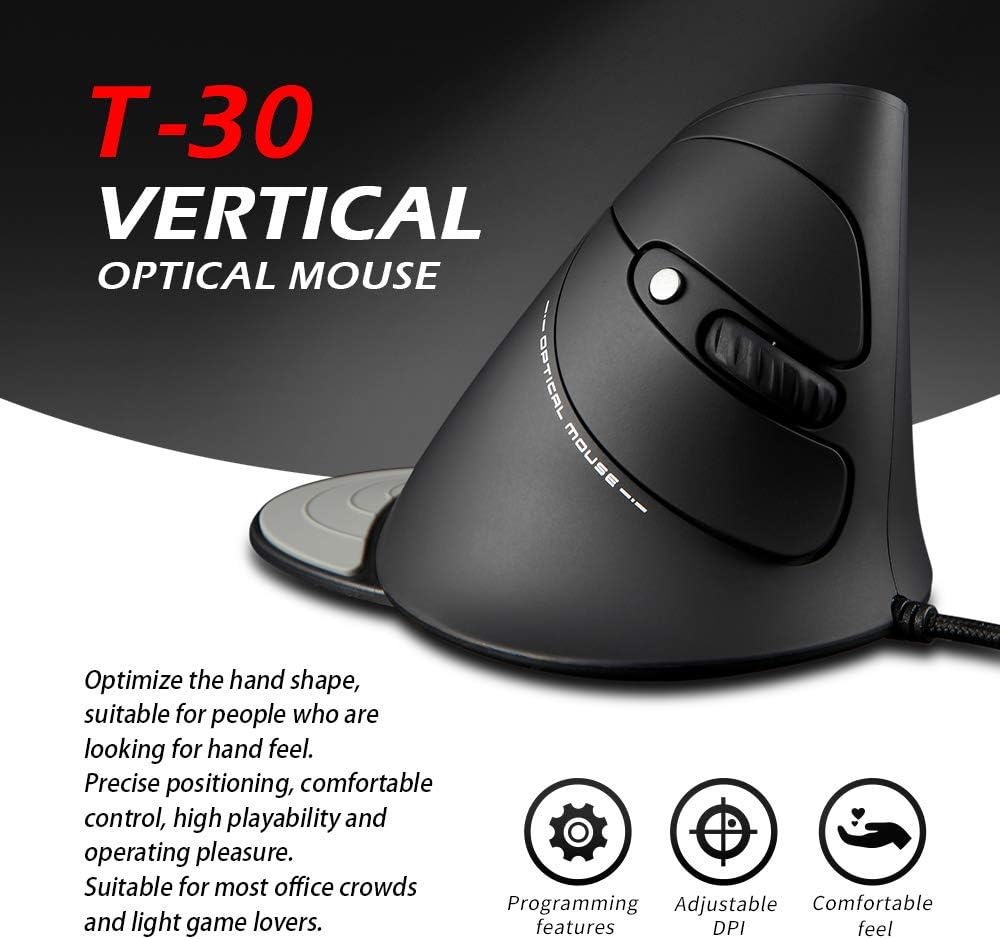
Figure 6: The T30 mouse with an emphasis on its adjustable DPI feature.
Feidhmeanna Cnaipe
The zelotes T30 mouse is equipped with 6 buttons for various functions:
- Cnaipe Cliceáil Clé: Feidhm chliceála chaighdeánach phríomhúil.
- Cnaipe Cliceáil Ar Dheis: Feidhm chliceála tánaisteach chaighdeánach.
- Roth Scrollaigh: For vertical scrolling. Can also be pressed for middle-click functionality.
- Cnaipe DPI: Adjusts mouse sensitivity (DPI).
- Cnaipe Ar Aghaidh: Nascleanúint ar aghaidh i web brabhsálaithe nó file taiscéalaithe.
- Cnaipe Ar Ais: Nascleanúint siar isteach web brabhsálaithe nó file taiscéalaithe.
Video 1: Demonstration of the zelotes T30 Ergonomic Vertical Mouse features and usage.
Cothabháil
To ensure the longevity and optimal performance of your zelotes T30 mouse, follow these maintenance guidelines:
- Glanadh: Bain úsáid as éadach bog, tirim chun dromchla na luiche a ghlanadh. I gcás salachar righin, bain úsáid as éadach beagán tirim.amp Is féidir éadach a úsáid, ach cinntigh nach dtéann aon leacht isteach sa luch. Seachain ceimiceáin ghéara nó glantóirí scríobacha.
- Stóráil: Nuair nach bhfuil sé in úsáid, stóráil an luch i dtimpeallacht ghlan, thirim amach ó theocht mhór agus ó sholas díreach na gréine.
- Cúram Cábla: Seachain an cábla USB a lúbadh nó a chasadh an iomarca, mar is féidir leis seo damáiste a dhéanamh do na sreanga inmheánacha.
Fabhtcheartú
If you encounter issues with your zelotes T30 mouse, refer to the following common problems and solutions:
| Fadhb | Cúis Féideartha | Réiteach |
|---|---|---|
| Luch gan freagairt | Loose USB connection, faulty USB port, operating system issue. |
|
| Tá gluaiseacht an chúrsóra neamhrialta nó preabach | Braiteoir optúil salach, dromchla ceap luiche mí-oiriúnach. |
|
| Níl an coigeartú DPI ag obair | Button malfunction, temporary software glitch. |
|
Sonraíochtaí
| Gné | Sonraigh |
|---|---|
| Branda | zelotes |
| Uimhir Mhúnla | T-30 |
| Toisí Táirge | 4.33 x 3.15 x 3.27 orlach |
| Meáchan Mír | 4.2 unsa |
| Teicneolaíocht Nascachta | USB Wired |
| Teicneolaíocht Braite Gluaiseachta | Optúil |
| Socruithe DPI | 1200/1600/2400/3200 pso |
| Líon na gCnaipí | 6 |
| Gné Speisialta | Ergonomic Design, Detachable Wrist Rest, LED Illumination |
| Comhoiriúnacht | Win11, Win10, Win8, Win7, Mac OS, Linux |

Figure 7: Detailed dimensions of the zelotes T30 Vertical Mouse.
Barántas agus Tacaíocht
For warranty information and technical support, please refer to the official zelotes websuíomh gréasáin nó déan teagmháil dhíreach lena seirbhís do chustaiméirí. Coinnigh d’admháil ceannaigh le haghaidh éilimh bharántais.
Monaróir: zelotes