
Réamhrá
This manual provides comprehensive instructions for the setup, operation, maintenance, and troubleshooting of your Ousmile Digital Basketball Scoreboard. Please read this manual thoroughly before using the product to ensure proper function and longevity.
Gnéithe Táirge
- Professional Score Keeper: High-definition LED lights display score, time, period, bonus, and possession. Score range (0-199), period (0-9). A 90 dB beep sounds when time expires. All functions are easily controlled by the remote.
- Ceallraí Cumhachtaithe: The LED scoreboard is powered by three 18650 batteries (not included) and supports rechargeable batteries for convenience and durability. The digital scoreboard can also be plugged in and used without batteries.
- Versatile Electronic Scoreboard: This portable scoreboard can be used for basketball, volleyball, tennis, ping-pong, baseball, pickleball, shuffleboard, and football. An excellent score keeper for outdoor, court, table, or fence games.
- Roghanna Ilsuiteála: Mount on a tripod, place on a table, hang on a wall, or suspend from a net. All four methods include necessary installation accessories.
- Ard-Infheictheacht: Features high-quality LED digital tubes designed to adapt to various lighting conditions, ensuring clear visibility up to 70 feet.
- Cianrialú: Operates wirelessly with a remote control, offering a range of up to 100 feet for convenient score management.

Image: The scoreboard displaying scores and time, highlighting a 100 ft remote control distance and a 90 dB sound alert.

Image: A diagram illustrating the dimensions of various display elements (Countdown Time, Poss, Bonus, Period, Score) and a 70 ft visible distance.
Ábhar an Phacáiste
- Ousmile Digital Basketball Scoreboard
- Cianrialú
- Tripod Stand (assembly required)
- Mounting Accessories (for wall/net hanging)
- Power Adapter (for plug-in use)

Image: The complete Ousmile Digital Scoreboard package, including the scoreboard, tripod stand, remote control, and a close-up of the battery compartment.
Socrú
1. Powering the Scoreboard
- Suiteáil Battery:
- Locate the battery compartment on the back of the scoreboard.
- Insert three 18650 batteries (not included) into the compartment, ensuring correct polarity (+/-).
- Dún an urrann ceallraí go daingean.
- Ceangal Cumhachta AC:
- Alternatively, connect the provided power adapter to the scoreboard's power input port.
- Breiseán an t-oiriúntóir isteach i soicéad leictreach caighdeánach.
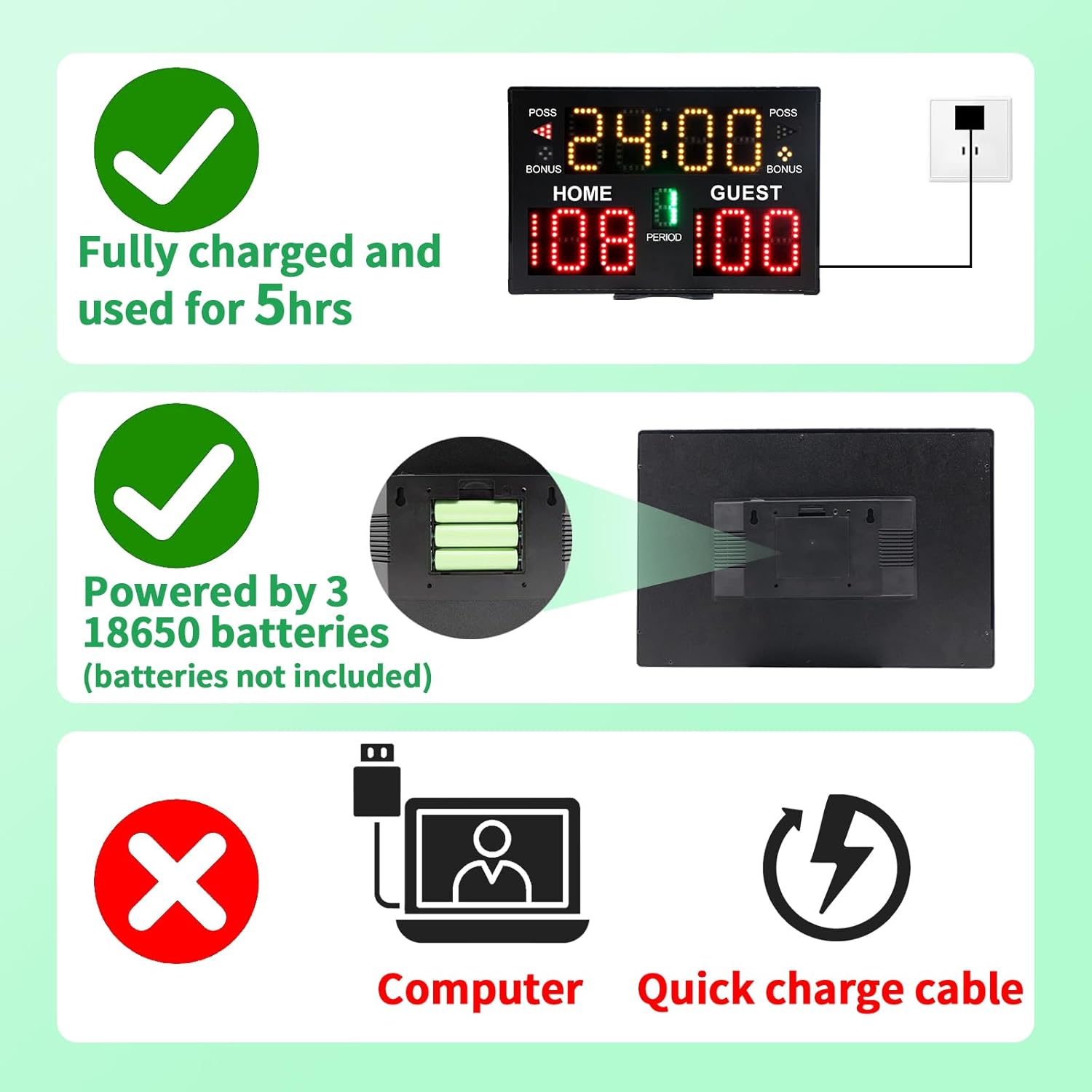
Image: Visual representation of the scoreboard's power options, showing battery installation and AC power connection. Note that 18650 batteries are required and not included.
2. Stand Assembly and Mounting
- Seastán Tripod:
- Unfold the tripod legs and secure them.
- Síneadh an cuaille teileascópach go dtí an airde atá ag teastáil.
- Attach the scoreboard to the top of the tripod stand using the provided mounting screw.
- Socrúchán Tábla:
- Ensure the scoreboard is placed on a stable, flat surface.
- Wall/Net Mounting:
- Use the included mounting accessories to securely attach the scoreboard to a wall or net. Refer to the specific accessory instructions for detailed steps.
Treoracha Oibriúcháin
The scoreboard is operated using the included remote control. Ensure the remote has working batteries and is pointed towards the scoreboard for optimal signal.
Feidhmeanna Cianrialaithe:
- CUMHACHT: Turns the scoreboard ON/OFF.
- HOME/GUEST +/-: Adjusts the score for the Home or Guest team.
- AM +/-: Adjusts the game time.
- TOSAIGH / STOP: Starts or pauses the game timer.
- ATHShocraigh: Resets all scores and timer to default.
- PERIOD +/-: Adjusts the current game period.
- BÓNAS: Toggles the bonus indicator for Home/Guest.
- POSS: Toggles possession indicator for Home/Guest.
- bíp: Activates the 90 dB end-of-time beep (automatically sounds when timer reaches zero).
Image: The remote control used to operate the Ousmile Digital Scoreboard, showing various buttons for score, time, and period adjustments.
Cothabháil
- Glanadh: Use a soft, dry cloth to wipe the scoreboard surface. Do not use abrasive cleaners or solvents.
- Cúram Battery: If using batteries, remove them if the scoreboard will not be used for an extended period to prevent leakage.
- Stóráil: Store the scoreboard in a cool, dry place away from direct sunlight and extreme temperatures. Disassemble the tripod stand for compact storage.
- Láimhseáil: Avoid dropping or subjecting the scoreboard to strong impacts.
Fabhtcheartú
| Fadhb | Cúis Féideartha | Réiteach |
|---|---|---|
| Scoreboard does not turn on. | No power, dead batteries, or loose connection. | Check if the power adapter is securely plugged in. If using batteries, ensure they are correctly inserted and charged/new. |
| Cianrialtán nach n-oibríonn. | Remote batteries are dead, remote is too far, or obstruction. | Replace remote batteries. Ensure remote is within 100 ft range and pointed at the scoreboard without obstructions. |
| Display segments are not lighting up correctly. | Fadhb le comhpháirt inmheánach. | Try turning the scoreboard off and on again. If the problem persists, contact customer support. |
| Score or time cannot be adjusted. | Remote control issue or scoreboard in a locked state. | Ensure the remote is functioning. Try pressing the RESET button on the remote. |
Sonraíochtaí
- Branda: Ousmile
- Monaróir: YiZhi Sports
- Toisí Táirge (L x W x H): 37.59 x 24.89 x 2.29 cm (14.8 x 9.8 x 0.9 orlach)
- Meáchan Táirge: 453.59 grams (approximately 1 lb)
- Foinse Cumhachta: 3 x 18650 batteries (not included) or AC power adapter
- Raon Cianrialaithe: Suas le 100 troigh
- Fad Infheicthe: Suas le 70 troigh
- Foláireamh Fuaime: 90 dB beep
- ASIN: B0CD296M9J
- Dáta Ar Fáil den Chéad Uair: 7 Lúnasa, 2023

Image: A person holding the scoreboard, illustrating its portable and lightweight design, with dimensions of 14.8 inches (length) and 9.8 inches (height).
Barántas agus Tacaíocht
For warranty information or technical support, please refer to the product packaging or contact the seller directly through your purchase platform. Keep your purchase receipt as proof of purchase.