
1. Réamhrá
Go raibh maith agat as an gceannachasing the Dpofirs LMD-750 Portable DVD Player. This device is designed to provide versatile entertainment on the go, at home, or in the office. Featuring a 270° rotating HD LCD screen, multi-format disc support, USB/SD card playback, analog TV function, FM radio, and game capabilities, it offers a comprehensive multimedia experience. Please read this manual carefully to ensure proper use and to maximize the performance and longevity of your device.
2. Faisnéis Sábháilteachta
- Ná nochtaigh an gléas do bháisteach, taise ná teochtaí foircneacha.
- Seachain an gléas a chur in aice le foinsí teasa nó i solas díreach.
- Use only the provided power adapter and car adapter.
- Ná déan iarracht an gléas a dhíchóimeáil ná a dheisiú leat féin. Téigh i dteagmháil le pearsanra seirbhíse cáilithe.
- Coinnigh an gléas ar shiúl ó réimsí maighnéadacha láidre.
- Cinntigh aeráil cheart agus an gléas á oibriú.
- Remove discs when transporting the player to prevent damage.
3. Ábhar Pacáiste
Seiceáil an pacáiste le do thoil le haghaidh na míreanna seo a leanas:
- 1 x Dpofirs LMD-750 Portable DVD Player
- 1 x Cianrialú
- 1 x Oiriúntóir Cumhachta (Breiseán AE)
- 1 x Car Adapter
- 1 x AV Cábla
- 1 x Antenna
- Cluiche 1 x gamepad
- 1 x Game Disc
- 1 x lámhleabhar úsáideora
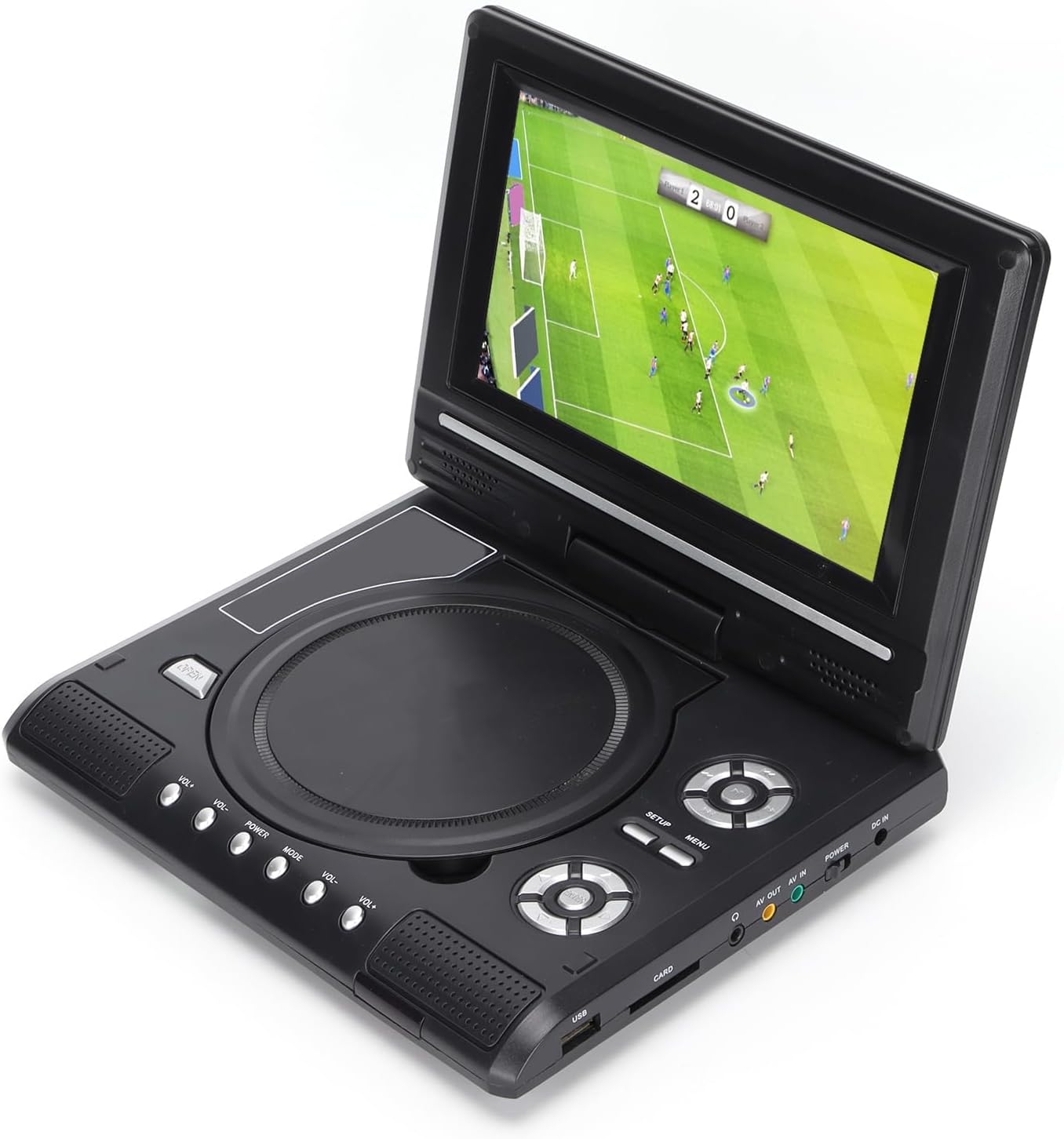
Image: All accessories included with the Dpofirs LMD-750 Portable DVD Player.
4. Táirge Tharview
The Dpofirs LMD-750 features a compact design with intuitive controls and multiple connectivity options.

Íomhá: Tosaigh view of the Dpofirs LMD-750 Portable DVD Player with the screen open.

Íomhá: Taobh view detailing the input/output ports.

Íomhá: Barr view of the player when closed.
Rialuithe agus Poirt:
- Scáileán: 6.8"/8.5" HD LCD, 270° rotatable.
- Tráidire Diosca: For DVD/CD media.
- Cnaipí Rialaithe: Play/Pause, Stop, Fast Forward/Rewind, Next/Previous, Setup, Menu, Volume +/-.
- USB Port: Chun tiomántáin USB flash a nascadh.
- CARD Slot: For inserting memory cards (e.g., SD card).
- Jack Cluasán: Le haghaidh éisteacht phríobháideach.
- AV AMACH: Audio/Video output to external display.
- AV IN: Audio/Video input from external source.
- Athraigh CUMHACHT: To turn the device On/Off.
- DC IN: Power input for adapter.
5. Socrú
5.1 An Ceallra a mhuirearú
Before first use, fully charge the built-in 1500mAh lithium battery. Connect the power adapter to the DC IN port on the player and plug it into a wall outlet (110-240V 50/60Hz). The charging indicator will illuminate. Once fully charged, the indicator may change color or turn off. A full charge provides approximately 30-60 minutes of continuous playback, depending on usage.
5.2 Cumhacht a nascadh
- Úsáid Baile: Connect the AC power adapter to the DC IN port and a wall socket.
- Úsáid Gluaisteán: Connect the car adapter to the DC IN port and your vehicle's cigarette lighter socket.
5.3 Connecting to an External Display (AV OUT)
Chuig view content on a larger screen:
- Connect one end of the AV cable to the AV OUT port on the DVD player.
- Connect the other end of the AV cable to the corresponding AV IN ports (Yellow for Video, White/Red for Audio) on your TV or monitor.
- Roghnaigh an fhoinse ionchuir AV cheart ar do thaispeántas seachtrach.
5.4 Connecting External Devices (AV IN)
To display content from an external source on the DVD player's screen:
- Connect one end of the AV cable to the AV IN port on the DVD player.
- Connect the other end of the AV cable to the AV OUT ports of your external device (e.g., another DVD player, game console).
- Switch the DVD player to AV IN mode (refer to Operating Instructions).
6. Treoracha Oibriúcháin
6.1 Cumhacht ar siúl / as
Sleamhnán an CUMHACHT switch to the "ON" position to turn on the player. Slide it to "OFF" to power down.
6.2 Rothlú Scáileáin
The LCD screen can rotate up to 270 degrees. Gently adjust the screen to your desired viewing angle. This allows for flexible viewing in various environments.
6.3 Rialú Toirt
Bain úsáid as an VOL+ agus Vol- buttons on the player or remote control to adjust the audio volume.
6.4 Nascleanúint Roghchláir
Brúigh an MENU button to access the main menu. Use the directional buttons (up, down, left, right) to navigate and the OK cnaipe chun roghanna a dhearbhú. Brúigh SETUP chun rochtain a fháil ar shocruithe córais.
7. Athsheinm Meán
7.1 Disc Playback (DVD/CD)
- Oscail an clúdach diosca.
- Carefully place a compatible disc (DVD, DVD±R, DVD±RW, VCD, CD, CD±R, CD±RW) onto the spindle with the label side facing up.
- Close the disc cover securely.
- The player will automatically detect and begin playback. If not, press the IMIRCE cnaipe.

Image: Player displaying video content.

Image: Player displaying a sports event.
7.2 Athsheinm Cárta USB/SD
- Cuir tiomántán USB flash isteach sa USB port or a memory card into the CÁRTA sliotán.
- The player will automatically switch to USB/Card mode or prompt you to select the source.
- Nascleanúint trí do files using the directional buttons and press OK a imirt.
Formáidí Tacaithe: DIVX, AV/VOB, MPG, MP3, MP4, WMA, JPEG, TXT, RMVB.
The player features an intelligent power-off memory function, resuming playback from where it stopped after a power interruption.
8. TV Function
The Dpofirs LMD-750 includes an analog TV tuner.
- Connect the included antenna to the antenna port on the player.
- Switch the player to TV mode (usually via the MODE button or menu selection).
- Perform an automatic channel scan in the TV settings menu to find available analog channels.
- Channel reception quality depends on local signal strength.
Supported TV Standards: PAL, NTSC, SECAM (optional).
9. Game Function
Enjoy gaming with the included gamepad and game disc.
- Connect the gamepad to the designated game port on the player.
- Insert the game disc into the disc tray.
- Select the game function from the main menu.
- Choose from the available games on the disc (up to 300 games).
10. Cothabháil
10.1 An Gléas a Ghlanadh
- Cuimil taobh amuigh an imreora le héadach bog, tirim.
- Ná húsáid glantóirí leachtacha ná ábhair scríobacha.
- For the screen, use a soft, lint-free cloth specifically designed for LCD screens.
10.2 Cúram Diosca
- Láimhseáil dioscaí ag a n-imeall chun méarloirg a sheachaint.
- Glan dioscaí le héadach bog, saor ó lint, ag cuimilt ón lár amach.
- Store discs in their cases to prevent scratches.

Image: Internal disc mechanism.
11. Fabhtcheartú
| Fadhb | Cúis Féideartha | Réiteach |
|---|---|---|
| Gan chumhacht | Battery drained; Power adapter not connected; Power switch OFF. | Charge the battery; Connect power adapter; Slide POWER switch to ON. |
| No disc playback | Disc inserted incorrectly; Disc dirty or scratched; Incompatible disc format. | Insert disc correctly (label up); Clean or replace disc; Use supported disc format. |
| Gan fuaim | Volume too low; Mute function active; Headphone connected. | Increase volume; Deactivate mute; Disconnect headphones if using speakers. |
| Fáiltiú go dona ar an teilifís | Weak signal; Antenna not positioned correctly. | Adjust antenna position; Rescan channels; Check local signal strength. |
| Cianrialtán nach bhfuil ag obair | Batteries drained or inserted incorrectly; Obstruction between remote and player. | Replace batteries (2x AAA); Ensure correct polarity; Remove obstructions. |
12. Sonraíochtaí
| Uimhir Mhúnla | LMD-750 (Dpofirsrgi5bmonx0-13) |
| Ábhar | ABS |
| Dath | Dubh |
| Méid an Scáileáin | 6.8" / 8.5" (diagonal, depending on variant) |
| Cineál Taispeána | LCD |
| Taifeach Taispeána | 234 x 480 x RGB (native), supports up to 1280 x 720, 1366 x 768 |
| Ionchur Voltage | 110-240V 50/60Hz |
| Aschur Voltage | 12V |
| Cumas Battery | 1500mAh Lithium Battery (built-in) |
| Ceallraí Cianrialú | 2 x cadhnraí AAA (gan a bheith san áireamh) |
| Formáidí Diosca Tacaithe | DVD, DVD±R, DVD±RW, VCD, MP3, MP4, CD±R, CD±RW |
| Supported Media Formats (USB/Card) | DIVX, AV/VOB, MPG, MP3, MP4, WMA, JPEG, TXT, RMVB |
| Córas teilifíse | PAL, NTSC, SECAM (full system) |
| Cainéil Glactha | LHF1-5, VHF6-12, UHF13-69, ATV |
| Teicneolaíocht Ionchódaithe Fuaime | 96kHz/24 giotán |
| Raon Dinimiciúla | ≥ 80dB |
| -Comhartha-go Torann Cóimheas | ≥ 70dB |
| Leithlisiú Cainéal | ≥ 70dB |
| Teicneolaíocht Nascachta | USB, Composite Video |
| Monaróir | Dpofirs |
| Tír Bhunaidh | tSín |
13. Barántas agus Tacaíocht
Chun eolas faoi bharántas agus tacaíocht do chustaiméirí a fháil, féach ar an doiciméadacht a cuireadh ar fáil le do cheannachán nó déan teagmháil le do mhiondíoltóir. Coinnigh do chruthúnas ceannaigh le haghaidh aon éilimh bharántais.