
1. Treoracha Tábhachtacha Sábháilteachta
Léigh agus tuig na treoracha sábháilteachta go léir sula n-úsáideann tú an táirge seo. Má theipeann ort na treoracha seo a leanúint, d’fhéadfadh turraing leictreach, tine nó díobháil thromchúiseach a bheith mar thoradh air.
- Ná nochtaigh an gléas do theocht mhór, do sholas díreach na gréine, ná do thaise ard.
- Keep the device away from water and other liquids. If it gets wet, turn it off immediately and allow it to dry completely before reuse.
- Ná déan iarracht an gléas a dhíchóimeáil, a dheisiú ná a mhodhnú. Tabhair aird phearsanra cáilithe ar gach seirbhísiú.
- Use only specified charging methods (USB-C, solar, hand crank).
- Coinnigh as teacht leanaí.
- Déan cadhnraí a dhiúscairt de réir rialacháin áitiúla.
2. Táirge Tharview
The FosPower Emergency Weather Radio Model A6 is a versatile device designed for emergency preparedness and outdoor activities. It features multiple power sources, radio reception, lighting, and a power bank function.
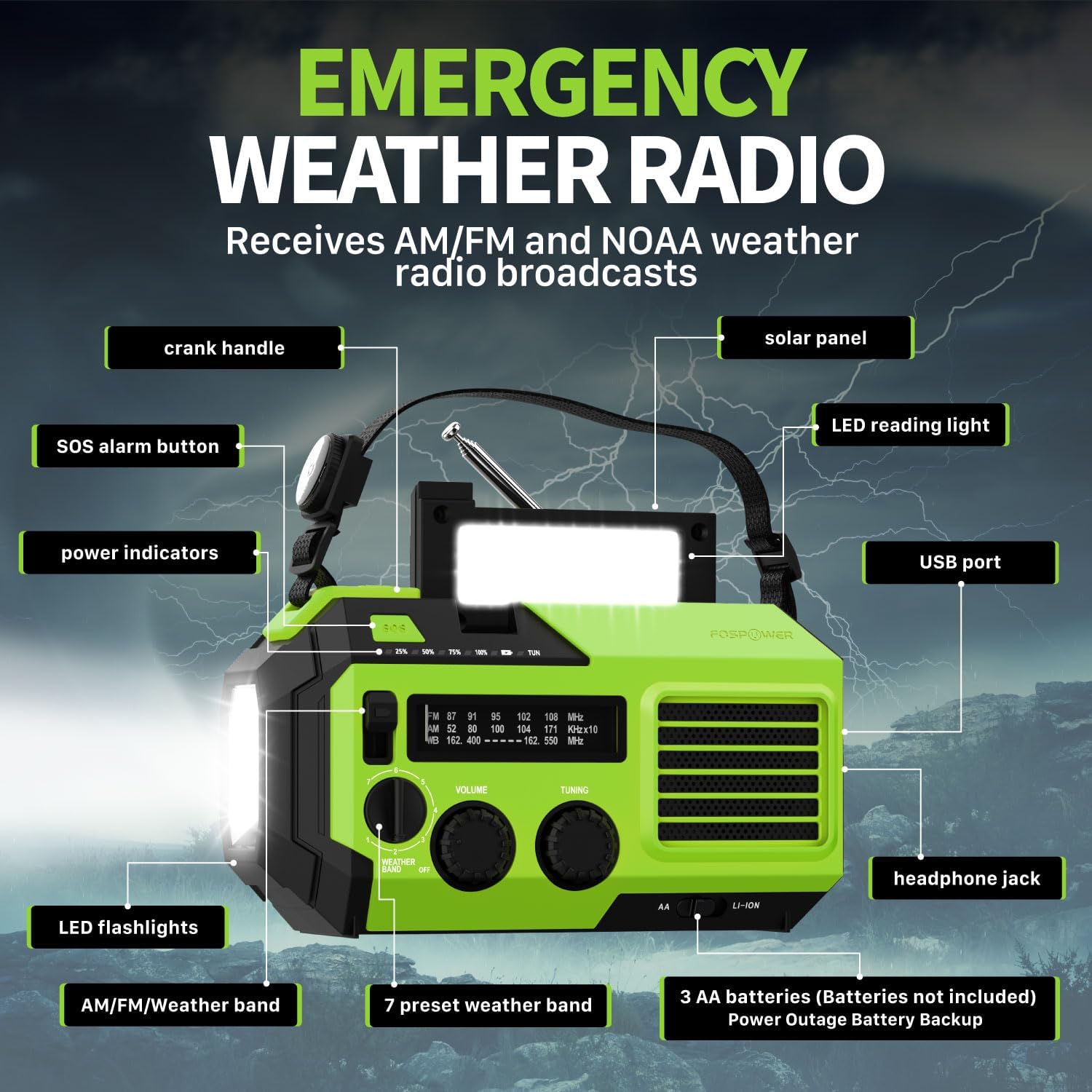
Íomhá 2.1: Tosaigh view of the FosPower Emergency Weather Radio with key components labeled, including the crank handle, solar panel, SOS alarm button, power indicators, LED reading light, USB port, LED flashlights, AM/FM/Weather band selector, volume and tuning knobs, and headphone jack.
Príomhghnéithe:
- NOAA/AM/FM Radio: Access local weather information and emergency hazard alerts, as well as standard AM/FM broadcasts.
- 19240mWh (5200mAh) Power Bank: Charge USB devices during power outages or in outdoor settings.
- Foinsí Ilchumhachta: Recharge via USB-C cable, solar panel, or hand crank. Can also be powered by AA batteries (not included).
- Aláram SOS: Gníomhaíonn sé sirean ard agus solas ag splancadh le haghaidh comharthaíochta éigeandála.
- Soilsiú Comhtháite: Features a powerful flashlight and a reading light.
- Friotaíocht Uisce IPX3: Soláthraíonn sé cosaint i gcoinne uisce splancscáileáin.
3. Socrú
3.1 Muirearú Tosaigh
Before first use, fully charge the internal battery using the provided USB-C cable. Connect the USB-C cable to the radio's USB-C port and the other end to a USB power adapter (not included) or a computer USB port. The power indicators will illuminate to show charging progress.
3.2 AA Battery Installation (Optional)
The radio can also operate on 3 AA batteries (not included) as a backup power source. Open the battery compartment cover on the back of the radio and insert 3 AA batteries, ensuring correct polarity. Close the cover securely.

Íomhá 3.1: Cúil view of the radio highlighting the solar panel, hand-crank, AA battery compartment, and USB charging port, illustrating the multiple power sources.
4. Treoracha Oibriúcháin
4.1 Oibríocht Raidió
- Cumhacht ar siúl / as: Rotate the 'VOLUME' knob clockwise to turn the radio on and adjust the volume. Rotate counter-clockwise until it clicks to turn off.
- Roghnú Banna: Use the 'WEATHER BAND' switch to select between AM, FM, or WB (Weather Band).
- Tiúnadh: Rotate the 'TUNING' knob to scan for radio stations. Extend the telescopic antenna for improved reception, especially for FM and WB.
- Banna Aimsire NOAA: When WB is selected, the radio will receive NOAA weather alerts. The radio supports 7 preset weather bands.
- Jack Cluasán: For private listening, connect 3.5mm headphones to the headphone jack.
4.2 Tóirse agus Solas Léitheoireachta

Image 4.1: The radio demonstrating its high-power flashlight and cool-tone reading lamp gnéithe.
- Flashlight: Press the flashlight button located on the front of the radio to turn the flashlight on or off.
- Solas Léitheoireachta: Lift the solar panel to reveal the LED reading light. Press the reading light button to turn it on or off.
4.3 Aláram SOS
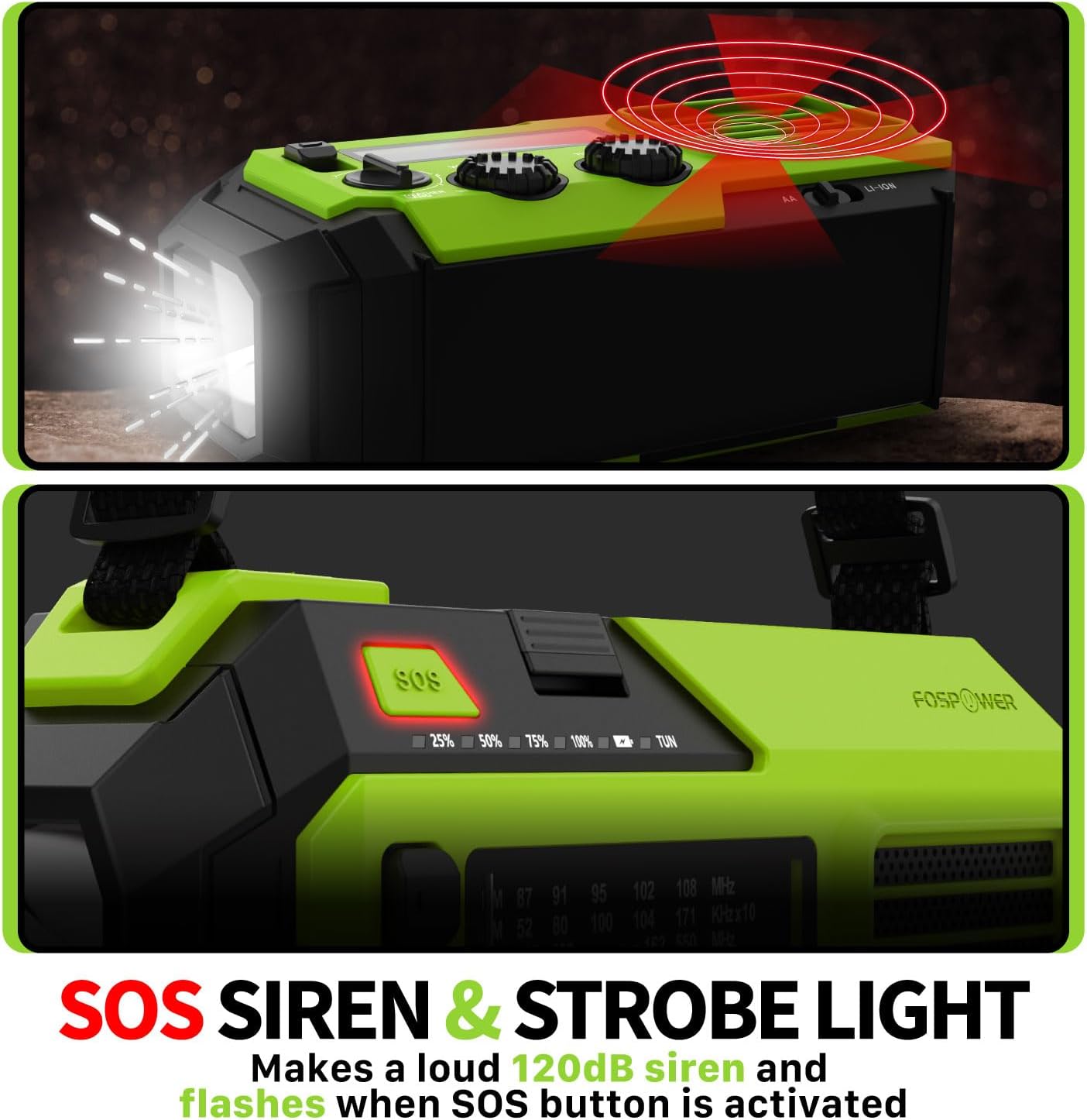
Image 4.2: Close-up of the radio's SOS button and an illustration of the siren and strobe light being activated.
In an emergency, press and hold the 'SOS' button to activate a loud 120dB siren and a flashing strobe light. Press the 'SOS' button again to deactivate.
4.4 Charging External Devices (Power Bank)

Image 4.3: The radio connected via USB to a smartphone, demonstrating its power bank capability for charging small electronics.
Connect your USB-powered device (e.g., smartphone, tablet) to the radio's USB-A output port using your device's charging cable. The radio's internal battery will begin charging your device.
4.5 Muirearú ar an Raidió
- Muirearú USB-C: Connect the provided USB-C cable to the radio's USB-C input port and a USB power source. This is the most efficient charging method.
- Muirearú Gréine: Place the radio with the solar panel facing direct sunlight. The solar panel charges the internal battery, primarily for maintaining charge or slow charging in emergencies.
- Muirearú Cromán Láimhe: Rotate the hand crank clockwise or counter-clockwise at a steady pace (approximately 130-150 RPM) for 3-5 minutes to generate power for short-term use or to initiate charging.
5. Cothabháil
- Glanadh: Glan an raidió le héadach bog tirim. Ná húsáid glantóirí scríobacha ná tuaslagóirí.
- Stóráil: Store the radio in a cool, dry place away from direct sunlight when not in use for extended periods. For optimal battery health, fully charge the internal battery every 3-6 months.
- Cúram Battery: If using AA batteries, remove them if the radio will not be used for a long time to prevent leakage.
6. Fabhtcheartú
| Fadhb | Cúis Féideartha | Réiteach |
|---|---|---|
| Ní chasann an raidió air. | Internal battery is depleted; AA batteries are depleted or incorrectly installed. | Charge the internal battery via USB-C or hand crank. Check and replace AA batteries if used. |
| Fáiltiú raidió lag. | Antenna gan síneadh amach; limistéar comhartha lag; cur isteach. | Fully extend the telescopic antenna. Adjust radio position. Try tuning to a stronger station. |
| Gléas seachtrach nach bhfuil ag muirearú. | Tá ceallraí inmheánach an raidió íseal; cábla mícheart; gléas neamh-chomhoiriúnach. | Ensure the radio's internal battery is sufficiently charged. Use a functional USB charging cable. Verify device compatibility. |
| Hand crank is stiff or not generating power. | Mechanism obstruction; improper cranking speed. | Ensure no obstructions. Crank at a steady, moderate pace (130-150 RPM). |
7. Sonraíochtaí
| Gné | Sonraigh |
|---|---|
| Uimhir Mhúnla | FOSPWB-2419 |
| Toisí Táirge | 6.76 x 3.52 x 2.59 orlach |
| Meáchan Mír | 1.08 punt |
| Battery Inmheánach | 19240mWh (5200mAh) |
| Tacaíocht Ceallraí Seachtracha | 3 x cadhnraí AA (gan áireamh) |
| Bannaí Raidió | AM, FM, NOAA Weather Band (WB) |
| Modhanna Muirir | USB-C, Solar, Hand Crank |
| Gnéithe Speisialta | Built-In Flashlight, Reading Light, SOS Alarm, Power Bank |
| Friotaíocht Uisce | IPX3 |
8. Barántas agus Tacaíocht
FosPower provides a limited lifetime warranty for this product. For warranty claims, technical assistance, or customer service inquiries, please contact FosPower's USA-based customer support team. Refer to the official FosPower websuíomh gréasáin nó i do dhoiciméid cheannaigh le haghaidh sonraí teagmhála.