
Réamhrá
The eECO-FLYING X1 Bluetooth Intercom Headset is designed to provide clear communication and entertainment for motorcycle riders. Featuring Bluetooth 5.0, DSP+CVC noise reduction, and IPX6 waterproofing, this headset ensures a reliable and enjoyable riding experience. This manual provides detailed instructions for installation, operation, and maintenance of your X1 headset.
Cad atá sa Bhosca
Deimhnigh le do thoil go bhfuil na hearraí uile i láthair i do phacáiste:
- Príomh-Aonad
- Lúibín Gléasta
- Cábla USB
- Bosca Pacála
- Lámhleabhar Úsáideora
- Full Helmet Speaker and Microphone (or Retro Helmet Speaker and Microphone)
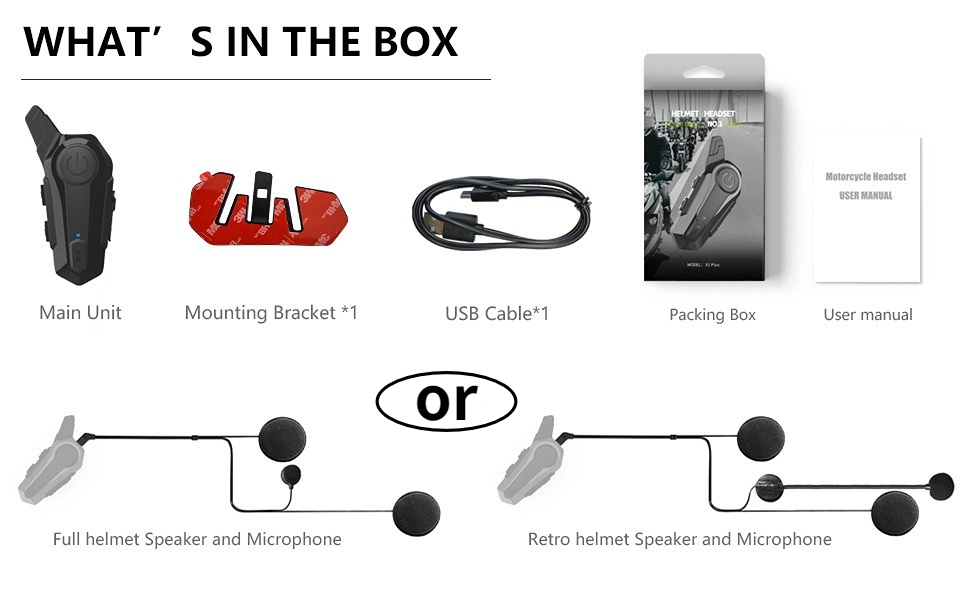
Image: Contents of the eECO-FLYING X1 package.
Gnéithe
- Bluetooth 5.0: Ensures fast and stable transmission for seamless connectivity and an immersive riding experience.
- DSP + CVC Noise Reduction: Intelligent noise reduction technology provides clear communication and high-quality music by minimizing bothersome background noise.
- Physical Pressure Button Design: User-friendly buttons are designed for easy operation even when wearing gloves, offering a tactile and responsive experience.
- U Frequency Channel: Guarantees stable transmission and wide bandwidth for clear voice calls, convenient mobile communication, and strong anti-interference capabilities.
- IPX6 Waterproof & 800mAh Battery: The IPX6 waterproof design allows the headset to handle various weather conditions. The 800mAh battery provides long-lasting power for continuous use, with up to 44 hours standby time, 12 hours working time, and 2.5 hours charging time.

Image: Two riders using the intercom with a 1000M range.

Image: Headset demonstrating IPX6 waterproof capability.

Image: Battery life details for the X1 headset.

Image: Noise cancellation technology diagram.
Socrú agus Suiteáil
Follow these steps to properly install your eECO-FLYING X1 Bluetooth Intercom Headset on your motorcycle helmet:
- Ullmhaigh an clogad: Remove the inner padding of your helmet to access the shell.
- Socrúchán Cainteoir: Attach the speaker pads (velcro) to the inside of the helmet where your ears will be. Ensure they are positioned for optimal sound. The short speaker line should be attached to the left side, and the long speaker line to the right side.
- Socrúchán Micreafón: Secure the microphone in front of your mouth area, ensuring it is close enough for clear voice pickup but not obstructing your vision or comfort.
- Cáblaí Bealaigh: Carefully route all cables under the helmet padding to keep them tidy and prevent interference.
- Ceangail an Príomh-Aonad: Choose between the clip-on bracket or the adhesive bracket. For the adhesive bracket, peel off the protective film and firmly press the bracket onto the side of your helmet. For the clip-on bracket, slide it onto the edge of the helmet.
- Mount Headset: Slide the main headset unit onto the installed bracket until it clicks securely into place.
- Connect Speakers/Mic: Plug the speaker and microphone cable into the designated port on the main unit.
Video: Detailed installation guide for the eECO-FLYING X1 helmet Bluetooth headset.
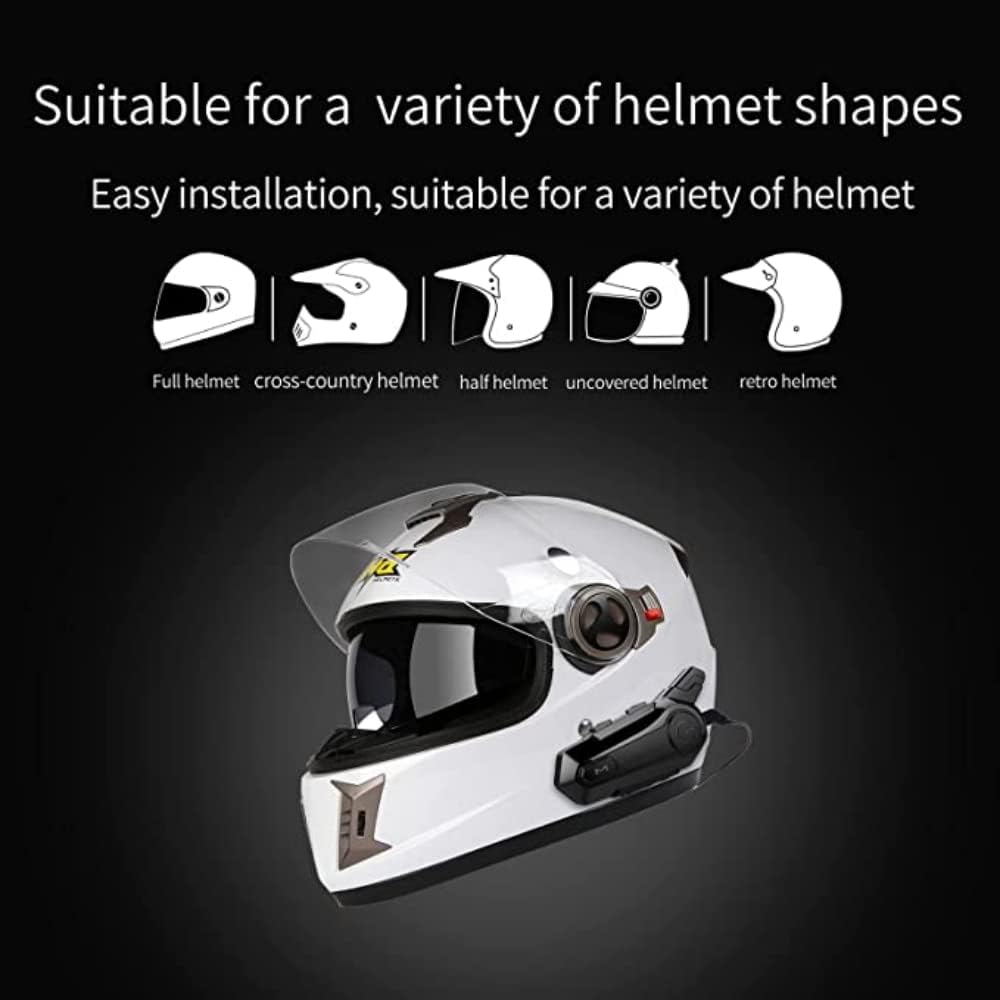
Image: Compatibility with various helmet shapes.

Image: X1 headset mounted on a helmet.
Treoracha Oibriúcháin
Familiarize yourself with the controls and functions of your X1 headset:

Image: Labeled diagram of headset buttons and ports.
- Cumhacht ar siúl / as: Press and hold the Power button for approximately 3 seconds to turn the unit on or off.
- Péireáil Bluetooth: With the unit off, press and hold the Power button until the indicator light flashes red and blue, indicating pairing mode. Cuardaigh le haghaidh "X1" on your device's Bluetooth settings and connect.
- Feidhm Idirchum: To initiate intercom communication with another X1 headset, ensure both units are paired. Press the Mode button once to start or end intercom.
- Athsheinm Ceoil: After pairing with your phone, open your music player. Use the Volume +/- buttons for track navigation (short press) and volume adjustment (long press).
- Cúntóir Gutha: Short press the "M" key to activate your phone's voice assistant (e.g., Siri, Google Assistant). You can then issue commands like "Please play music" or "Give Mary a call."
- Bainistíocht Glaonna: Press the Power button once to answer an incoming call. Press again to end a call. Long press to reject a call.
- Rialú Toirte: Long press the Volume + button to increase volume, and long press the Volume - button to decrease volume.
Físeán: Tharview of X1 intercom features and usage.

Image: Using the voice assistant feature.
Sonraíochtaí
| Gné | Sonraigh |
|---|---|
| Ainm an tSamhail | X1 |
| Branda | eECO-FLYING |
| Teicneolaíocht Cumarsáide Gan Sreang | Bluetooth 5.0 |
| Raon Idirchum | Up to 1000M (for 2 riders) |
| Laghdú Torainn | DSP + CVC Technology |
| Rátáil uiscedhíonach | IPX6 |
| Cumas Battery | 800mAh |
| Am Fuireachas | Suas le 44 uair an chloig |
| Am Oibre | Suas le 12 uair an chloig |
| Am Muirir | Thart ar 2.5 uair an chloig |
| Cineál Rialaithe | Media Control, Touch (Physical Buttons) |
| Gléasanna Comhoiriúnacha | Gluaisrothair |
| Úsáidí Molta | Calling, Music |
| Comhpháirteanna San áireamh | Headset, Headband (speakers/mic) |
Fabhtcheartú
- Gan Cumhacht: Ensure the battery is charged. Connect the headset to a power source using the provided USB cable.
- Ní féidir péireáil: Make sure the headset is in pairing mode (flashing red and blue light). Turn off and on your phone's Bluetooth, then try searching again. Ensure no other devices are connected to the headset.
- Níl an t-idirchumarsáid ag ceangal: Verify both headsets are within range and are not connected to other Bluetooth devices. Try re-pairing the intercom units.
- Drochchaighdeán Fuaime: Check speaker placement inside the helmet. Ensure the microphone is positioned correctly and not obstructed. Reduce background noise if possible.
- Damáiste Uisce: Although IPX6 rated, avoid prolonged submersion or high-pressure water jets. If water ingress is suspected, power off the device immediately and allow it to dry completely before attempting to use it again.
Cothabháil
- Glanadh: Glan an t-aonad cluasán le clúdach bog,amp éadach. Ná húsáid ceimiceáin gharbh ná glantóirí scríobacha.
- Stóráil: Stóráil na cluasáin in áit fhionnuar tirim amach ó sholas díreach na gréine agus ó theocht mhór nuair nach bhfuil siad in úsáid.
- Cúram Battery: For optimal battery life, avoid fully discharging the battery frequently. Charge the device regularly, even if not in constant use.
Barántas agus Tacaíocht
The eECO-FLYING X1 Bluetooth Intercom Headset comes with a standard manufacturer's warranty. Please refer to the warranty card included in your package for specific terms and conditions. For technical support, troubleshooting assistance, or warranty claims, please contact eECO-FLYING customer service through the retailer where you purchased the product or visit the official eECO-FLYING websuíomh.