
1. Réamhrá
Thank you for choosing the HEALGEN Bosmiller Recliner Chair. This manual provides important information regarding the assembly, operation, maintenance, and troubleshooting of your new recliner. Please read this manual thoroughly before use to ensure safe and correct operation and to maximize the lifespan of your product. Keep this manual for future reference.
Réamhchúraimí Sábháilteachta:
- Cinntigh go bhfuil na codanna go léir i láthair agus nach ndéantar damáiste dóibh roimh thionól.
- Ná lig do leanaí imirt ar an gcathaoir leathar nó timpeall air gan mhaoirseacht.
- Keep hands and feet clear of the reclining mechanism when adjusting the chair.
- Ná seas ar an gcathaoir agus ná húsáid í mar stól céime.
- Cuir an chathaoir ar dhromchla cothrom.
- Only use the provided power adapter for the massage and heat functions.
2. Liosta Páirteanna
Before assembly, verify that all components are included in the packaging:
- Rannóg Cúltaca
- Bonn Suíocháin le hArmchláir
- Power Adapter for Massage/Heat
- Cianrialtán le haghaidh Suathaireacht/Teas
- Assembly Hardware (if applicable, usually pre-attached)
Íomhá: Tharview of the HEALGEN Bosmiller Recliner Chair, showing its main sections and features. This image helps identify the primary components of the chair.
3. Socrú agus Tionól
Assembly typically requires two adults. Follow these steps:
- Díphacáil Comhpháirteanna: Bain na codanna go léir as an bpacáistiú go cúramach. Cuir iad ar dhromchla bog, glan chun scríobtha a chosc.
- Ceangail Cúltaca: Align the metal brackets on the backrest with the corresponding slots on the seat base. Slide the backrest down firmly until it locks into place. You should hear a click.
- Ceangail sreanga: Locate any electrical wires extending from the backrest and seat base. Connect them securely. Ensure the connections are snug to prevent power interruptions for the massage and heat functions.
- Ceangail Cuibheoir Cumhachta: Plug the power adapter into the chair's power input port, then plug the adapter into a standard wall outlet.
- Seiceáil Deiridh: Gently rock and recline the chair to ensure all parts are securely assembled and functioning correctly.
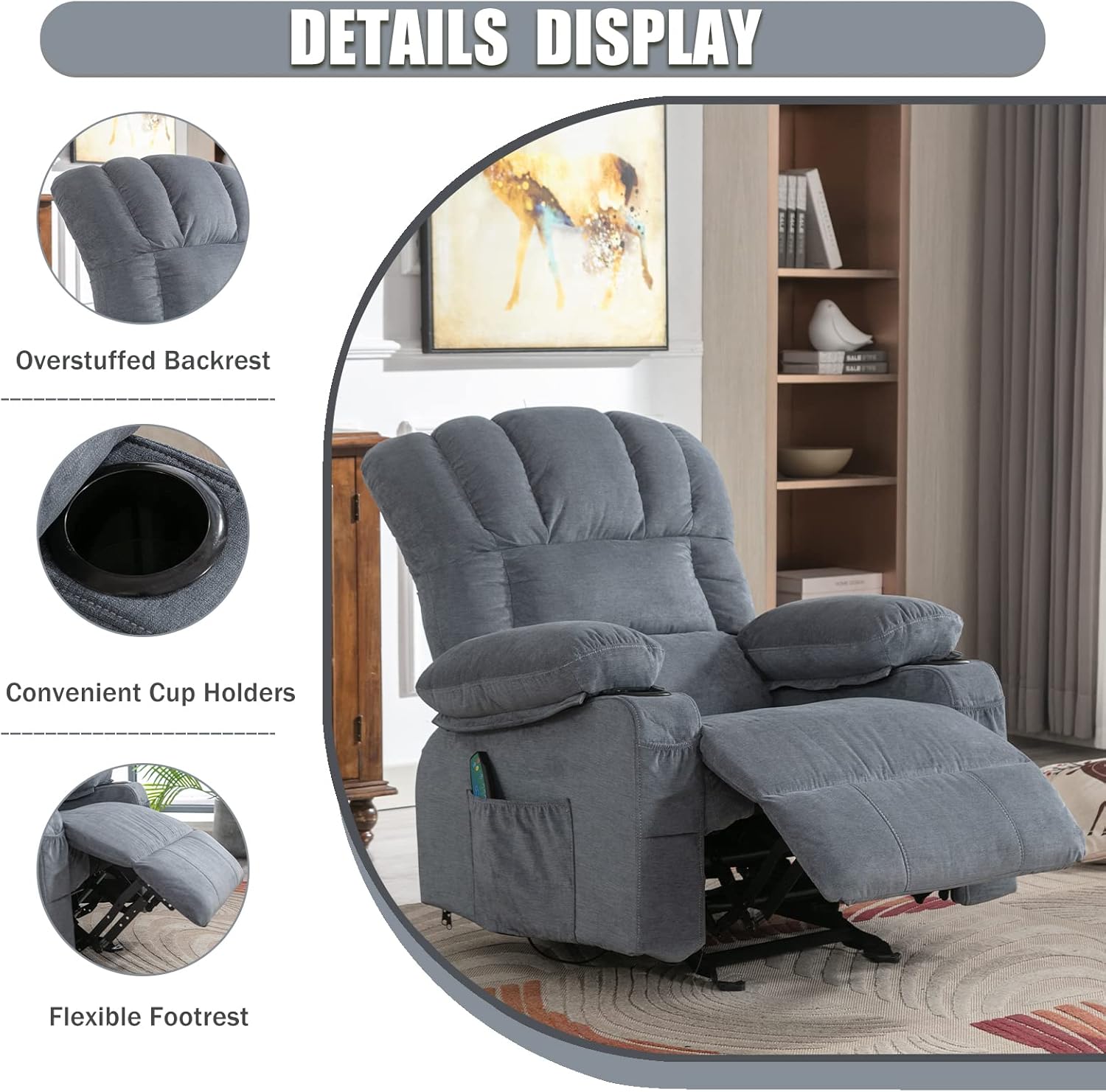
Íomhá: Mionsonraithe view of the recliner, highlighting the overstuffed backrest, convenient cup holders, and flexible footrest. This image provides a closer look at key features.
4. Treoracha Oibriúcháin
4.1 Feidhm Luí
To recline the chair, locate the handle on the side of the chair (typically on the right). Pull the handle firmly to release the footrest. Lean back to adjust the backrest to your desired angle. To return to the upright position, push the footrest down with your legs and lean forward, allowing the backrest to return to its original position. Push the handle back into its original position to lock the footrest.

Image: Illustration showing the rocking motion and the handle used to activate the recline function and extend the footrest. This demonstrates how to operate the manual recline.

Image: Visual representation of the chair in various recline positions, from upright to fully reclined, suitable for reading, watching TV, or napping. This illustrates the versatility of the recline feature.
4.2 Massage and Heat Functions
The chair features an 8-point massage system and lumbar heating. Use the provided remote control to operate these functions:
- Cnaipe Cumhachta: Press to turn the massage and heat functions on/off.
- Cnaipe Mód: Cycle through 5 different massage modes (e.g., pulse, press, wave, auto, normal).
- Cnaipe Déine: Adjust the massage intensity (low, medium, high).
- Roghnú Crios: Select specific massage zones (e.g., back, lumbar, thighs, legs).
- Cnaipe Teasa: Gníomhachtaigh nó díghníomhachtaigh feidhm téimh lumbar.
- Cnaipe Uaineadóir: Set a timer for the massage session (e.g., 15, 30, 60 minutes).

Image: Diagram illustrating the 8-point massage zones and the lumbar heating area on the recliner. This helps users understand where the massage and heat functions are applied.
4.3 Port Muirearú USB
A USB charging port is located on the side of the chair, typically within the armrest or side pocket area. Connect your compatible electronic devices (e.g., smartphones, tablets) to this port for convenient charging while you relax. Ensure the chair is plugged into a power outlet for the USB port to function.
4.4 Cup Holders and Side Pocket
The chair is equipped with two cup holders integrated into the armrests for beverages. A side storage pocket is also available for holding remote controls, magazines, or other small items.
5. Cúram agus Cothabháil
Proper care will extend the life and appearance of your recliner:
- Glanadh Fabraice: For general cleaning, vacuum the fabric regularly using a soft brush attachment to remove dust and debris. For spills, blot immediately with a clean, dry cloth. For stubborn stains, use a mild fabric cleaner following the product instructions, testing on an inconspicuous area first. Do not saturate the fabric.
- Glanadh Páirteanna Plaisteacha/Miotail: Glan comhpháirteanna plaisteacha agus miotail le clúdach bog, damp éadach. Seachain glantóirí scríobach.
- Comhpháirteanna Leictreacha: Ensure the power adapter and remote control are kept dry. Do not attempt to repair electrical components yourself.
- Ag Bogadh na Cathaoireach: When moving the chair, lift it rather than dragging it to prevent damage to the legs or frame.
- Seiceálacha Rialta: Periodically check all connections and hardware to ensure they are tight. Tighten if necessary.
6. Fabhtcheartú
If you encounter issues with your recliner, refer to the table below for common problems and solutions:
| Fadhb | Cúis Féideartha | Réiteach |
|---|---|---|
| Chair does not recline or footrest does not extend. | Recline handle not fully pulled/released; mechanism obstructed. | Ensure the handle is fully engaged. Check for obstructions under the footrest or around the mechanism. |
| Massage/Heat functions not working. | Power adapter unplugged; loose wire connection; remote control battery low. | Check if the power adapter is securely plugged into the wall and the chair. Verify all internal wire connections are snug. Replace remote control batteries if applicable. |
| Mothaíonn an chathaoir éagobhsaí nó crithteach. | Crua-earraí cóimeála scaoilte; urlár míchothrom. | Check and tighten all assembly bolts and screws. Ensure the chair is on a level surface. |
| Unusual noise during recline. | Mechanism needs lubrication; foreign object. | Inspect the reclining mechanism for any foreign objects. Apply a silicone-based lubricant to moving parts if necessary (consult customer support if unsure). |
7. Sonraíochtaí Táirge
| Gné | Sonraigh |
|---|---|
| Branda | HEALGEN |
| Múnla | Bosmiller Recliner Chair (B0BLMPXWNT) |
| Gnéithe Speisialta | Massage (8-point, 5 modes), Lumbar Heating, 2 Cup Holders, USB Charge Port, Side Pocket, Rocking Function |
| Fachtóir Foirme | Recliner, Rocking, Tilt |
| Úsáid Molta | Relaxing, Living Room |
| Ábhar | Fabraic Bog |
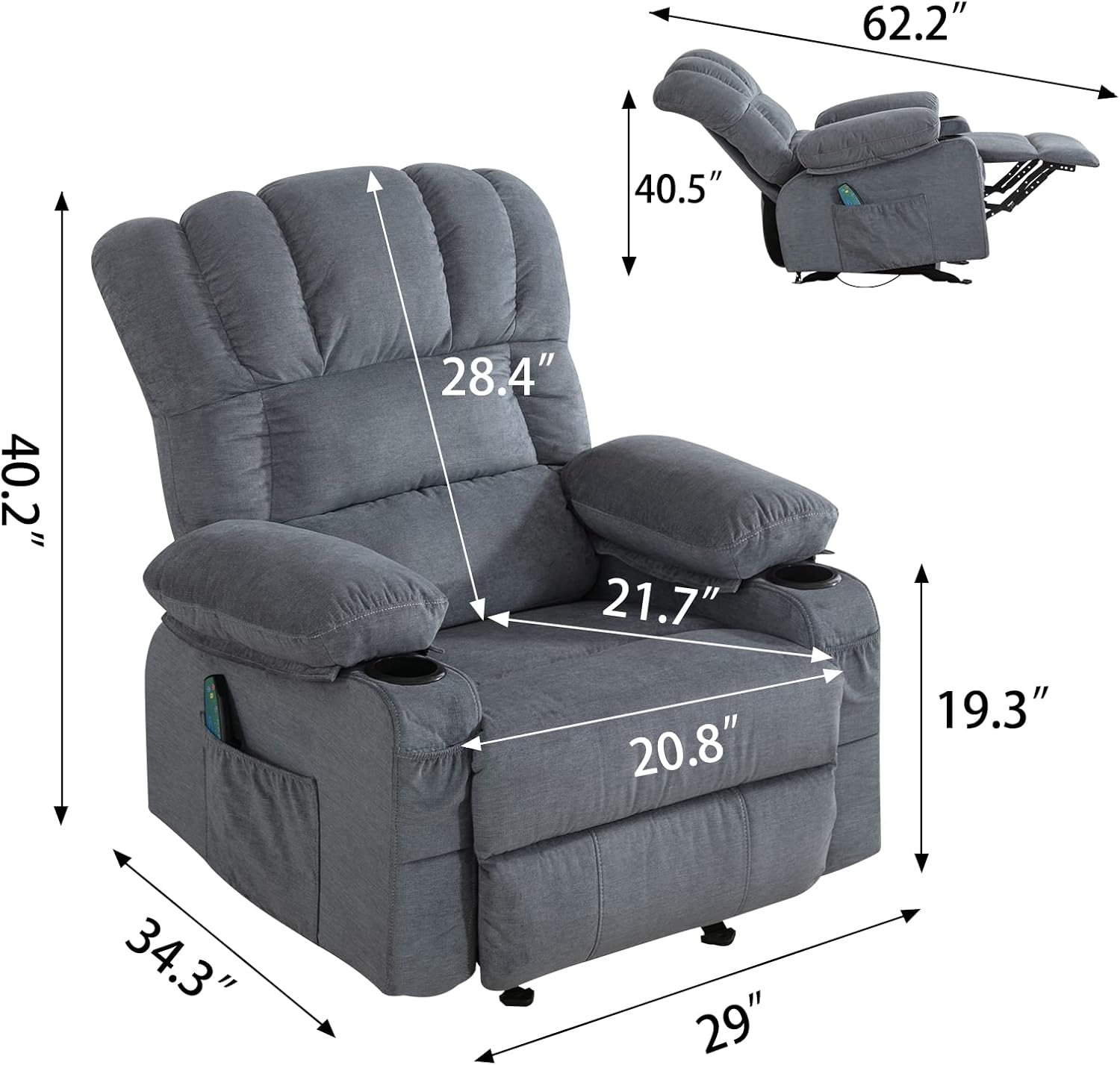
| Toisí Foriomlána (Ingearach) | Approx. 34.3" (W) x 29" (D) x 40.2" (H) |
| Fad Lán-Luíte | Approx. 62.2" |
| Toisí Suíochán | Approx. 20.8" (W) x 21.7" (D) |
| Airde Backrest | Approx. 28.4" |
| Ionchur Cumhachta | Standard AC (via included adapter) |
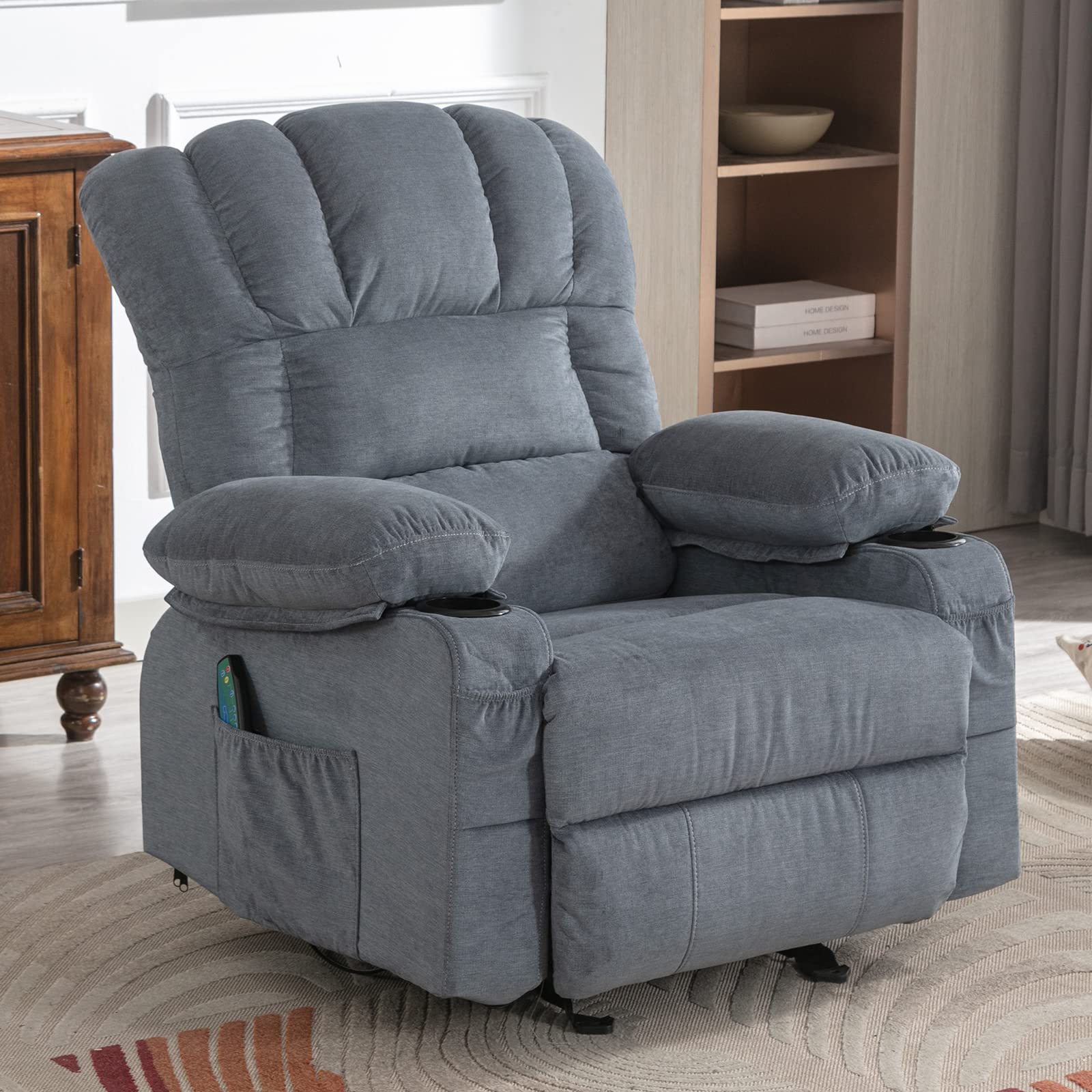
Image: Detailed diagram showing the dimensions of the HEALGEN Bosmiller Recliner Chair in both upright and fully reclined positions. This provides essential measurements for placement and space planning.
8. Barántas agus Tacaíocht
Your HEALGEN Bosmiller Recliner Chair comes with a limited warranty against manufacturing defects. Please refer to the warranty card included with your purchase for specific terms and conditions, including the warranty period and coverage details. Keep your proof of purchase for warranty claims.
For technical support, replacement parts, or any questions not covered in this manual, please contact HEALGEN customer service. Contact information can typically be found on the HEALGEN official websuíomh nó ar do dhoiciméid cheannaigh.
Seirbhís do Chustaiméirí:
- Refer to your purchase invoice or HEALGEN's official websuíomh gréasáin le haghaidh na sonraí teagmhála is déanaí.


