
1. Réamhrá
This manual provides detailed instructions for the setup, operation, and maintenance of your Graflsoa PG-9078 Bluetooth Wireless Gamepad. Please read this manual thoroughly before using the product to ensure proper functionality and to maximize your gaming experience. This gamepad is compatible with iOS, Android, Tablet, Phone, PC, Smart TV, and Set Top Box devices.
2. Faisnéis Sábháilteachta
- Do not expose the gamepad to extreme temperatures, humidity, or direct sunlight.
- Avoid dropping or subjecting the gamepad to strong impacts.
- Do not attempt to disassemble or modify the gamepad. This will void the warranty.
- Keep the gamepad away from water and other liquids.
- Ná húsáid ach an cábla luchtaithe a chuirtear ar fáil nó a choibhéis dheimhnithe.
- Store the gamepad in a clean, dry place when not in use.
3. Ábhar Pacáiste
Seiceáil ábhar an phacáiste le do thoil nuair a dhíbhoscaítear é:
- Graflsoa PG-9078 Wireless Gamepad
- Cábla Muirearú USB
- Lámhleabhar Úsáideora (an doiciméad seo)
4. Táirge Tharview
Familiarize yourself with the components and features of your PG-9078 gamepad.
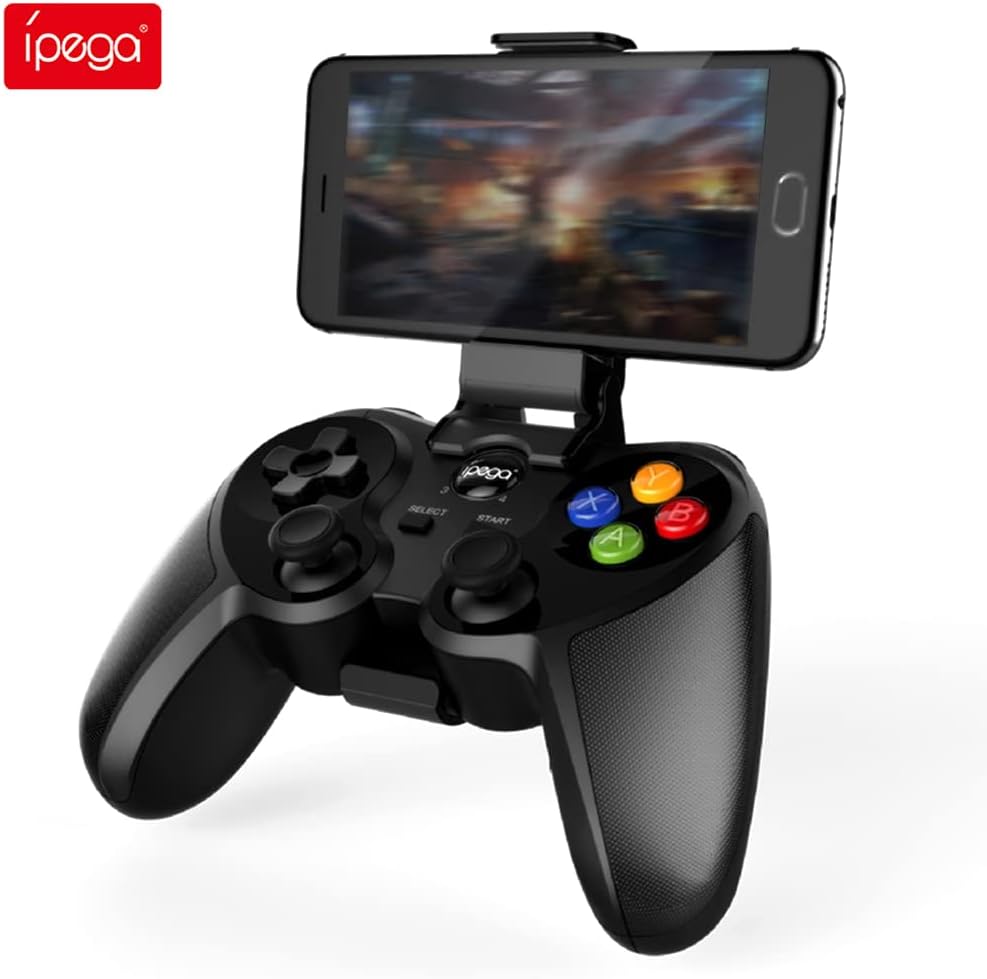
Figure 4.1: Graflsoa PG-9078 Wireless Gamepad with a smartphone mounted in the integrated holder.
The Graflsoa PG-9078 is a versatile Bluetooth gamepad designed for various gaming platforms. It features a comfortable ergonomic design, precise controls, and an integrated phone holder.
4.1 Príomhghnéithe
- Sealbhóir Fón Comhtháite: Supports smartphones from 4 to 5.5 inches, with an adjustable angle for optimal viewing.
- Hall Effect Sensor Switches: Provides durable and responsive trigger input.
- High Accuracy Joysticks: 360-degree precision joysticks with anti-slip texture to prevent operational errors.
- Cnaipí Sofhreagracha: Fast response time for all face buttons and shoulder buttons.
- Analog L2/R2 Triggers: Offers precise control for racing and other games requiring nuanced input.
- Nascacht Bluetooth: Stable wireless connection with a transmission distance of up to 8 meters.

Figure 4.2: The adjustable phone holder, designed to securely hold smartphones between 4 and 5.5 inches. The angle can be freely adjusted for user comfort.

Figure 4.3: The high-accuracy joystick, featuring 360-degree movement and an anti-slip texture for enhanced control.

Figure 4.4: The highly sensitive and responsive face buttons and shoulder buttons, designed for quick input.
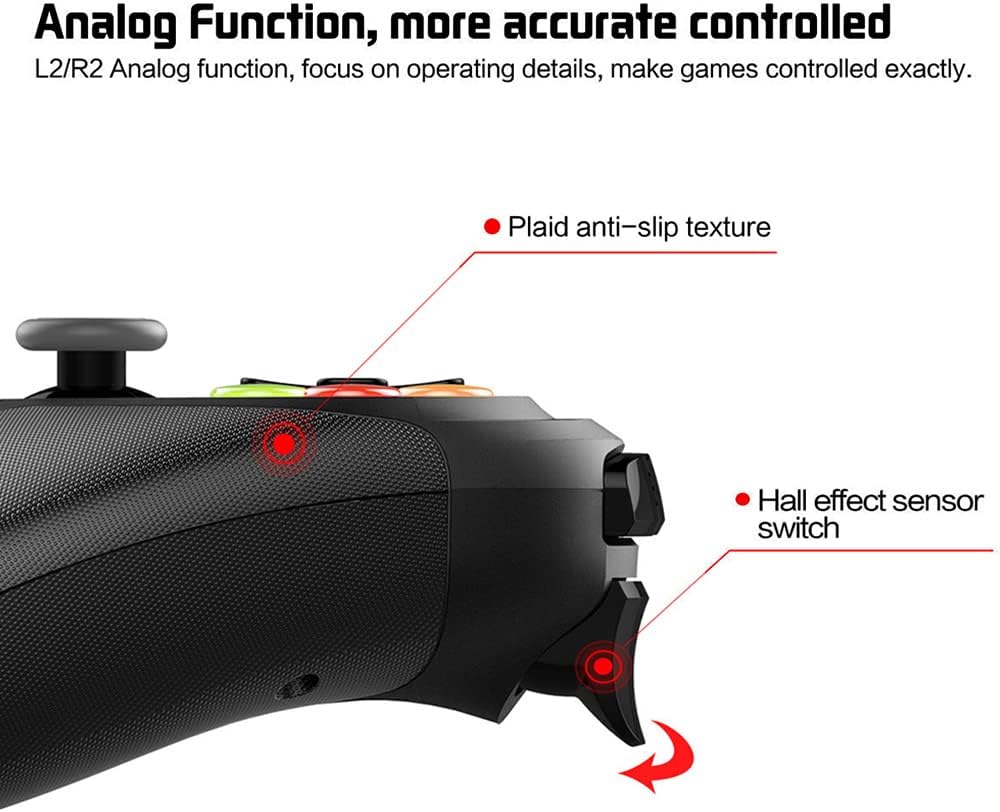
Figure 4.5: The L2/R2 analog triggers, providing accurate and detailed control for various in-game actions.

Figure 4.6: The gamepad utilizes Bluetooth technology for wireless connectivity, offering a stable connection up to 8 meters.
5. Treoracha Socraithe
5.1 Muirearú an Gamepad
- Connect the small end of the USB charging cable to the charging port on the gamepad.
- Ceangail ceann is mó an chábla luchtaithe USB le foinse cumhachta USB (m.sh., port USB ríomhaire, oiriúntóir balla USB).
- The charging indicator light on the gamepad will illuminate during charging and turn off or change color when fully charged.
- De ghnáth tógann lánmhuirear thart ar 2-3 uair an chloig.
5.2 Attaching the Phone Holder
- Locate the phone holder attachment point on the top of the gamepad.
- Carefully slide the phone holder into the designated slot until it clicks securely into place.
- Adjust the angle of the holder to your preferred viewseasamh.
- Gently place your smartphone (4-5.5 inches) into the holder, ensuring it is securely gripped.
5.3 Péireáil Bluetooth
The PG-9078 supports multiple connection modes. Select the appropriate mode for your device.
5.3.1 Android Standard Mode
- Cinntigh go bhfuil an gamepad múchta.
- Brúigh agus coinnigh an "X" button + HOME button simultaneously until the indicator light flashes rapidly.
- On your Android device, enable Bluetooth and search for available devices.
- Select "PG-9078" from the list to pair. The indicator light will become solid once connected.
5.3.2 iOS Standard Mode
- Cinntigh go bhfuil an gamepad múchta.
- Brúigh agus coinnigh an "Y" button + HOME button simultaneously until the indicator light flashes rapidly.
- On your iOS device, enable Bluetooth and search for available devices.
- Select "PG-9078" from the list to pair. The indicator light will become solid once connected.
5.3.3 PC/Smart TV Mode (Direct Play)
- Cinntigh go bhfuil an gamepad múchta.
- Brúigh agus coinnigh an "A" button + HOME button simultaneously until the indicator light flashes rapidly.
- On your PC or Smart TV, enable Bluetooth and search for available devices.
- Select "PG-9078" from the list to pair. The indicator light will become solid once connected.
Note: After successful pairing, the gamepad will automatically connect to the last paired device when powered on in the same mode.
6. Treoracha Oibriúcháin
6.1 Cumhacht ar siúl / as
- Cumhacht ar: Brúigh an Cnaipe BAILE for 1 second. The indicator light will flash, then connect to the last paired device.
- Múch: Brúigh agus coinnigh an Cnaipe BAILE for 5 seconds until the indicator light turns off. The gamepad will also automatically power off after 5 minutes of inactivity.
6.2 Gamepad Modes
The PG-9078 supports different modes for optimal compatibility:
- Android Standard Mode (X + HOME): For most Android games and emulators.
- iOS Standard Mode (Y + HOME): For iOS games that support MFi controllers or specific gamepad protocols.
- PC/Smart TV Mode (A + HOME): For direct play on Windows PCs (requires Bluetooth adapter) and compatible Smart TVs.
Note: Game compatibility varies by platform and game title. Some games may require specific mapping or may not support external controllers.
6.3 Ag baint úsáide as na Rialuithe
The gamepad features standard controls:
- Ceap Treorach (D-Pad): Le haghaidh ionchur treorach beacht.
- Bataí Analógacha Clé/Deas: Le haghaidh gluaiseachta 360 céim agus rialú ceamara.
- Cnaipí Aghaidhe (A, B, X, Y): Le haghaidh gníomhartha sa chluiche.
- Cnaipí Gualainn (L1, R1): For quick actions.
- Analog Triggers (L2, R2): For pressure-sensitive input, ideal for acceleration/braking in racing games.
- Cnaipí ROGHNAIGH/TOSAIGH: For menu navigation and game functions.
- Cnaipe BAILE: For power on/off and mode switching.

Figure 6.1: Proper grip and button access on the Graflsoa PG-9078 gamepad, highlighting its ergonomic design and Hall effect sensor switches.
7. Cothabháil
- Glanadh: Bain úsáid as éadach bog, tirim chun dromchla an gamepad a ghlanadh. Ná húsáid ceimiceáin ghéara ná glantóirí scríobacha.
- Stóráil: Stóráil an gamepad in áit fhionnuar, thirim amach ó sholas díreach na gréine agus ó theochtaí foircneacha.
- Cúram Battery: To prolong battery life, avoid fully discharging the gamepad frequently. Charge it regularly, even if not in constant use. If storing for an extended period, charge it to about 50% every few months.
8. Fabhtcheartú
8.1 Gamepad Does Not Power On
- Ensure the gamepad is charged. Connect it to a power source using the USB cable and allow it to charge for at least 30 minutes before attempting to power on again.
- Brúigh agus coinnigh an cnaipe BAILE ar feadh 1 soicind chun cumhacht a chur air.
8.2 Ní féidir péireáil trí Bluetooth
- Ensure the gamepad is in the correct pairing mode for your device (Android: X+HOME, iOS: Y+HOME, PC/Smart TV: A+HOME).
- Cinntigh go bhfuil Bluetooth cumasaithe ar do ghléas agus gur féidir é a aimsiú.
- Move the gamepad closer to your device (within 8 meters).
- Forget/remove "PG-9078" from your device's Bluetooth list and attempt to pair again.
- Restart both your device and the gamepad.
8.3 Buttons/Joysticks Not Responding
- Verify that the gamepad is successfully connected to your device.
- Check game settings to ensure controller support is enabled and controls are mapped correctly.
- Some games may not fully support external gamepads.
- Try restarting the gamepad and your device.
9. Sonraíochtaí
| Múnla | PG-9078 |
| Nascacht | Gan sreang Bluetooth |
| Raon Bluetooth | Suas le 8 méadar |
| Comhoiriúnacht | iOS, Android, Tablet, Phone, PC, Smart TV, Set Top Box |
| Tacaíocht do Shealbhóirí Gutháin | 4 - 5.5 inch smartphones |
| Gnéithe Speisialta | Hall Effect Sensor Switches, 360-degree High Accuracy Joysticks, Analog L2/R2 Triggers |
| Foinse Cumhachta | Rechargeable Battery (Internal) |
10. Barántas agus Tacaíocht
Chun eolas faoi bharántas agus tacaíocht theicniúil a fháil, féach ar an doiciméadacht a cuireadh ar fáil le do cheannachán nó déan teagmháil le do mhiondíoltóir. Coinnigh do chruthúnas ceannaigh le haghaidh aon éilimh bharántais.