
Réamhrá
Thank you for choosing the Dpofirs Portable MP3 Player. This device is designed to provide high-quality, lossless audio playback in a compact and durable form factor. This manual will guide you through the setup, operation, and maintenance of your new MP3 player.
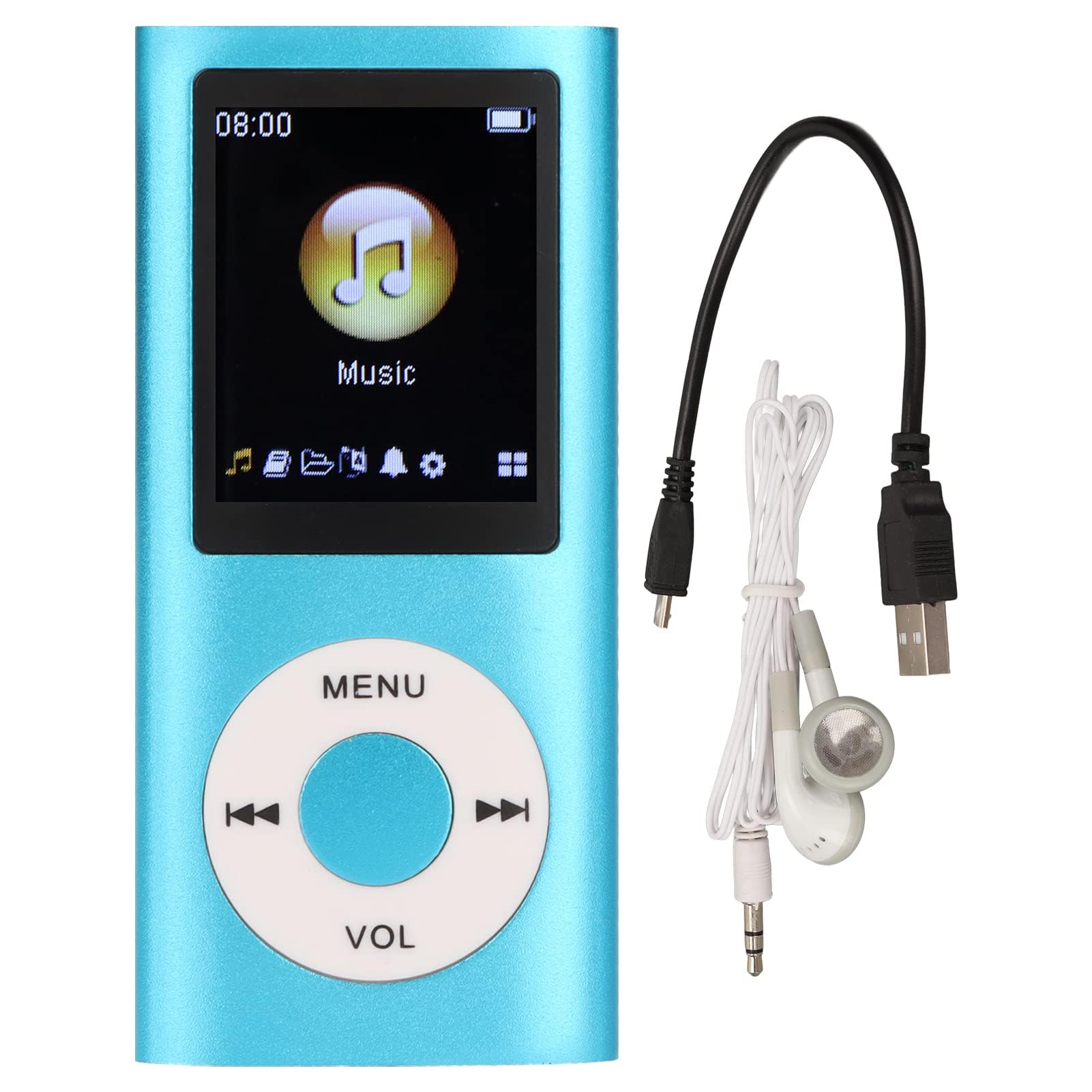
Image: The Dpofirs Portable MP3 Player, featuring a blue aluminum alloy casing and a circular control pad. A person is visible in the background, enjoying music with headphones.
Ábhar an Phacáiste
Seiceáil an pacáiste le do thoil le haghaidh na míreanna seo a leanas:
- 1 x Seinnteoir MP3 Dpofirs
- 1 x Cábla Muirir
- 1 x Cluasáin
Príomhghnéithe
- Cáilíocht Fuaime Gan Chaillteanas: Tacaíonn sé le formáidí fuaime MP3, WMA, FLAC, APE, AAC, OGG, agus ACELP.
- Cuimhne Inleathnaithe: Supports up to 64GB memory card (not included). MYMAHDI memory cards are recommended.
- Comhéadan Úsáideora: Easy navigation for selecting songs, creating playlists, and managing playback.
- Saol Fada Battery: Suas le 8 uair an chloig d'athsheinm leanúnach ar mhuirear iomlán.
- Dearadh Buan: Constructed from premium aluminum alloy for enhanced durability.
- Modhanna Athsheinm: Supports sequential and random playback, and sleep shutdown function.
Socrú
1. An Gléas a mhuirearú
Sula n-úsáidtear é den chéad uair, luchtaigh do sheinnteoir MP3 go hiomlán.
- Connect the provided charging cable to the MP3 player's charging port.
- Ceangail an ceann eile den chábla le hoiriúntóir cumhachta USB (nach bhfuil san áireamh) nó le port USB ríomhaire.
- The device will indicate charging status. A full charge typically takes approximately 2 hours.
Tábhachtach: Ensure the charging cable is functioning correctly. If the device does not charge, try a different USB port or adapter.
2. Cárta Cuimhne a chur isteach
The MP3 player requires a memory card for storing music.
- Locate the memory card slot on the side of the MP3 player.
- Gently insert a microSD card (up to 64GB, not included) into the slot until it clicks into place.
- Chun é a bhaint, brúigh an cárta isteach beagán go dtí go preabann sé amach.
Nóta: A memory card is not included with the player. MYMAHDI brand memory cards are recommended for optimal performance.
3. Cluasáin a Cheangal
Connect the provided earphones or your preferred 3.5mm audio headphones to the headphone jack on the MP3 player.
Treoracha Oibriúcháin
1. Cumhacht Ar / As
- To power on, press and hold the power button (usually the Play/Pause button or a dedicated power button) until the screen lights up.
- Chun an scáileán a mhúchadh, brúigh agus coinnigh an cnaipe cumhachta arís go dtí go múchfaidh an scáileán.
2. Nascleanúint Bhunúsach
The MP3 player features a circular control pad with several buttons:
- MENU: Rochtain a fháil ar an bpríomh-roghchlár nó téigh ar ais go dtí an scáileán roimhe seo.
- VOL (+/-): Coigeartaigh an leibhéal toirte.
- Seinn/Sos: Tosaigh nó sos athsheinm.
- Ar Aghaidh/Roimhe Seo: Skip to the next track or go back to the previous track. Long press to fast forward/rewind.
3. Ceol a Aistriú Files
To transfer music to your MP3 player:
- Connect the MP3 player to your computer using the charging cable.
- The player should appear as a removable disk drive on your computer.
- Tarraing agus scaoil do cheol files (MP3, WMA, FLAC, APE, AAC, OGG, ACELP) into the player's memory card folder.
- Bain an gléas amach go sábháilte ó do ríomhaire sula ndícheanglaíonn tú an cábla.
4. Ag Seinn Ceol
- From the main menu, navigate to the "Music" or "Audio" section.
- Browse your music by artist, album, genre, or all songs.
- Roghnaigh amhrán le tosú ag seinm.
- Use the Play/Pause, Next/Previous, and VOL buttons to control playback.
5. Playback Options
- Seinmliostaí: Create and manage custom playlists directly on the device.
- Shuffle/Repeat: Toggle between sequential playback, shuffle, and repeat modes.
- Sleep Shutdown: Socraigh lasc ama le go múchfaidh an gléas go huathoibríoch.
Cothabháil
- Keep the device dry. Moisture can damage internal circuits.
- Seachain teochtaí foircneacha.
- Clean the device with a soft, dry cloth. Do not use harsh chemicals or cleaning agents.
- Protect the screen from scratches.
- Stóráil an gléas in áit shábháilte nuair nach bhfuil sé in úsáid.
Fabhtcheartú
Ní lasann an gléas:
- Ensure the battery is charged. Connect the player to a power source and allow it to charge for at least 30 minutes.
- Try pressing and holding the power button for an extended period (5-10 seconds).
Cannot hear any sound:
- Check if the earphones are properly connected to the headphone jack.
- Méadaigh an toirt ag baint úsáide as an gcnaipe VOL+.
- Test with a different pair of earphones to rule out faulty headphones.
- Cinntigh an fhuaim fileNíl s truaillithe agus tá siad i bhformáid a dtacaítear léi.
Ceol files are not recognized:
- Ensure the memory card is properly inserted and recognized by the device.
- Deimhnigh go bhfuil an ceol files are in one of the supported formats (MP3, WMA, FLAC, APE, AAC, OGG, ACELP).
- Try reformatting the memory card (this will erase all data) and re-transferring the music.
- Ensure the memory card is not full.
Reoiteann an gléas nó ní fhreagraíonn sé:
- Brúigh agus coinnigh an cnaipe cumhachta ar feadh thart ar 10-15 soicind chun atosú a chur i bhfeidhm.
- If available, use a small pin to press the reset button (if present on the device).
Sonraíochtaí
| Branda | Dpofirs |
| Uimhir Mhúnla | Dpofirs5yhtvp70d23123-13 |
| Ábhar | Cóimhiotal Alúmanam |
| Ceallraí | Insuite i 200mAh Litiam Battery |
| Am Muirir | Thart. 2 n-uaire |
| Am Athsheinm | Suas le 8 uair an chloig (luchtaithe go hiomlán) |
| Tacaíocht Cárta Cuimhne | Up to 64GB (microSD, not included) |
| Formáidí Fuaime Tacaithe | MP3, WMA, FLAC, APE, AAC, OGG, ACELP |
| Teicneolaíocht Nascachta | Auxiliary, Bluetooth, Wi-Fi (Note: Bluetooth/Wi-Fi functionality not detailed in product description, focusing on core MP3 player features) |
| Dath | Gorm |
| Tír Bhunaidh | tSín |
Barántas agus Tacaíocht
Specific warranty information for this product is not provided in the available documentation. Please refer to the retailer's return policy or contact the seller directly for details regarding warranty coverage.
For technical support or further assistance, please contact Dpofirs customer service through the platform where you purchased the product.