
1. Táirge Tharview
The LENVII F510 is a versatile wired 2D barcode scanner designed for efficient data capture in various environments such as retail, warehouses, libraries, and pharmacies. It supports both 1D and 2D barcodes, including QR codes, and can read barcodes from mobile phone and PC screens. Its ergonomic design ensures comfortable operation for extended periods.

Figure 1: LENVII F510 Barcode Scanner from various perspectives.
2. Ábhar Pacáiste
Nuair a osclaíonn tú an pacáiste, déan cinnte go bhfuil na míreanna seo a leanas go léir san áireamh:
- LENVII F510 Wired 2D Barcode Scanner
- USB Cable (1.8 meters)
- Lámhleabhar Úsáideora

Figure 2: Typical package contents for the LENVII F510 Barcode Scanner.
3. Socrú
3.1 Nasc USB Sreangaithe
The LENVII F510 scanner is designed for plug-and-play operation via its USB connection. No additional drivers are typically required for most operating systems.
- Connect the USB cable to the scanner's port.
- Plug the other end of the USB cable into an available USB port on your computer (PC, laptop).
- Cuirfear an scanóir ar siúl agus beidh sé réidh le húsáid.

Figure 3: Connecting the LENVII F510 scanner to a computer via USB.
3.2 Comhoiriúnacht an Chórais
The LENVII F510 barcode scanner is compatible with a wide range of operating systems, ensuring broad usability:
- Windows (7, 8, XP, 10)
- Mac OS
- Linux
Nóta: Connection with Square systems is not supported.

Figure 4: The scanner supports various operating systems including Windows, Mac, and Linux.
4. Treoracha Oibriúcháin
4.1 Scanadh Bunúsach
To scan a barcode, aim the scanner's light beam at the barcode and press the trigger button. The scanner will emit a beep and the data will be transmitted to your connected device.
4.2 Cumais Díchódaithe
The LENVII F510 is capable of decoding a wide array of 1D and 2D barcode types:
- Barrachóid 1D: UPC, EAN-13, EAN-8, Codabar, Code 39, MSI, Code 93, Code 128, ISBN, ISSN, Code 39 extended, Interleaved 2 of 5 (ITF), Appendix 2 of 5, IATA Code, MSI/Plessy, Chinese Postcode, Code 32 (Italian Pharmaceutical Code), RSS 14, RSS Limited, RSS Extension.
- Barrachóid 2D: PDF417, MicroPDF417, Data Matrix, Maxicode, QR Code, Aztec.

Figure 5: The scanner supports various 1D and 2D barcode formats, including QR codes.
4.3 Scanning from Screens
The scanner can read barcode information directly from mobile phone screens and computer displays, making it suitable for digital tickets or QR codes.

Figure 6: Demonstrating the scanner's ability to read barcodes from digital screens.
4.4 Modhanna Scanadh
The scanner offers different scanning modes to suit various applications. Refer to the full manual for details on configuring specific modes, such as continuous scanning.

Figure 7: The scanner supports multiple scanning modes for flexibility.
5. Cothabháil
To ensure optimal performance and longevity of your LENVII F510 scanner, follow these maintenance guidelines:
- Keep the scanner clean by wiping it with a soft, dry cloth. Avoid abrasive cleaners or solvents.
- Protect the scanning window from scratches or damage.
- The scanner is designed with a 1.5-meter anti-shock and anti-fall capability, providing durability against accidental drops.
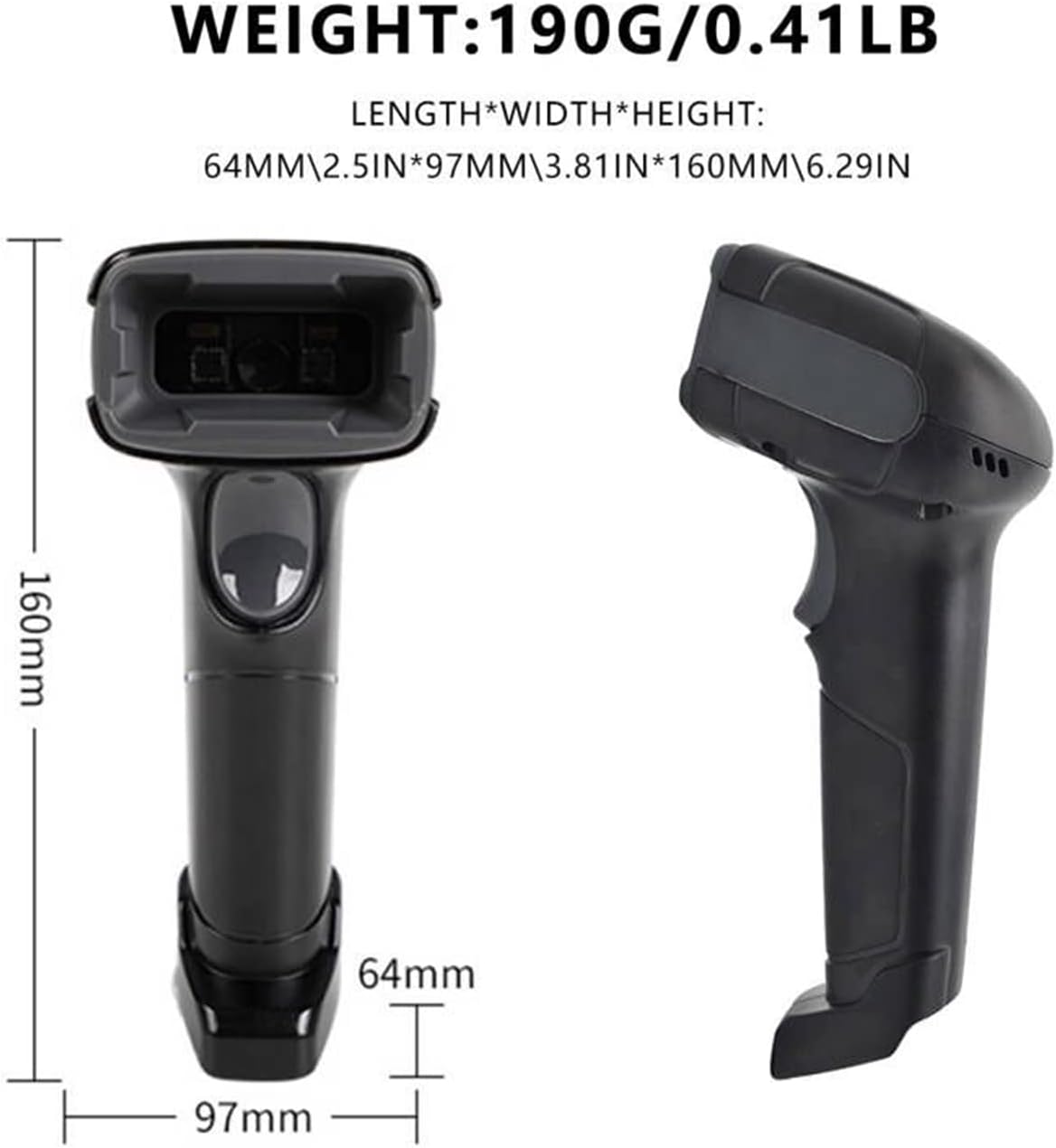
Figure 8: The scanner is built to withstand drops from up to 1.5 meters.
6. Fabhtcheartú
If you encounter issues with your LENVII F510 scanner, consider the following common solutions:
- No Scan Output: Ensure the USB cable is securely connected to both the scanner and the computer. Verify that the computer recognizes the device.
- Aschur Sonraí Mícheart: If the scanner outputs incorrect data, it may require configuration. Refer to the full user manual for specific configuration barcodes to adjust settings like prefix/suffix or data format.
- Scanóir Gan Freagairt: Disconnect and reconnect the USB cable. If the issue persists, try connecting to a different USB port or computer to rule out port-specific problems.
7. Sonraíochtaí
| Gné | Sonraíocht |
|---|---|
| Uimhir Mhúnla | F510 |
| Toisí Táirge (L x W x H) | 160 x 64 x 97 mm (6.29 x 2.5 x 3.81 orlach) |
| Meáchan | 190 gram (0.41 lb) |
| Fad Cábla | 1.8 méadar |
| Foinse Solais | Aiming: 617 nm LED; Illumination: 6500K LED |
| Image (Pixel) | 640 pixels (H) x 480 pixels (V) |
| Scanadh Luas | 200 scanadh in aghaidh an tsoicind |
| Rún | Reads minimum 5mil barcode and maximum 13mil barcode |
| Vol Oibriúcháintage | 5 Volts DC (VDC) |
| Teocht Uasta Stórála | 50 Céim Celsius |
| Drop Protection Height | 5 meters (Note: Product description states 1.5m anti-shock/anti-fall, but specifications list 5m drop protection. Please refer to product packaging for definitive information.) |
| Teicneolaíocht Nascachta | USB |
8. Barántas agus Tacaíocht
For warranty information and technical support, please refer to the official LENVII websuíomh gréasáin nó déan teagmháil le do mhiondíoltóir. Coinnigh d’admháil ceannaigh mar chruthúnas ceannaigh.