
Sharp 32FG6EA
Sharp 32FG6EA 32-inch HD Android TV User Manual
Model: 32FG6EA
1. Réamhrá
This manual provides essential information for the proper setup, operation, and maintenance of your Sharp 32FG6EA 32-inch HD Android TV. The Sharp 32FG6EA offers a wide range of connection options and features the Android TV operating system, providing a modern and intuitive television experience. It functions as an all-in-one entertainment hub, integrating Google Assistant for a smarter viewing experience. Users can quickly access entertainment, control smart devices, and obtain on-screen information using voice commands.
2. Faisnéis Sábháilteachta
Léigh na treoracha sábháilteachta go léir go cúramach sula n-úsáideann tú an teilifís. Coinnigh an lámhleabhar seo le haghaidh tagartha sa todhchaí.
- Soláthar Cumhachta: Ensure the TV is connected to a power source with the correct voltage. Do not overload power outlets.
- Aeráil: Ná bac na hoscailtí aerála. Fág dóthain spáis timpeall an teilifíse le haghaidh sreabhadh aeir ceart chun róthéamh a chosc.
- Uisce agus Taise: Do not expose the TV to rain, moisture, or excessive humidity. Avoid placing objects filled with liquids on or near the TV.
- Glanadh: Unplug the TV before cleaning. Use a soft, dry cloth. Do not use liquid cleaners or aerosol sprays.
- Socrúchán: Cuir an teilifís ar dhromchla cobhsaí, cothrom. Más ar bhalla atá sé á shuiteáil, cinntigh go bhfuil an gléas suite go daingean agus gur féidir leis meáchan na teilifíse a iompar.
- Ag seirbhísiú: Ná déan iarracht an teilifís a sheirbhísiú tú féin. Cuir gach seirbhísiú faoi bhráid phearsanra seirbhíse cáilithe.
3. Ábhar Pacáiste
Deimhnigh go bhfuil na míreanna uile i láthair sa phacáistiú:
- Sharp 32FG6EA 32-inch HD Android TV
- Cianrialtán (le 2 chadhnraí AAA)
- Stand Type Base
- Lámhleabhar Treoraithe
- Cábla Cumhachta
4. Socrú
4.1 Díphacáil
Carefully remove the TV and all accessories from the packaging. Retain the packaging materials for future transport or servicing.
4.2 An Seastán a cheangal
If you are not wall-mounting the TV, attach the included stand base:
- Cuir scáileán an teilifíse síos ar dhromchla bog, cothrom chun damáiste a chosc.
- Ailínigh bonn an tseastáin leis na poill gléasta ag bun an teilifíse.
- Daingnigh an seastán ag baint úsáide as na scriúnna atá ar fáil. Cinntigh go bhfuil an seastán ceangailte go daingean.
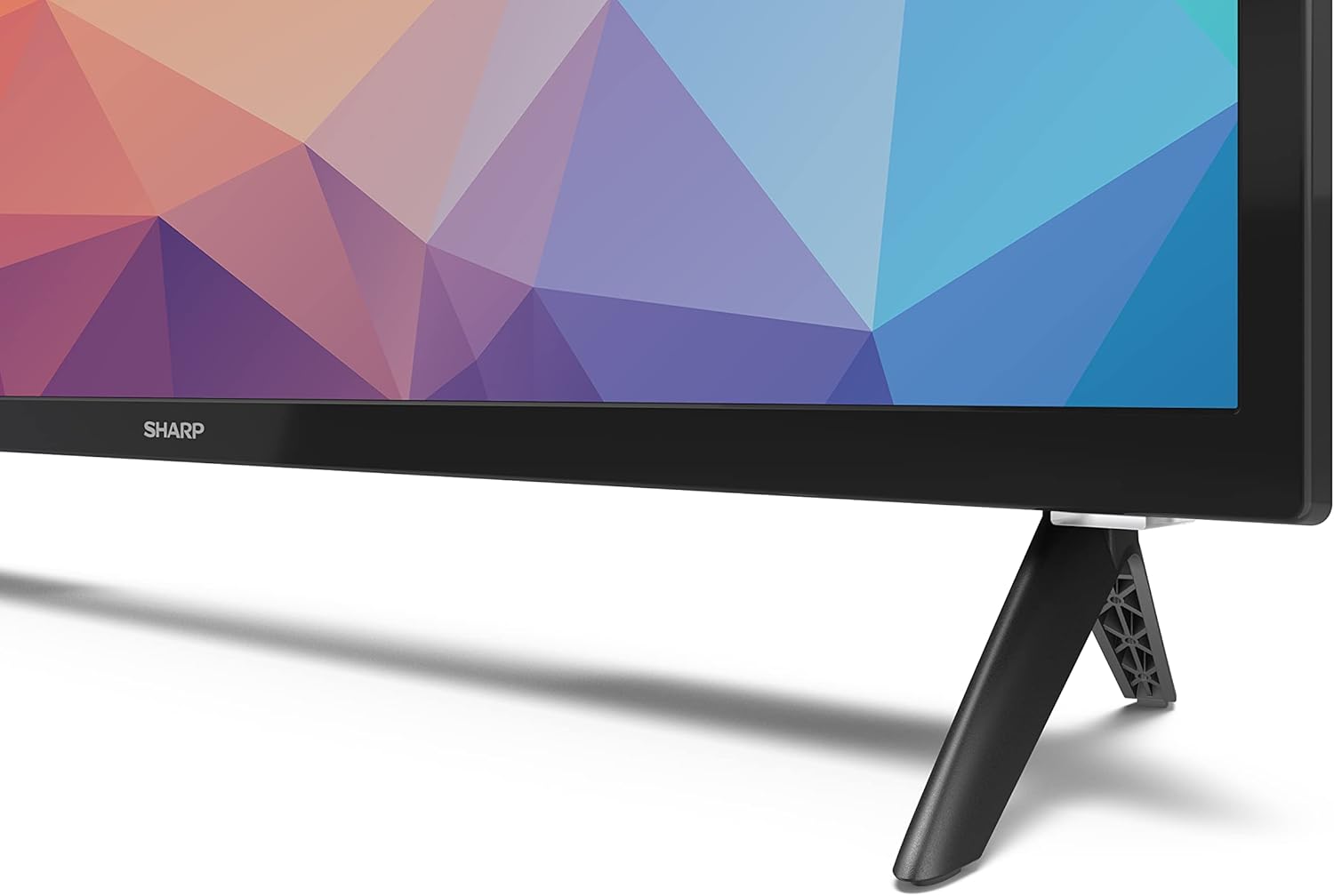
Image: Close-up of the TV stand attachment.
4.3 Feistiú Balla
The Sharp 32FG6EA supports VESA wall mounts with dimensions of 75 x 75 mm. Wall mount hardware is not included. Follow the instructions provided with your wall mount kit.
4.4 Gléasanna Seachtracha a Cheangal
Tá calafoirt iolracha ar do theilifís chun gléasanna éagsúla a nascadh:
- HDMI: Connect Blu-ray players, game consoles, or set-top boxes to the 2 HDMI ports.
- USB: Connect USB storage devices for media playback to the 2 USB ports.
- Antenna/Cábla: Ceangail antenna nó foinse teilifíse cábla le haghaidh bealaí craolta.
- Ethernet: Le haghaidh nasc idirlín sreangaithe.
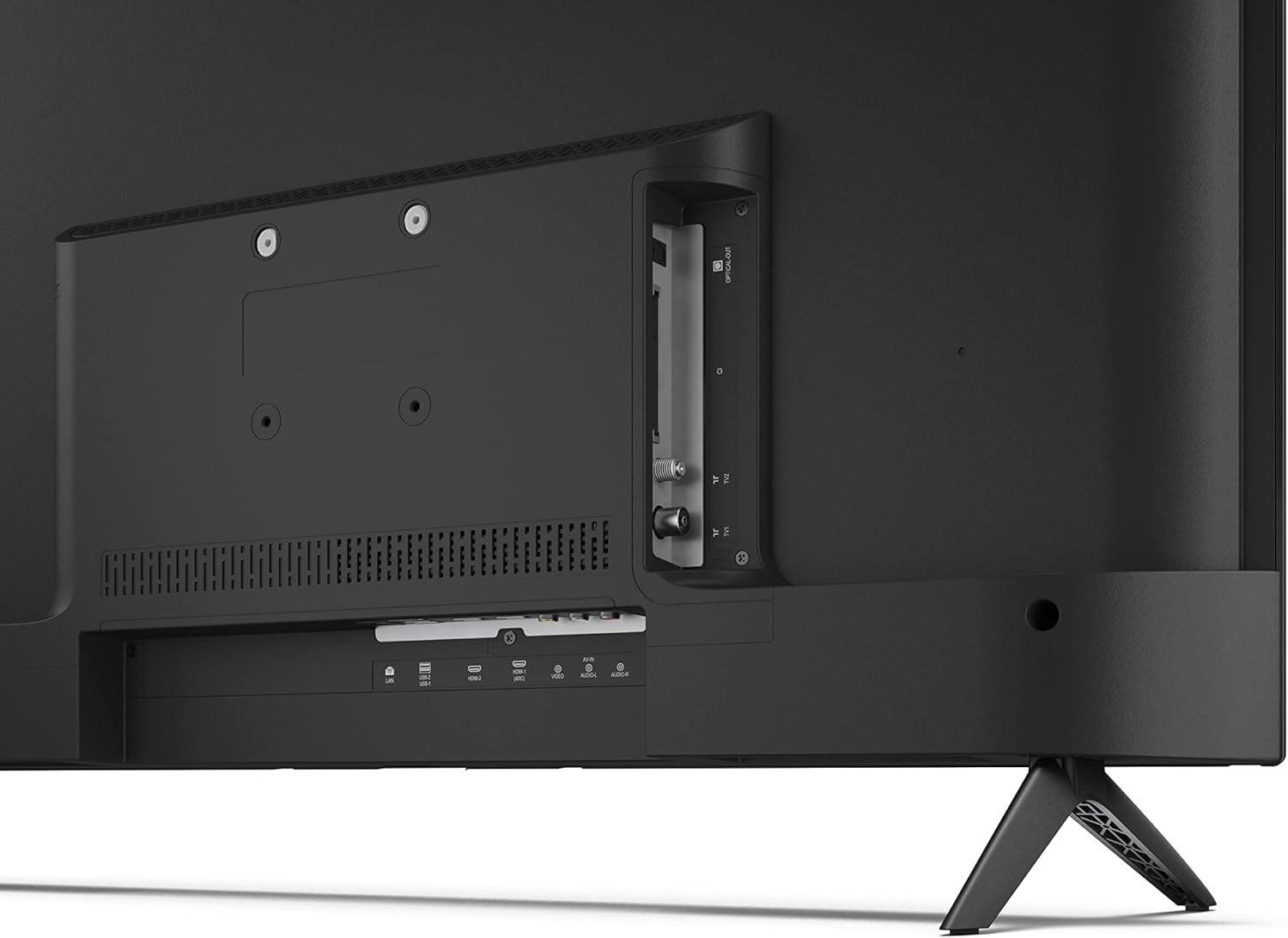
Íomhá: Cúl view of the TV with connection ports.
4.5 Ceangal Cumhachta
After connecting all necessary devices, plug the power cable into the TV and then into a wall outlet.
4.6 Draoi Socraithe Tosaigh
Nuair a chuirfear ar siúl é den chéad uair, treoróidh an teilifís tú trí phróiseas socraithe tosaigh. Áirítear leis seo:
- Roghnú teanga.
- Nasc líonra (Wi-Fi nó Ethernet).
- Logáil isteach le cuntas Google (riachtanach le haghaidh gnéithe iomlána Android TV).
- Scanadh cainéal.
5. Oibriúcháin
5.1 Cianrialú Tharview
The included remote control allows you to navigate the TV's features. Insert the 2 AAA batteries into the remote control before use.
- Cnaipe Cumhachta: Casann sé an teilifís air nó as.
- Ceap Treorach (D-Pad) & Cnaipe OK: Nascleanúint a dhéanamh trí na biachláir agus roghanna a dheimhniú.
- Cnaipe Ar Ais: Filleann sé ar an scáileán roimhe seo.
- Cnaipe Baile: Rochtain ar scáileán baile Android TV.
- Imleabhar Suas/Síos: Coigeartaíonn an méid fuaime.
- Cainéal Suas/Síos: Athraíonn sé bealaí teilifíse.
- Cnaipe Cúntóir Google: Gníomhaíonn sé rialú gutha.
- Cnaipí Aicearra Aipeanna: Dedicated buttons for popular streaming services like Netflix, Prime Video, and YouTube.
5.2 Nascleanúint Chomhéadain Teilifíse Android
The Android TV home screen provides access to your installed apps, recommended content, and settings. Use the directional pad on your remote to navigate through the interface.
5.3 Cúntóir Google
Press the Google Assistant button on your remote and speak into the microphone to:
- Cuardaigh le haghaidh movies, shows, or information.
- Rialú gléasanna baile cliste.
- Feidhmchláir oscailte.
- Coigeartaigh socruithe teilifíse.
5.4 Chromecast Insuite
The TV includes Chromecast built-in, allowing you to cast content from compatible apps on your smartphone, tablet, or computer directly to the TV screen.
5.5 Nascacht Bluetooth
Connect Bluetooth devices such as headphones or speakers to your TV for a personalized audio experience. Navigate to the TV's settings menu to pair new Bluetooth devices.
5.6 Socruithe Fuaime
The TV supports Dolby Audio with 2 x 6 W RMS speakers. You can adjust audio settings, including sound modes and equalizer, through the TV's settings menu.
6. Cothabháil
6.1 Glanadh an teilifíseáin
To clean the TV screen and cabinet:
- Díphlugáil an téad cumhachta ón asraon balla.
- Use a soft, lint-free cloth to gently wipe the screen and surfaces.
- I gcás marcanna righne, beagán dampNigh an t-éadach le huisce nó le glantóir scáileáin speisialaithe (cuir i bhfeidhm ar an éadach, ní go díreach ar an scáileán).
- Ná húsáid glantóirí scríobacha, céirithe ná tuaslagóirí.
6.2 Nuashonrú Bogearraí
D’fhéadfadh nuashonruithe bogearraí a bheith á ndéanamh go tréimhsiúil ar do theilifís Android chun feidhmíocht a fheabhsú agus gnéithe nua a chur leis. Cinntigh go bhfuil do theilifís ceangailte leis an idirlíon chun na nuashonruithe seo a fháil. Is féidir leat seiceáil de láimh le haghaidh nuashonruithe i roghchlár socruithe an teilifíse.
7. Fabhtcheartú
Má bhíonn fadhbanna agat le do theilifís, féach ar na fadhbanna agus na réitigh choitianta seo a leanas:
- Gan Cumhacht: Cinntigh go bhfuil an cábla cumhachta plugáilte go daingean isteach sa teilifís agus i soicéad balla atá ag obair. Bain triail as soicéad eile.
- Gan Pictiúr/Fuaim: Check that the correct input source is selected. Verify all cables (HDMI, antenna) are properly connected.
- Cianrialtán Neamhoibríoch: Check the batteries and ensure they are inserted correctly. Point the remote directly at the TV's IR sensor.
- Droch-Cháilíocht Pictiúr: Check antenna/cable connections. Adjust picture settings in the TV menu. For streaming content, ensure a stable internet connection.
- Gan nasc Idirlín: Verify Wi-Fi password or Ethernet cable connection. Restart your router and the TV.
- Aipeanna nach bhfuil ag Obair: Ensure the TV's software is up to date. Try clearing the app's cache or reinstalling the app.
If problems persist, consult the Sharp support websuíomh nó déan teagmháil le seirbhís do chustaiméirí.
8. Sonraíochtaí
| Gné | Sonraíocht |
|---|---|
| Uimhir Mhúnla | 32FG6EA |
| Branda | Géar |
| Méid an Scáileáin | 32 n-orlach (81 cm trasnánach) |
| Teicneolaíocht Taispeána | stiúir |
| Rún | 720p (1366 × 768 picteilín) |
| Cóimheas Gné | 16:9 |
| Ráta Athnuachana | 50 Hz |
| Córas Oibriúcháin | Android TV 11 |
| Gnéithe Speisialta | Android TV, Google Assistant, Chromecast built-in |
| Aschur Fuaime | 2 x 6 W RMS, Dolby Audio |
| Poirt HDMI | 2 |
| Calafoirt USB | 2 |
| Nascacht | Wi-Fi, Bluetooth, Ethernet |
| Sliabh Balla VESA | 75 x 75 mm |
| Toisí le Seastán (W x H x D) | 731 x 486 x 177 mm |
| Toisí gan Seastán (W x H x D) | 731 x 433 x 68 mm |
| Toisí Táirge (D x W x H) | 16 x 73 x 46.4 cm (approximate, with stand) |
| Meáchan | 3.9 kg |
| Aicme Éifeachtúlachta Fuinnimh | E |

Image: TV dimensions diagram.

Image: Energy Label. For more details, visit Bunachar Sonraí EPREL.
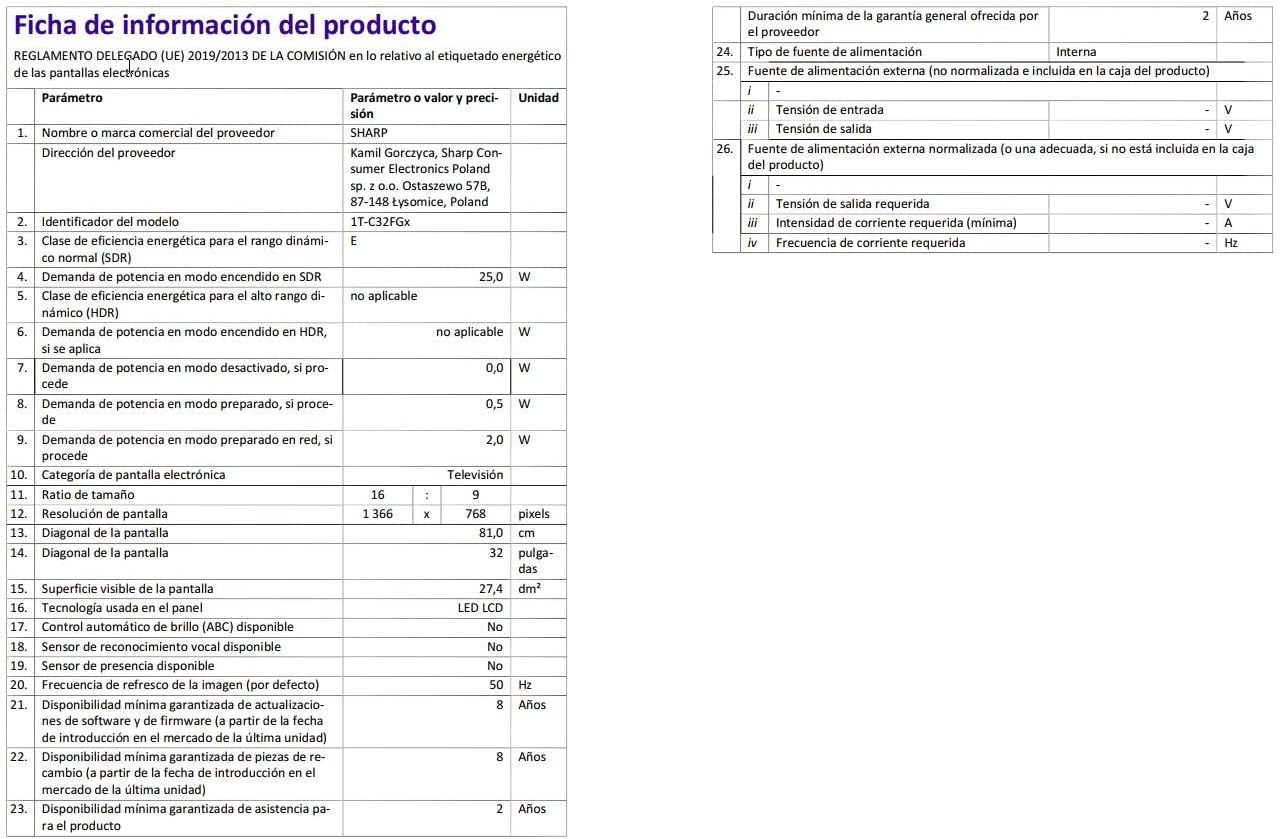
Image: Detailed product information sheet.
9. Barántas agus Tacaíocht
The Sharp 32FG6EA television comes with a minimum general warranty duration of 2 years from the provider.
For technical support, warranty claims, or further assistance, please refer to the contact information provided with your purchase documentation or visit the official Sharp support websuíomh do do réigiún.
Ask a question about this manual
Ask about setup, troubleshooting, compatibility, parts, safety, or missing instructions. Manuals+ will review the question and use this page’s manual context to help answer it.