
1. Réamhrá
Thank you for choosing the Awei TC-7 Wired Earphones. These in-ear earphones are designed for clear audio and convenient communication, featuring a Type-C connector for modern devices and an inline microphone with control buttons. Please read this manual carefully to ensure proper use and maintenance of your earphones.
2. Ábhar Pacáiste
- Awei TC-7 Wired Earphones
- Multiple sizes of Ear Cushions (Small, Medium, Large)

Fíor 2.1: The Awei TC-7 earphones include ear caps in various sizes to ensure a comfortable and secure fit for different users.
3. Táirge Tharview
The Awei TC-7 earphones feature a durable design with a Type-C plug for direct connection to compatible devices. The inline remote control allows for easy management of audio playback and calls.

Fíor 3.1: A close view of the Awei TC-7 earphones, showcasing their in-ear design for optimal sound delivery.

Fíor 3.2: The inline remote control features multi-function buttons for managing audio and calls.

Fíor 3.3: The integrated HD microphone is designed to pick up clear audio, even in noisy environments.
4. Socrú
- Roghnaigh Cúisíní Cluas: Choose the ear cushion size (Small, Medium, or Large) that provides the most comfortable and secure fit for your ears. A proper fit enhances sound quality and noise isolation.
- Ceangail le Gléas: Insert the USB-C plug of the earphones into the Type-C port of your smartphone, tablet, laptop, or other compatible device.
- Aschur Fuaime: Ensure your device's audio output is set to the connected earphones. This is usually automatic upon connection.
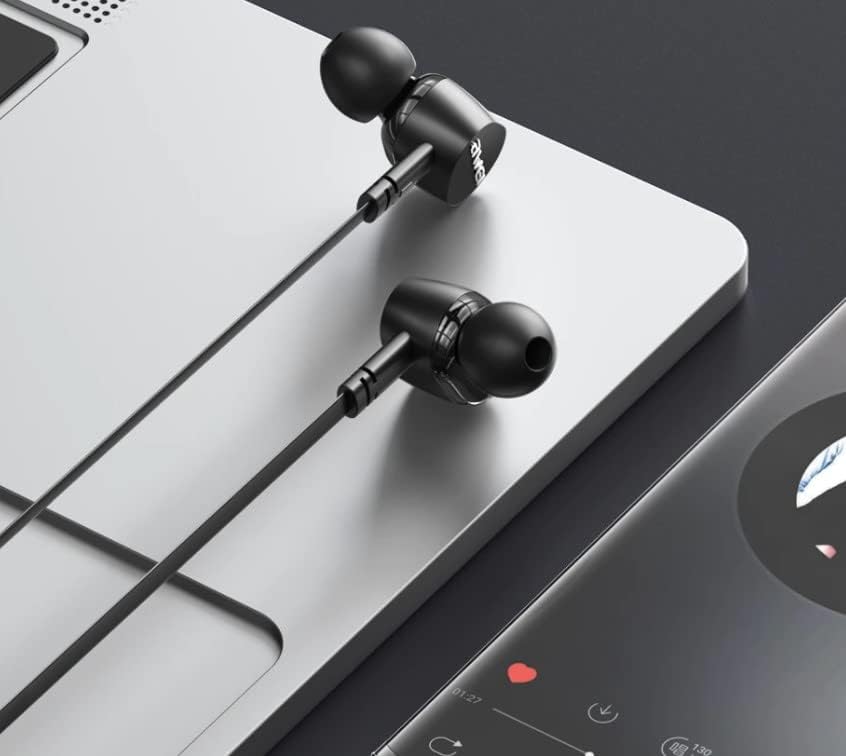
Fíor 4.1: The earphones are compatible with various devices featuring a USB-C port, such as laptops and smartphones.
5. Treoracha Oibriúcháin
The Awei TC-7 earphones feature an inline remote with buttons for convenient control of your audio and calls.
5.1. Rialú Athsheinm Ceoil
- Seinn/Sos: Brúigh an cnaipe lár uair amháin.
- An Chéad Amhrán Eile: Brúigh an cnaipe lár dhá uair go tapa.
- Rian Roimhe Seo: Brúigh an cnaipe lár trí huaire go tapa.
- Imleabhar Suas: Brúigh an cnaipe '+'.
- Imleabhar an Dúin: Brúigh an cnaipe '-'.
5.2. Bainistíocht Glaonna
- Freagra/Deireadh Glao: Brúigh an cnaipe lárnach uair amháin le linn glao isteach nó glao gníomhach.
- Diúltaigh Glao: Press and hold the center button for approximately 2 seconds during an incoming call.
6. Cothabháil
Proper care will extend the lifespan of your Awei TC-7 earphones.
- Glanadh Cúisíní Cluas: Regularly remove the ear cushions and clean them with a soft, damp éadach. Cinntigh go bhfuil siad tirim go hiomlán sula gcuirtear ar ais iad.
- Cúram Cábla: The cable is designed to be tangle-free. Avoid excessive pulling or sharp bending to prevent internal damage.
- Stóráil: When not in use, store the earphones in a clean, dry place, away from extreme temperatures.
- Friotaíocht Uisce: The earphones are rated as waterproof. However, avoid prolonged submersion and ensure the USB-C port is dry before connecting to a device after exposure to water.
7. Fabhtcheartú
If you encounter issues with your Awei TC-7 earphones, please refer to the following common solutions:
| Fadhb | Cúis Féideartha | Réiteach |
|---|---|---|
| Gan fuaim ó na cluasáin | Earphones not properly connected; device volume too low; incorrect audio output setting on device. | Ensure the USB-C plug is fully inserted. Increase device volume. Check device audio settings to confirm output is set to earphones. |
| Micreafón nach bhfuil ag obair | Microphone port blocked; incorrect input setting on device; application permissions. | Ensure the microphone area is clear. Check device sound settings for microphone input. Verify application permissions for microphone access. |
| Cnaipí nach bhfuil ag freagairt | Loose connection; device incompatibility; software glitch. | Reconnect the earphones. Test with another compatible device if possible. Restart your device. |
8. Sonraíochtaí
| Gné | Sonraigh |
|---|---|
| Ainm an tSamhail | TC-7 |
| Teicneolaíocht Nascachta | Sreangaithe |
| Jack cluasáin | USB-C |
| Socrúchán Cluas | I gCluas |
| Raon Minicíochta | 20Hz - 20kHz |
| Gnéithe Breise | Microphone Included, Inline Control |
| Ábhar | Plaisteach |
| Leibhéal Friotaíocht Uisce | Uiscedhíonach |
| Gnéithe Cábla | Tangle saor in aisce, |
| Gléasanna Comhoiriúnacha | Smartphones, Laptops, Tablets, Desktops with USB-C |
9. Barántas agus Tacaíocht
Chun eolas faoi bharántas agus tacaíocht do chustaiméirí a fháil, féach ar an doiciméadacht a cuireadh ar fáil ag an bpointe ceannaigh nó déan teagmháil le do mhiondíoltóir. Coinnigh do chruthúnas ceannaigh le haghaidh aon éilimh bharántais.