
TOUCARE T9S
TOUCARE T9S Motorcycle Bluetooth Intercom User Manual
Model: T9S | Brand: TOUCARE
Réamhrá
The TOUCARE T9S is a high-performance Bluetooth intercom system designed for motorcycle riders. It enables clear communication between up to four riders, offers music sharing, and integrates with your mobile phone for calls and GPS navigation. With advanced noise cancellation and a robust waterproof design, the T9S ensures a reliable and enjoyable riding experience in various conditions.
Príomhghnéithe
- 1200M Maximum Distance: Equipped with Bluetooth 5.0 for high compatibility and stability, allowing group communication within a 1200m intercom range.
- Support 4-Riders Intercom: Full-duplex communication for up to 4 riders simultaneously. Universal pairing function ensures compatibility with most Bluetooth headsets and mobile phones.
- Comhroinnt Ceoil: Share music with another rider, enjoy Hi-Fi stereo music, FM radio, or GPS voice guidance.
- Noise Reduction and IP67 Waterproof: DSP and CVC advanced noise reduction technology for clear communication up to 120km/h. IP67 waterproof rating for all-weather use.
- Ultra-Long Standby Battery: 800mAh rechargeable battery provides up to a week of standby time and 15 hours of working time.

Image: The T9S system supports communication for up to four riders over a distance of 1200 meters.

Image: CVC & DSP Noise Cancellation Technology ensures clear and smooth communication even at high speeds.

Image: The IP67 waterproof rating makes the T9S suitable for use in all weather conditions, including water sports.

Image: The T9S offers extended endurance times for talking, music playback, and standby, supporting long-distance travel.
Ábhar an Phacáiste
Each TOUCARE T9S package includes the following components:
- 1 x Bluetooth Intercom Unit
- 1 x Hi-Fi Speaker Set
- 1 x Boom Microphone
- 1 x Button Microphone
- 1 x Cábla USB
- 1 x Lúibín Gléasta
- 1 x Clamp Pláta
- 1 x Sreang Allen

Image: All components included in the TOUCARE T9S package, ensuring you have everything needed for installation and use.
Táirge Tharview agus Feidhmeanna Cnaipí
Familiarize yourself with the buttons and indicators on your T9S intercom unit:
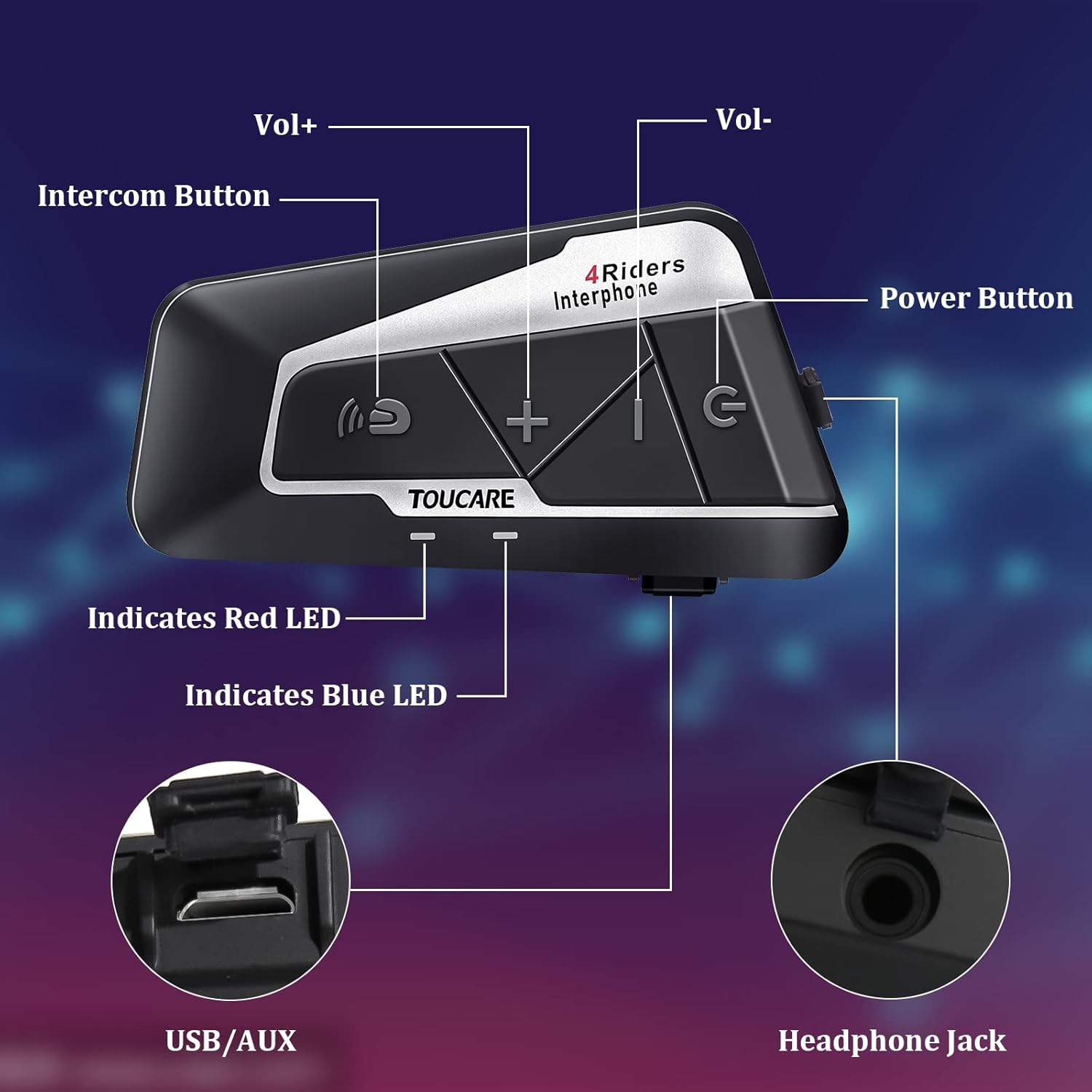
Image: Detailed diagram of the T9S unit, highlighting the location and labels of each button and port.
Power On/Off Button (G)
- Cumhacht ar siúl / as: Brúigh agus coinnigh chun an gléas a chasadh air nó as.
- Paired Mobile Phone: Short press to connect/disconnect with a paired mobile phone.
- Leid Cumhachta: Short press to hear battery level prompt.
- Hang up Bluetooth Intercom: Short press during an intercom call to end it.
- Seinn / Sos Ceoil: Brúigh gearr chun ceol a sheinm nó a chur ar sos.
- Call Answering/Third Party Answer/End/Reject: Manage phone calls.
Bluetooth Intercom Button (Intercom Icon)
- Imleabhar +: Preas gairid chun toirt a mhéadú.
- Amhrán Deireanach: Brúigh go fada chun dul go dtí an t-amhrán roimhe sin.
- FM Turn Up: Short press during FM mode to tune up.
- FM Turn On/Off: Long press to turn FM radio on or off.
- Athrialú Uimhir Dheireanach: Double press to redial the last dialed number.
Volume - Button (-)
- Imleabhar -: Preas gairid chun an toirt a laghdú.
- Amhrán Eile: Brú fada chun dul go dtí an chéad amhrán eile.
- FM Turn Down: Short press during FM mode to tune down.
- FM Turn On/Off: Long press to turn FM radio on or off.
- Diailiú Gutha: Double press to activate voice dialing (if supported by your phone).

Image: The T9S features ultra-large buttons, designed for easy operation even while wearing gloves.
Treoir Suiteáil
Modh Suiteála Seasta
Follow these steps to securely install the T9S intercom unit on your helmet:
- Locate and Clean: Identify a suitable flat area on the left side of your helmet for mounting. Ensure the surface is clean and dry.
- Prepare Adhesive: Peel off the protective film from the 3M adhesive on the back of the mounting bracket.
- Cuir Brú i bhFeidhm: Firmly press the mounting bracket onto the chosen location on your helmet. Apply consistent pressure for several seconds to ensure a strong bond.
- Aonad Slán: Slide the T9S intercom unit onto the mounted bracket until it clicks securely into place.
- Install Speakers and Microphone: Route the speaker and microphone wires inside the helmet lining. Position the speakers inside the ear pockets and the microphone near your mouth for optimal audio.
Treoracha Oibriúcháin
Péireáil le Fón Póca
- Ensure the T9S is powered off.
- Press and hold the Power On/Off button until the LED indicator flashes red and blue alternately, indicating pairing mode.
- On your mobile phone, enable Bluetooth and search for new devices. Select "TOUCARE T9S" from the list.
- Once paired, the LED will flash blue slowly.
Initiating Intercom Communication
- Ensure all T9S units are powered on and within range.
- To initiate a group intercom, short press the Bluetooth Intercom Button on your unit. The units will attempt to connect.
- To end an intercom call, short press the Power On/Off button.
Athsheinm Ceoil
- Seinn/Sos: Gearr brúigh an cnaipe Cumhacht Ar / As.
- Amhrán Eile: Brúigh an cnaipe Imleabhar - ar feadh i bhfad.
- Amhrán Roimhe Seo: Long press the Bluetooth Intercom button.
- Coigeartú Toirt: Short press Volume + or Volume - buttons.
Raidió FM
- Cas air/Múch: Long press either the Bluetooth Intercom button or the Volume - button.
- Tune Up: Short press the Bluetooth Intercom button.
- Tune Down: Brúigh an cnaipe Imleabhar - go gairid.
Ag Freagairt/Críoch Glaonna
- Freagra Glao: Short press the Power On/Off button when a call comes in.
- Glao Deiridh: Short press the Power On/Off button during a call.
- Diúltaigh Glao: Long press the Power On/Off button when a call comes in.
- Diailiú Gutha: Double press the Volume - button (requires phone support).
- Athrialú Uimhir Dheireanach: Double press the Bluetooth Intercom button.
Sonraíochtaí Teicniúla
| Gné | Sonraíocht |
|---|---|
| Leagan Bluetooth | 5.0 |
| Bluetooth profiles Tacaithe | HSP, HFP, A2DP, AVRCP, AGHSP |
| Uaireanta Oibre | 15 uair |
| Am Fuireachas | 350 uair |
| Am Muirir | 3 uair |
| Cineál Battery | Rechargeable Lithium Battery, 800mAh, 3.7V |
| Toisí | 89 x 46 x 30 mm |
| Meáchan | 85g |
| Rialú Torainn | Active Noise Cancellation (DSP & CVC) |
| Leibhéal Friotaíocht Uisce | IP67 |
| Teicneolaíocht Nascachta | Gan sreang |
| Ábhar | Rubair |
| Cineál Rialaithe | Voice Control (via phone), Button Control |
Cothabháil
To ensure the longevity and optimal performance of your TOUCARE T9S intercom, follow these maintenance guidelines:
- Glanadh: Wipe an t-aonad le bog, damp éadach. Ná húsáid ceimiceáin gharbh, tuaslagóirí glantacháin, nó glantaigh láidre.
- Stóráil: Stóráil an gléas in áit fhionnuar tirim amach ó sholas díreach na gréine agus ó theocht mhór nuair nach bhfuil sé in úsáid.
- Cúram Battery: For long-term storage, charge the battery to about 50% every three months to prevent deep discharge and extend battery life.
- Nochtadh Uisce: Although IP67 rated, avoid prolonged submersion. Ensure charging port is dry before charging.
- Bainistíocht Cábla: Handle cables and connectors gently to prevent damage.
Fabhtcheartú
If you encounter issues with your T9S intercom, try the following solutions:
Gan Cumhacht
- Seiceáil Battery: Ensure the unit is fully charged. Connect it to a power source and check if the charging indicator lights up.
- Athshocraigh: If unresponsive, try holding the Power On/Off button for an extended period (e.g., 10-15 seconds) to force a reset.
Cannot Pair with Mobile Phone/Other Intercoms
- Modh Péireála: Ensure the T9S is in pairing mode (LED flashing red and blue alternately).
- Device Visibility: Make sure Bluetooth is enabled on your phone/other intercoms and they are discoverable.
- Glan Stair Péireála: On your phone, forget the T9S device and try pairing again. For intercoms, consult the manual for clearing pairing history if available.
- Fad: Ensure devices are within close proximity (e.g., 1 meter) during pairing.
Poor Audio Quality/No Sound
- Toirt: Check if the volume is turned up on both the T9S and the connected device (phone/intercom).
- Seasamh Micreafón: Ensure the microphone is correctly positioned near your mouth and not obstructed.
- Ceangal Cainteoir: Verify that the speakers are securely plugged into the headphone jack.
- Cur isteach: Bog ar shiúl ó fhoinsí cur isteach leictreamaighnéadach láidir.
- Firmware: Seiceáil an monaróir website for any available firmware updates that might improve audio performance.
Barántas agus Tacaíocht
For warranty information, technical support, or service inquiries, please refer to the warranty card included with your product or visit the official TOUCARE websuíomh. Coinnigh d’admháil ceannaigh mar chruthúnas ceannaigh le haghaidh éilimh bharántais.
For further assistance, you may also contact TOUCARE customer service through the contact information provided on their official channels.
Doiciméid Ghaolmhara - T9S
 |
Lámhleabhar Úsáideora Cluasáin Idirchum Clogad Gluaisrothair Kebidumei Y10-2X Lámhleabhar úsáideora cuimsitheach do chluasáin idirchumarsáide clogad gluaisrothair Kebidumei Y10-2X, a chlúdaíonn an táirge os cionnview, gnéithe, oibriú, suiteáil, agus réamhchúraimí sábháilteachta. |
 |
Lámhleabhar Úsáideora Idirchum Bluetooth Gluaisrothair LEXIN LX-B4FM Comprehensive user manual for the LEXIN LX-B4FM Motorcycle Bluetooth Intercom System, covering features, installation, operation, pairing, troubleshooting, and warranty. |
 |
LX-B4FM Motorcycle Bluetooth Intercom User Manual Comprehensive user manual for the LEXIN LX-B4FM motorcycle Bluetooth intercom system, covering installation, operation, pairing, group calls, troubleshooting, and warranty information. |
 |
Lámhleabhar Úsáideora Intercom Bluetooth Fodsports M1-S AIR Gluaisrothar Lámhleabhar úsáideora cuimsitheach don chóras idirchumarsáide Bluetooth gluaisrothair Fodsports M1-S AIR. Foghlaim faoi shuiteáil, gnéithe, péireáil, comhroinnt ceoil, feidhmeanna idirchumarsáide, agus réamhchúraimí sábháilteachta. |
 |
FODSPORTS M1-S PRO Bluetooth Headset Intercom - Treoir Tosaigh Treoir chuimsitheach tosaithe do chluasáin idirchumarsáide Bluetooth FODSPORTS M1-S PRO, a chlúdaíonn socrú, feidhmeanna, comhroinnt ceoil, idirchumarsáid, muirearú agus suiteáil. |
 |
Lámhleabhar Úsáideora Idirchum Gluaisrothair JESIMAIK R16 Pro Tugann an lámhleabhar úsáideora seo treoracha mionsonraithe don idirchumarsáid gluaisrothair JESIMAIK R16 Pro, ina gclúdaítear gnéithe, suiteáil, oibriú, péireáil agus fabhtcheartú. |
Ask a question about this manual
Ask about setup, troubleshooting, compatibility, parts, safety, or missing instructions. Manuals+ will review the question and use this page’s manual context to help answer it.