
1. Réamhrá
Thank you for choosing the iPega PG-P4008 Wireless Game Controller. This manual provides detailed instructions on how to set up, operate, and maintain your controller. The PG-P4008 offers broad compatibility with PS4, PS3, Android (10.0+), iOS (13.0+), and Windows PC, connecting wirelessly via Bluetooth for an enhanced gaming experience.
2. Táirge Tharview
The iPega PG-P4008 is designed for versatile gaming across multiple platforms. It features a comfortable ergonomic design, responsive controls, and several advanced functionalities to immerse you in your games.
Príomhghnéithe:
- Wireless Bluetooth connectivity (BT2.1+EDR) with up to 8 meters range.
- No driver installation required for connection.
- Integrated colored LED light indicator for operational status.
- Dual motors for realistic vibration feedback during gameplay.
- Built-in three-dimensional acceleration sensor and gyroscope sensor with six-axis induction.
- Integrated speaker and 3.5mm earphone jack for game audio.
- Dual-point capacitive touchpad for enhanced control.
- Compatible with PS4, PS3, Android (10.0+), iOS (13.0+), and Windows PC.
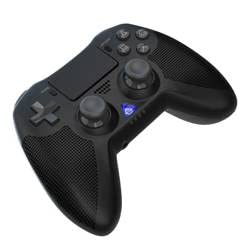
Íomhá 1: Tosaigh view of the iPega PG-P4008 Wireless Game Controller. This image displays the controller's ergonomic design, dual analog sticks, D-pad, action buttons, touchpad, and the central LED indicator.
3. Socrú agus Ceangal
The PG-P4008 controller connects wirelessly via Bluetooth. Follow these steps to pair your controller with your device:
- Cumhacht ar: Ensure the controller is charged. Press and hold the Cnaipe PS (or equivalent power button) to turn on the controller.
- Modh Péireála:
- For PS4/PS3: Connect the controller to the console using a USB cable. Once recognized, you can disconnect the cable for wireless play. The connection method is similar to the official P4 controller.
- For Android/iOS: Activate Bluetooth on your mobile device. On the controller, press and hold the SHARE button + PS button simultaneously until the LED indicator flashes rapidly, indicating pairing mode. Select "PG-P4008" (or similar) from your device's Bluetooth list to connect.
- For Windows PC: Ensure your PC has Bluetooth capability. On the controller, press and hold the PS button + OPTIONS button simultaneously until the LED indicator flashes rapidly. On your PC, go to Bluetooth settings, add a new device, and select "PG-P4008" (or similar) to pair.
- Ceangal rathúil: Once connected, the LED indicator on the controller will change to a solid color, indicating a successful pairing.
Nóta: No additional driver software is required for operation. The controller supports a stable connection up to 8 meters.
4. Treoracha Oibriúcháin
Táscaire LED:
The built-in colored LED light indicates the controller's operational status and player assignment, similar to the official PS4 controller. Different colors will signify different stages or player numbers.
Aiseolas ar Chreathadh:
The controller features dual motors embedded in the handles, providing tactile vibration feedback to enhance your gaming immersion. This feedback will vary based on in-game events.
touchpad:
The dual-point capacitive touchpad allows for intuitive control in games that support touch input, offering an additional layer of interaction.
Feidhmiúlacht Fuaime:
Connect your 3.5mm earphones to the integrated jack on the controller to experience game audio directly, providing a private and immersive sound experience.
5. Cothabháil
- Keep the controller dry and away from moisture to prevent damage to internal components.
- Glan an rialtóir go rialta le héadach bog tirim. Seachain ceimiceáin ghéara nó ábhair scríobacha a úsáid.
- Stóráil an rialtóir in áit fhionnuar, thirim nuair nach bhfuil sé in úsáid.
- Avoid exposing the controller to extreme temperatures or direct sunlight.
- Do not attempt to disassemble or modify the controller, as this will void any potential warranty and may cause damage.
6. Fabhtcheartú
- Rialaitheoir nach bhfuil ag ceangal:
- Cinntigh go bhfuil an rialtóir luchtaithe go hiomlán.
- Deimhnigh go bhfuil Bluetooth cumasaithe ar do ghléas.
- Make sure the controller is in the correct pairing mode for your device (refer to Section 3).
- Bain triail as an rialtóir agus do ghléas a atosú.
- Remove previous pairings from your device's Bluetooth list and try pairing again.
- Moill ionchuir nó dícheangal:
- Ensure you are within the 8-meter operating range.
- Íoslaghdaigh cur isteach ó ghléasanna gan sreang eile.
- Check for any physical obstructions between the controller and the device.
- Creathadh nach bhfuil ag obair:
- Cinntigh go dtacaíonn an cluiche atá á imirt agat le haiseolas creatha.
- Seiceáil socruithe sa chluiche lena chinntiú go bhfuil creathadh cumasaithe.
- Audio not working via 3.5mm jack:
- Ensure your earphones are properly plugged in.
- Check the volume settings on your device and in-game.
- Test with another pair of earphones to rule out earphone issues.
7. Sonraíochtaí
| Uimhir Mhúnla | PG- P4008 |
| Branda | iPega |
| Nascacht | Bluetooth (BT2.1+EDR) |
| Sreang Range | Suas le 8 méadar |
| Gléasanna Comhoiriúnacha | PS4, PS3, Android (10.0+), iOS (13.0+), Windows PC |
| Gnéithe Speisialta | Wireless, Touchpad, Vibration, 6-axis Gyroscope, Built-in Speaker, 3.5mm Audio Jack |
| Cainníocht Cnaipe | 17 |
| Foinse Cumhachta | Ceallraí Powered |
8. Barántas agus Tacaíocht
Ní chuirtear faisnéis maidir le barántas táirge agus tacaíocht do chustaiméirí ar fáil sa lámhleabhar seo. Féach ar phacáistiú an táirge nó ar an miondíoltóir. websuíomh gréasáin le haghaidh sonraí faoi chlúdach bharántais agus conas teagmháil a dhéanamh le tacaíocht do chustaiméirí le haghaidh cúnaimh.