
Réamhrá
Thank you for choosing the Audizio SB85 Soundbar with Subwoofer. This manual provides essential information for the safe and correct operation of your new audio system. Please read it thoroughly before use and retain it for future reference. The SB85 is designed to enhance your television's audio, providing a rich, immersive sound experience for movies, games, and music, complete with a dedicated subwoofer for powerful bass.
Treoracha Sábháilteachta
- Léigh na treoracha go léir go cúramach sula n-oibríonn an gléas.
- Keep the unit away from water, moisture, and heat sources.
- Ná bac le haon oscailtí aerála.
- Ná húsáid ach ceangaltáin/gabhálais atá sonraithe ag an monaróir.
- Díphlugáil an gaireas le linn stoirmeacha tintreach nó nuair nach bhfuil sé in úsáid ar feadh tréimhsí fada.
- Déan gach seirbhísiú a tharchur chuig pearsanra seirbhíse cáilithe.
- Do not expose the battery (if applicable) to excessive heat such as sunshine, fire, or the like.
Ábhar an Phacáiste
Cinntigh go bhfuil na hearraí go léir sa bhosca:
- Audizio SB85 Soundbar
- Subwoofer sreangaithe
- Cianrialú
- Optical Cable (Toslink)
- Cábla AUX
- Cuibheoir Cumhachta
- Lámhleabhar Úsáideora
Táirge Tharview
The Audizio SB85 system consists of a soundbar and a separate wired subwoofer, designed to deliver a powerful and clear audio experience.
Gnéithe an Bharra Fuaime
- Integrated 150W speaker system with 4 speakers (2x 2cm range, 2x 2cm tweeter).
- Front LED display for status indication.
- Control buttons on the side panel.
- Multiple input options: HDMI (ARC), USB, Line In (AUX), Coaxial, Optical.
- Bluetooth 5.0 le haghaidh sruthú fuaime gan sreang.

Image: Close-up of the Audizio SB85 Soundbar's control panel and its remote control, highlighting Bluetooth 5.0 and ease of use.

Íomhá: Inmheánach view of the Audizio SB85 Soundbar's full-range speaker, emphasizing its 150W speaker system for an immersive audio experience.
Gnéithe Subwoofer
- 5.25-inch wired subwoofer for enhanced bass response.

Image: Close-up of the Audizio SB85 wired subwoofer, designed to amplify bass frequencies.
Socrú
1. Socrúchán
Place the soundbar centrally below your television. The subwoofer can be placed on the floor near the soundbar, ideally in a corner for optimal bass reflection, but ensure it is not obstructed.

Image: Audizio SB85 Soundbar and Subwoofer setup in a living room, demonstrating room-filling sound and clean design.

Image: Audizio SB85 Soundbar placed below a television, illustrating its universal compatibility with any TV.
2. Ceangal le Cumhacht
Connect the power adapter to the DC IN port on the soundbar and then plug it into a wall outlet (230 Vac/50 Hz).
3. An Subwoofer a nascadh
Connect the wired subwoofer to the dedicated subwoofer output port on the soundbar.
4. Ag Ceangal le Foinsí Fuaime
The SB85 offers several connection options:
- HDMI (ARC): For the best audio quality and control, connect an HDMI cable from the HDMI (ARC) port on the soundbar to the HDMI ARC port on your TV. This allows the TV to send audio to the soundbar and often enables TV remote control of the soundbar's volume.
- Optúil (Toslink): Connect the included optical cable from the OPTICAL port on the soundbar to the Optical Digital Audio Out port on your TV or other audio source.
- Line In (AUX): Use the included AUX cable to connect the LINE IN port on the soundbar to the headphone jack or audio output of your device (e.g., smartphone, MP3 player).
- Comhaiseach: Connect a coaxial cable (not included) from the COAXIAL port on the soundbar to the Coaxial Digital Audio Out port on your TV or other audio source.
- USB: Insert a USB flash drive into the USB port for MP3 playback.
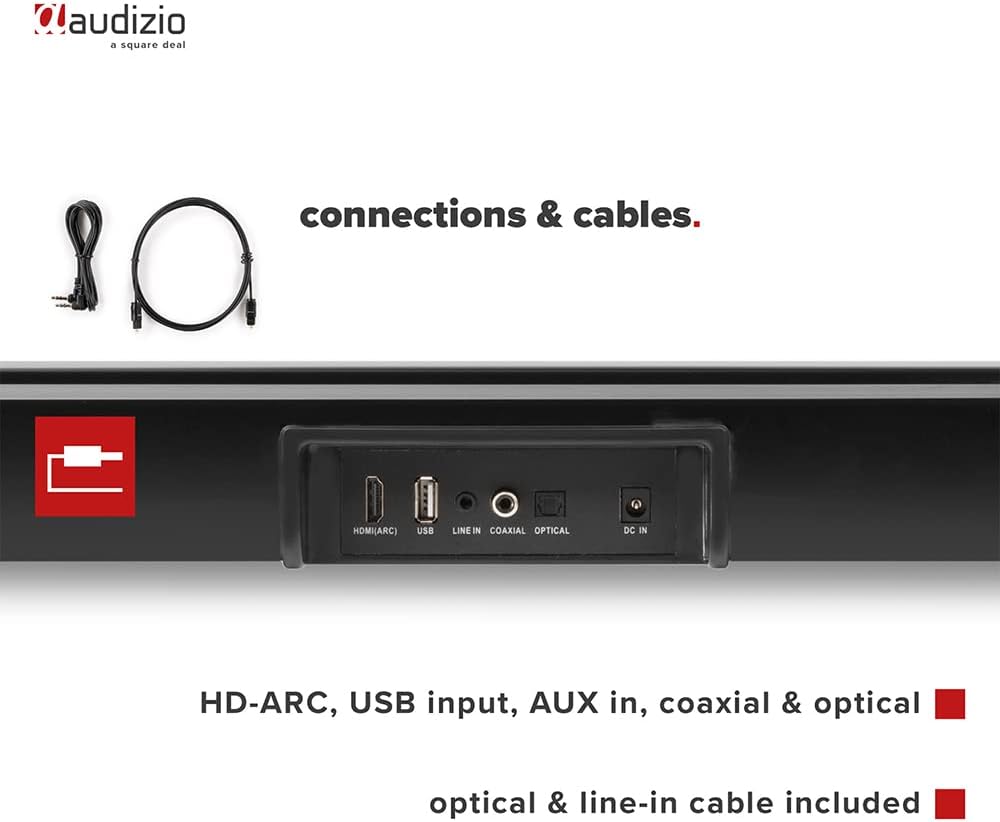
Íomhá: Cúl view of the Audizio SB85 Soundbar showing various connection ports: HDMI (ARC), USB, Line In, Coaxial, and Optical. Includes optical and line-in cables.
Treoracha Oibriúcháin
1. Cumhacht Ar / As
Brúigh an cnaipe Cumhachta ar an mbarra fuaime nó ar an gcianrialtán chun an t-aonad a chasadh air nó as.
2. Roghnú Foinse Ionchur
Press the 'MODE' button on the soundbar or the remote control repeatedly to cycle through the available input sources: HDMI (ARC), Optical, Coaxial, AUX, USB, and Bluetooth. The selected input will be shown on the front LED display.
3. Rialú Imleabhar
Use the 'VOL+' and 'VOL-' buttons on the soundbar or the remote control to adjust the volume. The 'MUTE' button on the remote control will temporarily silence the audio.
4. Péireáil Bluetooth
- Switch the soundbar to Bluetooth mode using the 'MODE' button. The LED display will show 'BT'.
- Ar do ghuthán cliste nó táibléad, cumasaigh Bluetooth agus déan cuardach do na gléasanna atá ar fáil.
- Select 'Audizio SB85' from the list of devices.
- Once paired, the soundbar will indicate a successful connection, and you can stream audio wirelessly.
5. Athsheinm USB
Cuir isteach tiomántán USB flash ina bhfuil fuaim MP3 files into the USB port. The soundbar will automatically switch to USB mode and begin playing the music. Use the remote control to navigate tracks (play/pause, next/previous).
6. Feidhmeanna Cianrialtáin
The remote control provides full functionality for the soundbar, including power, mode selection, volume, mute, and playback controls for USB and Bluetooth modes.
Cothabháil
Glanadh
Wipe the soundbar and subwoofer surfaces with a soft, dry cloth. Do not use abrasive cleaners, waxes, or solvents as they may damage the finish. Ensure the device is unplugged before cleaning.
Stóráil
Má tá an t-aonad á stóráil ar feadh tréimhse fada, díphlugáil é ón asraon cumhachta agus stóráil é in áit fhionnuar tirim, amach ó sholas díreach na gréine agus ó theocht mhór.
Fabhtcheartú
| Fadhb | Cúis Féideartha | Réiteach |
|---|---|---|
| Gan chumhacht | Cábla cumhachta gan cheangal; Asraon cumhachta lochtach | Seiceáil nasc an chábla cumhachta; Bain triail as asraon difriúil. |
| Gan fuaim | Incorrect input selected; Volume too low; Mute activated; Cable connection loose | Select correct input source; Increase volume; Deactivate mute; Check all audio cable connections. |
| Bluetooth gan nascadh | Soundbar not in Bluetooth mode; Device too far; Device already connected to another unit | Switch soundbar to BT mode; Move device closer; Disconnect from other devices and try again. |
| Cianrialtán nach bhfuil ag obair | Cadhnraí ídithe; Bac idir an cianrialtán agus an barra fuaime | Cuir cadhnraí in áit na gceallraí; bain aon bhacainní. |
Sonraíochtaí
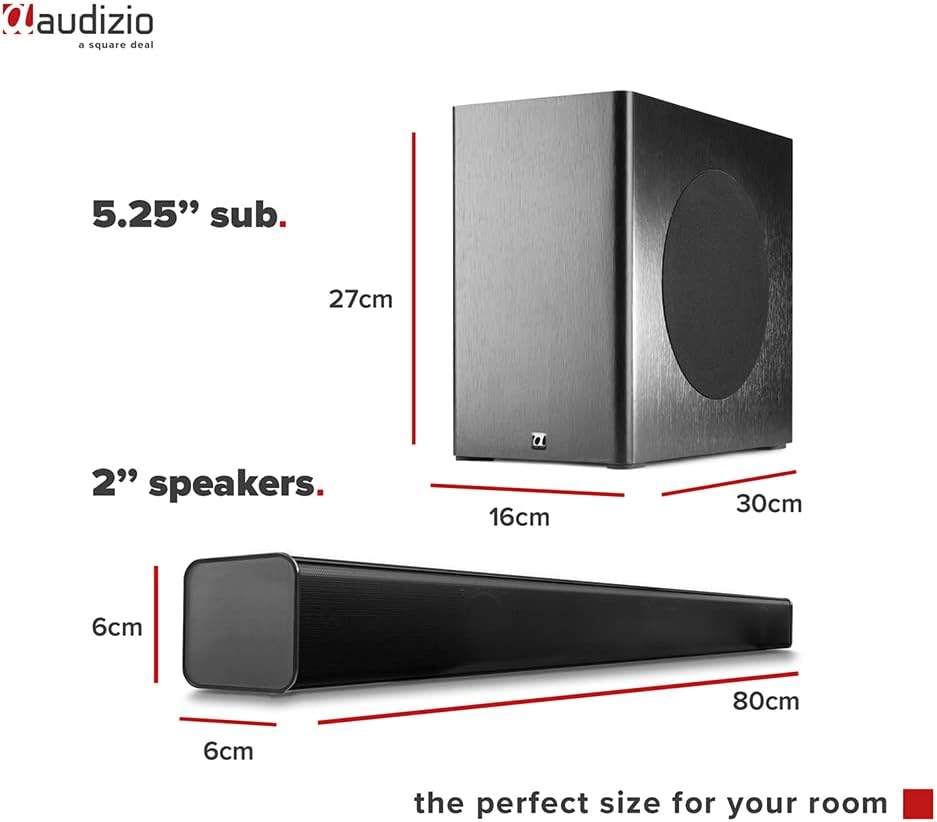
Image: Diagram showing the dimensions of the Audizio SB85 Soundbar and its subwoofer.
- Aschur Cumhachta: 150W (Uasmhéid)
- Cumraíocht an Chainteora: 4 speakers (2x 2cm range, 2x 2cm tweeter)
- Méid Subwoofer: 5.25 orlach
- Raon Minicíochta: 50 Hz - 16,000 Hz
- SPL uasta: 125 dB
- Nascacht: Bluetooth 5.0, HDMI (ARC), USB, Line In (AUX), Coaxial, Optical
- Modh Aschuir Fuaime: Steirió
- Gléasanna Comhoiriúnacha: MP3 Player, Smartphone, TV
- Foinse Cumhachta: 230 Vac/50 Hz (via electric cable)
- Soundbar Dimensions (L x W x H): 80 x 6 x 6 cm
- Subwoofer Dimensions (L x W x H): 16 x 30 x 27 cm
- Meáchan Iomlán: 3.9 kg
- Uimhir Mhúnla: 100.292
Barántas agus Tacaíocht
Chun eolas faoi bharántas nó tacaíocht theicniúil a fháil, féach ar an doiciméadacht a cuireadh ar fáil tráth an cheannaigh nó déan teagmháil le do mhiondíoltóir. Coinnigh do chruthúnas ceannaigh le haghaidh aon éilimh bharántais.