
Am measta ETA251590000
ETA Falco Smart Robot Vacuum Cleaner with Mopping Function User Manual
Múnla: ETA251590000
1. Réamhrá
Thank you for choosing the ETA Falco Smart Robot Vacuum Cleaner with Mopping Function. This manual provides essential information for the safe and efficient operation, maintenance, and troubleshooting of your device. Please read this manual thoroughly before using the product and keep it for future reference.
Eolas Tábhachtach Sábháilteachta
- Always ensure the robot is placed on a stable, level surface.
- Coinnigh an gléas ar shiúl ó uisce agus taise.
- Do not allow children or unauthorized persons to operate the robot.
- Use only the original charging adapter and accessories provided.
- Before cleaning or maintenance, ensure the robot is powered off and unplugged from the charging station.
- Avoid operating the robot near open flames or flammable materials.
2. Táirge Tharview
Comhpháirteanna agus Rialuithe
Familiarize yourself with the main parts and controls of your ETA Falco Smart robot vacuum cleaner.
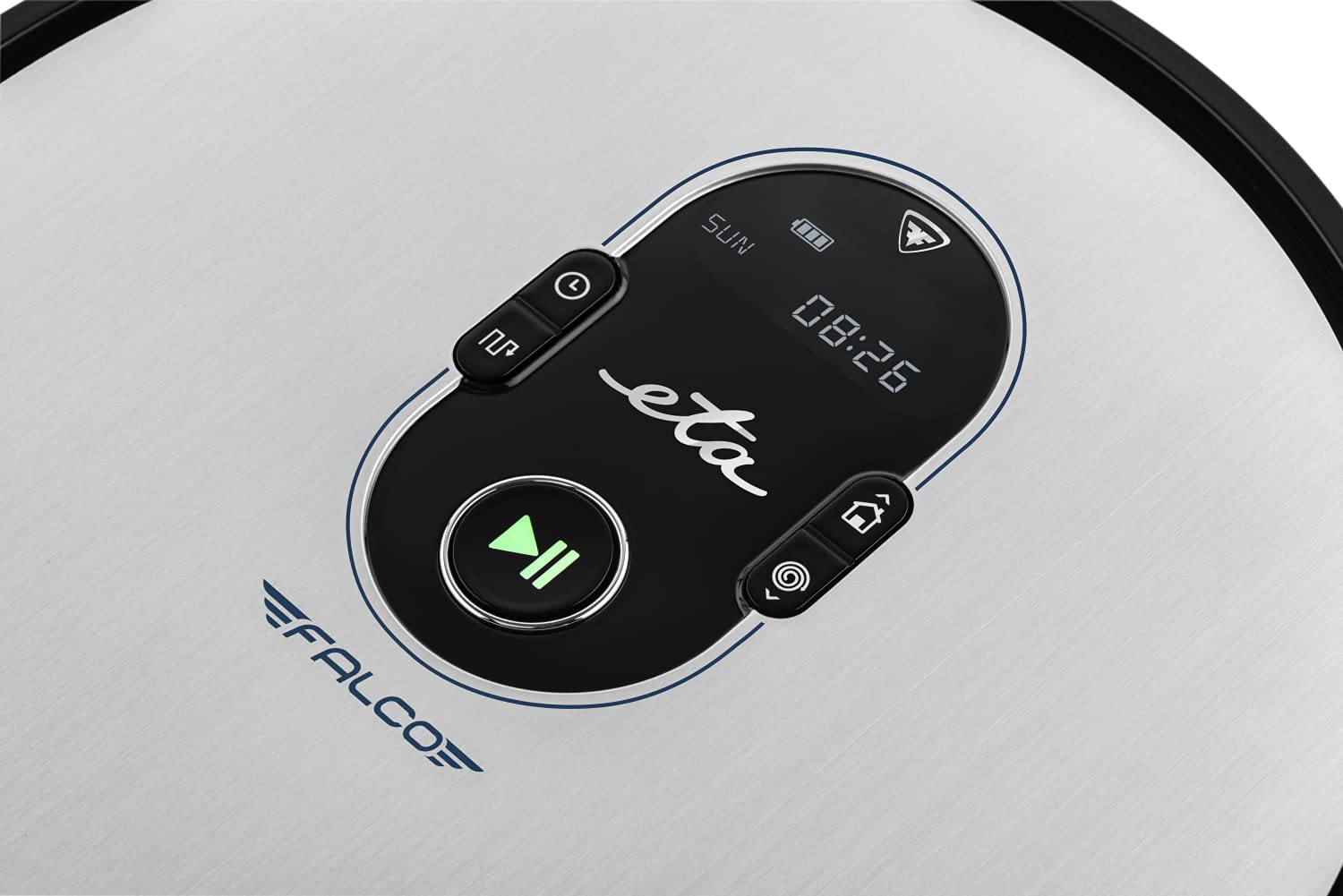
Íomhá 2.1: Top panel controls. This image shows the main control panel on the top of the robot, including buttons for power, scheduling, and return to charging station, along with a digital display.

Íomhá 2.2: Taobh thíos view. This image displays the bottom of the robot, highlighting the main brush, two side brushes, and the mop attachment.

Íomhá 2.3: Underside diagram. This diagram labels the key components on the robot's underside, including the side brushes, main brush, and mop attachment.
3. Ábhar Pacáiste
Agus tú ag díphacáil, déan cinnte go bhfuil na míreanna seo a leanas go léir i láthair:
- ETA Falco Smart Robot Vacuum Cleaner
- Port luchtaithe
- Cuibheoir Muirir
- Cianrialú
- 2x Spare Side Brushes
- Special Rotary and Lamella Brush
- 2x Cleaning Cloths (Mop Pads)
- Spare HEPA Filter
- Mop Attachment with 300 ml Water Tank
- Balla Fíorúil
4. Socrú
4.1 Muirearú Tosaigh
- Cuir an stáisiún luchtaithe i gcoinne balla i limistéar oscailte, ag cinntiú nach bhfuil aon chonstaicí laistigh de 1 mhéadar ar na taobhanna agus 2 mhéadar chun tosaigh.
- Connect the charging adapter to the charging station and plug it into a power outlet.
- Place the robot vacuum cleaner on the charging station. Ensure the charging contacts align. The robot will begin charging automatically. A full charge takes approximately 5 hours.
4.2 Scuaba Taobh a Shuiteáil
Attach the side brushes to the designated posts on the underside of the robot by pressing them down until they click into place. Ensure the 'L' and 'R' markings on the brushes match the corresponding markings on the robot.
4.3 Connecting to the ETA SMART App
The ETA SMART app enhances the functionality of your robot. Download the app from your smartphone's app store. Follow the in-app instructions to connect your robot to your home Wi-Fi network and pair it with the app.
4.4 An Balla Fíorúil a Chur Ar Bun
The virtual wall creates an invisible barrier to restrict the robot's access to certain areas. Place the virtual wall device on the floor where you want to create a boundary. Ensure the infrared beam is directed towards the area you wish to block. The robot will detect this beam and avoid crossing it.

Íomhá 4.1: Robot with charging station and virtual wall. This image shows the robot positioned near its charging station, with a virtual wall device placed nearby to illustrate its function.
5. Treoracha Oibriúcháin
5.1 Modhanna Glantacháin
The ETA Falco Smart offers four distinct cleaning modes:
- SMART: General cleaning mode for optimal coverage.
- Clasaiceach: Standard cleaning pattern.
- Imill: Glanann sé feadh ballaí agus imill troscáin.
- SPOT: Glanadh tiubhaithe i limistéar ar leith.
You can select these modes via the ETA SMART app or the remote control.
5.2 Glanadh a Sceidealú
Use the ETA SMART app to set a cleaning schedule for your robot. You can program specific times and days for the robot to automatically start cleaning.
5.3 Rialú de Láimh
You can manually control the robot's movement and functions using the remote control or the ETA SMART app. The app also allows you to monitor cleaning activity, battery charge, and view cleaning routes.

Íomhá 5.1: ETA Smart App features. This image displays the ETA Smart App interface on a smartphone, highlighting features such as remote control, cleaning history, activity monitoring, battery status, cleaning modes (SMART, CLASSIC, EDGE, SPOT), cleaning schedule, mopping intensity control, and suction power adjustment.
5.4 Feidhm Mhopáil
- Fill the 300 ml water tank with clean water. Do not use detergents or cleaning solutions that are not approved for robot vacuums.
- Attach a clean mop pad to the mop attachment.
- Slide the mop attachment into the designated slot on the underside of the robot.
- Tosaigh timthriall glantacháin. Déanfaidh an róbat folúsghlanadh agus mopáil ag an am céanna.
6. Cothabháil
Cinntíonn cothabháil rialta feidhmíocht is fearr agus síneann sí saolré do fholúsghlantóra róbait.
6.1 Glanadh an Bhosca Deannaigh agus an Scagaire
- Brúigh an cnaipe scaoilte deannaigh agus bain an bosca deannaigh.
- Open the dust bin and empty its contents into a trash can.
- Remove the HEPA filter and primary filter. Tap them gently to remove dust. If washable, rinse under running water and allow to air dry completely before reinserting.
- Wipe the inside of the dust bin with a dry cloth.
- Reassemble the filters and dust bin, then reinsert into the robot.
6.2 Glanadh an Phríomh-Scuab
- Tiontaigh an robot.
- Bain clúdach an phríomhscuib trí na cluaisíní scaoilte a bhrú.
- Tóg amach an príomh-scuab.
- Use the cleaning tool (if provided) or scissors to remove hair and debris tangled around the brush.
- Clean the brush compartment.
- Cuir an príomhscuab ar ais agus daingnigh an clúdach.
6.3 Glanadh Scuaba Taobh
Periodically check the side brushes for tangled hair or debris. If necessary, remove them by gently pulling upwards and clean them. Replace worn or damaged brushes with the spare ones provided.
6.4 Cleaning the Mop Pad and Water Tank
After each mopping session, remove the mop pad and wash it thoroughly. Empty any remaining water from the water tank and rinse it. Allow both to air dry completely before storing or reusing.
6.5 Braiteoirí Glantacháin
Wipe the anti-drop sensors, bumper sensors, and charging contacts on the robot and charging station with a clean, dry cloth to ensure proper function.
7. Fabhtcheartú
Má bhíonn fadhb le do ghlantóir folúis róbait, féach ar na fadhbanna agus na réitigh choitianta seo a leanas:
| Fadhb | Cúis Féideartha | Réiteach |
|---|---|---|
| Ní chuireann robot ar siúl | Ceallraí íseal; Múch an chumhacht | Muirearaigh an róbat; Cinntigh go bhfuil an lasc cumhachta AR |
| Robot gan mhuirearú | Charging contacts dirty; Charging station unplugged | Clean charging contacts; Ensure charging station is plugged in |
| Feidhmíocht ghlantacháin lag | Dust bin full; Brushes tangled; Filter clogged | Empty dust bin; Clean brushes; Clean/replace filter |
| Bíonn an róbat sáinnithe go minic | Obstacles on floor; Sensors dirty | Clear floor of cables/small items; Clean sensors |
| Virtual wall not working | Virtual wall batteries low; Incorrect placement | Replace batteries; Adjust virtual wall position |
Má leanann an fhadhb ar aghaidh tar éis duit na réitigh seo a thriail, déan teagmháil le tacaíocht do chustaiméirí.
8. Sonraíochtaí
Technical specifications for the ETA Falco Smart Robot Vacuum Cleaner (Model ETA251590000):
| Gné | Sonraigh |
|---|---|
| Monaróir | MTE |
| Toisí Táirge (L x W x H) | 32.5 x 33.5 x 7.5 cm |
| Meáchan | 250 gram |
| Uimhir Mhúnla Mír | ETA251590000 (T2261) |
| Dath Múnla | Gorm |
| Ábhar | Plaisteach |
| Cineál Cumhachta | Ceallraí Powered |
| Imltage | 3 Volts (14.4V Li-ion battery, 2400 mAh) |
| Líon na míreanna sa phacáiste | 1 |
| Gnéithe Speisialta | Pet brush compatibility, Smart App control, Floating brush system, HEPA filter, Virtual wall |
| Comhpháirteanna San áireamh | Battery, Filter, Charging station, Adapter, Remote control, Side brushes, Rotary brush, Cleaning cloths, Mop attachment, Virtual wall |
| Comhdhéanamh Battery | Litiam-ian |
| Saol Battery | Suas le 120 nóiméad |
| Am Muirir | Thart. 5 n-uaire |
| Moladh Dromchla | Laminate |
| Cineál Rialaitheora | Rialú app |
| Infhaighteacht Páirteanna breise | Faisnéis ar fáil maidir le páirteanna breise |
9. Barántas agus Tacaíocht
For warranty information, product support, or to inquire about spare parts, please refer to the warranty card included with your purchase or visit the official ETA websuíomh. Coinnigh do chruthúnas ceannaigh le haghaidh éilimh bharántais.
Ask a question about this manual
Ask about setup, troubleshooting, compatibility, parts, safety, or missing instructions. Manuals+ will review the question and use this page’s manual context to help answer it.