
1. Réamhrá
Welcome to the instruction manual for your AMAFACE Kids Wireless Earbuds K62. These earbuds are designed to provide a comfortable and enjoyable audio experience with features tailored for children, including a unique panda-themed charging case, Bluetooth 5.1 connectivity, and intuitive touch controls. Please read this manual carefully to ensure proper use and maintenance of your device.

Figure 1: AMAFACE K62 Kids Wireless Earbuds with Panda Charging Case
2. Táirge Tharview
2.1 Ábhar an Phacáiste
- AMAFACE K62 Wireless Earbuds (Left and Right)
- Cás Muirir Panda
- Cábla Muirearú USB-C
- Méideanna Ilghnéitheacha de Chluasáin Silicone (S, M, L)
- Lámhleabhar Úsáideora
2.2 Príomhghnéithe
- True Wireless Stereo (TWS) with Bluetooth 5.1
- Rialú Dteagmháil Chliste le haghaidh oibriú éasca
- IPX5 Sweat Resistance
- Ergonomic and Lightweight Design
- Teicneolaíocht Laghdú Torainn

Figure 2: Open Panda Charging Case with Earbuds

Figure 3: Included Silicone Ear Tips (S, M, L)
3. Socrú
3.1 Muirearú na gCluasán agus an Chás
Before first use, fully charge the earbuds and the charging case. Connect the provided USB-C charging cable to the charging port on the back of the panda case and to a compatible USB power source. The indicator lights on the case will show the charging status.

Figure 4: Charging Port on Panda Case
3.2 Péireáil le Gléas
- Cinntigh go ngearrtar na cluasáin.
- Open the panda charging case. The earbuds will automatically power on and enter pairing mode.
- On your device (phone, tablet, etc.), go to Bluetooth settings and enable Bluetooth.
- Look for 'K62' in the list of available devices and select it to connect.
- Nuair a bheidh an nasc ceangailte, deimhneoidh guth go mbeidh an péireáil rathúil.
Video 1: This video demonstrates the automatic pairing process of the AMAFACE K62 Kids Wireless Earbuds. It shows the earbuds being removed from the panda charging case and instantly connecting to a device.
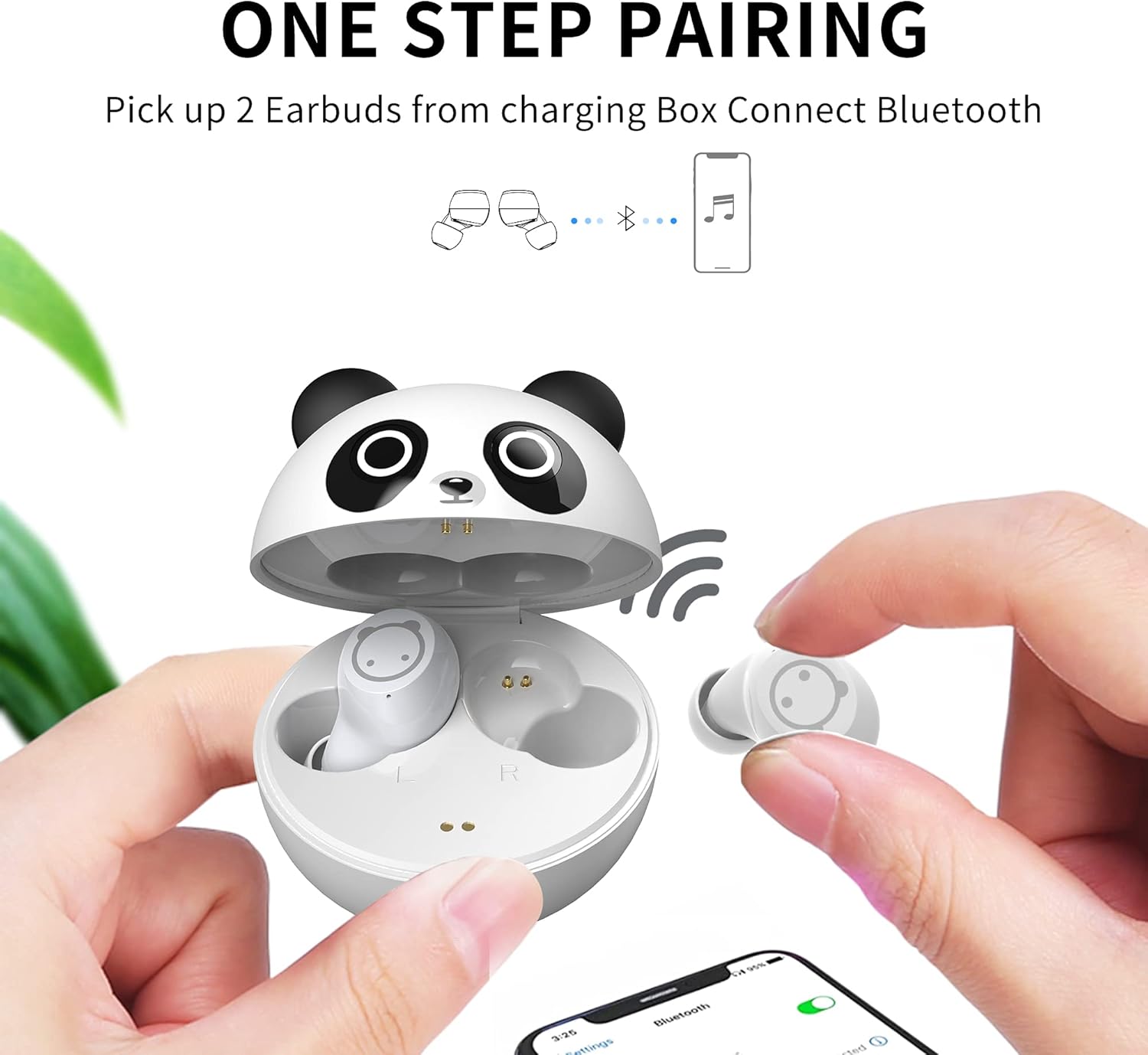
Figure 5: One-Step Pairing Process
4. Treoracha Oibriúcháin
4.1 Smart Touch Control
The earbuds feature touch-sensitive areas for easy control of music and calls:
- Seinn/Cuir Ceol ar sos: Beartaíonn uair amháin ar cheachtar earbud.
- Freagra/Deireadh Glao: Beartaíonn uair amháin ar cheachtar earbud.
- Refuse Incoming Call: Brúigh fada ar feadh 2 soicind ar cheachtar cluasán.
- An Chéad Amhrán Eile: Long touch the Right (R) earbud for 2 seconds.
- Rian Roimhe Seo: Long touch the Left (L) earbud for 2 seconds.
- Gníomhaigh Cúntóir Gutha: Triple-click on either earbud.
- Coigeartú Toirt: Press and hold the Left earbud to decrease volume, press and hold the Right earbud to increase volume.

Fíor 6: Rialuithe Tadhaill na gCluasán
4.2 Ag Caitheamh na gCluasán
For optimal sound quality and comfort, choose the silicone ear tips that best fit your ears. Gently insert the earbuds into your ear canal and twist slightly to secure them.

Figure 7: Earbud Worn Comfortably in Ear
5. Cothabháil
5.1 Glanadh agus Stóráil
- Glan na cluasáin agus an cás luchtaithe go rialta le héadach bog, tirim.
- Bain na bairr chluas agus glan iad le gallúnach éadrom agus uisce, ansin triomaigh go maith iad sula n-athcheanglaítear iad.
- Stóráil na cluasáin ina gcás luchtaithe nuair nach bhfuil siad in úsáid chun iad a chosaint agus coinnigh muirear orthu.
- Seachain na cluasáin a nochtadh do theocht foircneach nó solas díreach.
5.2 Friotaíocht Uisce
The earbuds are IPX5 sweat resistant, meaning they can withstand sweat and light splashes of water. They are not designed for submersion in water. Ensure the earbuds are dry before placing them back in the charging case.

Figure 8: IPX5 Sweat Resistant Earbuds
6. Fabhtcheartú
Má bhíonn aon fhadhbanna agat le do chluasáin, féach ar na réitigh choitianta seo a leanas:
- Ní bhíonn na cluasáin ag péireáil: Ensure both earbuds are out of the case and in pairing mode. Turn off and on your device's Bluetooth, then try pairing again.
- Gan aon fhuaim ó chluasán amháin: Place both earbuds back in the charging case, close the lid, then open it again and try reconnecting. Ensure both earbuds are charged.
- Saincheisteanna muirir: Check if the USB-C cable is securely connected to both the case and the power source. Ensure the charging contacts on the earbuds and inside the case are clean and dry.
- Volume too low or high: Adjust the volume using the touch controls on the earbuds or directly on your connected device. Note that these earbuds are designed with a safe volume limit for children.
- Nasc uaineach: Ensure your device is within the Bluetooth range (up to 10 meters) and there are no significant obstacles between the earbuds and your device.
7. Sonraíochtaí
| Gné | Sonraíocht |
|---|---|
| Ainm an tSamhail | ZY-K62 |
| Leagan Bluetooth | 5.1 |
| Raon Bluetooth | 10 Mhéadar |
| Rialú Torainn | Cealú Torainn Gníomhach |
| Leibhéal Friotaíocht Uisce | IPX5 (Friotánach in aghaidh Allais) |
| Cineál Rialaithe | Rialú Dteagmhála |
| Meáchan Mír | 0.634 unsa |
| Comhpháirteanna San áireamh | Cás Muirir |
8. Barántas agus Tacaíocht
For warranty information or technical support, please refer to the contact details provided with your purchase or visit the official AMAFACE website. Our customer service team is available to assist you with any questions or concerns regarding your AMAFACE Kids Wireless Earbuds K62.
Video 2: This video highlights the design and features of the AMAFACE K62 Kids Wireless Earbuds, showcasing the panda charging case and the earbuds themselves.