
SmartWatch HW16
Lámhleabhar Úsáideora Uaireadóir Cliste HW16
Múnla: HW16
Branda: Uaireadóir Cliste
Réamhrá
This user manual provides comprehensive instructions for the HW16 Smart Watch. It covers setup, operation, maintenance, and troubleshooting to help you maximize your device's potential. The HW16 Smart Watch features a 1.72-inch full screen, Bluetooth call functionality, music system, heart rate sensor, fitness tracking, and password lock screen, compatible with both iOS and Android devices.
Socrú
1. An Gléas a mhuirearú
Before first use, fully charge your HW16 Smart Watch. Connect the magnetic charging cable to the charging points on the back of the watch and plug the USB end into a compatible power adapter (not included) or a computer USB port. The watch display will indicate charging status.
2. Cumhacht Ar / As
To power on, press and hold the side button until the screen illuminates. To power off, press and hold the side button, then select the power off option on the screen.
3. Péireáil le do ghuthán cliste
The HW16 Smart Watch connects via Bluetooth. Download the recommended companion application (e.g., Wearfit Pro APP as mentioned in specifications) from your smartphone's app store. Ensure Bluetooth is enabled on your phone. Open the app, follow the on-screen instructions to search for and pair with your HW16 device. Confirm the pairing request on both your phone and the watch.
Treoracha Oibriúcháin
Loingseoireacht
The HW16 features a full touch screen. Swipe left/right, up/down to navigate through menus and features. Press the side button to return to the home screen or access the app list.
Feidhmiúlacht Glaonna Bluetooth
Once paired with your phone, the watch supports HD-Dial calls. You can swipe to answer incoming calls, dial numbers directly from the watch, and synchronize your mobile phone call history and address book. This feature allows for hands-free communication.

Image: The HW16 Smart Watch showing its HD-Dial Call feature, including options to answer, dial, and access contacts. This image illustrates the watch's capability for direct phone calls.
Córas Ceoil
Control music playback on your connected smartphone directly from your watch. Play, pause, skip tracks, and adjust volume without needing to take out your phone.
Rianú Aclaíochta
The watch tracks various fitness metrics including steps, distance, and calories burned. Utilize the multi-sport mode for specific activity tracking.
Braiteoir Ráta Croí
Monitor your heart rate in real-time. Access the heart rate application on the watch to view your current heart rate and historical data.

Íomhá: An cúl view of the HW16 Smart Watch, highlighting the optical heart rate sensor. This sensor uses light to detect blood flow and measure heart rate.
Password Lock Screen
Enhance your privacy and security by setting a password lock for your watch. This prevents unauthorized access to your data.

Image: The HW16 Smart Watch screen showing a numerical keypad for entering a password. This feature provides enhanced security for the device.
Gnéithe Monatóireachta Sláinte
The HW16 Smart Watch offers comprehensive health data detection, including:
- Ráta Croí: Monatóireacht leanúnach ar do ráta croí.
- Ocsaigin Fola: Measurement of blood oxygen saturation levels.
- Brú Fola: Estimation of blood pressure (for reference only, not medical device).
- Monatóireacht Codlata: Rianaíonn sé patrúin codlata, lena n-áirítear codladh domhain, codladh éadrom, agus amanna múscailte.
- Stress Test: Tugann sé léargas ar leibhéil struis.
- Oiliúint análaithe: Cleachtaí análaithe treoraithe le haghaidh scíthe.
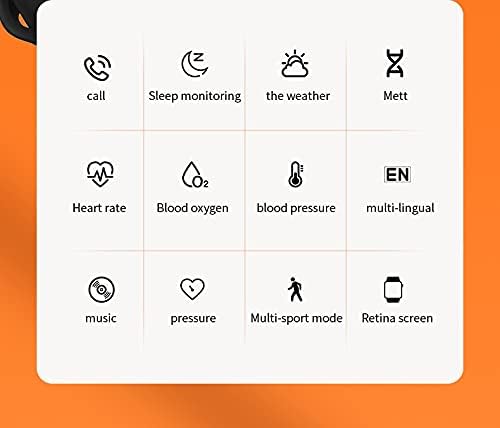
Image: A grid of icons illustrating the various functions of the HW16 Smart Watch, including call, sleep monitoring, weather, Mett, heart rate, blood oxygen, blood pressure, multi-lingual support, music, pressure, multi-sport mode, and Retina screen.
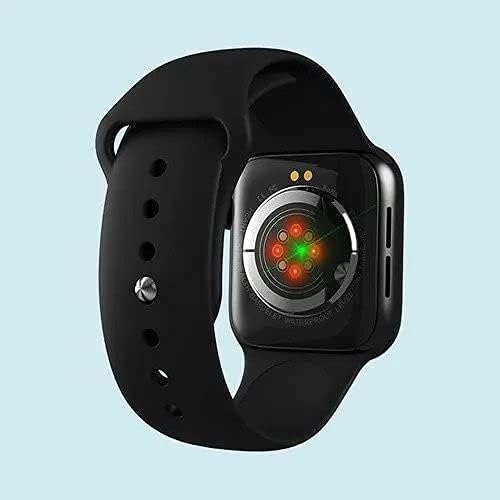
Image: This image showcases the health data detection capabilities of the HW16 Smart Watch, including a MET graph and a custom component display for personalized shortcuts.
Sonraíochtaí
| Gné | Sonraigh |
|---|---|
| Ainm an tSamhail | HW16 |
| Méid Taispeána | 1.72 orlach |
| Rún | 320*385 |
| Teicneolaíocht Nascachta | Bluetooth 5.2 |
| Ábhar Coirp | Zinc alloy + IML injection process |
| Ábhar strap | Silicone leachtach |
| Cumas Battery | 250mAh |
| OS comhoiriúnach | iOS 10.0 agus os a chionn / Android 5.0 agus os a chionn |
| Toisí | 43.4mm*38mm*11mm |
| Méid Wristband | 260mm*20mm*2.5mm |
| Gnéithe Speisialta | Camera (remote control), Heart Rate Sensor, Fitness Tracker, Password Lock Screen, Music System |
| Uiscedhíonach | Yes (implied by "Waterproof" keyword, but no specific IP rating provided) |
| Teangacha Tacaithe | Chinese, English, Arabic, French, German, Spanish, Portuguese, Russian, Thai, Polish, Italian, Japanese, Traditional, Czech, Turkish, Greek, Latin, Romanian, Vietnamese, Danish... |

Image: The HW16 Smart Watch, black casing with a blue strap, displayed on a watch stand. The screen shows time, steps, and various app icons.

Image: The HW16 Smart Watch worn on a wrist, displaying its main menu with various circular app icons for different functions.
Cothabháil
- Glanadh: Glan an faire agus an strap go rialta le clúdach bog,amp éadach. Seachain ceimiceáin harsh nó ábhair scríobacha a úsáid.
- Friotaíocht Uisce: While the watch is waterproof (as per keywords), avoid prolonged submersion or exposure to hot water/steam. Dry the watch thoroughly if it gets wet.
- Muirearú: Use only the provided charging cable. Do not force the charger into the port.
- Stóráil: Stóráil an faire in áit fhionnuar, thirim nuair nach bhfuil sé in úsáid.
Fabhtcheartú
Ní bhíonn an faire ag casadh air
Ensure the watch is fully charged. Connect it to the charger for at least 30 minutes before attempting to power on again.
Cannot Pair with Phone
- Cinntigh go bhfuil Bluetooth cumasaithe ar do ghuthán agus ar an uaireadóir.
- Cinntigh go bhfuil an faire laistigh de raon Bluetooth do ghutháin.
- Atosaigh do ghuthán agus an faire araon.
- Clear previous Bluetooth connections on your phone and try pairing again.
- Cinntigh go bhfuil an aip tionlacain suiteáilte agus ag rith.
Sonraí Sláinte Mícheart
Ensure the watch is worn snugly on your wrist, not too loose or too tight. Clean the sensor on the back of the watch regularly. Note that health data is for reference only and not intended for medical diagnosis.
Scáileán Neamhfhreagrach
Try restarting the watch. If the issue persists, ensure the screen is clean and dry. If the problem continues, contact customer support.
Barántas agus Tacaíocht
For warranty information and customer support, please refer to the documentation included with your purchase or visit the official SmartWatch brand websuíomh. Coinnigh do chruthúnas ceannaigh le haghaidh éilimh bharántais.
Ask a question about this manual
Ask about setup, troubleshooting, compatibility, parts, safety, or missing instructions. Manuals+ will review the question and use this page’s manual context to help answer it.