
SPRT POS58 IVU
SPRT POS58 IVU Receipt Thermal Printer User Manual
Model: POS58 IVU
Réamhrá
This manual provides essential information for the proper setup, operation, and maintenance of your SPRT POS58 IVU Receipt Thermal Printer. Please read this manual thoroughly before using the printer to ensure optimal performance and longevity.
The SPRT POS58 IVU is a compact and efficient thermal receipt printer designed for various point-of-sale applications. It features USB connectivity and is compatible with 5.7 cm wide thermal paper.
Socrú
1. Díphacáil agus Cigireacht
- Bain an printéir agus na gabhálais go léir as an bpacáistiú go cúramach.
- Verify that all components are present: printer unit, power adapter, USB cable.
- Inspect the printer for any visible damage. If damaged, contact your supplier immediately.
2. An Printéir a Cheangal
- Cumhacht Ceangail: Insert the power adapter cable into the printer's power port and plug the other end into a suitable power outlet.
- Ceangail USB: Ceangail ceann amháin den chábla USB le port USB an printéara agus an ceann eile le port USB atá ar fáil ar do ríomhaire nó ar do chóras POS.
- Cumhacht ar: Locate the power switch on the printer (typically on the side or front) and turn it to the 'ON' position.
3. Páipéar Teirmeach á Luchtú
The SPRT POS58 IVU printer uses standard 5.7 cm wide thermal paper rolls.
- Open the paper cover by pressing the release button or lifting the latch (location may vary slightly).
- Insert the thermal paper roll with the printing surface facing the thermal head. Ensure the roll is seated correctly in the paper compartment.
- Tarraing méid beag páipéir amach thar an ngearrthóir.
- Dún an clúdach páipéir go daingean go dtí go gcliceálann sé ina áit.
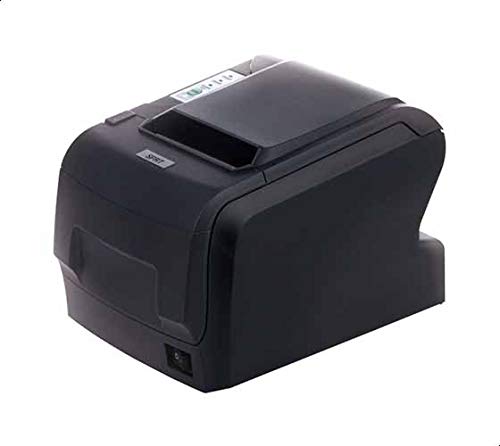
Figure 1: SPRT POS58 IVU Receipt Thermal Printer. This image displays the compact black thermal printer from an angled view, highlighting its paper output slot and the power switch located on the side.
Treoracha Oibriúcháin
Bunphriontáil
- Ensure the printer is powered on and connected to your computer/POS system.
- Install the necessary printer drivers on your operating system if not already installed. Refer to the driver installation guide provided separately or available from the manufacturer's websuíomh.
- From your application (e.g., POS software, word processor), select the SPRT POS58 IVU as your printer.
- Initiate the print command. The printer will automatically feed and print the receipt.
- Tear off the receipt against the serrated edge of the paper output slot.
Táscaire Soilse
The printer typically has indicator lights to show its status:
- Solas Cumhachta: Léiríonn sé go bhfuil an printéir ar siúl.
- Solas Earráide: Illuminates or blinks to indicate an error condition (e.g., paper out, print head overheat).
- Paper Out Light: Indicates that the paper roll is empty or incorrectly loaded.
Cothabháil
Glanadh an Ceann Teirmeach
Regular cleaning of the thermal head ensures clear print quality and extends printer life. Clean the thermal head after every 50-100 km of printing or if print quality degrades.
- Múch an printéir agus dícheangail an cábla cumhachta.
- Oscail an clúdach páipéir.
- Wait a few minutes for the thermal head to cool down if the printer has been recently used.
- Gently wipe the thermal head surface with a cotton swab lightly moistened with absolute alcohol (ethanol).
- Allow the alcohol to evaporate completely before closing the cover and reconnecting power.
Glanadh an Taobh amuigh
Glan taobh amuigh an printéara le clúdach bog,amp éadach. Ná húsáid tuaslagóirí láidre ná glantóirí scríobacha.
Láimhseáil Páipéir
- Use only high-quality thermal paper to prevent damage to the thermal head and ensure optimal print quality.
- Store thermal paper in a cool, dry place away from direct sunlight and heat.
Fabhtcheartú
| Fadhb | Cúis Féideartha | Réiteach |
|---|---|---|
| Ní lasann an printéir. | Power cable not connected; power outlet faulty; printer switch off. | Seiceáil nasc an chábla cumhachta; bain triail as asraon difriúil; cinntigh go bhfuil an lasc cumhachta AR SIÚL. |
| No printing / Blank output. | Paper loaded incorrectly (upside down); paper out; driver not installed/configured; printer not selected. | Reload paper correctly (printing side facing thermal head); replace paper roll; install/reinstall drivers; select printer in application. |
| Droch-chaighdeán priontála. | Thermal head dirty; low-quality paper; paper stored improperly. | Clean thermal head; use recommended thermal paper; store paper correctly. |
| Subh páipéir. | Paper not loaded straight; foreign object in paper path. | Open cover, remove jammed paper carefully, reload paper straight; inspect for obstructions. |
Sonraíochtaí
| Gné | Sonraigh |
|---|---|
| Branda | SPRT |
| Uimhir Mhúnla | POS58 IVU |
| Cineál Clódóra | Printéir Teirmeach Admhála |
| Teicneolaíocht Nascachta | USB |
| Meáin Phriontála | Labels (commonly used for receipts) |
| Leithead Pháipéir | 5.7 cm |
| Dath | Dubh |
| Meáchan Mír | 1.82 cileagram |
| Toisí Pacáiste | 28 x 21.4 x 17.8 cm |
Barántas agus Tacaíocht
Specific warranty terms and detailed support contact information are not provided within the available product data. For warranty claims, technical support, or service inquiries, please refer to the documentation included with your purchase or contact your point of sale or the manufacturer directly.
You may find additional resources and contact details on the official SPRT websuíomh.
Ask a question about this manual
Ask about setup, troubleshooting, compatibility, parts, safety, or missing instructions. Manuals+ will review the question and use this page’s manual context to help answer it.