
1. Réamhrá
The ANYSECU HB880 is a hands-free Bluetooth headset designed for motorcycle helmets, enabling communication with two-way radios and mobile phones. It features Push-to-Talk (PTT) functionality, allowing seamless switching between radio and phone calls, enhancing safety and convenience during rides. This manual provides detailed instructions for installation, operation, and maintenance of your HB880 headset.
2. Ábhar Pacáiste
Roimh an suiteáil, déan cinnte go bhfuil na míreanna go léir atá liostaithe thíos i láthair i do phacáiste:
- HB880 Bluetooth Main Unit
- Helmet Speakers (2)
- Micreafón Boom
- Wireless PTT Controller
- 2-Pin Radio Adapter Cable
- Cábla Muirearú USB
- Helmet Mounting Bracket (Pinch Cock and Sticker options)
- Microphone Windshield Foam

Fíor 2.1: Tharview of the ANYSECU HB880 Bluetooth Helmet PTT Headset components, including the main unit, speakers, microphone, wireless PTT controller, and radio adapter.
3. Táirge Tharview
The HB880 main unit features intuitive controls for power, volume, and Push-to-Talk (PTT) functions. The wireless PTT controller provides convenient remote activation of the PTT feature.

Fíor 3.1: Diagram illustrating the HB880 main unit's connections to a mobile phone, wireless PTT controller, and two-way radio.

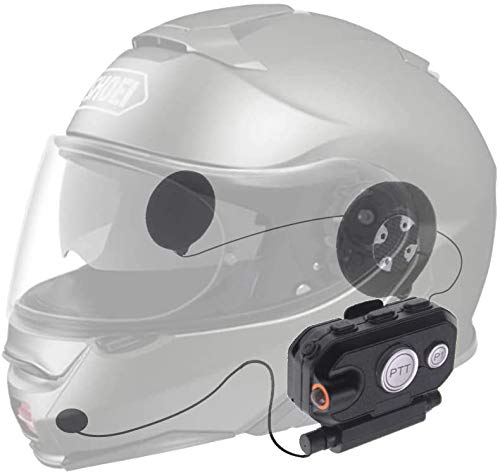
Fíor 3.2: The HB880 main unit connected to its helmet speakers and boom microphone.
4. Socrú agus Suiteáil
4.1 Muirearú an Ghléis
Before first use, fully charge the HB880 main unit. Connect the USB charging cable to the charging port on the unit and to a standard USB power source. Charging typically takes less than 3 hours. The indicator light will change to show charging status.
4.2 Suiteáil clogad
Follow these steps to properly install the HB880 headset into your motorcycle helmet:
- Choose Affixing Method: Select either the pinch cock clip for thin-shelled helmets or the adhesive sticker for thick-shelled helmets. The pinch cock is easier to remove, while the sticker provides a more permanent fit.
- Suí an Pedestal: Attach the chosen mounting pedestal to the right side of your helmet. Ensure it is in a position that allows the main unit to be easily accessible and does not obstruct your vision or helmet functionality.
- Install Earphones and Microphone: Carefully install the earphones inside the helmet, aligning them with your ears. Route the microphone boom towards your mouth, ensuring it is close for clear voice transmission. Hide excess cable within the helmet lining.
- Ceangail an Príomh-Aonad: Slide the HB880 main unit onto the installed pedestal until it locks securely.
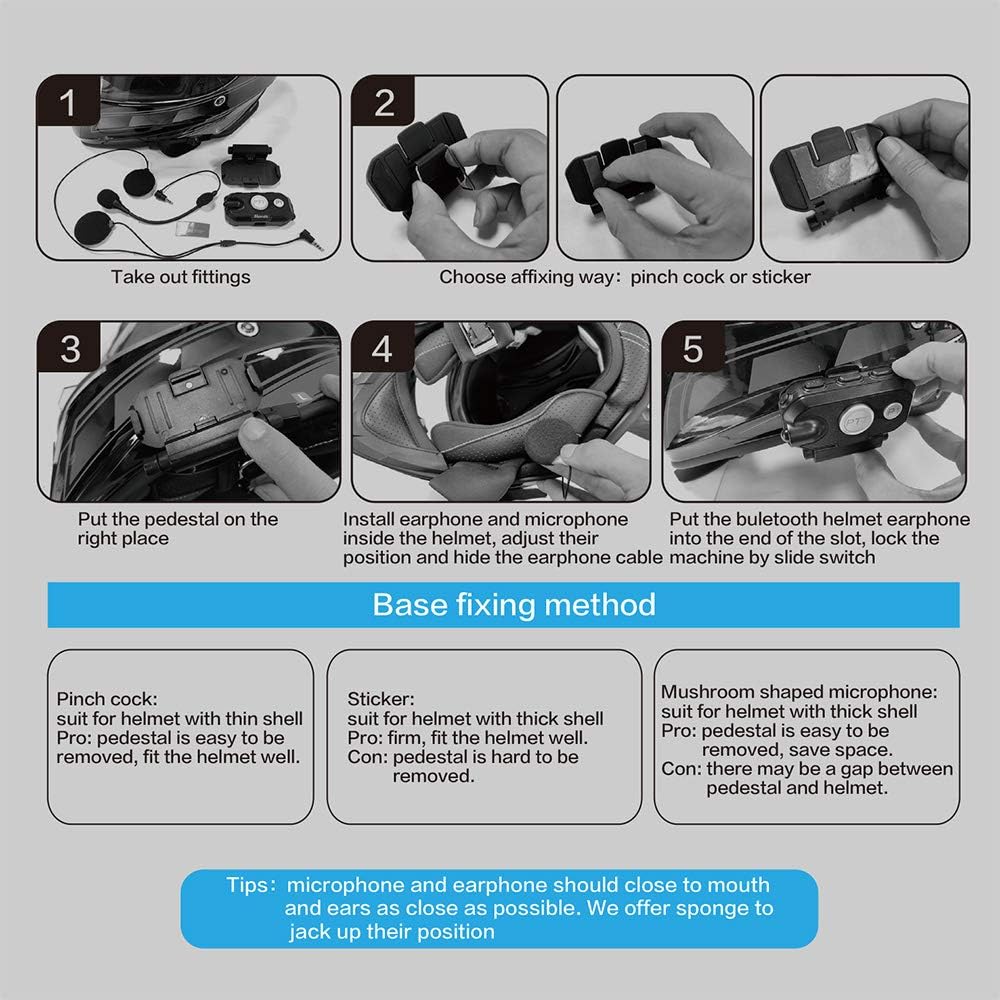
Fíor 4.1: Step-by-step guide for installing the HB880 Bluetooth headset components into a motorcycle helmet.
Fíor 4.2: Visual representation of the HB880 headset installed on a helmet, connected to a two-way radio via adapter, and paired with a wireless PTT controller.
4.3 Connecting to a Two-Way Radio
Use the provided 2-pin adapter cable to connect your HB880 main unit to a compatible two-way radio. Ensure the connection is secure.
4.4 Péireáil Bluetooth
The HB880 supports pairing with both mobile phones and the wireless PTT controller.
- Péireáil le Fón Póca:
- Ensure the HB880 is powered off.
- Brúigh agus coinnigh an cnaipe cumhachta go dtí go splancann an solas táscaire go tapa, rud a léiríonn mód péireála.
- On your mobile phone, go to Bluetooth settings and search for "HB880" or a similar device name.
- Select the HB880 to pair. Once connected, the indicator light will change.
- Pairing with Wireless PTT Controller:
- Ensure the HB880 is in pairing mode (refer to mobile phone pairing steps).
- Activate pairing mode on the wireless PTT controller (refer to its specific instructions, usually a long press of the PTT button).
- Nascfaidh na feistí go huathoibríoch.
Note: The HB880 can connect to a phone, an adapter, a wireless PTT controller, and a radio simultaneously.
5. Oibríocht
5.1 Cumhacht ar siúl / as
- Cumhacht ar: Press and hold the power button until you hear an audible prompt.
- Múch: Press and hold the power button until you hear an audible prompt.
5.2 Rialú Toirt
Use the volume buttons on the HB880 main unit to adjust the audio level. Press the '+' button to increase volume and the '-' button to decrease volume.
5.3 Push-to-Talk (PTT) Function
The PTT button on the main unit or the wireless PTT controller activates transmission on your connected two-way radio. Press and hold to transmit, release to listen.
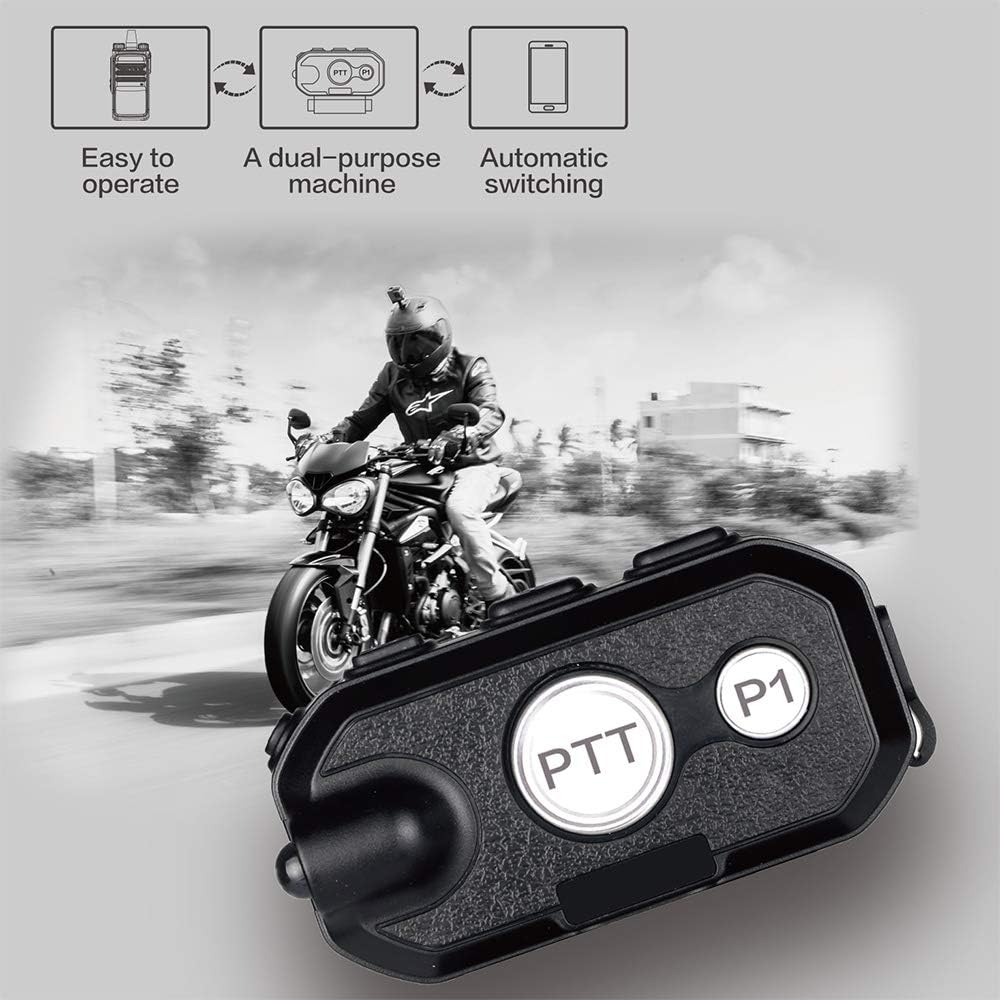
Fíor 5.1: The HB880 main unit highlighting the PTT button, shown in a motorcycle riding context.
5.4 Modhanna Cumarsáide
The HB880 supports multiple communication modes:
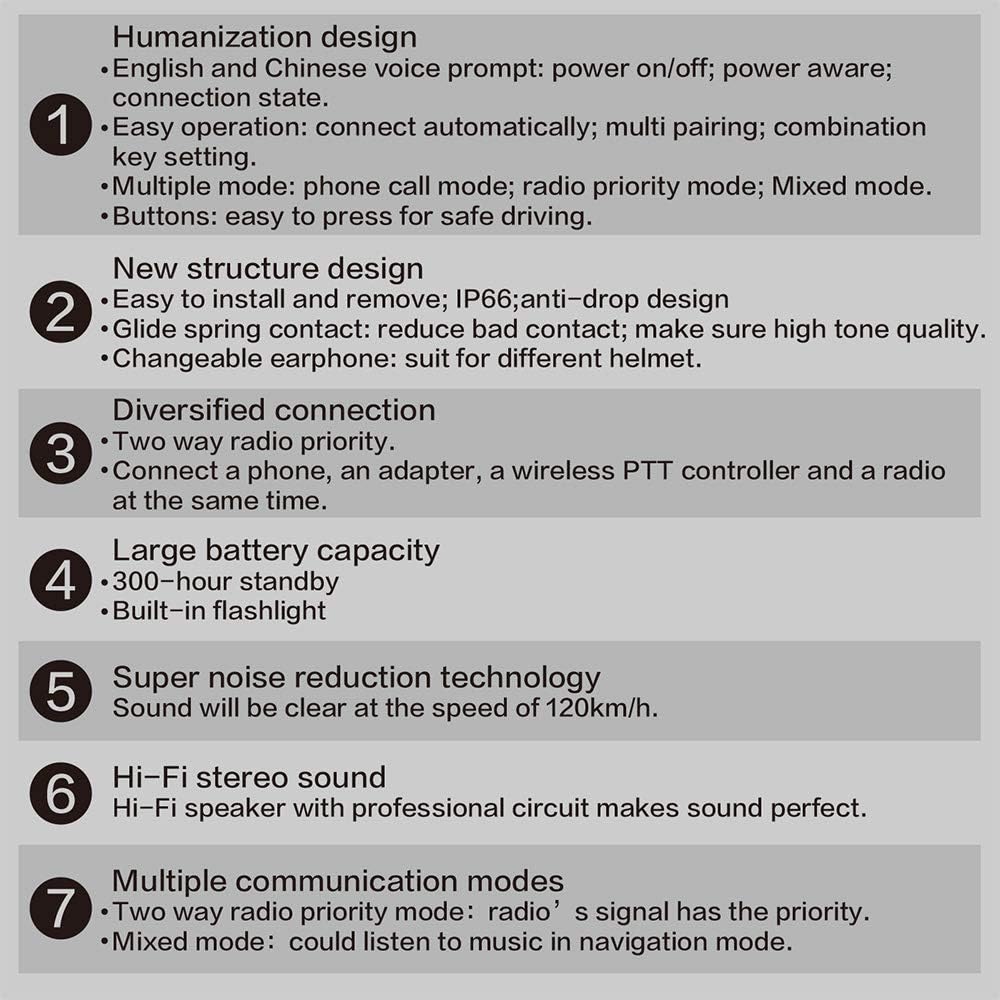
- Mód Glaonna Gutháin: When a phone call is received, the headset will automatically switch to phone call mode.
- Radio Priority Mode: Two-way radio signals take priority over other audio sources.
- Mód Measctha: Allows listening to navigation audio from a phone while maintaining radio communication.
The device features automatic switching between connected devices based on activity.
6. Cothabháil
- Glanadh: Wipe the main unit and other components with a soft, dry cloth. Avoid using harsh chemicals or abrasive cleaners.
- Stóráil: Stóráil an gléas in áit fhionnuar, tirim nuair nach bhfuil sé in úsáid.
- Cúram Battery: To prolong battery life, avoid fully discharging the battery frequently. Charge the device regularly, especially if stored for extended periods.
- Microphone Windshield: Ensure the microphone windshield foam is securely attached to prevent it from falling off during use.
7. Fabhtcheartú
| Fadhb | Cúis Féideartha | Réiteach |
|---|---|---|
| Gan chumhacht / Ní chasann an gléas air | Ceallraí íseal | Muirear an gléas go hiomlán. |
| Cannot pair with phone/PTT controller | Device not in pairing mode; previously paired device interfering | Ensure HB880 is in pairing mode. Disconnect or "forget" previous pairings on your phone/controller and try again. |
| Toirt fuaime íseal | Volume set too low; poor speaker placement | Increase volume using the '+' button. Ensure speakers are positioned directly over your ears inside the helmet. |
| Intermittent audio / Poor connection | Loose cable connections; interference | Check all cable connections (speakers, microphone, radio adapter). Ensure devices are within Bluetooth range. |
| Cnaipí nach bhfuil ag freagairt | Button stuck or malfunction | Gently check if the button is physically stuck. If the issue persists, contact customer support. |
| Microphone foam falls off | Oiriúnach scaoilte | Secure the foam windshield more firmly, possibly using a small rubber band if necessary. |
8. Sonraíochtaí
- Múnla: HB880-K
- Leagan Bluetooth: V4.1 Class2
- Raon Oibríochta: 10 méadar (33 troigh)
- Bluetooth profiles: HFP, HSP, PTT
- Am Caint: Thart ar 50 uair an chloig
- Am Fuireachas: Thart ar 300 uair an chloig
- Am Muirir: Níos lú ná 3 uair an chloig
- Toisí (Príomhaonad): Thart ar 5.91 x 3.15 x 3.94 orlach
- Monaróir: Anysecu
- UPC: 049500289744
Fíor 8.1: Summary of key features and specifications for the HB880 headset.
9. Barántas agus Tacaíocht
For warranty information or technical support, please contact your retailer or the manufacturer directly. Keep your purchase receipt as proof of purchase for any warranty claims.