
1. Réamhrá
Go raibh maith agat as an gceannachasing the RHM K666 Karaoke Machine. This portable system is designed to deliver powerful and clear sound with rich, deep bass, perfect for various occasions including home entertainment, parties, weddings, picnics, and outdoor activities. It features two wireless microphones, a long-lasting rechargeable battery, and multiple connectivity options. This manual will guide you through the setup, operation, maintenance, and troubleshooting of your new karaoke machine.
2. Ábhar Pacáiste
Cinntigh go bhfuil na hearraí go léir i do phacáiste:
- 1 x RHM K666 Karaoke Machine
- 2 x Micreafóin Láimhe Gan Sreang
- 1 x Cumhacht Adapter
- 1 x Cábla Muirir (USB)
- Cábla 1 x AUX
- 1 x lámhleabhar úsáideora

Image: The RHM K666 Karaoke Machine along with its included accessories: two wireless microphones, power adapter, charging cable, AUX cable, and user manual.
3. Táirge Tharview
3.1 Gnéithe den Phríomh-Aonad
The RHM K666 is a compact yet powerful karaoke machine. Its dimensions are approximately 13.86 x 7.87 x 6.89 inches, making it highly portable with a sturdy built-in handle. It features 2x15W tweeters and a 30W subwoofer for clear, loud sound and deep bass. A DSP chip ensures full-range surround stereo sound.

Íomhá: Tosaigh view of the RHM K666 Karaoke Machine with a smartphone placed in the integrated holder, showcasina dhearadh dlúth.

Image: An exploded diagram illustrating the internal components of the RHM K666, highlighting the 15W tweeters and 30W subwoofer for high-quality stereo sound.
Físeán: Thar barrview of the RHM K666 Karaoke Machine, highlighting its clear sound quality and various features.
3.2 Micreafón Gan Sreang
The system includes two wireless microphones made of metal material. Each microphone features controls for speaker volume, microphone volume, echo effect, and voice enhancement, allowing for convenient adjustments without needing to access the main unit. They are equipped with a 400mAh rechargeable battery, providing up to 6 hours of use.

Íomhá: Dlúthghraf view of the two wireless microphones, showing their control buttons for volume, echo, and voice enhancement, along with an LED display.
3.3 Roghanna Nascachta
The RHM K666 supports multiple connection methods:
- Bluetooth: For wireless connection to smartphones, tablets, and other Bluetooth-enabled devices.
- 3.5mm AUX In: Le haghaidh nasc sreangaithe le foinsí fuaime.
- Tiomántán USB: For playing music directly from a USB storage device.
- PC: Le haghaidh nascadh le ríomhaire.
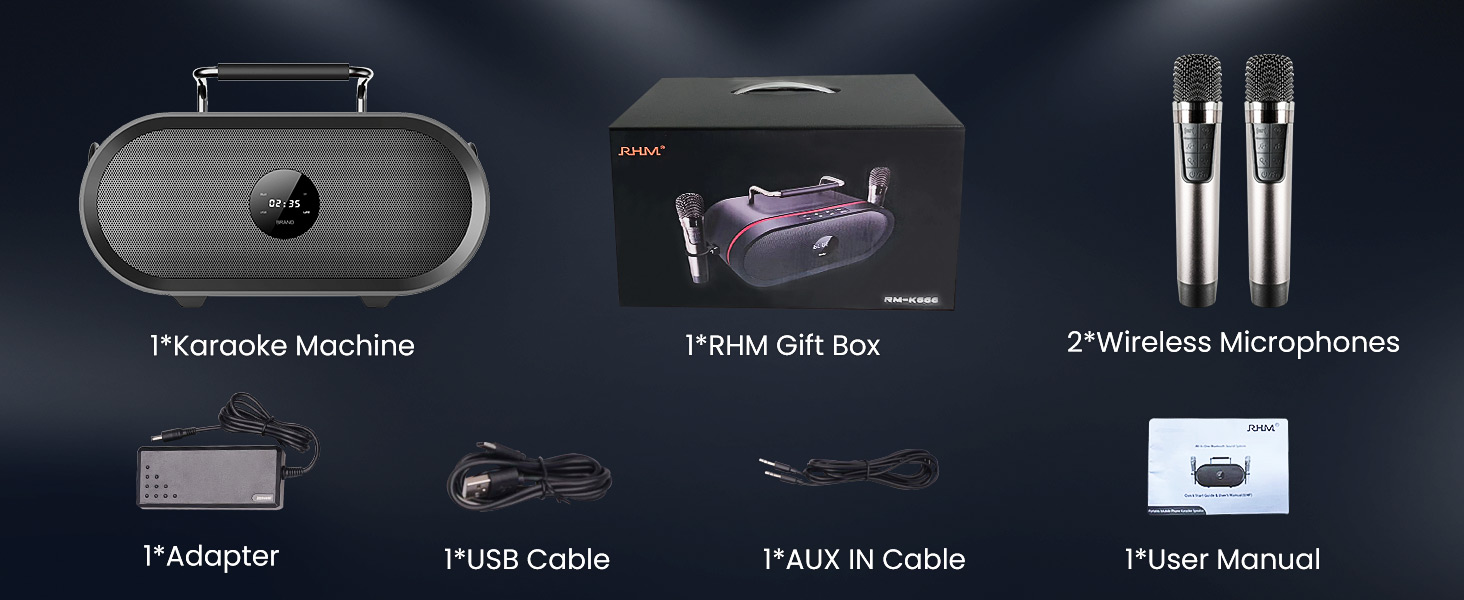
Image: A graphic illustrating the various connectivity options of the RHM K666 Karaoke Machine, including Bluetooth, AUX, USB, and PC.
4. Socrú
4.1 Muirearú Tosaigh
Before first use, fully charge the karaoke machine and both wireless microphones. The main unit's 4400mAh battery takes approximately 3 hours to fully charge and provides up to 8 hours of playtime. The microphones' 400mAh batteries last up to 6 hours.
4.2 Cumhachtú Amach/Amach
- To power on the main unit, press and hold the power button on the top panel.
- To power on the microphones, press and hold the power button on each microphone.
- To power off, repeat the process for both the main unit and microphones.
4.3 Péireáil Micreafóin
The microphones are typically pre-synced with the speaker. If re-pairing is needed:
- Cinntigh go bhfuil an cainteoir múchta.
- Turn off one of the microphones.
- Hold the music decrease button and the power button on the remaining microphone to switch it between Mic 1 and Mic 2. Confirm one is Mic 1 and the other is Mic 2.
- With both microphones on, hold the music decrease button and the power button on both microphones simultaneously. The icons on both mics will flash.
- While the mic icons are still blinking (for approximately 20 seconds), turn on the speaker.
- The icons on both microphones will stop blinking after successful pairing. If not, please try to re-sync again.
Video: This video demonstrates the process of re-syncing the RHM K666 wireless microphones with the main speaker unit, providing a solution if the microphones are not working correctly.
4.4 Connecting Audio Source
- Bluetooth: Activate Bluetooth on your device and select "RM-K666" from the available devices list.
- AUX i: Connect one end of the 3.5mm AUX cable to your audio source and the other end to the "AUDIO IN" port on the back of the karaoke machine.
- Tiomántán USB: Insert a USB drive containing music files into the USB port on the back of the machine.
- PC: Connect the machine to your PC using a compatible cable.
5. Treoracha Oibriúcháin
5.1 Basic Controls (Main Unit)
The top panel of the RHM K666 features intuitive controls:
- Imleabhar +/-: Adjusts the overall speaker volume.
- An tAmhrán Roimhe/Ar Aghaidh: Skips to the previous or next song.
- Seinn/Sos: Rialaíonn sé athsheinm ceoil.
- Mód (M): Switches between input modes (Bluetooth, AUX, USB, PC).
- Power/Bluetooth (BT): Cuireann sé an t-aonad ar siúl/as agus gníomhaíonn sé mód péireála Bluetooth.
5.2 Rialuithe Micreafóin
Each wireless microphone offers the following controls:
- Speaker Volume +/-: Adjusts the main speaker's volume directly from the microphone.
- Toirt na Micreafóin +/-: Adjusts the microphone's output volume.
- Éifeacht macalla: Cycles through different echo levels (up to 5 levels) or turns it off.
- Feabhsú Gutha: Activates special voice effects.
- Power/Function (U/Fn): Powers the microphone on/off and may switch between functions.
Video: A demonstration of the echo effect feature on the RHM K666 Karaoke Machine's wireless microphones, showing how to adjust the echo levels.
5.3 Using the Phone/Tablet Holder
The integrated handle on the top of the unit doubles as a convenient stand for your smartphone or tablet, allowing you to easily view lyrics or control music while performing.
Image: The RHM K666 Karaoke Machine with a smartphone securely placed in the built-in holder on top of the unit, ready for use.
6. Cothabháil
- Keep the unit and microphones clean by wiping with a soft, dry cloth.
- Seachain an gléas a nochtadh do theocht mhór, solas díreach na gréine, nó taise.
- Stóráil in áit fhionnuar, thirim nuair nach bhfuil sé in úsáid.
- Ná déan iarracht an t-aonad a dhíchóimeáil ná a dheisiú leat féin. Téigh i dteagmháil le tacaíocht do chustaiméirí le haghaidh cúnaimh.
7. Fabhtcheartú
| Fadhb | Réiteach |
|---|---|
| Gan fuaim ón gcainteoir |
|
| Micreafóin nach bhfuil ag obair |
|
| Fadhbanna nasc Bluetooth |
|
Video: A detailed guide on troubleshooting microphone issues, specifically addressing scenarios where the RHM K666 wireless microphones may not be functioning as expected.
8. Sonraíochtaí
| Gné | Sonraigh |
|---|---|
| Múnla | K666 |
| Cumhacht Aschuir | 55W (2x15W tweeters + 30W subwoofer) |
| Freagra Minicíochta | 35Hz - 20KHz |
| Impedance Leictreach | 4Ω |
| Sonraíocht Cumhachta | 15V 4ADC adaptor (110-240V, 50/60Hz) |
| Battery (Main Unit) | Ceallraí litiam rechargeable 4400mAh |
| Playtime (Main Unit) | Suas le 8 uair an chloig |
| Battery (Microphones) | 400mAh ceallraí rechargeable |
| Playtime (Microphones) | Suas le 6 uair an chloig |
| Toisí | 13.86 x 7.87 x 6.89 orlach |
| Meáchan | 11.13 punt |
| Nascacht | Bluetooth, 3.5mm AUX In, USB, PC |
9. Barántas agus Tacaíocht
For warranty information and customer support, please refer to the contact details provided in your product packaging or visit the official RHM websuíomh. Coinnigh d’admháil cheannaigh le haghaidh éilimh bharánta.