
Tiománaí do R580
Lámhleabhar Úsáideora Glantóra Folúis Róbat Coredy R580
Múnla: R580
1. Réamhrá
This manual provides essential information for the safe operation, maintenance, and troubleshooting of your Coredy R580 Robot Vacuum Cleaner. Please read this manual thoroughly before using the product and retain it for future reference.
The Coredy R580 is a versatile robotic vacuum cleaner designed to simplify your cleaning routine. It features powerful 2000Pa suction, Wi-Fi connectivity for app control, and compatibility with voice assistants like Amazon Alexa and Google Assistant. It supports both sweeping and mopping functions (water tank and mop cloth sold separately) and can transition seamlessly from hard floors to carpets, automatically boosting suction when needed. Its slim design allows it to clean under furniture, and it supports virtual boundaries (strips sold separately) to define cleaning areas.
2. Treoracha Sábháilteachta
- Léigh na treoracha go léir sula n-oibríonn tú an fearas.
- Ná lig do leanaí imirt leis an róbat. Déan maoirseacht ar leanaí agus ar pheataí agus an róbat ag feidhmiú.
- Ná húsáid ach an t-oiriúntóir cumhachta bunaidh a sholáthraíonn an monaróir.
- Do not use the robot in environments with open flames or fragile objects.
- Ensure the robot is turned off and unplugged before cleaning or performing maintenance.
- Do not immerse the robot or its charging dock in water.
- Avoid using the robot on wet surfaces or in areas with standing water.
- Remove power cords, small objects, and loose rugs from the floor before operation to prevent entanglement.
3. Ábhar Pacáiste
Nuair a osclaíonn tú an pacáiste, déan cinnte go bhfuil na míreanna go léir atá liostaithe thíos san áireamh agus i riocht maith:
- Fholúis Robot Coredy R580
- Duga luchtaithe
- Cuibheoir Cumhachta
- Scuaba Taobh (4x)
- High Efficiency Filter (1x extra)
- Cianrialú
- Scuab Glanadh
Note: The 300ML water tank, cleaning mop cloth, and boundary strips are sold separately and are not included in the standard package.
4. Táirge Tharview

Fíor 4.1: Barr view of the Coredy R580 Robot Vacuum Cleaner with an accompanying smartphone displaying the control application. The robot is black with bronze accents and features a central power button and home button.
Comhpháirteanna Robot
- Painéal Barr: Power/Clean button, Home/Recharge button, Wi-Fi indicator.
- Tuairteoir Tosaigh: Braiteoirí imbhuailte.
- Scuaba Taobh: Two rotating brushes for edge and corner cleaning.
- Dustbin: Collects debris.
- Príomh-Scuab: Scuab lárnach le haghaidh glanadh domhain.
- Rothaí Tiomána: Le haghaidh gluaiseachta thar dhromchlaí éagsúla.
- Teagmhálaithe á Muirearú: For automatic charging with the dock.
- Braiteoirí Aille: Detects drops to prevent falling down stairs.
5. Socrú
5.1 An róbat a mhuirearú
Before first use, fully charge the robot. Place the charging dock against a wall in an open, uncluttered area. Ensure there is at least 1 meter (3 feet) of clear space to the front and 0.5 meters (1.5 feet) to each side of the charging dock. Connect the power adapter to the charging dock and plug it into a wall outlet. Place the robot on the charging dock, ensuring the charging contacts align. The indicator light on the robot will show charging status.
5.2 Scuaba Taobh a Shuiteáil
Attach the side brushes by pressing them onto the square posts at the bottom of the robot until they click into place. Ensure the brushes are securely fastened.
5.3 Ceangal le Wi-Fi agus Socrú Aipeanna
To utilize smart features, download the Coredy app from your smartphone's app store. Follow the in-app instructions to connect your R580 to your home Wi-Fi network. Note that the robot supports 2.4 GHz Wi-Fi networks only.

Figure 5.1: The Coredy smartphone application allows users to control cleaning, monitor status, schedule cleaning, and access support.
6. Oibriú an Fholúsghlanadóra Róbait
6.1 Glanadh a Thosú/Ag Stopadh
- Tús Lámhleabhar: Press the Power/Clean button on the robot or the remote control.
- Tús an Aip: Use the Coredy app to initiate cleaning.
- Ordú Gutha: If connected to Alexa or Google Assistant, use voice commands like "Alexa, ask Coredy to start cleaning."
- To pause cleaning, press the Power/Clean button again. To send the robot back to the charging dock, press the Home/Recharge button.
6.2 Modhanna Glantacháin
- Glanadh Uathoibríoch: Glanann an róbat go huathoibríoch i bpatrún córasach.
- Glanadh Spota: Glanann an róbat limistéar ar leith i bpatrún bíseach.
- Glanadh Imeall: Glanann an róbat feadh ballaí agus imill troscáin.
6.3 Ag Úsáid Rialú Gutha
The Coredy R580 is compatible with Amazon Alexa and Google Assistant. Once connected through the Coredy app, you can use simple voice commands to start or stop cleaning.

Figure 6.1: The Coredy R580 can be controlled via voice commands through Amazon Alexa or Google Assistant for hands-free operation.
6.4 Virtual Boundary (Sold Separately)
The R580 supports virtual boundary strips to restrict the robot from entering certain areas. Place the boundary strips on the floor to create invisible barriers. The robot's specialized sensors will detect these strips and avoid crossing them.

Figure 6.2: Virtual boundary strips (sold separately) allow you to define specific areas where the robot vacuum should not clean.
6.5 Sweep and Mop Function (Accessories Sold Separately)
The R580 can perform wet-dry mopping when equipped with the optional 300ML water tank and cleaning mop cloth. Attach the water tank with the mop cloth to the robot for comprehensive cleaning on hard surface floors.
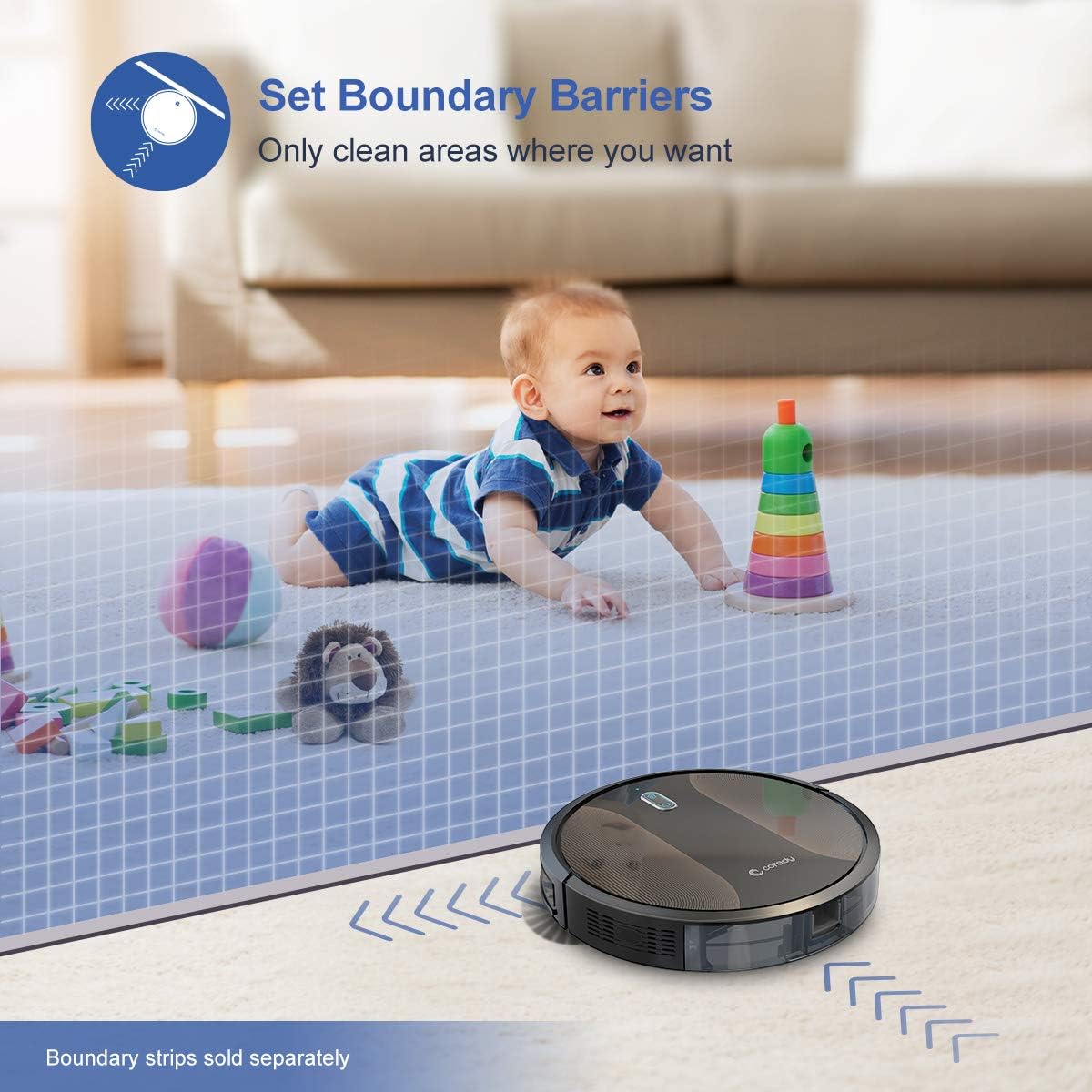
Figure 6.3: The Coredy R580 can be converted for mopping by attaching the optional water tank and mop cloth.
6.6 Boost-Intellect Technology
The robot is equipped with Boost-Intellect Technology, which automatically increases suction power when it detects carpeted surfaces, ensuring a deeper clean across different floor types.

Figure 6.4: Boost-Intellect Technology automatically adjusts suction power when the robot moves from hard floors to carpets.

Figure 6.5: The Coredy R580 provides strong suction power to effectively clean various types of debris from hard floors.
7. Cothabháil
Regular maintenance is crucial for optimal performance and longevity of your robot vacuum. Perform the following cleaning procedures regularly:
7.1 An Bosca Bruscair a Fholmhú
Press the dustbin release button and pull out the dustbin. Open the dustbin cover and empty its contents into a trash can. It is recommended to empty the dustbin after each cleaning cycle.
7.2 Glanadh an Phríomh-Scuab
Remove the main brush cover and lift out the main brush. Use the provided cleaning tool or a pair of scissors to remove any hair or debris tangled around the brush. Reinstall the main brush and cover.
7.3 Glanadh Scuaba Taobh
Periodically check the side brushes for tangled hair or debris. Gently pull them off their posts to clean. If they are worn or damaged, replace them with new ones. Push them back onto the posts until they click.
7.4 Glanadh an Scagaire
Remove the filter from the dustbin. Tap the filter against a trash can to remove dust. Do not wash the filter with water, as this can damage it. Replace the filter every 2-3 months, or more frequently depending on usage.
7.5 Glanadh Braiteoirí agus Teagmhálacha Muirir
Wipe the cliff sensors (located on the bottom of the robot) and the charging contacts (on the robot and charging dock) with a clean, dry cloth. Keeping these clean ensures proper navigation and charging.
8. Fabhtcheartú
If your Coredy R580 encounters issues, refer to the following table for common problems and solutions:
| Fadhb | Cúis Féideartha | Réiteach |
|---|---|---|
| Ní chuireann robot ar siúl | Ceallraí íseal; Múch an chumhacht | Charge the robot; Turn on the main power switch. |
| Ní ghearrann robot táille | Teagmhálacha luchtaithe salach; Níl an duga luchtaithe cumhachtaithe | Clean charging contacts on robot and dock; Ensure charging dock is plugged in. |
| Bíonn an róbat sáinnithe go minic | Obstacles (cables, rugs); Cliff sensors dirty | Clear obstacles from cleaning path; Clean cliff sensors. |
| Feidhmíocht ghlantacháin lag | Bosca bruscair lán; Scuaba fite fuaite; Scagaire blocáilte | Empty dustbin; Clean main and side brushes; Clean or replace filter. |
| Saincheisteanna maidir le ceangal Wi-Fi | Incorrect Wi-Fi password; Router too far; 5GHz network | Re-enter password; Move robot closer to router; Ensure 2.4GHz network is used. |
If the problem persists after trying the above solutions, please contact Coredy customer support for further assistance.
9. Sonraíochtaí
| Gné | Sonraigh |
|---|---|
| Branda | Coredy |
| Múnla | R580 |
| Gné Speisialta | HEPA Filtration, Pet Tools, Vacuums |
| Dath | Dubh |
| Cineál Scagaire | Cartús |
| Cumas Bruscair | 0.3 lítear |
| Foinse Cumhachta | Battery Powered (1 ceallraí ian litiam san áireamh) |
| Modh Rialaithe | Remote, Voice (Alexa, Google Home), App |
| Fachtóir Foirme | Róbait |
| Toisí (L x W x H) | 16.89 x 13.66 x 4.57 orlach |
| Meáchan Mír | 8.91 punt |
| Cumhacht shúchán | Suas le 2000Pa |
| Leibhéal Torainn | Faoi 65dB |
10. Barántas agus Tacaíocht
10.1 Faisnéis Bharántas
Coredy products are manufactured to the highest quality standards. For specific warranty details regarding your R580 Robot Vacuum Cleaner, please refer to the warranty card included in your product packaging or visit the official Coredy websuíomh. De ghnáth, clúdaíonn an bharántas lochtanna in ábhair agus i gceardaíocht faoi ghnáthúsáid.
10.2 Tacaíocht do Chustaiméirí
If you have any questions, require technical assistance, or need to report an issue with your Coredy R580, please contact Coredy customer support. Contact information can usually be found on the official Coredy website or on the product packaging. Please have your model number (R580) and purchase information ready when contacting support.
Ask a question about this manual
Ask about setup, troubleshooting, compatibility, parts, safety, or missing instructions. Manuals+ will review the question and use this page’s manual context to help answer it.