
Réamhrá
This manual provides detailed instructions for the setup, operation, and maintenance of your BUFFBEE Glow Alarm Clock HRS-BLACK. Please read this manual thoroughly before using the product to ensure proper function and longevity.
Táirge Tharview
The BUFFBEE Glow Alarm Clock is a versatile device combining a digital alarm clock, FM radio, and a 7-color night light. It is designed to enhance your sleep and wake-up experience with customizable features.
Príomhghnéithe:
- Feidhmiúlacht 3-in-1: Digital alarm clock, FM radio, and night light.
- Solas Oíche 7-Dath: Adjustable with 5 brightness levels.
- Dé Aláraim: Set two independent alarms with choice of FM radio, built-in beep, or bird sounds.
- Adjustable Display Dimmer: 0-100% brightness control for the time display.
- Cnaipí Soilsithe: For easy operation in low light conditions.
- Uaineadóir Nap: Quick nap setting from 10 to 120 minutes.
- Auto-Off Sleep Timer: Automatically turns off night light and FM radio after a set duration.
- Port luchtaithe USB: For charging external electronic devices.
- Roghanna Cumhachta: AC powered with AAA battery backup (batteries not included).
Ábhar an Phacáiste:
- 1 x BUFFBEE Glow Alarm Clock
- 1 x Cumhacht Adapter
- 1 x lámhleabhar úsáideora
Aitheantas Comhpháirte:
Féach ar an íomhá thíos le haghaidh tuilleadh eolaisview of the alarm clock's buttons and display.

Íomhá: Tosaigh view of the BUFFBEE Glow Alarm Clock, showing the digital time display, alarm indicators, and control buttons on the top panel. The top edge features a light strip.
Socrú
1. Ceangal Cumhachta:
- Ceangail an t-oiriúntóir cumhachta a chuirtear ar fáil leis an gcalafort ionchuir DC ar chúl an chloig aláraim.
- Breiseán an t-adapter i asraon balla caighdeánach.
2. Cúltaca Ceallraí (Roghnach):
Le haghaidh oibriú gan bhriseadh le linn múchta cumhachtatages, install 3 AAA batteries (not included) into the battery compartment on the bottom of the unit. The clock will maintain time and alarm settings, and the alarm will still function, but the display and night light may be limited to conserve power.

Íomhá: Cúl view of the alarm clock showing the power input and battery compartment, alongside a power adapter and three AAA batteries (not included).
3. Socrú Ama Tosaigh:
- When first powered on, the display will show a default time.
- Brúigh agus coinnigh an SET AMA button (usually located on the top panel) until the hour digits flash.
- Bain úsáid as an +/- buttons (or similar navigation buttons) to adjust the hour.
- Brúigh SET AMA again to confirm the hour and move to minute adjustment.
- Bain úsáid as an +/- cnaipí chun na miontuairiscí a choigeartú.
- Brúigh SET AMA one more time to confirm and exit time setting mode.
- Chun aistriú idir formáid 12 uair an chloig agus 24 uair an chloig, brúigh an 12/24H button (if available, often combined with time set or a dedicated button).
Treoracha Oibriúcháin
1. Setting Alarms (Alarm 1 & Alarm 2):
Tacaíonn an clog le dhá aláram neamhspleácha.
- Brúigh an Aláraim 1 cnaipe (nó Aláraim 2) once to display the current alarm time.
- Brúigh agus coinnigh an Aláraim 1 (nó Aláraim 2) go dtí go mbeidh na digití uair an chloig ag splancadh.
- Bain úsáid as an +/- cnaipí a choigeartú an uair an chloig.
- Brúigh an ALARM cnaipe arís chun an uair a dhearbhú agus bogadh go dtí coigeartú na nóiméad.
- Bain úsáid as an +/- cnaipí chun na miontuairiscí a choigeartú.
- Brúigh an ALARM button again to select the alarm sound: FM radio, built-in beep, or bird sounds. Use +/- chun dul trí na roghanna.
- Brúigh an ALARM brúigh an cnaipe arís chun an t-aláram a dhearbhú agus a ghníomhachtú. Beidh deilbhín aláraim le feiceáil ar an taispeáint.
- To turn off an active alarm, press the corresponding ALARM button. The alarm icon will disappear.
2. Feidhm Snooze:
Nuair a chloiseann tú aláram, brúigh an cnaipe mór SNOOZE / SOLAS button on top to temporarily silence the alarm for 9 minutes. The alarm will sound again after the snooze period.
3. Night Light Operation:
The alarm clock features a 7-color night light with adjustable brightness.

Image: The alarm clock shown with its top light strip illuminated in various colors, demonstrating the 7-color night light feature.
- Brúigh an SOLAS button (often combined with SNOOZE or a dedicated button) to turn the night light on/off.
- When the night light is on, press the SOLAS button repeatedly to cycle through the 7 available colors.
- To adjust the brightness, use the +/- buttons while the night light is active. There are 5 brightness levels.
4. Raidió FM:
The built-in FM radio allows you to listen to your favorite stations.
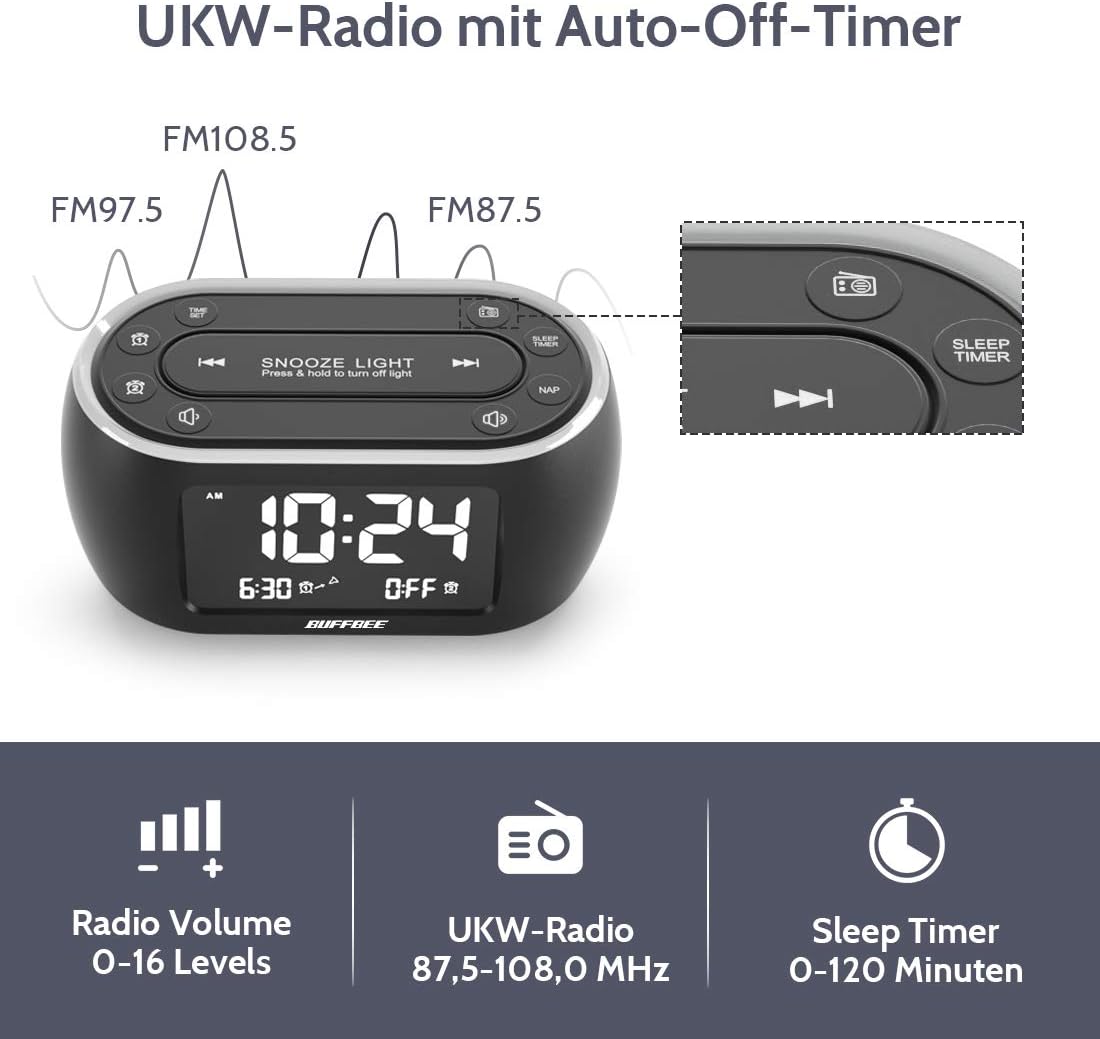
Image: The alarm clock display showing FM radio frequencies (FM108.5, FM97.5, FM87.5) and icons for radio volume and sleep timer.
- Brúigh an RAIDIÓ button to turn the FM radio on/off.
- Brúigh an SCAN button (or similar) to automatically scan and save available FM stations.
- Bain úsáid as an PREV / Next buttons to navigate through saved stations or manually tune.
- Coigeartaigh an toirt ag baint úsáide as an TOIRT +/- buttons. The volume can be set from 0 to 16 levels.
5. Nap Timer:
The nap timer allows for quick, short sleep periods without affecting regular alarm settings.
- Brúigh an NAP button. The display will show the default nap time (e.g., 10 minutes).
- Brúigh an NAP button repeatedly to cycle through preset nap durations (e.g., 10, 20, 30, 60, 90, 120 minutes).
- The nap timer will start automatically after selection.
- To cancel the nap timer, press the NAP button until "OFF" is displayed.
6. Auto-Off Sleep Timer:
Set a timer for the night light and/or FM radio to automatically turn off after a specified duration.
- While the night light or FM radio is active, press the Timire codlata cnaipe.
- Brúigh an Timire codlata button repeatedly to cycle through available durations (e.g., 15, 30, 60, 90, 120 minutes, or OFF).
- The selected duration will be displayed, and the timer will begin. The night light and/or FM radio will turn off automatically when the timer expires.
7. Display Dimmer:
Adjust the brightness of the main time display from 0% to 100%.

Image: Six different views of the alarm clock display, illustrating the range of brightness from very dim to fully bright, and also showing the night light dimmer.
Bain úsáid as an tiomnaithe DIMMER dial or DIMMER +/- buttons (if available) to adjust the display brightness to your preference. This allows for comfortable viewin aon riocht soilsithe.
8. Port Muirir USB:
A USB port is located on the back of the unit for charging small electronic devices.

Image: The alarm clock with a smartphone plugged into its side USB port, indicating the charging function.
Connect your device's USB charging cable to the port. The clock must be powered by the AC adapter for the USB charging function to work.
Cothabháil
To ensure the longevity and optimal performance of your BUFFBEE Glow Alarm Clock, follow these maintenance guidelines:
- Glanadh: Glan an t-aonad le héadach bog tirim. Ná húsáid glantóirí scríobacha, céirithe ná tuaslagóirí mar d’fhéadfadh siad damáiste a dhéanamh don dromchla.
- Cumhacht: Always disconnect the power adapter from the wall outlet before cleaning or if the unit will be unused for an extended period.
- Timpeallacht: Keep the alarm clock away from direct sunlight, heat sources, and excessive moisture.
- Athsholáthar Ceallra: If using battery backup, replace AAA batteries annually or when the battery indicator suggests low power. Ensure correct polarity when inserting new batteries.
Fabhtcheartú
If you encounter issues with your BUFFBEE Glow Alarm Clock, refer to the following common problems and solutions:
| Fadhb | Cúis Féideartha | Réiteach |
|---|---|---|
| Clock display is blank or flickering. | No power or loose connection. Low battery backup. | Ensure the power adapter is securely plugged into the clock and the wall outlet. Check if AAA batteries are installed correctly and have sufficient charge. |
| Ní chloiseann an t-aláram. | Alarm not activated. Alarm volume too low. | Verify that the alarm icon is displayed. Check the alarm volume setting. Ensure the correct alarm time is set. |
| Tá glacadh raidió FM lag. | Weak signal. Antenna not extended. Interference. | Extend the FM antenna fully. Try repositioning the clock. Perform an auto-scan for stations again. |
| Níl an solas oíche ag obair. | Feidhm solais múchta. | Press the LIGHT button to turn it on. Check if the brightness is set to 0%. |
| Níl an muirearú USB ag obair. | Clock not connected to AC power. Device not compatible. | Ensure the clock is powered by the AC adapter. Check if your device is compatible with standard USB charging. |
Sonraíochtaí
| Gné | Sonraigh |
|---|---|
| Branda | BUIFBEE |
| Uimhir Mhúnla | HRS-BLACK |
| Toisí (L x W x H) | 12 x 3.81 x 6 cm (4.72 x 1.5 x 2.36 orlach) |
| Meáchan | 330 gram (0.73 lb) |
| Ionchur Cumhachta | AC 100-240V, 50/60Hz |
| Cúltaca Battery | 3 x cadhnraí AAA (gan a bheith san áireamh) |
| Cineál Taispeána | Digiteach |
| Taispeáin Gile | 0-100% inchoigeartaithe |
| Dathanna Solas Oíche | 7 dathanna |
| Night Light Brightness | 5 leibhéal inchoigeartaithe |
| Minicíocht Raidió FM | 87.5-108.0 MHz |
| Toirt Aláraim | 0-16 leibhéal inchoigeartaithe |
| Gnéithe Speisialta | Ambient light, Dual Alarm, Nap Timer, Sleep Timer, USB Charging Port |
Barántas agus Tacaíocht
BUFFBEE products are designed for reliability and performance. For specific warranty information, please refer to the documentation included with your purchase or contact BUFFBEE customer support.
If you require technical assistance or have questions regarding your BUFFBEE Glow Alarm Clock, please visit the official BUFFBEE websuíomh gréasáin nó déan teagmháil lena roinn seirbhíse do chustaiméirí. De ghnáth, bíonn sonraí teagmhála le fáil ar phacáistiú an táirge nó ar shuíomh an mhonaróra. websuíomh.