
1. Réamhrá
This manual provides essential instructions for the safe and efficient operation of your Lenco DIR-250 Internet Radio. Please read this manual thoroughly before using the device and retain it for future reference. The Lenco DIR-250 is a versatile audio system offering Internet Radio, DAB+, FM radio, Bluetooth connectivity, Spotify Connect, and USB playback.
2. Faisnéis Sábháilteachta
- Ná nochtaigh an t-aonad don bháisteach ná don taise chun tine nó turraing leictreach a chosc.
- Cinntigh aeráil cheart. Ná bac na hoscailtí aerála.
- Ná húsáid ach an cuibheoir cumhachta a sholáthraítear leis an aonad.
- Ná hoscail an casing. Tabhair aird phearsanra cáilithe ar gach seirbhísiú.
- Coinnigh an t-aonad ar shiúl ó sholas díreach na gréine, ó fhoinsí teasa, agus ó réimsí maighnéadacha láidre.
- Seachain rudaí troma a chur ar bharr an aonaid.
3. Ábhar Pacáiste
Deimhnigh go bhfuil na hearraí go léir i láthair nuair a dhíphacáiltear iad:
- Lenco DIR-250 Internet Radio Unit
- Cuibheoir Cumhachta
- Cianrialú
- Lámhleabhar Úsáideora (an doiciméad seo)
- Antennas (2 included)
4. Táirge Tharview

Fíor 4.1: Tosaigh view of the Lenco DIR-250 Internet Radio and its remote control.

Fíor 4.2: Close-up of the right side of the front panel, featuring the TFT LCD display, volume control knob, Dimmer, and Alarm buttons.
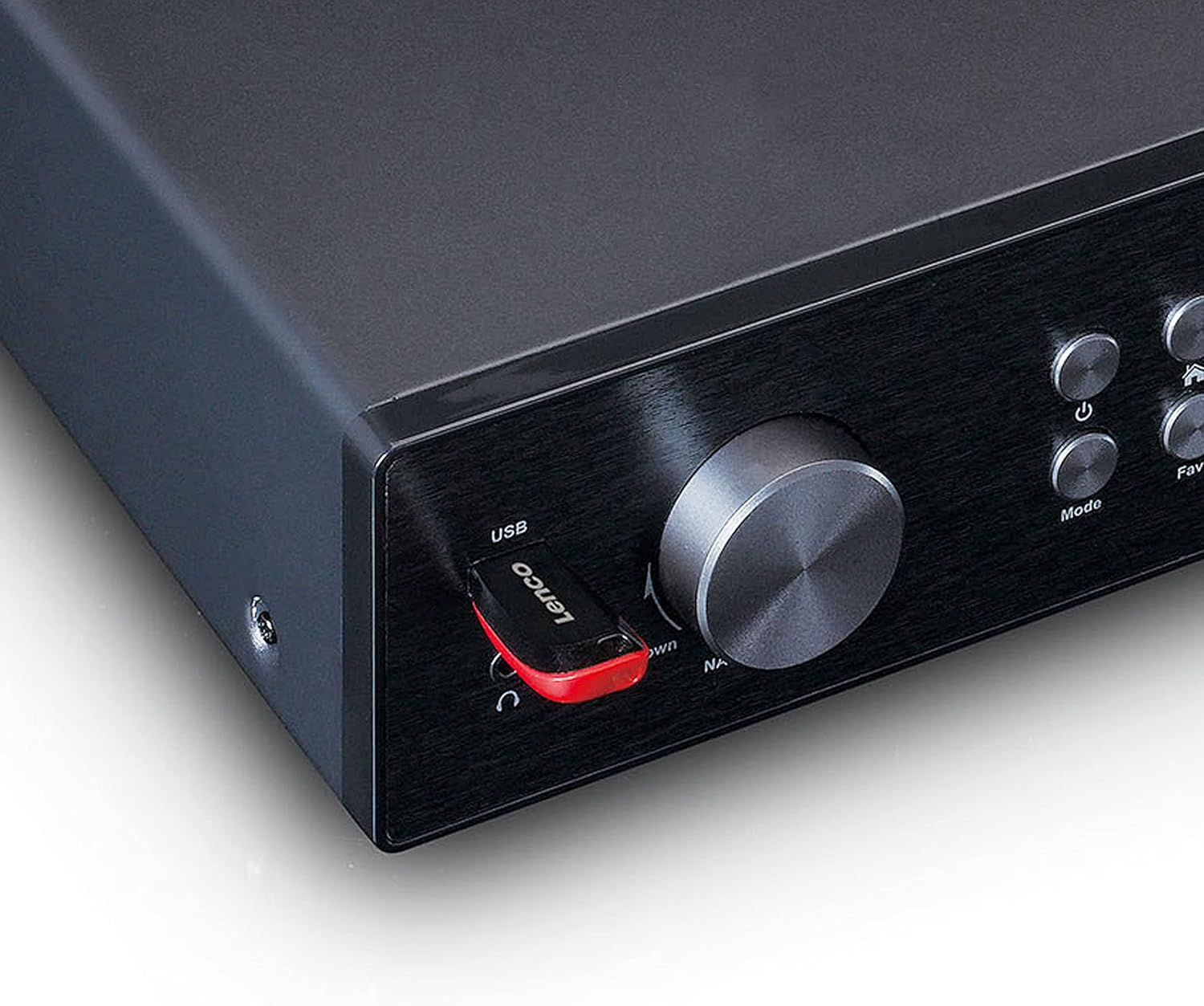
Fíor 4.3: Close-up of the left side of the front panel, showing the USB port, headphone jack, Navigate/OK knob, Mode, and Favorite buttons.

Fíor 4.4: Rear panel connections, including DC IN, Audio Output (RCA), Analog Input/Output, Optical Output, Coaxial Output, LAN (RJ45), and Antenna ports.
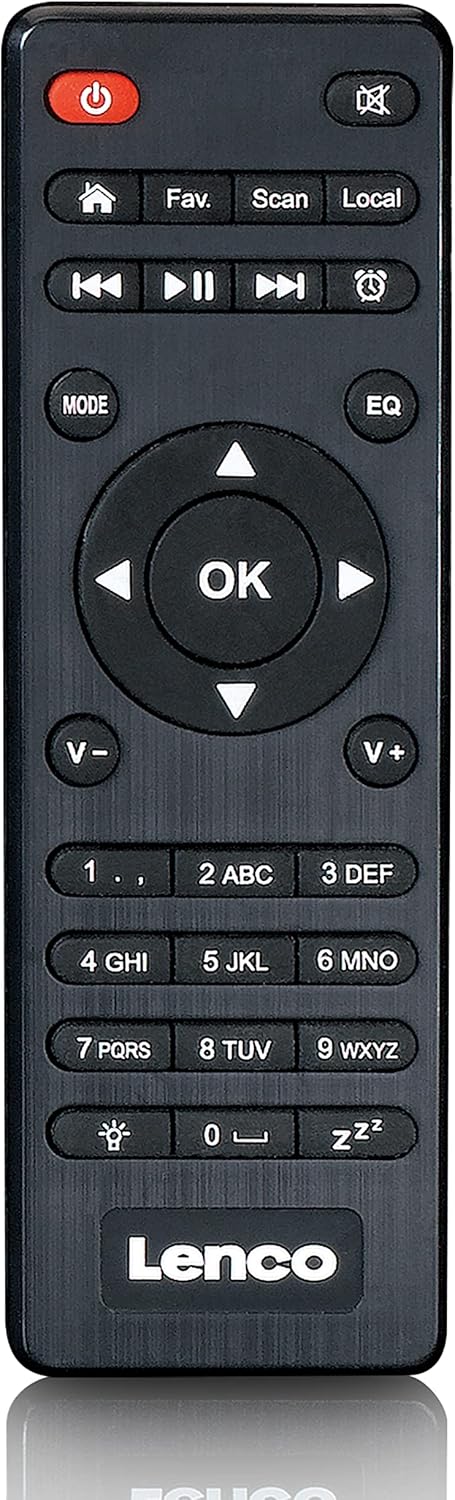
Fíor 4.5: The included remote control for convenient operation of the Lenco DIR-250.
5. Socrú
5.1. Ceangal Cumhachta
- Connect the supplied power adapter to the DC IN port on the rear of the unit.
- Plug an adapter cumhachta isteach asraon balla.
5.2. Ceangal antenna
For optimal reception of DAB+ and FM radio, connect the provided antennas to their respective ports on the rear panel. Extend the telescopic antenna fully for best results.
5.3. Ceangal Líonra
The DIR-250 supports both Wi-Fi and Ethernet connections for Internet Radio and Spotify Connect.
- Wi-Fi: Upon first power-on, the unit will guide you through the Wi-Fi setup. Select your network from the list and enter the password using the navigation knob and OK button, or the remote control.
- Ethernet: Connect an Ethernet cable from your router to the LAN port on the rear of the unit. The device will automatically detect the wired connection.
5.4. Treoraí Socrú Tosaigh
The first time you power on the DIR-250, an initial setup wizard will appear on the display. Follow the on-screen prompts to configure language, time, date, and network settings. This ensures the device is ready for use.
6. Oibriúcháin
6.1. Rialuithe Bunúsacha
The DIR-250 can be operated using the front panel controls or the included remote control.
- Cnaipe Cumhachta: Turns the unit on/off or puts it into standby mode.
- Knob Imleabhar: Rothlaigh chun an toirt a choigeartú. Brúigh chun múchadh/dímhúchadh.
- Navigate/OK Knob: Rotate to scroll through menus and options. Press to confirm a selection.
- Cnaipe Mód: Cycles through available modes (Internet Radio, DAB+, FM, Bluetooth, USB, AUX).
- Fav. Button: Accesses your list of favorite stations or saves the current station as a favorite.
- Cnaipe dimmer: Coigeartaíonn gile an taispeántais.
- Cnaipe Aláraim: Sets or manages alarms.
6.2. Raidió Idirlín
Access thousands of radio stations worldwide via your internet connection.
- Brúigh an Mód button until "Internet Radio" is selected.
- Bain úsáid as an Navigate/OK knob or remote control to browse stations by location, genre, or search.
- Brúigh OK chun stáisiún a roghnú.
- To save a station as a favorite, press and hold the fabht. cnaipe.
6.3. Raidió DAB+
Enjoy high-quality digital radio broadcasts.
- Brúigh an Mód button until "DAB+" is selected.
- The radio will automatically scan for available DAB+ stations.
- Bain úsáid as an Navigate/OK knob or remote to select a station from the list.
6.4. Raidió FM
Tune into traditional analog FM radio stations.
- Brúigh an Mód button until "FM" is selected.
- Bain úsáid as an Scanadh button on the remote or the Navigate/OK knob to search for stations.
- Brúigh OK to listen to a selected station.
6.5. Mód Bluetooth
Stream audio wirelessly from your smartphone, tablet, or other Bluetooth-enabled devices.
- Brúigh an Mód an cnaipe go dtí go roghnófar "Bluetooth". Taispeánfaidh an taispeáint "Péireáil".
- On your external device, enable Bluetooth and search for "Lenco DIR-250".
- Select the device to pair. Once connected, you can play audio from your device through the radio.
6.6. Spotify Connect
Control your music directly from the Spotify app on your smartphone or tablet.
- Ensure your Lenco DIR-250 and your smartphone/tablet are connected to the same Wi-Fi network.
- Oscail an app Spotify ar do ghléas.
- Play a song and tap the "Devices Available" icon (usually a speaker or computer icon).
- Select "Lenco DIR-250" from the list of available devices.
6.7. Athsheinm USB
Seinn fuaime files (MP3, WAV, AAC) from a USB flash drive.
- Cuir tiomántán USB flash isteach sa phort USB ar an bpainéal tosaigh.
- Brúigh an Mód button until "USB" is selected.
- Bain úsáid as an Navigate/OK knob or remote to browse and select audio files.
6.8. Ionchur AUX
Ceangail gléasanna fuaime seachtracha ag baint úsáide as cábla fuaime 3.5mm.
- Connect your external audio device to the AUX IN port on the rear panel.
- Brúigh an Mód button until "AUX" is selected.
- Seinn fuaim ó do ghléas ceangailte.
6.9. Alarm and Sleep Timer
Set alarms to wake up to your favorite radio station or use the sleep timer to automatically turn off the radio.
- Aláram: Brúigh an Aláram button on the front panel or remote. Follow the on-screen instructions to set alarm time, source, and volume.
- Uaineadóir Codlata: Brúigh an Codladh button on the remote control repeatedly to cycle through available sleep timer durations (e.g., 15, 30, 60 minutes, Off).
7. Cothabháil
7.1. Glanadh
To clean the unit, wipe it with a soft, dry cloth. Do not use abrasive cleaners, waxes, or solvents as these may damage the surface. Ensure the unit is unplugged before cleaning.
7.2. Stóráil
If you plan not to use the unit for an extended period, unplug it from the power outlet and store it in a cool, dry place, away from direct sunlight and extreme temperatures.
8. Fabhtcheartú
| Fadhb | Cúis Féideartha | Réiteach |
|---|---|---|
| Gan chumhacht | Níl an t-oiriúntóir cumhachta ceangailte nó tá an asraon lochtach. | Seiceáil naisc chumhachta. Bain triail as asraon difriúil. |
| Gan fuaim | Volume too low, muted, or incorrect input selected. | Increase volume. Check if muted. Select correct input mode. |
| Ní féidir ceangal le Wi-Fi | Pasfhocal mícheart, lasmuigh den raon, nó fadhb leis an ródaire. | Verify Wi-Fi password. Move unit closer to router. Restart router. |
| Internet Radio buffering/disconnecting | Weak Wi-Fi signal or slow internet connection. | Improve Wi-Fi signal strength. Check internet speed. Try wired Ethernet connection. |
| Poor DAB+/FM reception | Antenna not properly connected or extended. | Ensure antennas are fully extended and positioned for best reception. |
| Fadhbanna péireála Bluetooth | Device not in pairing mode, or already paired with another device. | Ensure DIR-250 is in Bluetooth mode. Disconnect from other devices. |
| Reoiteann an t-aonad nó éiríonn sé neamhfhreagrach | Fabht sealadach bogearraí. | Unplug the power adapter, wait 10 seconds, then plug it back in to restart the unit. |
9. Sonraíochtaí
| Branda | Lenco |
| Uimhir Mhúnla | A004231 |
| Teicneolaíocht Taispeána | LCD |
| Nascacht | Bluetooth V5.0, Ethernet (RJ45), Wi-Fi |
| Bandaí Raidió Tacaithe | Internet Radio, DAB+, FM |
| Gnéithe Speisialta | Spotify Connect, USB Playback, Alarm, Sleep Timer |
| Toisí (L x W x H) | 43 x 28.7 x 7.2 cm |
| Meáchan | 1.5 cileagram |
| Foinse Cumhachta | Wired (AC Adapter) |
| Gléasanna Comhoiriúnacha | Tablet, Smartphone, USB storage devices |
10. Barántas
This product comes with a manufacturer's warranty of 24 months from the date of purchase. Please retain your proof of purchase for warranty claims. The warranty covers defects in materials and workmanship under normal use. It does not cover damage caused by misuse, accidents, unauthorized modifications, or normal wear and tear.
11. Tacaíocht
For technical support, service, or further inquiries regarding your Lenco DIR-250 Internet Radio, please visit the official Lenco website or contact their customer service department. Contact information can typically be found on the Lenco website or in the warranty documentation included with your product.
Lenco Official Websuíomh: www.lenco.com