
Réamhrá
This manual provides detailed instructions for the installation, operation, and maintenance of your XVIM 8CH 1080P Home Security Camera System. Please read this manual thoroughly before using the product to ensure proper setup and functionality. Keep this manual for future reference.
Táirge Tharview
The XVIM 8CH 1080P Home Security Camera System includes an 8-channel Digital Video Recorder (DVR) with a 1TB hard drive and four 2MP HD outdoor IP66 waterproof cameras. The system is designed for reliable surveillance with features such as night vision and remote access capabilities.

Íomhá: Tharview of the XVIM 1080P HD Security Camera System, showing a camera and a smartphone displaying live view.
Gnéithe Ceamara
- IP66 Metal Housing: Durable and weatherproof construction.
- Lionsa HD 3.6mm: Soláthraíonn sé radharc 75° viewuillinn ing.
- Scagaire Gearrtha IR: Ensures clear day and night vision.
- 24 stiúir: Offers up to 65ft night vision range.

Image: Diagram highlighting key camera features: IP66 metal housing, 3.6mm HD lens, IR-cut filter, and 24 LEDs.
Day and Night Monitoring
The cameras are equipped with an IR-Cut filter and infrared LEDs to provide clear surveillance both during the day and at night. During the day, images are colorful and high definition. At night, the cameras automatically switch to infrared mode for clear black and white vision in low-light conditions.
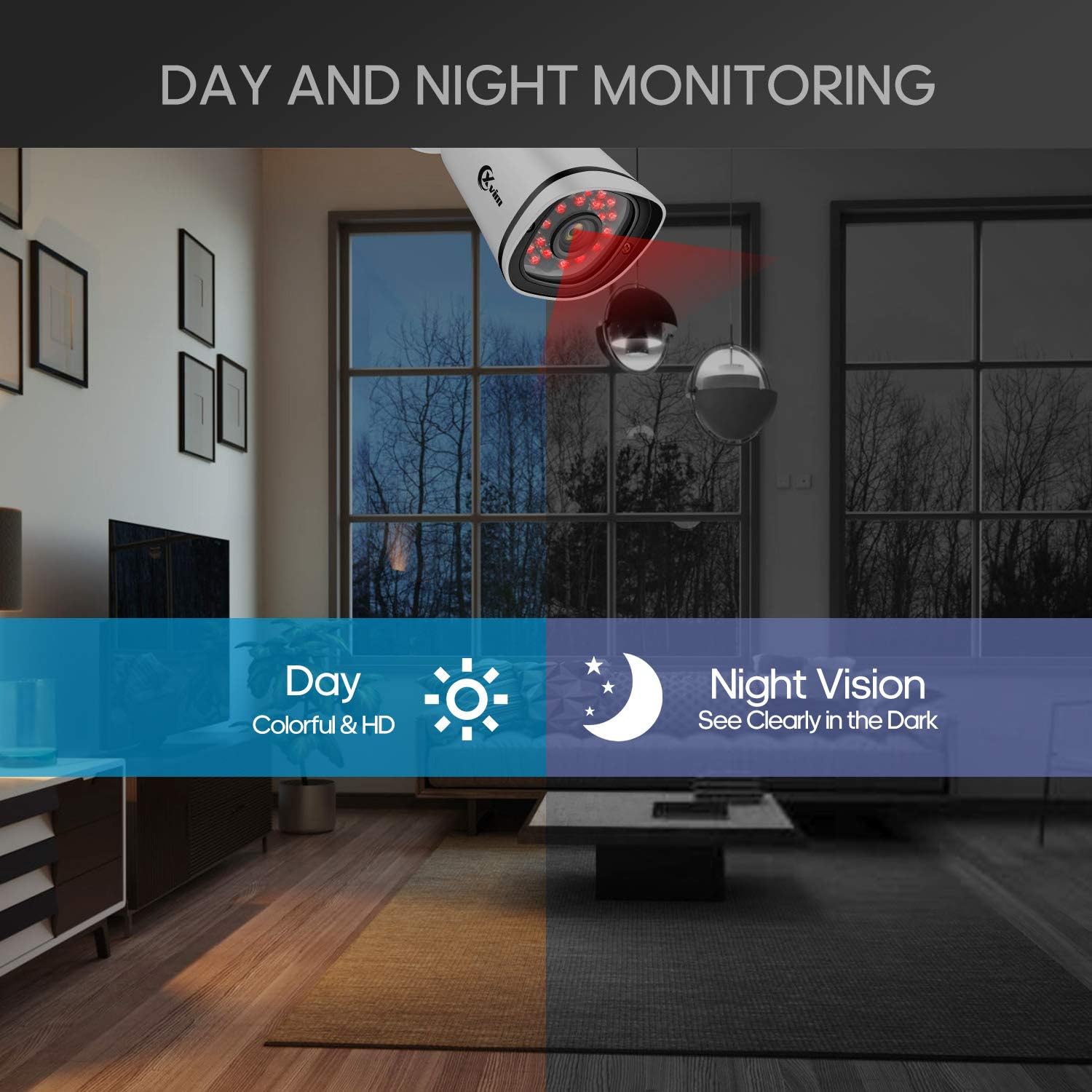
Image: Illustration showing the camera's ability to monitor both during the day (colorful HD) and at night (clear vision in the dark).
Dearadh Uiscedhíonach
The cameras feature an IP66-rated metal housing, ensuring they are protected against dust and powerful water jets, making them suitable for outdoor installation in various weather conditions.
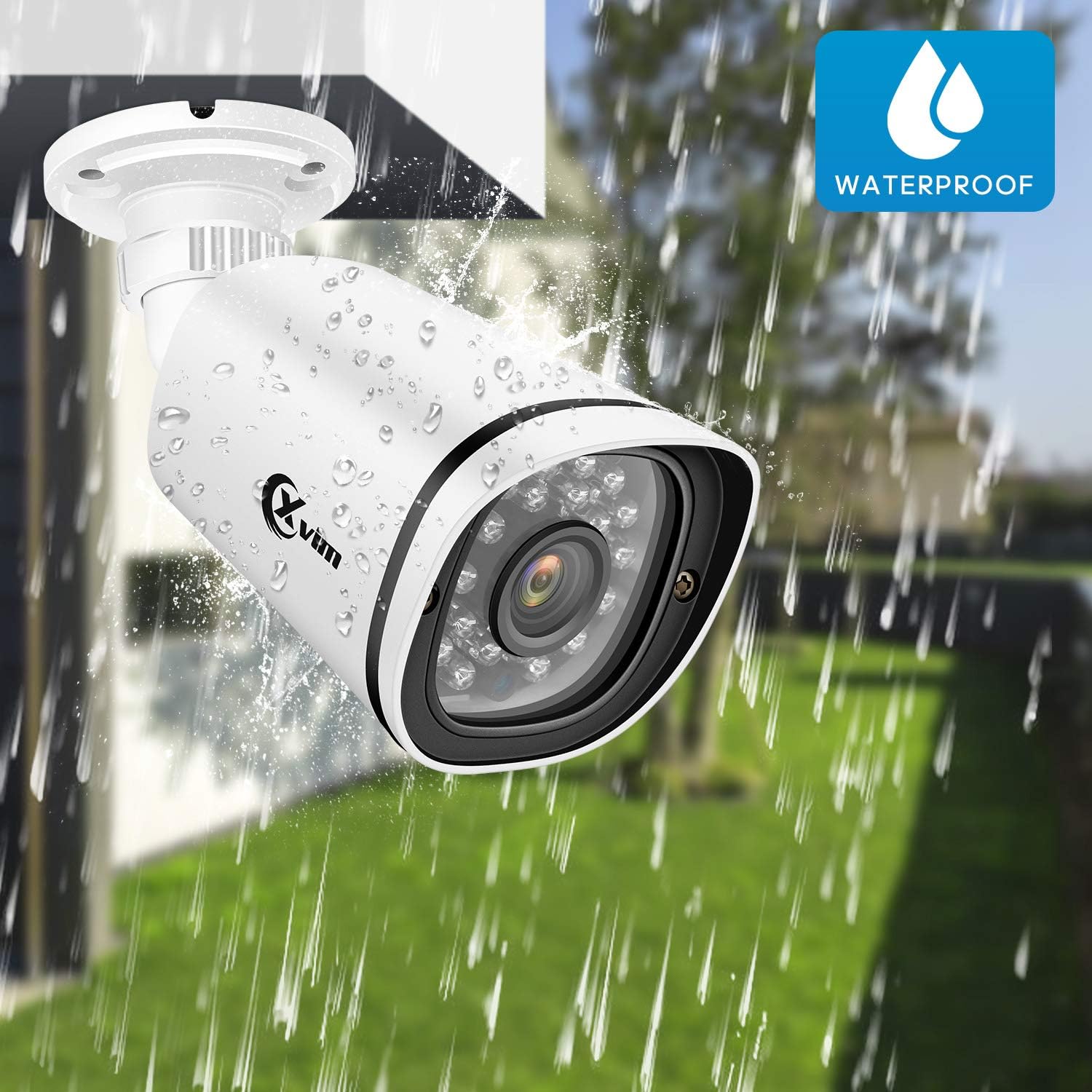
Image: An XVIM camera being sprayed with water, illustrating its waterproof design.
DVR Back Panel Overview
The DVR unit provides multiple ports for connecting cameras, a monitor, audio input/output, and network connectivity. Familiarize yourself with the ports before installation.
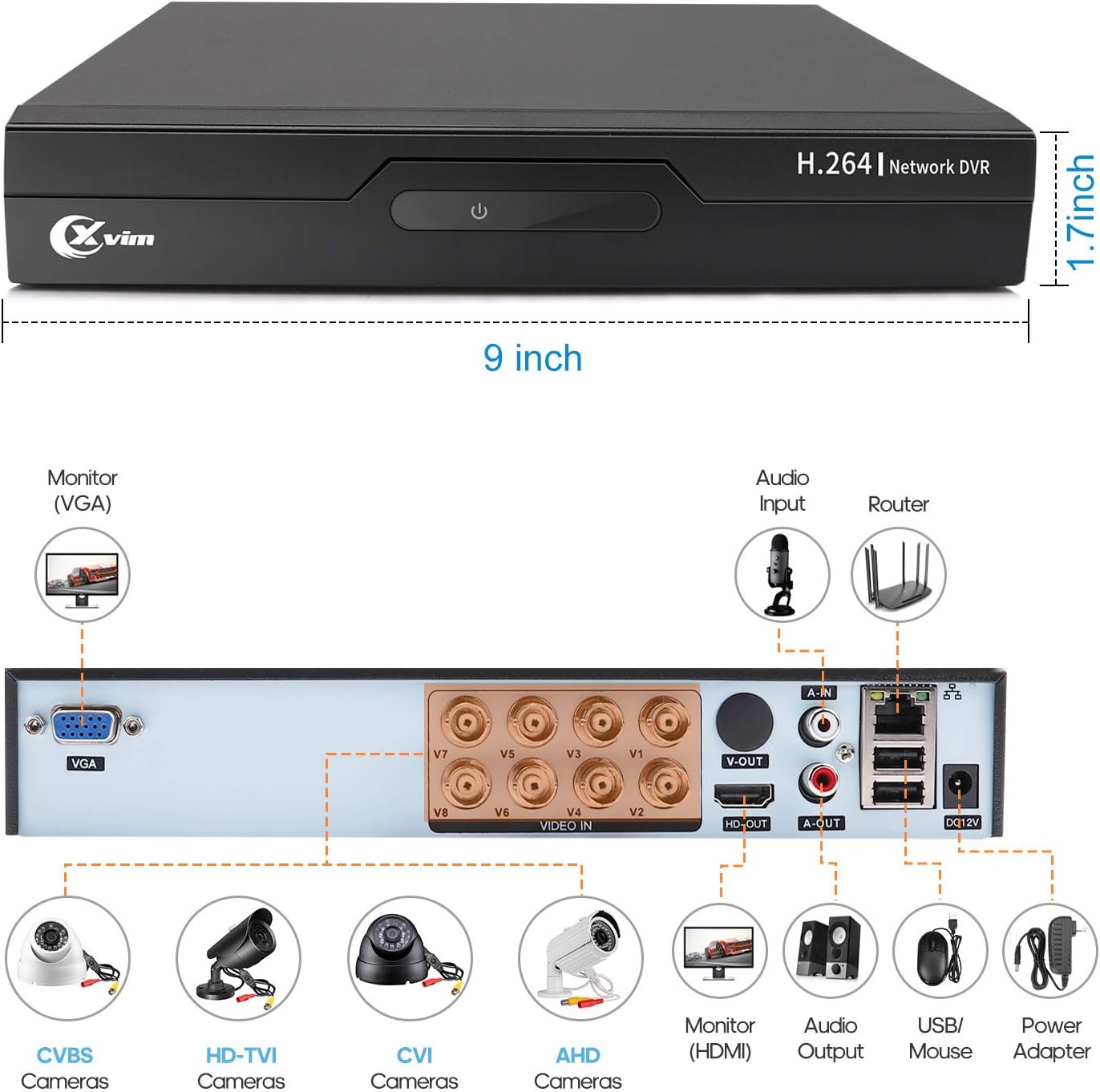
Image: Diagram of the DVR's back panel, showing ports for VGA, HDMI, video input (BNC), audio input/output, USB, and power.
Treoracha Socraithe
- Connect Cameras to DVR: Connect each camera to the corresponding video input (BNC) port on the DVR using the provided cables. Ensure secure connections.
- Connect DVR to Monitor: Connect the DVR to a monitor using either the VGA or HDMI port.
- Connect DVR to Network: For remote access, connect the DVR to your router using an Ethernet cable.
- Cumhacht Ceangail: Connect the power adapters to the cameras and the DVR, then plug them into a power outlet. The system will power on automatically.
- Socrú Tosaigh: Follow the on-screen prompts on your monitor to complete the initial DVR setup, including setting up a password and configuring basic settings.
- Socrú Aip Móibíleach:
- Download the "XVR Pro" app from your smartphone's app store.
Íosluchtaigh le haghaidh Android srónbheannach
Íosluchtaigh le haghaidh ios - Register for an account within the app.
- Add your DVR device by scanning the QR code displayed on the DVR's monitor or by manually entering the device ID.
- Nuair a chuirtear leis, is féidir leat view your cameras remotely from anywhere.
- Download the "XVR Pro" app from your smartphone's app store.

Image: Step-by-step guide for connecting the system components and setting up the XVR Pro mobile application.
Treoracha Oibriúcháin
Beo View
After successful setup, you can view beo footage from your cameras on the connected monitor or through the XVR Pro mobile app. The DVR interface allows you to switch between single-camera view agus eangach ilcheamaraí view.
Modhanna Taifeadta
The system supports various recording modes:
- Taifeadadh de Láimh: Start and stop recording manually via the DVR interface.
- Taifeadadh Braite Tairisceana: Configure the system to record automatically when motion is detected in specified areas. This helps conserve hard drive space.
- Taifeadadh Sceidealta: Set specific times for continuous recording.
Refer to the DVR's on-screen menu for detailed configuration of recording schedules and motion detection zones.
Cianrochtain
The XVR Pro app enables you to:
- View fothaí ceamara beo ó áit ar bith a bhfuil nasc idirlín aige.
- Athsheinm taifeadta footage stored on the DVR.
- Faigh foláirimh braite gluaisne.
- Control certain DVR settings remotely.
Camera Mode Switching (OSD Menu)
Each camera features an OSD (On-Screen Display) button on its cable, allowing you to switch between different video modes (Analog, AHD, TVI, CVI) to ensure compatibility with various DVRs. To access the OSD menu and switch modes:
- Analog (CVBS) Mode: Brúigh an cnaipe OSD aníos ar feadh 5 soicind.
- AHD Mode: Brúigh an cnaipe OSD Ar chlé ar feadh 5 soicind.
- TVI Mode: Brúigh an cnaipe OSD Ar dheis ar feadh 5 soicind.
- CVI Mode: Brúigh an cnaipe OSD anuas ar feadh 5 soicind.
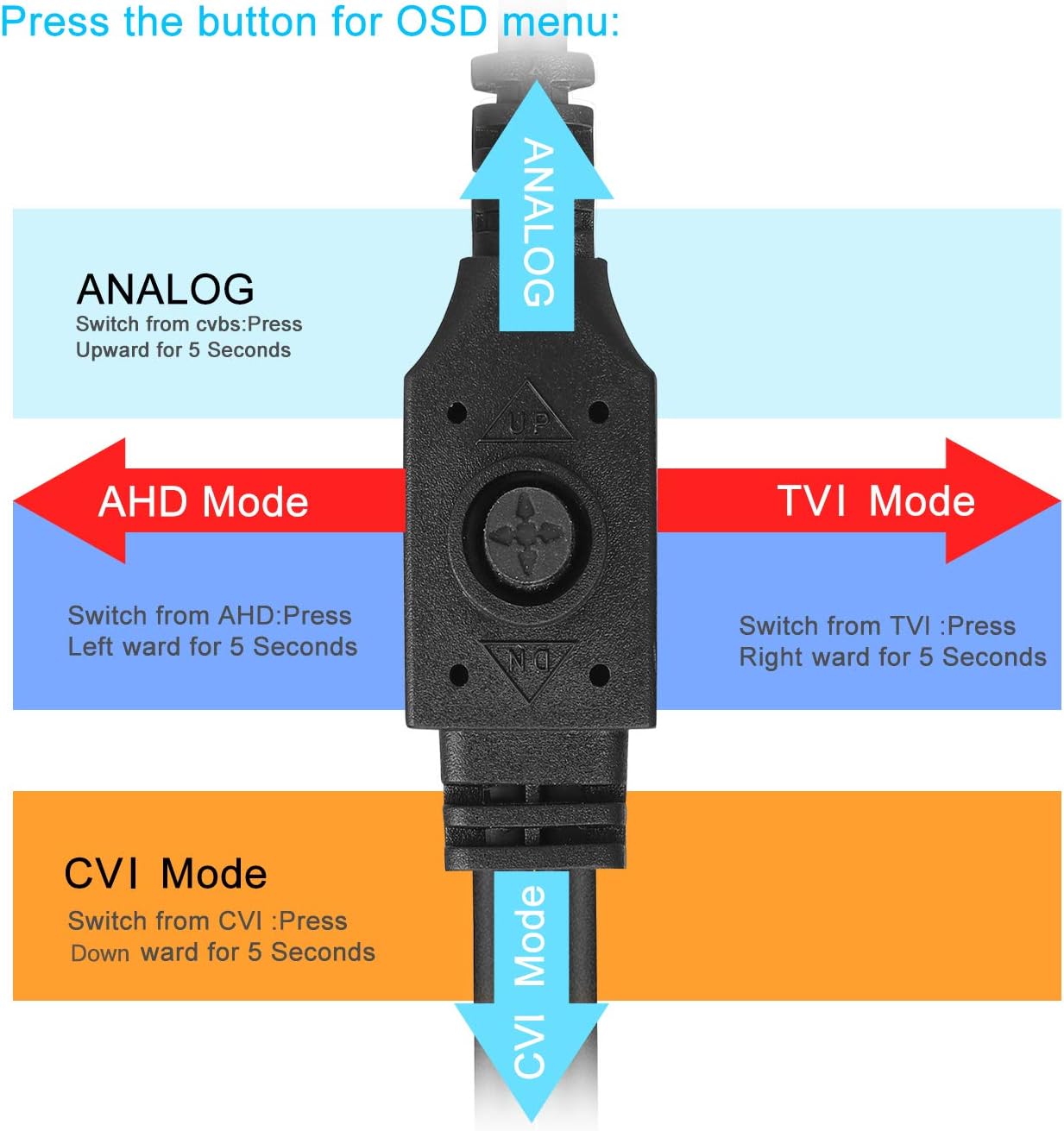
Image: Diagram illustrating how to use the OSD button on the camera cable to switch between Analog, AHD, TVI, and CVI video modes.
Cothabháil
- Glanadh Ceamara: Glan lionsaí an cheamara go rialta le clúdach bog,amp éadach chun cáilíocht íomhá shoiléir a chinntiú. Seachain glantóirí scríobacha.
- Cigireacht Cábla: Periodically check all cables and connections for wear, damage, or loose connections.
- DVR Ventilation: Ensure the DVR unit has adequate ventilation to prevent overheating. Keep vents clear of obstructions.
- Bainistíocht Tiomántán Crua: The 1TB hard drive will automatically overwrite the oldest footage when full. Regularly back up important recordings if needed.
- Nuashonruithe Firmware: Check the XVIM official website for any available firmware updates for your DVR to ensure optimal performance and security.
Fabhtcheartú
No Video Display
- Check all power connections for the DVR and cameras.
- Verify that the monitor is correctly connected to the DVR via VGA or HDMI and is set to the correct input source.
- Ensure camera cables are securely connected to the DVR's video input ports.
- If a specific camera has no video, try switching its video mode using the OSD button (refer to "Camera Mode Switching" section).
Remote Access Issues
- Confirm the DVR is connected to your router and has internet access.
- Seiceáil nasc idirlín do ródaire.
- Ensure the XVR Pro app is updated to the latest version.
- Verify that the device ID is correctly added in the app and your login credentials are correct.
Radharc Droch Oíche
- Cinntigh go bhfuil lionsa an cheamara glan agus saor ó bhacainní.
- Check for strong light sources near the camera that might interfere with the infrared LEDs.
DVR Not Recording
- Check the hard drive status in the DVR's system settings. Ensure it is detected and functioning.
- Verify that recording schedules or motion detection settings are correctly configured.
- Ensure there is sufficient hard drive space (though the system typically overwrites old footagagus).
If you encounter persistent issues not covered here, please contact XVIM customer support for assistance.
Sonraíochtaí
| Branda | XVIM |
| Uimhir Mhúnla | US-D8-4AHD7-1T-203 |
| Teicneolaíocht Nascachta | Sreangaithe |
| Rún Gabhála Físeáin | 1080p |
| Gnéithe Speisialta | Image, Motion Sensor, Night Vision, Waterproof |
| Líon Cainéil | 4 (cameras included, DVR supports 8 channels) |
| Cumas Stórála Cuimhne | 1 TB (Tiomántán Crua) |
| Foinse Cumhachta | Corded Leictreach |
| Toisí na Mír (L x W x H) | 13.94 x 11.85 x 6.93 orlach |
| Raon Fís Oíche | 85 troigh |
| Mód Taifeadta | Manual, Motion Detection |
| Comhéadan Crua-earraí | USB 3.0 Cineál B |
| Cineál Lionsa | Seasta |
| Ionchur Físeáin | BNC, RCA (CVBS) |
| Viewing Uillinn | 81 Céim |
Barántas agus Tacaíocht
XVIM products are designed for reliability and performance. For specific warranty details, please refer to the warranty card included with your product or visit the official XVIM website. For technical support, troubleshooting assistance, or any inquiries, please contact XVIM customer service through their official channels.
Acmhainní Ar Líne: For additional support, FAQs, and software downloads, please visit the XVIM Store on Amazon or the official XVIM websuíomh.