
1. Réamhrá
Thank you for choosing the FeinTech LED Desk Lamp LTL00600. This high-quality desk lamp is designed to provide optimal lighting for your workspace while offering convenient features such as a USB charging port, adjustable brightness, and customizable color temperature. Please read this manual thoroughly before use to ensure proper operation and to maximize the lifespan of your product.
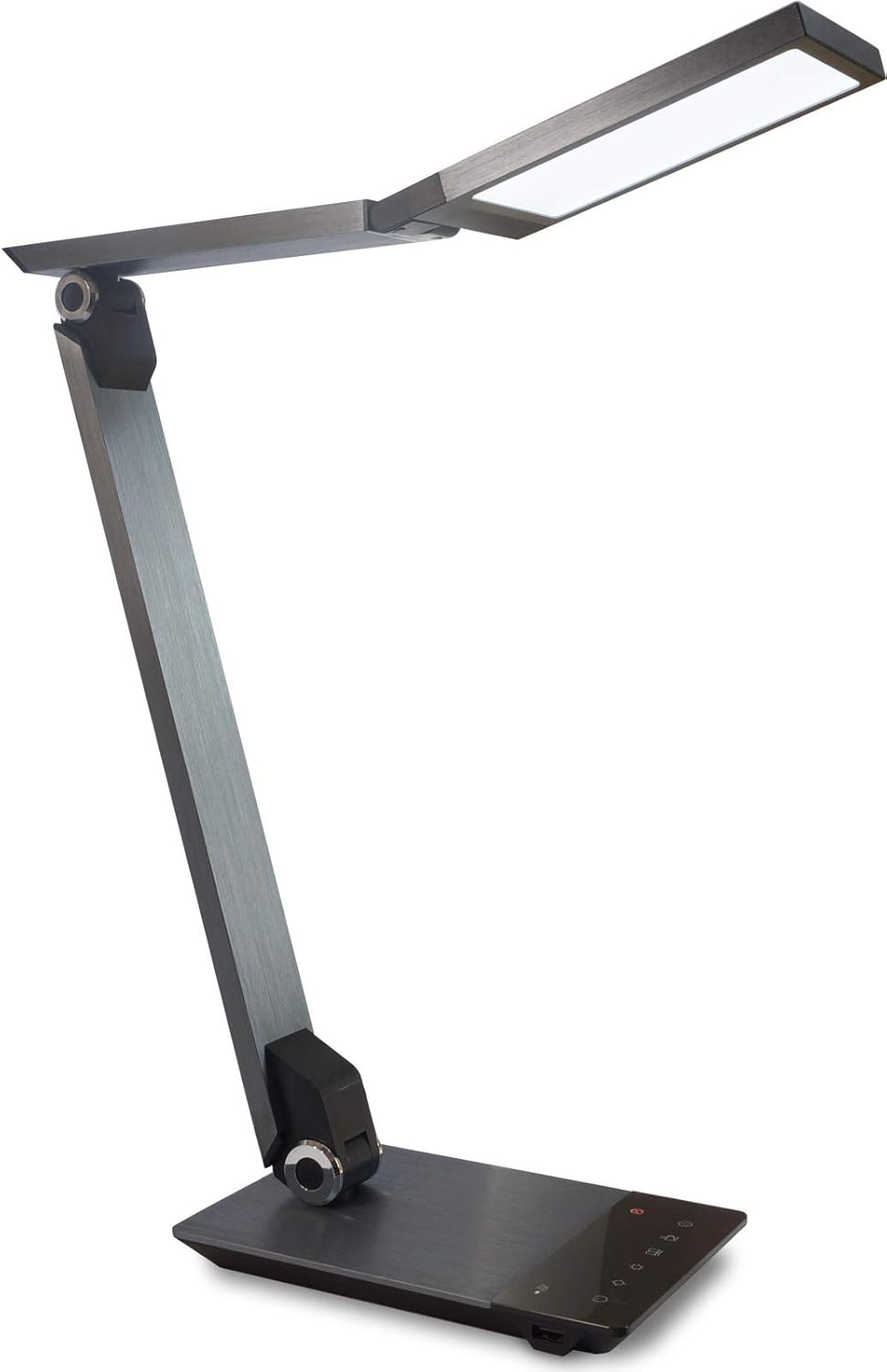
Image 1.1: FeinTech LED Desk Lamp LTL00600. This image displays the lamp ina seasamh díreach, taispeáinasing its brushed aluminum finish and sleek design.
2. Treoracha Sábháilteachta
Chun damáiste nó díobháil a chosc, lean na réamhchúraimí sábháilteachta seo a leanas:
- Cinntigh go bhfuil an t-oiriúntóir cumhachta ceangailte le soicéad cumhachta oiriúnach.
- Ná nocht an lamp to water or excessive humidity.
- Avoid disassembling or modifying the lamp. Repairs should only be performed by qualified personnel.
- Coinnigh an lamp amach ó fhoinsí teasa agus solas díreach.
- Glan an lamp le héadach bog tirim amháin. Ná húsáid glantóirí scríobacha ná tuaslagóirí.
- Ná féach go díreach isteach sa fhoinse solais LED ar feadh tréimhsí fada.
3. Ábhar Pacáiste
Seiceáil le do thoil go bhfuil na hearraí go léir i láthair sa phacáiste:
- Deasc LED FeinTech Lamp (Model: LTL00600)
- Cuibheoir Cumhachta (12V/2A)
4. Táirge Tharview
Familiarize yourself with the components of your FeinTech LED Desk Lamp:
- Lamp Ceann: Contains the LED light source.
- Armas Inchoigeartaithe: Multiple joints for flexible positioning.
- Bonn: Provides stability and houses the control panel and USB port.
- Painéal Rialaithe: Touch-sensitive buttons for power, brightness, color temperature, and timer.
- Port luchtaithe USB: Located on the side of the base for device charging.

Íomhá 4.1: Barr-síos view den lamp's base and control panel. This image highlights the touch-sensitive buttons for various functions.

Íomhá 4.2: Taobh view den lamp's base, showing the integrated USB charging port. This port allows for convenient charging of compatible devices.
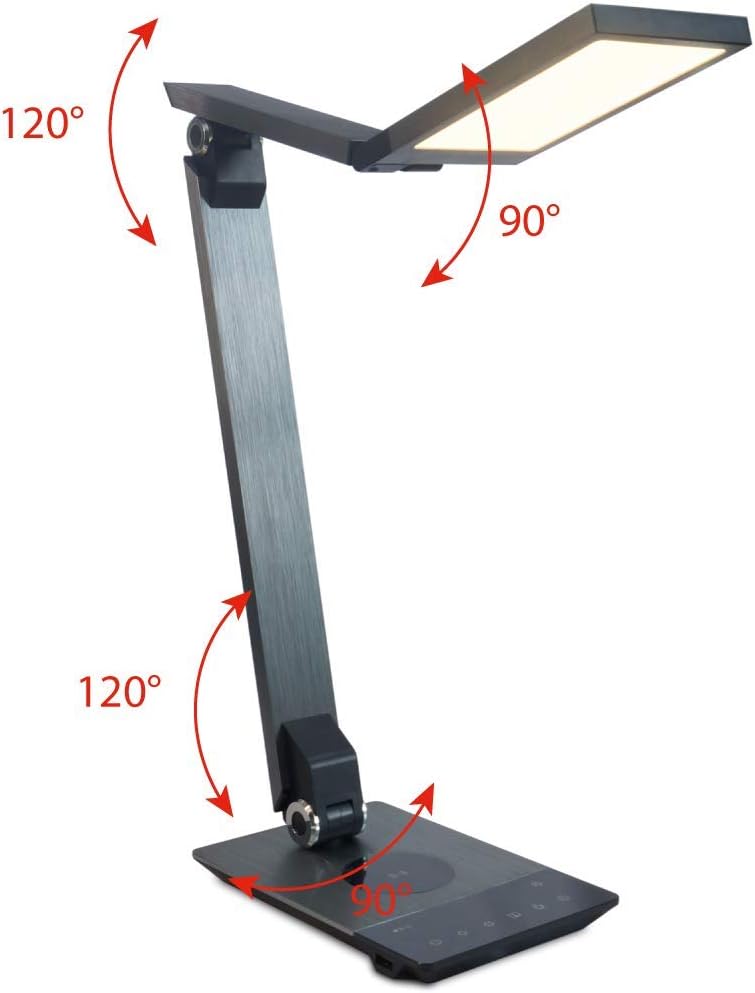
Image 4.3: Diagram illustrating the articulation angles of the lamp's joints. The lamp head can rotate 90 degrees, the upper arm 120 degrees, and the lower arm 120 degrees, allowing for flexible positioning.
5. Socrú
Lean na céimeanna seo don socrú tosaigh:
- Díphacáil: Bain go cúramach na comhpháirteanna go léir as an bpacáistiú.
- Socrúchán: Cuir an lamp base on a stable, flat surface. Ensure there is enough space for the lamp to be adjusted without obstruction.
- Cumhacht Ceangail: Insert the power adapter cable into the DC input port on the back of the lamp base. Plug the power adapter into a standard electrical outlet.
6. Treoracha Oibriúcháin
The FeinTech LED Desk Lamp features intuitive touch controls on its base.
6.1 Cumhacht ar siúl / as
- Dteagmháil leis an Cnaipe cumhachta on the control panel (refer to Image 4.1) to turn the lamp ar nó as.
6.2 Coigeartú Gile (Laghdú)
- Leis an lamp on, touch and hold the Gile Suas or Gile an Dúin buttons (refer to Image 4.1) to steplessly adjust the light intensity.
- An lamp base will vibrate slightly when the minimum or maximum brightness level is reached.
6.3 Coigeartú Teochta Dath
- Leis an lamp on, touch and hold the Color Temperature Up or Color Temperature Down buttons (refer to Image 4.1) to steplessly adjust the light color from warm white (2700K) to cool white (6500K).
- An lamp base will vibrate slightly when the minimum or maximum color temperature is reached.
6.4 Favorite Settings
- An lamp allows you to store and recall 3 favorite light settings (brightness and color temperature).
- To save a setting: Adjust the brightness and color temperature to your desired level. Then, touch and hold one of the Cnaipí is fearr leat (refer to Image 4.1) until the lamp flashes briefly, indicating the setting is saved.
- To recall a setting: Simply touch the corresponding Cnaipe is fearr leat.
- The last used brightness and color temperature settings are automatically saved even after the lamp múchta.
6.5 Feidhm Muirearú USB
- Connect your smartphone or other compatible device to the USB charging port on the side of the lamp base (refer to Image 4.2) using a suitable USB cable.
- The intelligent USB port delivers up to 2.4A for fast charging.
- An LED indicator will signal ongoing and completed charging status.
6.6 Feidhm Uaineadóir
- Dteagmháil leis an Cnaipe lasc ama (refer to Image 4.1) to activate the timer function.
- The first touch activates a 3-minute timer.
- A second touch activates a 1-hour timer.
- An lamp will automatically turn off after the selected time period.
7. Cothabháil
Chun do lamp's appearance and functionality:
- Déan an l a dhícheangal i gcónaíamp ón soláthar cumhachta roimh ghlanadh.
- Scrios an lamp le éadach bog, tirim, saor ó lint.
- Do not use liquid or aerosol cleaners, as they may damage the finish or internal components.
- Avoid scratching the brushed aluminum surface.
8. Fabhtcheartú
Má bhíonn fadhbanna agat le do lamp, féach ar na fadhbanna agus na réitigh choitianta seo a leanas:
| Fadhb | Cúis Féideartha | Réiteach |
|---|---|---|
| Lamp ní casann air. | Gan soláthar cumhachta. | Check if the power adapter is securely connected to the lamp and the electrical outlet. Test the outlet with another device. |
| Níl an muirearú USB ag obair. | Gléas neamh-chomhoiriúnach nó cábla lochtach. | Ensure your device is compatible with USB charging. Try a different USB cable. Verify the lamp faoi thiomáint ar. |
| Tá rialuithe tadhaill neamhfhreagrach. | Temporary software glitch or power issue. | Disconnect the power adapter for 30 seconds, then reconnect it. Ensure your fingers are clean and dry when operating the touch controls. |
9. Sonraíochtaí
| Uimhir Mhúnla | LTL00600 |
| Toisí (L x W x H) | 36 x 13.5 x 44 cm (thart ar 14.2 x 5.3 x 17.3 orlach) |
| Meáchan | 1.84 kg (thart ar 4.06 lb) |
| Ábhar | Alúmanam Brushed |
| Foinse Solais | stiúir |
| Max. Light Output | 500 lumens (1000 lux at 40 cm distance) |
| Teocht Datha (CCT) | 2700 K (Warm White) to 6500 K (Cool White) |
| Power Consumption (Lamp amháin) | uas. 10 W |
| Power Consumption (Lamp & Charging) | uas. 22 W |
| Aschur USB | Suas go dtí 2.4 A |
| Ionchur Voltage (Adapter) | 12 V / 2 A |
| Athraigh Cineál | Dteagmháil |

Image 9.1: Diagram showing the dimensions of the FeinTech LED Desk Lamp. An lamp measures approximately 36 cm in length, 13.5 cm in width, and 44 cm in height.
10. Barántas agus Tacaíocht
FeinTech products are designed for reliability and performance. For warranty information or technical support, please refer to the warranty card included with your purchase or visit the official FeinTech websuíomh. Coinnigh do chruthúnas ceannaigh le haghaidh éilimh bharántais.