
Réamhrá
Thank you for choosing the Zelotes F-35 2.4GHz Vertical Wireless Rechargeable Gaming Mouse. This ergonomic mouse is designed to provide a comfortable and efficient user experience, reducing wrist strain during extended use. Featuring multiple connectivity options and customizable buttons, it is ideal for both productivity and gaming on various devices.
Gnéithe Táirge
- Dearadh Ingearach Eirgeanamaíochta: Positions the hand in a natural handshake posture to minimize wrist and forearm strain.
- Nascacht Ilmhód: Supports 2.4GHz wireless via USB dongle, Bluetooth 1, and Bluetooth 2 for versatile device pairing.
- Ceallraí In-athluchtaithe: Built-in rechargeable battery for convenience.
- DPI inchoigeartaithe: Up to 2400 DPI for precise cursor control, suitable for various tasks and gaming.
- 6 Cnaipe Ríomhchláraithe: Includes left/right click, scroll wheel, DPI button, and forward/backward buttons for enhanced functionality.
- Braiteoir Optúil: Reliable and accurate tracking on most surfaces.
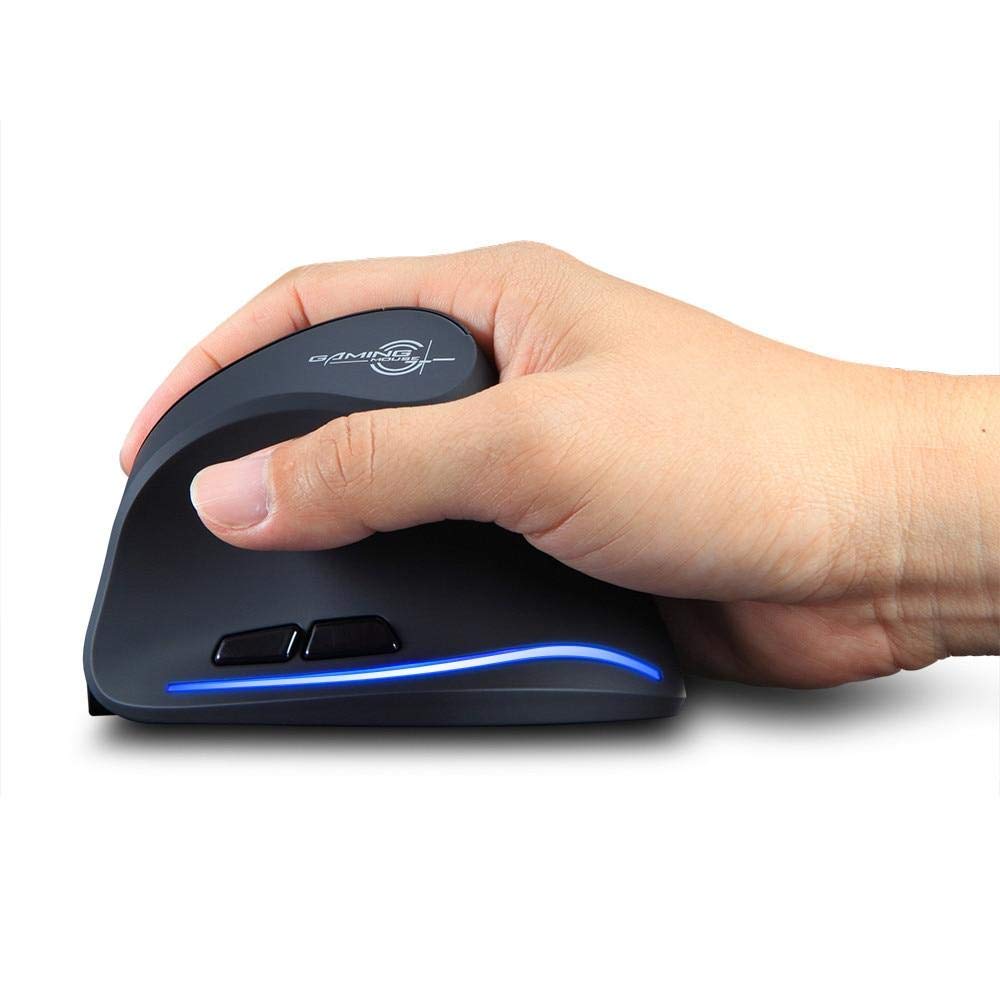
Image: The Zelotes F-35 Vertical Wireless Gaming Mouse, showcasing its unique ergonomic shape and illuminated accents.

Image: A visual comparison illustrating the natural hand position with a vertical mouse versus the twisted wrist position with a traditional horizontal mouse, highlighting the ergonomic benefits.
Treoracha Socraithe
- Cumhacht ar: Locate the ON/OFF switch on the bottom of the mouse and slide it to the 'ON' position.
- Roghnaigh Mód Ceangail: The mouse supports three connection modes: 2.4GHz wireless (via USB dongle), Bluetooth 1, and Bluetooth 2. Use the 'Mode Switch' button on the bottom of the mouse to cycle through these options. The corresponding indicator light will illuminate.
- Ceangal gan sreang 2.4GHz:
- Remove the USB receiver dongle from its storage slot on the bottom of the mouse.
- Plug an glacadóir USB isteach i bport USB atá ar fáil ar do ríomhaire nó ríomhaire glúine.
- Ba chóir go mbeadh an luch ceangailte go huathoibríoch.
- Bluetooth Connection (BT1/BT2):
- Switch the mouse to either Bluetooth 1 or Bluetooth 2 mode using the 'Mode Switch'.
- On your computer or laptop, go to Bluetooth settings and search for new devices.
- Select 'Zelotes F-35' from the list of available devices to pair.

Image: The underside of the Zelotes F-35 mouse, highlighting the ON/OFF switch, mode switch, and the integrated storage slot for the 2.4GHz USB receiver dongle.
Treoracha Oibriúcháin
The Zelotes F-35 mouse features 6 buttons designed for intuitive control and enhanced productivity:
- Cnaipe Cliceáil Clé: Feidhm chliceála chaighdeánach phríomhúil.
- Cnaipe Cliceáil Ar Dheis: Feidhm chliceála tánaisteach chaighdeánach.
- Roth Scrollaigh: Scroll up or down for navigation. Can also be pressed for a middle-click function.
- Cnaipe Coigeartaithe DPI: Located near the scroll wheel, press to cycle through different DPI settings (e.g., 800/1200/1600/2400) to adjust cursor sensitivity.
- Cnaipe Ar Aghaidh: Located on the thumb rest, typically navigates forward in web brabhsálaithe nó file taiscéalaithe.
- Cnaipe Siar: Located on the thumb rest, typically navigates backward in web brabhsálaithe nó file taiscéalaithe.
Muirearú agus Ceallraí
The Zelotes F-35 mouse is equipped with a rechargeable battery for continuous use.
- Port Luchtaithe: The mouse features a USB-C charging port, typically located at the front base of the mouse.
- Muirearú: Connect the provided USB-C cable to the mouse and the other end to a USB power source (e.g., computer USB port, wall adapter).
- Táscaire Battery: The mouse may have an indicator light to show charging status or low battery. Refer to the product packaging for specific indicator behavior.
- Saol Battery: The average battery life is approximately 12 months, depending on usage.
Cothabháil
- Glanadh: Bain úsáid as éadach bog, tirim chun dromchla na luiche a ghlanadh. Chun salachar righin a fháil, bain úsáid as éadach atá beagán tirim.amp Is féidir éadach a úsáid, ag cinntiú nach dtéann taise isteach sna comhpháirteanna inmheánacha.
- Cúram Braiteoir: Coinnigh an braiteoir optúil ar bhun an luiche glan agus saor ó dheannach nó smionagar chun rianú cruinn a chinntiú.
- Stóráil: When not in use for extended periods, turn off the mouse to conserve battery life. Store the USB receiver in its designated slot to prevent loss.
Fabhtcheartú
- Luch Gan Fhreagracht:
- Cinntigh go bhfuil an luch casta AR SIÚL.
- Seiceáil leibhéal na ceallraí agus muirearaigh más gá.
- For 2.4GHz connection, ensure the USB receiver is securely plugged into the computer.
- For Bluetooth connection, ensure Bluetooth is enabled on your device and the mouse is correctly paired. Try re-pairing if issues persist.
- Rianú Mícheart:
- Glan an braiteoir optúil ar bhun an luiche.
- Ensure you are using the mouse on a suitable surface (non-reflective, non-glass).
- Adjust the DPI setting to a comfortable level.
- Connectivity Drops:
- Ensure the mouse is within the effective range of your device (typically up to 10 meters for wireless).
- Íoslaghdaigh cur isteach ó ghléasanna gan sreang eile.
Sonraíochtaí
| Gné | Sonraigh |
|---|---|
| Branda | Zelotes |
| Múnla | F-35 |
| Cineál | 2.4GHz gan sreang, Bluetooth |
| Mód Oibriúcháin | Opto-leictreonach |
| Líon na gCnaipí | 6 |
| Líon na Rollóirí | 1 |
| Treoshuíomh Láimhe | Ceart |
| Cineál Comhéadain | USB |
| DPI | 2400 |
| Gné Speisialta | In-athluchtaithe, Gan Sreang |
| Brath Gluaiseachta | Optúil |
| Gléasanna Comhoiriúnacha | Ríomhaire glúine, ríomhaire pearsanta |
| Córas Oibriúcháin | Linux, Windows 7 (and newer) |
| Meánshaol Battery | 12 mhí |
| Foinse Cumhachta | Ceallraí Powered |
| Dath | Dubh |
| Tír Bhunaidh | tSín |
Barántas agus Tacaíocht
For warranty information and technical support, please refer to the documentation included with your product or visit the official Zelotes websuíomh. Féadfaidh tú teagmháil a dhéanamh leis an miondíoltóir inar cheannaigh tú an táirge le haghaidh cúnaimh freisin.