
1. Réamhrá
This manual provides essential information for the safe and efficient operation of your Mastervolt Mass 24/50-2 battery charger. The Mass 24/50-2 is a robust 24 V battery charger designed for demanding marine and industrial applications. It delivers up to 50 A of total charging current and features two battery outputs for managing multiple battery banks. The unit incorporates automatic multi-stage charging and comprehensive protection mechanisms to ensure reliable and efficient power support.
2. Treoracha Sábháilteachta
Léigh na treoracha sábháilteachta go léir go cúramach roimh shuiteáil agus oibriú. Má theipeann ort na treoracha seo a leanúint, d’fhéadfadh turraing leictreach, tine nó díobháil thromchúiseach a bheith mar thoradh air.
- Always disconnect the AC power supply before performing any installation, maintenance, or troubleshooting.
- Cinntigh aeráil cheart timpeall an charger chun róthéamh a chosc.
- Do not expose the charger to rain, moisture, or excessive dust.
- Use appropriate personal protective equipment (PPE) when working with batteries and electrical systems.
- Ensure all electrical connections are tight and secure to prevent arcing and overheating.
- This device is designed for use with 24V battery systems only. Do not connect to other voltage córais.
- Keep children and unauthorized personnel away from the charger and battery area.
3. Táirge Tharview
The Mastervolt Mass 24/50-2 battery charger features a durable construction suitable for harsh environments. Key components include power terminals, communication ports, and configuration switches.
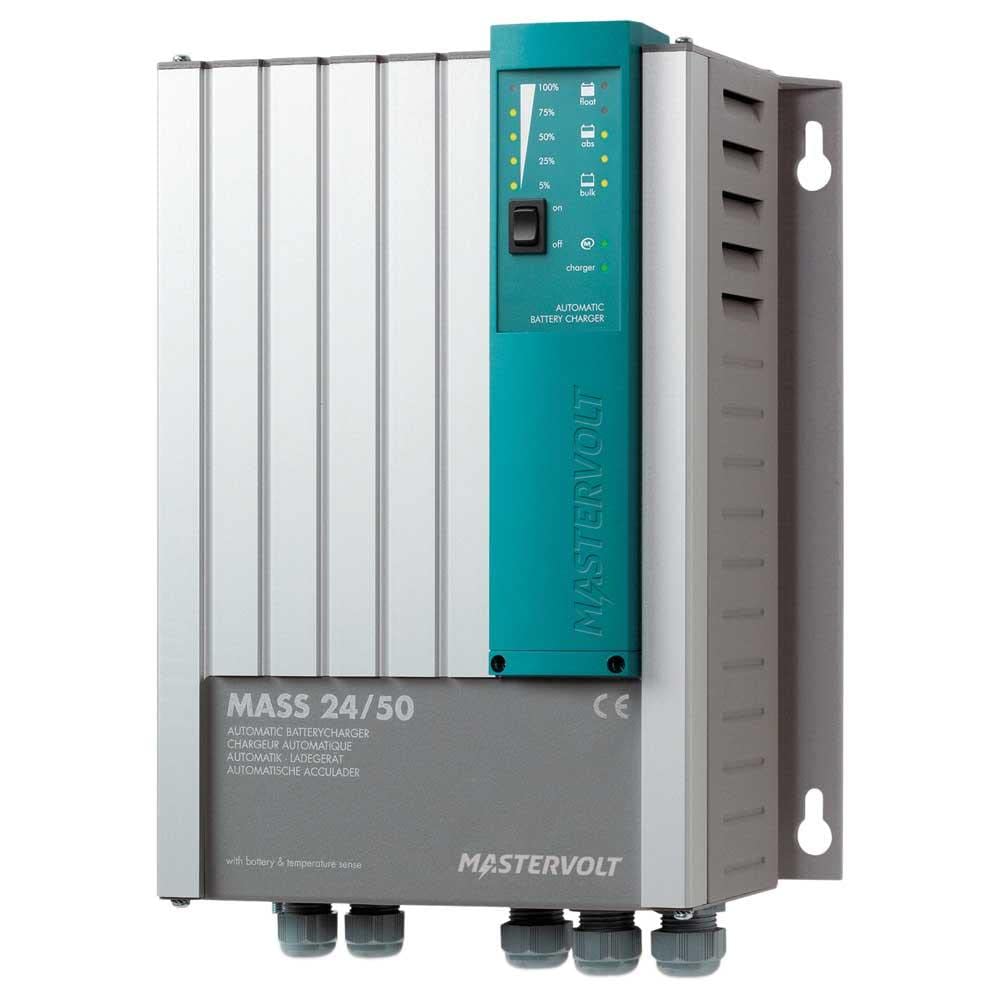
Figure 1: Connection Panel of the Mastervolt Mass 24/50-2
This image displays the various connection points on the Mastervolt Mass 24/50-2. Visible are the DIP switches labeled '4321' for configuration, RJ45 ports for 'RS485', 'RS232', 'ANALOG', and 'TEMP.SENSOR' communication, and a green terminal block for remote sensing or control labeled '+S', '-S', 'NO', 'C', 'NC'. Additionally, a '+3A' terminal and two large screw terminals for main power connections are shown.
Príomhghnéithe:
- Aschur toirte 24 Vtage.
- 50 A total charging current.
- Two independent battery outputs.
- Uathoibríoch il-stage charging for optimal battery health.
- Robust design for marine and industrial use.
- Integrated protections against overvoltage, forshrutha, agus ciorcaid ghearr.
- Communication interfaces: RS485, RS232, Analog, Temperature Sensor input.
4. Socrú
4.1. Gléasta
Mount the charger in a dry, well-ventilated area, away from direct sunlight and heat sources. Ensure sufficient clearance around the unit for airflow. The charger is designed to be waterproof and shakeproof, making it suitable for challenging environments, but proper mounting is still crucial for optimal performance and longevity.
4.2. Naisc Leictreacha
- Naisc Ceallraí: Connect the main battery bank to the large screw terminals marked with '+' and '-' symbols. Ensure correct polarity. If using the second output, connect the secondary battery bank as per the wiring diagram in the full product manual.
- Ionchur AC: Connect the AC power supply cable to the designated AC input terminals. Ensure the AC supply matches the charger's input voltage riachtanais.
- Braiteoir Teochta: Connect the optional temperature sensor to the 'TEMP.SENSOR' port. This allows the charger to adjust charging voltage based on battery temperature, optimizing charging and extending battery life.
- Remote Sensing/Control: Utilize the green terminal block ('+S', '-S', 'NO', 'C', 'NC') for remote voltage sensing or control functions as required by your system setup. Refer to the detailed wiring diagrams for specific applications.
- Poirt Chumarsáide: Connect RS485 or RS232 communication cables to the respective RJ45 ports for integration with monitoring systems or other Mastervolt devices.
- Lasca DIP: The DIP switches labeled '4321' are used for configuring specific charger settings, such as battery type or charging profile. Consult the comprehensive product manual for detailed instructions on DIP switch settings relevant to your battery type and application.
5. Oibriúcháin
The Mastervolt Mass 24/50-2 operates automatically once properly installed and powered. It employs an advanced multi-stage charging process to ensure batteries are charged efficiently and safely.
- Cumhacht ar: After all connections are secure, apply AC power to the charger. The charger will initiate its startup sequence.
- Muirearú Stagé: The charger automatically progresses through various charging stages (e.g., bulk, absorption, float) to optimize battery charging.
- Monatóireacht: Monitor the charger's status indicators (if present, refer to the full manual for indicator descriptions) or connected monitoring systems for charging status and battery health.
6. Cothabháil
Regular maintenance ensures the longevity and optimal performance of your Mastervolt Mass 24/50-2 charger.
- Glanadh: Glan taobh amuigh an luchtaire go tréimhsiúil le héadach tirim, bog. Ná húsáid glantóirí scríobacha ná tuaslagóirí. Cinntigh go bhfuil na hoscailtí aerála saor ó dheannach agus smionagar.
- Seiceálacha Ceangail: Annually, or more frequently in harsh environments, inspect all electrical connections for tightness and corrosion. Tighten any loose connections.
- Cigireacht Battery: Regularly inspect your batteries for signs of damage, corrosion, or electrolyte leakage. Follow battery manufacturer's maintenance guidelines.
7. Fabhtcheartú
If you encounter issues with your Mastervolt Mass 24/50-2, refer to the following basic troubleshooting steps. For complex problems, consult the full product manual or contact Mastervolt support.
- Níl an luchtaire ag casadh air: Check the AC power supply, circuit breakers, and all AC input connections.
- No Charging Output: Verify battery connections and polarity. Ensure the charger is receiving AC input. Check for any error indicators on the unit.
- Róthéamh: Ensure adequate ventilation around the charger. Clear any obstructions from cooling vents. Reduce load if possible.
- Torainn nó Boladh Neamhghnácha: Immediately disconnect power and contact qualified service personnel.
8. Sonraíochtaí
| Sonraíocht | Luach |
|---|---|
| Branda | Máistirvolt |
| Uimhir Mhúnla | 40020506 |
| Aschur Voltage | 24 V |
| Reatha á Muirearú | 50 A |
| Líon Aschur | 2 |
| Ábhar | Plaisteach |
| Meáchan Mír | 8.4 Punt (3.8 kg) |
| Toisí an Táirge (F x L) | 18"F x 14"L (45.7 cm x 35.6 cm) |
| Gnéithe Speisialta | Waterproof, Shakeproof |
| Cineál Gléasta | Tabletop Mount (can be adapted for other mounts) |
| UPC | 852968002745 |
9. Barántas agus Tacaíocht
The Mastervolt Mass 24/50-2 comes with a manufacturer's warranty. For specific warranty terms and conditions, please refer to the warranty documentation included with your product or visit the official Mastervolt website. For technical support, service, or further inquiries, please contact Mastervolt customer service or your authorized dealer.