
Réamhrá
This manual provides instructions for the Dino-Lite AF4115ZT USB Digital Microscope. This device offers 20x to 220x optical magnification, 1.3MP image resolution, and features such as polarized light and measurement capabilities. It is designed for various applications including industrial, scientific, medical, educational, and hobbyist needs.
Táirge Tharview
The Dino-Lite AF4115ZT is a compact and versatile digital microscope. Key components and features are detailed below:
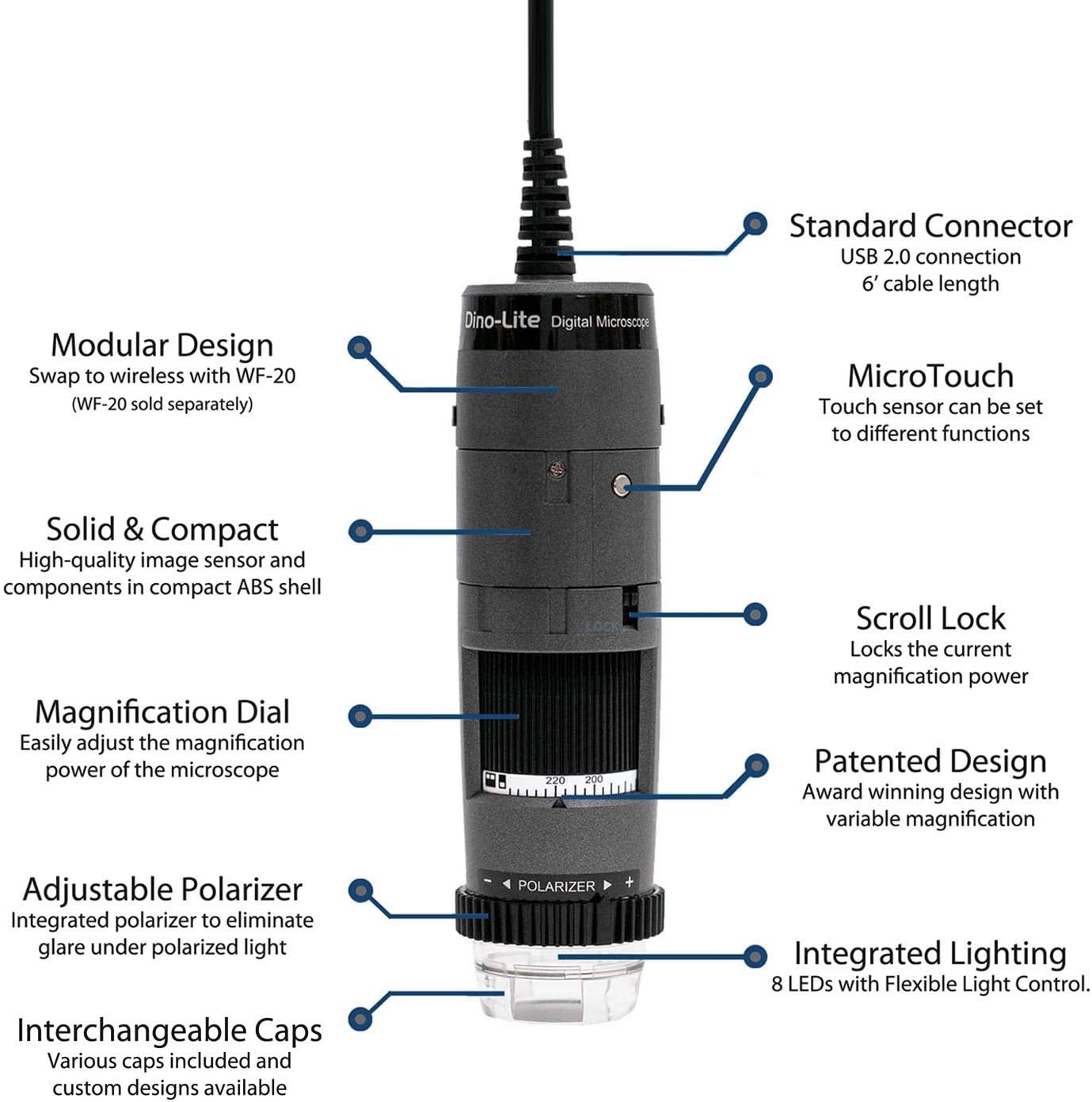
Íomhá: Tharview of the Dino-Lite AF4115ZT microscope with its main features labeled, including the standard USB 2.0 connection, MicroTouch button, modular design, compact ABS shell, scroll lock, magnification dial, adjustable polarizer, integrated lighting, and interchangeable caps.
- Standard USB 2.0 Connection: Provides a reliable connection to your computer with a 6-foot cable length.
- Dearadh Modúil: Allows for wireless operation with the separately sold WF-20 adapter.
- Solid & Compact: High-quality image sensor and components housed in a durable ABS shell.
- MicroTouch: A touch-sensitive area that can be programmed to capture images, record video, or toggle LEDs.
- Scrollaigh Lock: Locks the current magnification power to prevent accidental changes.
- Magnification Dial: Easily adjust the optical magnification from 20x to 220x.
- Adjustable Polarizer: Integrated to eliminate glare and reflections under polarized light.
- Soilsiú Comhtháite: Features 8 LEDs with Flexible Light Control (FLC) for optimal illumination.
- Interchangeable Caps: Various caps are included and custom designs are available for different applications.

Image: The Dino-Lite AF4115ZT microscope, illustrating its compact dimensions (4.65 inches length) and its modular design, showing how it can be adapted for wireless use with the WF-20 module (sold separately), which increases its length to 5.5 inches.
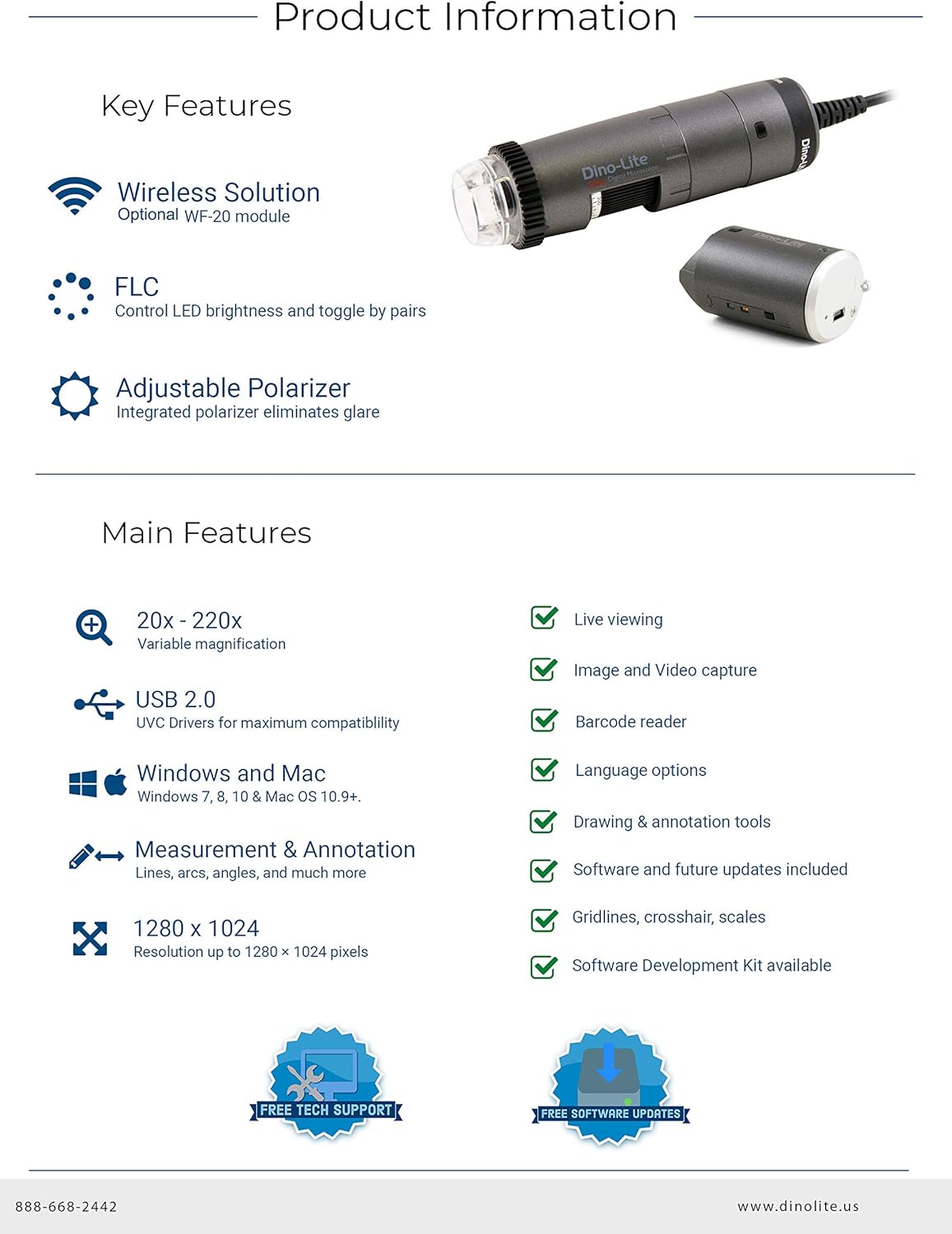
Image: A summary of the Dino-Lite AF4115ZT's key features, including wireless solution compatibility, Flexible Light Control (FLC), adjustable polarizer, 20x-220x variable magnification, USB 2.0, Windows and Mac compatibility, measurement and annotation tools, 1280x1024 resolution, live viewing, image and video capture, barcode reader, language options, drawing and annotation tools, software updates, gridlines, crosshairs, scales, and Software Development Kit (SDK) availability.
Treoracha Socraithe
- Suiteáil Bogearraí:
Insert the included CD-ROM into your computer's drive. Follow the on-screen instructions to install DinoCapture 2.0 for Windows or DinoXcope for Mac. Alternatively, download the latest software version from the official Dino-Lite websuíomh.

Image: The Dino-Lite AF4115ZT package contents, showing the microscope unit, USB cable, software CD (DinoCapture 2.0), quick guide, various interchangeable caps, and a carrying pouch.
- Ceangail an Micreascóp:
Plug the USB connector of the Dino-Lite microscope into an available USB 2.0 port on your computer. The device should be automatically recognized by the installed software.
- Optional Wireless Setup (WF-20 Adapter):
If using the optional WF-20 wireless adapter (sold separately), attach it to the microscope as per its instructions. This enables wireless connectivity to compatible devices like smartphones and tablets.
Video: This video demonstrates the key features and setup of the Dino-Lite AF4115ZT digital microscope, including its working distance at various magnifications, the magnification dial, scroll lock, adjustable polarizer, Flexible Light Control (FLC), interchangeable caps, programmable MicroTouch for photo/video capture and LED toggling, software features like measurements and auto-calibration, and the optional wireless capability.
Treoracha Oibriúcháin
- Formhéadú Coigeartaithe:
Rothlaigh an Dial Formhéadúcháin on the microscope body to change the optical magnification. The current magnification level is indicated on the dial. For stable viewing, use an optional stand (sold separately).
Image: The Dino-Lite AF4115ZT microscope, showing the magnification dial used to adjust optical zoom. The image also highlights the scroll lock feature, which secures the chosen magnification.
- Using the Adjustable Polarizer:
Rothlaigh an Polarizer inchoigeartaithe ring located at the bottom of the microscope to reduce glare and reflections from shiny surfaces. This feature can be adjusted for full or half polarization.
- Íomhánna agus Físeáin a Ghabháil:
Brúigh an Micrea-Tadhall button on the microscope body to capture a still image. This button can be programmed within the software to also initiate video recording or toggle the integrated LEDs.
- Software Features (DinoCapture/DinoXcope):
The included software provides advanced functionalities:
- Beo Viewá: View real-time images from the microscope on your computer screen.
- Gabháil Íomhá agus Físeáin: Save high-resolution images and videos.
- Uirlisí Tomhais: Perform various measurements (lines, circles, angles, etc.) in different units (inch/mil/mm/um).
- Anótáil: Add text, drawings, and other annotations directly onto captured images for detailed analysis.
- Calabrú Auto: Calibrate the microscope for accurate measurements using a calibration target.

Image: The DinoCapture 2.0 software interface displaying an image of a circuit board with various measurements and annotations applied, demonstrating the software's analytical capabilities.
Cothabháil
- Glanadh an Lionsa: Use a soft, lint-free cloth and a specialized lens cleaning solution to gently clean the optical lens. Avoid abrasive materials or harsh chemicals.
- Glanadh an Chorp: Wipe the microscope body with a dry or slightly damp cloth. Do not immerse the device in water or use excessive moisture.
- Stóráil: Store the microscope in a clean, dry place, away from direct sunlight and extreme temperatures. Use the provided pouch for protection when not in use.
- Nuashonruithe Bogearraí: Regularly check the Dino-Lite websuíomh le haghaidh nuashonruithe bogearraí chun feidhmíocht is fearr agus rochtain ar ghnéithe nua a chinntiú.
Fabhtcheartú
- Gan Taispeántas Íomhá:
Ensure the USB cable is securely connected to both the microscope and the computer. Verify that the Dino-Lite software is running and the correct device is selected. Check if the computer's USB drivers are up to date.
- Unclear or Blurry Image:
Coigeartaigh an Dial Formhéadúcháin to focus the image. Ensure the object is within the microscope's working distance. Clean the optical lens if smudges or dust are present. Adjust the integrated lighting for better illumination.
- Glare or Reflections:
Rothlaigh an Polarizer inchoigeartaithe ring to minimize glare from reflective surfaces. Adjust the angle of the microscope relative to the object.
- Bogearraí nach bhfuil ag aithint an ghléas:
Reinstall the Dino-Lite software. Try connecting the microscope to a different USB port. Restart your computer. Ensure your operating system meets the software requirements.
Sonraíochtaí
| Gné | Sonraigh |
|---|---|
| Uimhir Mhúnla | AF4115ZT |
| Formhéadú | 20x - 220x Optical |
| Taifeach Íomhá | 1280×1024 (1.3MP) |
| Ráta Fráma Físeáin | 30 CCT |
| Nascacht | USB 2.0 (WF-20 compatible for wireless) |
| Polarú | Inchoigeartaithe |
| Soilsiú | Integrated 8 LEDs with Flexible Light Control (FLC) |
| Micrea-Tadhall | Programmable touch-sensitive button |
| Comhoiriúnacht Bogearraí | Windows (XP/Vista/7/8/10), Mac OS 10.5 and above, Android, iOS (with WF-20) |
| Toisí Táirge | 1.3 x 1.3 x 4.49 orlach |
| Meáchan Mír | 12 unsa |
| Ábhar | Gloine, Miotal, Plaisteach |
| Imltage | 5 Volta |
Barántas agus Tacaíocht
Dino-Lite provides comprehensive support for its products. Users benefit from free technical support and regular software updates to enhance functionality and compatibility.
- Tacaíocht Theicniúil: For assistance with setup, operation, or troubleshooting, contact Dino-Lite customer support.
- Nuashonruithe Bogearraí: Ensure your software is up-to-date by visiting the official Dino-Lite website for the latest versions of DinoCapture 2.0 (Windows) and DinoXcope (Mac).
- Faisnéis Bharántas: Refer to the product packaging or the official Dino-Lite websuíomh gréasáin le haghaidh téarmaí agus coinníollacha mionsonraithe an bharántais.