
1. Táirge Tharview
The Dino-Lite USB Digital Microscope AF3113T is a versatile imaging solution designed for detailed inspection and analysis. It offers true optical magnification and high-resolution imaging, making it suitable for various applications across industrial, scientific, medical, educational, and hobbyist needs.
- Formhéadú: 20x - 50x, 200x True Optical Magnification
- Taifeach Íomhá: 640×480 (0.3MP)
- Ráta Fráma Físeáin: 30 CCT
- Nascacht: USB for easy setup and operation
- Comhoiriúnacht: Córais oibriúcháin Windows agus Mac
- Gnéithe: MicroTouch for image capture, measurement capabilities, adjustable LED lighting
This microscope provides a balanced field of view for typical inspection and viewing requirements, offering robust tools for capturing, annotating, and analyzing images.

Figure 1: Key features of the Dino-Lite AF3113T, including magnification, USB connectivity, software compatibility, and measurement functions.
2. Socrú
2.1 Cad atá sa Bhosca
- Dino-Lite USB Digital Microscope AF3113T
- Déan Pouch

Figure 2: The Dino-Lite AF3113T package includes the microscope unit and a protective carry pouch.
2.2 Suiteáil Bogearraí
The Dino-Lite AF3113T requires software for full functionality. Install the appropriate software for your operating system:
- Le haghaidh Windows: Install DinoCapture software.
- Le haghaidh Mac: Install DinoXcope software.
These applications provide tools for capturing, annotating, and analyzing images. Refer to the included Quick Start Guide for download links and detailed installation instructions.

Figure 3: The DinoCapture software interface displayed on a laptop, showing a magnified image.
2.3 Connecting the Microscope
Connect the Dino-Lite AF3113T to your computer via the provided USB cable. The microscope is designed for plug-and-play operation once the software is installed.
Le haghaidh cobhsaí viewing or precise movement, the microscope can be paired with a compatible stand (sold separately). The microscope can be used handheld or mounted on a stand.

Figure 4: The microscope can be used handheld for flexibility or with a stand for stability and precise positioning.
3. Treoracha Oibriúcháin
3.1 Cumhachtú Ar siúl agus As
The microscope powers on automatically when connected to a powered USB port and the software is launched. To power off, simply disconnect the USB cable or close the software application.
3.2 Formhéadú agus Fócas a Choigeartú
The AF3113T features variable magnification from 20x-50x and 200x. To adjust the magnification, rotate the barrel of the microscope. For fine-tuning the focus, use the scroll wheel located on the microscope body.

Figure 5: The magnification dial on the microscope allows for precise adjustment of optical zoom levels.
3.3 Rialú Soilsithe LED
The microscope is equipped with 8 white LEDs for illumination. The brightness of these LEDs can be controlled via the software interface (DinoCapture/DinoXcope) to optimize lighting for your subject.
3.4 Image Capture and Measurement
Bain úsáid as an Micrea-Tadhall feature on the microscope to easily capture still images. Simply tap the MicroTouch sensor to take a picture. The included software also provides advanced measurement features, supporting units like inches, millimeters, and micrometers for accurate analysis.
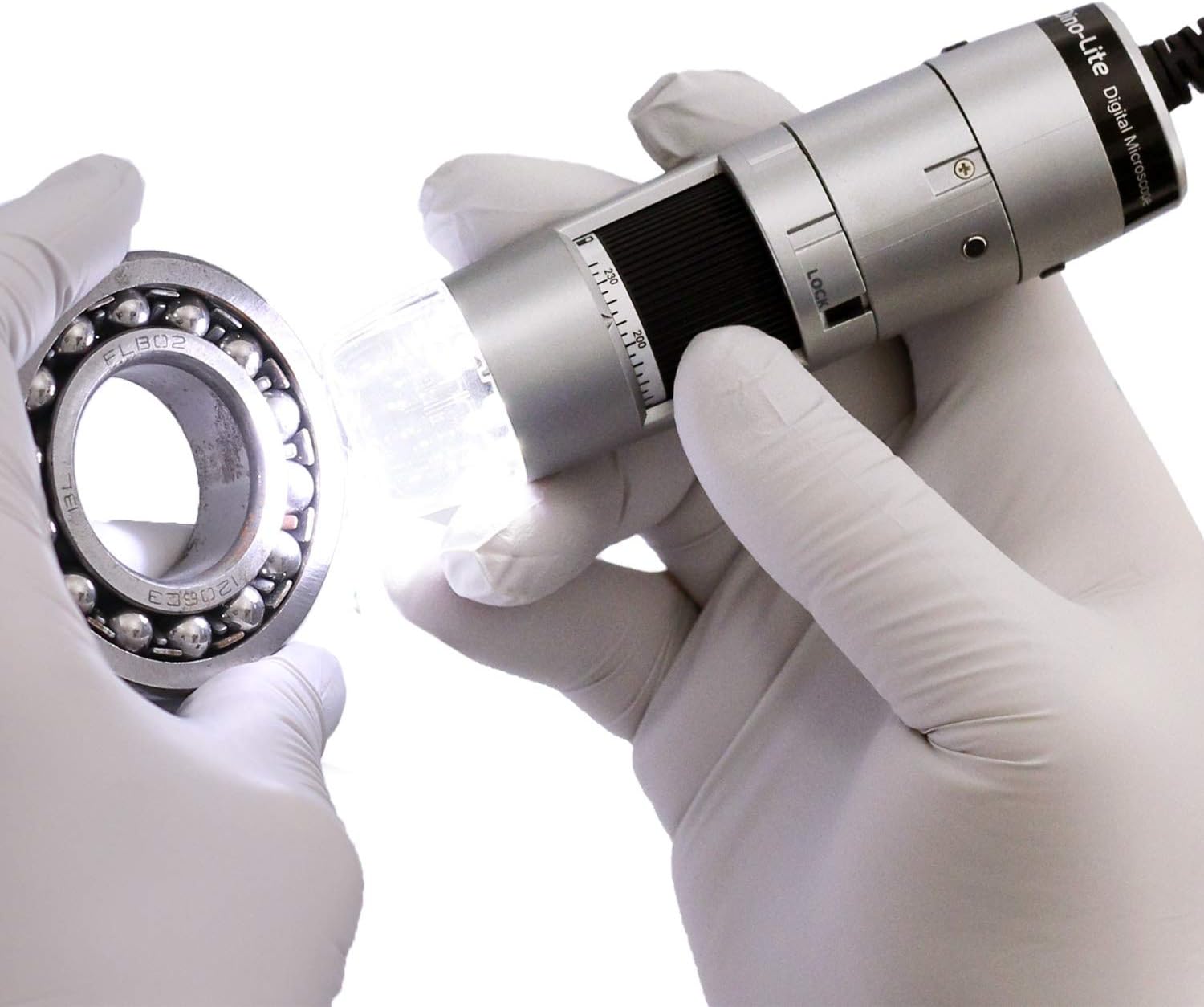
Figure 6: The Dino-Lite microscope in use, demonstrating its ability to inspect small objects with integrated lighting.
4. Cothabháil
- Keep the microscope clean by gently wiping the lens and body with a soft, lint-free cloth.
- Seachain an gléas a nochtadh do theocht foircneach, taise nó solas díreach.
- Store the microscope in its carry pouch when not in use to protect it from dust and damage.
5. Fabhtcheartú
- Image not appearing: Ensure the USB cable is securely connected to both the microscope and the computer. Verify that the DinoCapture/DinoXcope software is running and the correct device is selected.
- Droch-chaighdeán íomhá: Adjust the magnification and focus wheel. Ensure adequate lighting using the built-in LEDs. Clean the lens if necessary.
- Software not recognizing device: Reinstall the DinoCapture/DinoXcope software. Check your computer's device manager for proper driver installation. Try a different USB port.
- LEDs not working: Ensure the software is running and check the LED control settings within the application.
6. Sonraíochtaí
| Gné | Sonraíocht |
|---|---|
| Toisí Táirge | 1.3 x 1.3 x 4.49 orlach |
| Meáchan Mír | 10.5 unsa (0.3 cileagram) |
| Uimhir Mhúnla Mír | AF3113T |
| Monaróir | Dino-Lite |
| Cineál Foinse Solais | stiúir |
| Ábhar | Plaisteach |
| Uasmhéid Formhéadúcháin | 220 x |
| Imltage | 5 Volta |
| Gléasanna Comhoiriúnacha | Personal Computer (Windows, Mac) |
| Objective Lens Description | Achromatic |
7. Barántas agus Tacaíocht
For warranty information or technical support, please refer to the documentation included with your product or visit the official Dino-Lite website. You may also contact the manufacturer directly for assistance.