
1. Réamhrá
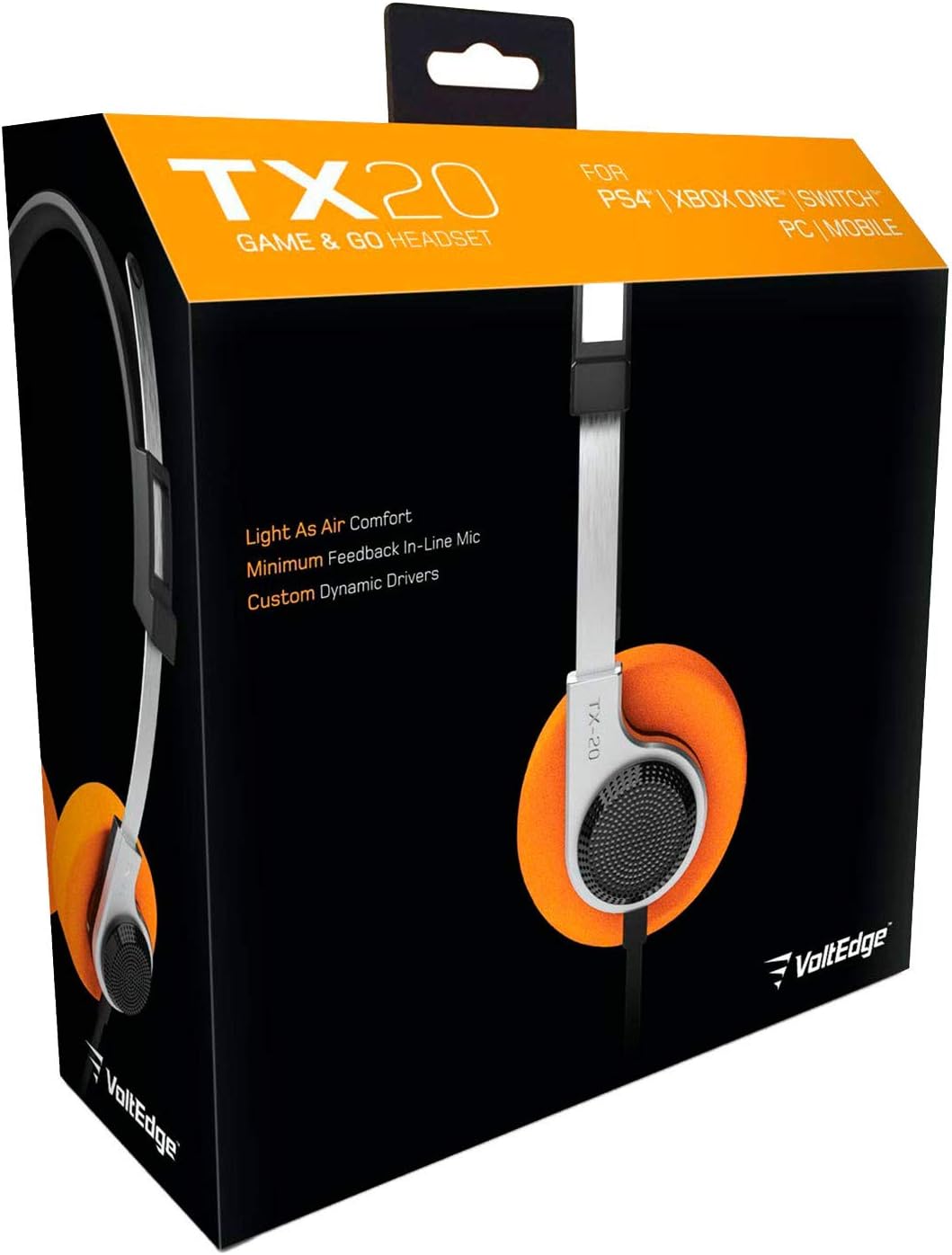
The VoltEdge TX20 Universal Headset is designed for versatile audio experiences, whether at home or on the go. Its lightweight construction, combined with a retro aesthetic, provides comfort and style. Engineered with stainless steel and polypropylene, the TX20 offers a flexible and durable design. Custom dynamic drivers deliver quality in-game sound, while the directional in-line microphone ensures clear chat audio. Convenient volume control and an instant push-pull mute function are integrated for ease of use.
Príomhghnéithe:
- Dearadh éadrom agus compordach
- Retro-inspired style
- In-line microphone with minimal feedback
- Custom dynamic audio drivers
- Robust and durable build quality

Figure 1: VoltEdge TX20 Universal Headset packaging, showing the headset and key features.
2. Comhpháirteanna Táirge
The VoltEdge TX20 headset consists of the following main components:
- Banda Ceann Inchoigeartaithe: Le haghaidh feistiú slán agus compordach.
- On-Ear Earcups: Featuring custom dynamic drivers and soft ear cushions.
- Aonad Rialaithe Inlíne: Contains volume control and a mute switch for the microphone.
- Directional In-line Microphone: Le haghaidh cumarsáide gutha soiléire.
- Jack Fuaime 3.5mm: For universal connectivity to various devices.
Fíor 2: Tosaigh view of the VoltEdge TX20 Headset, showing the headband and earcups.

Fíor 3: Taobh view of the VoltEdge TX20 Headset, highlighting the earcup design and TX-20 branding.
3. Treoracha Socraithe
3.1 Ceangal na gCluasán
- Locate the 3.5mm audio jack on your gaming console controller (e.g., PS4, Xbox One), Nintendo Switch, PC, or mobile device.
- Insert the 3.5mm audio jack from the VoltEdge TX20 headset firmly into the audio port of your device.
- Cinntigh go bhfuil an nasc slán chun cur isteach ar an bhfuaim a chosc.
3.2 Coigeartú le haghaidh Chompord
- Gently extend or retract the headband to fit your head size.
- Position the earcups so they rest comfortably over your ears. The on-ear design should provide a snug fit without excessive pressure.
4. Treoracha Oibriúcháin
4.1 Rialú Toirt
The VoltEdge TX20 features an in-line control unit on the cable. To adjust the audio volume, slide the volume wheel up or down. Increase the volume by sliding it up, and decrease it by sliding it down.
4.2 Feidhm Mhúchadh Micreafóin
To mute the microphone, locate the push-pull switch on the in-line control unit. Push the switch to mute your microphone, preventing your voice from being transmitted. Pull the switch to unmute the microphone and resume voice communication.
4.3 Úsáid Ghinearálta
- Cearrbhachas: Connect to your console or PC for immersive game audio and clear team chat.
- Físeán ceoil: Enjoy high-quality audio for music playback and video streaming on compatible devices.
- Mobile Calls: Use the integrated microphone for hands-free calls on your smartphone.
5. Cothabháil
5.1 Glanadh
- Use a soft, dry cloth to wipe the exterior surfaces of the headset.
- I gcás na gcluasán, cuimil go réidh iad le beagán uisce.amp éadach más gá, ansin triomaigh láithreach.
- Avoid using harsh chemicals, solvents, or abrasive cleaners, as these can damage the headset's finish.
5.2 Stóráil
- Stóráil na cluasáin in áit fhionnuar, thirim amach ó sholas díreach na gréine agus ó theochtaí foircneacha.
- Avoid tangling the cable. Consider coiling it loosely when not in use.
5.3 Réamhchúraimí a Láimhseáil
- Ná nochtaigh na cluasáin d'uisce ná do thaise iomarcach.
- Seachain na cluasáin a ligean titim nó a chur faoi thionchair láidre.
- Do not attempt to disassemble or modify the headset, as this will void any warranty.
6. Fabhtcheartú
6.1 Gan Fuaim nó Toirt Íseal
- Seiceáil Ceangal: Ensure the 3.5mm audio jack is fully inserted into the device's audio port.
- Coigeartaigh an Toirt: Verify that the in-line volume control on the headset is turned up. Also, check the volume settings on your connected device.
- Tástáil ar Ghléas Eile: Connect the headset to a different device (e.g., smartphone, another PC) to determine if the issue is with the headset or the original device.
6.2 Microphone Not Working or Unclear
- Seiceáil an Lasc Tosta: Ensure the in-line microphone mute switch is in the "unmute" position.
- Socruithe Gléas: Verify microphone input settings on your connected device (e.g., PC sound settings, console audio settings). Ensure the TX20 is selected as the input device.
- Socruithe Feidhmchláir: Some applications (e.g., gaming chat, video conferencing) have their own microphone settings. Check these as well.
- Tástáil ar Ghléas Eile: As with audio, test the microphone on another device to isolate the problem.
6.3 Fuaim Statach nó Saobhtha
- Seiceáil Ceangal: A loose connection can cause static. Re-insert the 3.5mm jack firmly.
- Cur isteach: Move away from other electronic devices that might be causing interference.
- Cáilíocht Foinse: Ensure the audio source itself is of good quality.
7. Sonraíochtaí Teicniúla
| Uimhir Mhúnla | TX20UNIV |
| Teicneolaíocht Nascachta | Wired (3.5mm Audio Jack) |
| Ábhar | Stainless Steel, Polypropylene |
| Cruth Cluas | Ar-Chluas |
| Cineál tiománaí fuaime | Tiománaí Dinimiciúla |
| Cineál Rialaithe | In-line Volume Control, Mute Switch |
| Gné Speisialta | Rialú Mute |
| Meáchan Mír | 7 ounces (approximately 0.44 pounds) |
| Toisí Táirge (LxWxH) | 7.5 x 3 x 7.9 orlach |
| Úsáidí Molta | Gaming, Music, Video, Mobile Calls |
| UPC | 857288008033 |
8. Faisnéis Bharántas
VoltEdge products are manufactured to high-quality standards. For specific warranty details regarding your TX20 Universal Headset, please refer to the warranty card included with your purchase or visit the official VoltEdge websuíomh. Coinnigh do chruthúnas ceannaigh le haghaidh aon éilimh bharántais.
9. Tacaíocht do Chustaiméirí
If you encounter any issues or have questions not covered in this manual, please contact VoltEdge customer support. You can typically find contact information on the product packaging, the official VoltEdge websuíomh, nó trí do mhiondíoltóir.
For the most up-to-date support resources, please visit the official VoltEdge websuíomh: VoltEdge Store on Amazon