
Réamhrá
This manual provides detailed instructions for the setup, operation, and maintenance of your TFA Dostmann SKY Radio Weather Station 35.1152.01. This device offers accurate indoor and outdoor temperature and humidity measurements, a weather forecast display, and a radio-controlled clock with an alarm function. Please read these instructions carefully before using the device to ensure proper function and longevity.
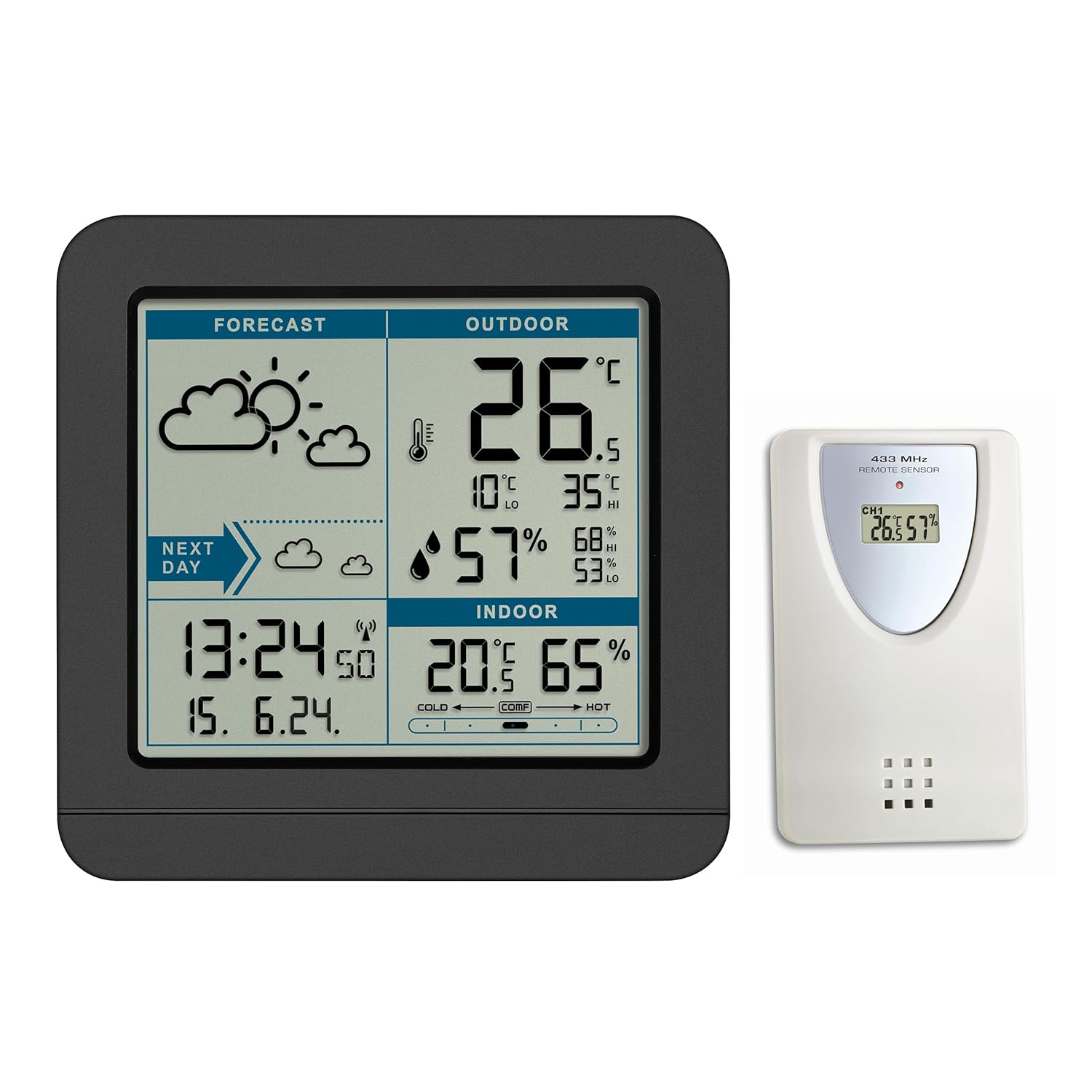
Íomhá: Tosaigh view of the TFA Dostmann SKY Radio Weather Station 35.1152.01, displaying forecast, outdoor temperature and humidity, indoor temperature and humidity, and time/date.
Ábhar an Phacáiste
Please check that all components are present and undamaged after unpacking:
- 1x Base Station (Display Unit)
- 1x Thermo-Hygro Transmitter (Outdoor Sensor)
- 1x Lámhleabhar teagasc
Nóta: Batteries are not included. You will need 3x AAA batteries for the base station and 2x AAA batteries for the outdoor sensor.
Socrú
- Ionsáigh Cadhnraí:
- Oscail an urrann ceallraí ar chúl an braiteoir lasmuigh. Insert 2x AAA batteries, observing the correct polarity (+/-). Close the compartment.
- Oscail an urrann ceallraí ar chúl an stáisiún bonn. Insert 3x AAA batteries, observing the correct polarity (+/-). Close the compartment.
The device will power on and begin searching for the outdoor sensor signal and the radio time signal.

Íomhá: Cúl view of the base station, showing the battery compartment and various control buttons.
- Sensor Synchronization: The base station will automatically attempt to connect with the outdoor sensor. This may take a few minutes. Once connected, the outdoor temperature and humidity will appear on the display. If the connection is not established, press the CUARDACH button on the base station to initiate a manual search.

Image: The remote outdoor sensor, displaying its own temperature and humidity readings and indicating 433 MHz transmission.
- Radio Clock Synchronization: The base station will automatically attempt to receive the DCF radio time signal. This process can take several hours, especially during initial setup. Ensure the station is placed away from sources of interference (e.g., TVs, computers).
- Placement of Outdoor Sensor:
- Place the outdoor sensor in a shaded, dry location, protected from direct sunlight and precipitation, to ensure accurate readings.
- The maximum transmission range between the sensor and base station is approximately 60 meters (197 feet) in open areas. Walls and other obstacles will reduce this range.
Treoracha Oibriúcháin
Taispeáin Tharview
The display is divided into several sections, providing comprehensive weather and time information:
- RÉAMHRÁ: Displays weather symbols for current and next day's forecast.
- ASCHUIR: Shows current outdoor temperature and humidity, along with daily high (HI) and low (LO) records.
- IOMLÁN: Displays current indoor temperature and humidity, and a comfort zone indicator.
- AM / DÁTA: Radio-controlled time, date, and day of the week.

Image: A detailed diagram highlighting various display sections and their functions, including dimensions of the base station.
Cnaipí agus Feidhmeanna
| Cnaipe | Feidhm |
|---|---|
| MODE / SET | Press to cycle through display modes or hold to enter setting mode. |
| ALARM AR / Off | Gníomhachtaíonn nó díghníomhaíonn sé an t-aláram. |
| ° C / ° F. | Athraíonn sé taispeáint teochta idir Celsius agus Fahrenheit. |
| TONN | Manually initiates radio time signal reception. |
| CUARDACH | Manually initiates outdoor sensor signal reception. |
| AIMSIR | Adjusts weather forecast settings (if applicable). |
| FÓGRA | Sets temperature alerts. |
| CUIMHNEACH | Displays maximum and minimum recorded values. Press again to clear. |
| SNOOZE / SOLAS | Activates snooze function during alarm or temporarily illuminates the backlight. |
Réamhaisnéis na hAimsire
The weather station predicts weather trends for the next 12-24 hours based on changes in atmospheric pressure. The forecast is represented by symbols (e.g., sun, clouds, rain). The accuracy is approximately 70% after a learning phase of several days.
A frost symbol may appear when outdoor temperatures are between -2°C and +3°C, indicating potential for icy conditions.
Uasluachanna/Íosluachanna
The station automatically records the highest and lowest indoor/outdoor temperatures and humidity values daily. These values are reset automatically every 24 hours. You can also manually reset them using the CUIMHNEACH cnaipe.
Comfort Zone Indicator
The indoor section of the display includes a comfort zone indicator, which provides a visual representation of the indoor climate based on temperature and humidity levels.
Cothabháil
- Glanadh: Glan an gléas le bog, damp éadach. Ná húsáid glantóirí nó tuaslagóirí scríobach.
- Athsholáthar Ceallra: Replace batteries in both the base station and outdoor sensor when the low battery indicator appears on the display. Always replace all batteries at the same time.
- Stóráil: Má tá an gléas á stóráil ar feadh tréimhse fada, bain na ceallraí go léir chun sceitheadh a chosc.
Fabhtcheartú
| Fadhb | Cúis Féideartha | Réiteach |
|---|---|---|
| No outdoor temperature/humidity reading (--- displayed) |
|
|
| Incorrect time or time not setting automatically |
|
|
| Réamhaisnéis na haimsire míchruinn |
|
|
| Tá an taispeáint dim nó bán |
|
|
Sonraíochtaí
| Gné | Sonraigh |
|---|---|
| Uimhir Mhúnla | 35.1152.01 |
| Dimensions (Base Station) | 12.3 x 5.2 x 11.7 cm (L x W x H) |
| Weight (Base Station) | 217 gram |
| Power Source (Base Station) | 3x cadhnraí AAA (gan a bheith san áireamh) |
| Foinse Cumhachta (Braiteoir Allamuigh) | 2x cadhnraí AAA (gan a bheith san áireamh) |
| Raon Teochta Allamuigh | -20 ° C go +50 ° C (-4 ° F go +122 ° F) |
| Raon Teochta Laistigh | -10 °C go +50 °C (+14 °F go +122 °F) |
| Raon Taise | 20% - 99% RH |
| Cruinneas Teochta | ±1 °C |
| Minicíocht Tarchuir | 433 MHz |
| Raon Tarchuir uasta | 60 méadar (limistéar oscailte) |
| Ábhar | Plaisteach (Plaisteach) |
| Cineál Taispeána | Digiteach |
| Gnéithe Speisialta | Alarm, Weather Forecast, Radio Clock, Max/Min Memory, Comfort Zone |
Barántas agus Tacaíocht
TFA Dostmann products are manufactured to high-quality standards. While specific warranty details are not provided in this manual, spare parts availability is indicated for 1 year from the date of purchase within the EU.
For technical support, warranty claims, or further assistance, please contact your retailer or the manufacturer directly. Manufacturer information can often be found on the product packaging or their official websuíomh.
Monaróir: TFA Dostmann
Websuíomh: www.tfa-dostmann.de