
AWEI T5
AWEI T5 True Wireless Earbuds User Manual
Réamhrá
This manual provides detailed instructions for the AWEI T5 True Wireless Earbuds. Please read this guide carefully before using the product to ensure proper operation and to maximize your listening experience.
Ábhar an Phacáiste
Deimhnigh go bhfuil na míreanna go léir atá liostaithe thíos i láthair i do phacáiste:
- AWEI T5 True Wireless Earbuds (Left and Right)
- Cás Muirir
- Cábla Muirearú USB
- Lámhleabhar Úsáideora
- Méideanna éagsúla de chluasáin

Image: AWEI T5 True Wireless Earbuds retail packaging, showing the brand logo and product model.
Táirge Tharview
Familiarize yourself with the components of your AWEI T5 True Wireless Earbuds and charging case.

Image: The AWEI T5 True Wireless Earbuds inside their charging case, with an additional image showing an earbud being worn by a user.

Íomhá: Dlúthghraf view of the AWEI T5 True Wireless Earbuds and their charging case resting on a laptop keyboard.
The earbuds are designed for a secure and comfortable fit, and the charging case provides both protection and power on the go.
Socrú
1. Muirearú Tosaigh
Sula n-úsáidtear iad den chéad uair, luchtaigh na cluasáin agus an cás luchtaithe go hiomlán.
- Cuir an dá earbuds sa chás luchtaithe.
- Connect the USB charging cable to the charging case and a power source.
- The indicator lights on the case and earbuds will show charging status.
- Nuair a bheidh tú luchtaithe go hiomlán, dícheangail an cábla.
2. Péireáil le Gléas
To connect your AWEI T5 earbuds to a Bluetooth-enabled device:
- Cinntigh go ngearrtar na cluasáin.
- Oscail an cás luchtaithe agus bain an dá chluasán. Rachaidh siad isteach sa mhodh péireála go huathoibríoch.
- Ar do ghléas (fón cliste, táibléad, srl.), téigh go socruithe Bluetooth agus cumasaigh Bluetooth.
- Cuardaigh le haghaidh available devices and select "AWEI T5" from the list.
- Nuair a bheidh tú ceangailte, cloisfidh tú ton deimhnithe, agus athróidh na soilse táscaire ar na cluasáin.
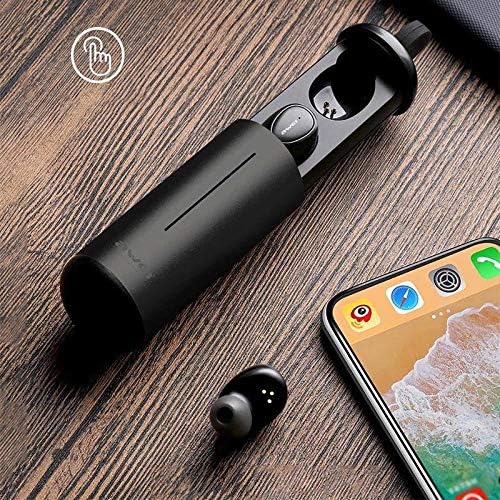
Image: AWEI T5 Earbuds in their charging case, positioned next to a smartphone, illustrating the pairing process.
Treoracha Oibriúcháin
Rialuithe Bunúsacha
The AWEI T5 earbuds feature touch controls for various functions:
- Seinn/Sos: Beartaíonn uair amháin ar cheachtar earbud.
- An Chéad Amhrán Eile: Tapáil faoi dhó ar an earbud ceart.
- Rian Roimhe Seo: Tapáil faoi dhó ar an earbud clé.
- Freagra/Deireadh Glao: Tapáil uair amháin ar cheachtar cluasán le linn glao isteach.
- Diúltaigh Glao: Brúigh agus coinnigh ceachtar cluasán ar feadh 2 shoicind le linn glao isteach.
- Gníomhaigh Cúntóir Gutha: Trí sconna ceachtar earbud.
Mód Earbud Aonair
You can use either the left or right earbud independently:
- Remove one earbud from the charging case. It will automatically connect to the last paired device.
- The other earbud can remain in the case or be turned off.
Mód Dual Earbud
For a stereo audio experience, use both earbuds:
- Remove both earbuds from the charging case. They will automatically connect to each other and then to the last paired device.
Cothabháil agus Cúram
To ensure the longevity and optimal performance of your AWEI T5 earbuds:
- Glanadh: Glan na cluasáin agus an cás luchtaithe go rialta le héadach bog, tirim, saor ó lint. Ná húsáid ceimiceáin ghéara ná ábhair scríobacha.
- Stóráil: Nuair nach bhfuil siad in úsáid, stóráil na cluasáin ina gcás luchtaithe chun iad a chosaint ar dheannach agus damáiste.
- Cúram Battery: Avoid fully discharging the battery frequently. Charge the earbuds and case regularly, even if not used for extended periods.
- Friotaíocht Uisce: The earbuds are rated IPX4, meaning they are resistant to splashing water from any direction. Do not submerge them in water or expose them to heavy rain.

Image: AWEI T5 Earbuds with water droplets, indicating their IPX4 splash-resistant rating.
Fabhtcheartú
If you encounter issues with your AWEI T5 earbuds, refer to the following common problems and solutions:
| Fadhb | Réiteach |
|---|---|
| Níl na cluasáin ag péireáil leis an ngléas. | Ensure earbuds are charged. Turn off and on Bluetooth on your device. Forget "AWEI T5" from your device's Bluetooth list and re-pair. |
| Níl ach earbud amháin ag obair. | Place both earbuds back into the charging case, close the lid, then open and remove them together. Ensure both are charged. |
| Gan fuaim ná toirt íseal. | Check volume levels on both your device and the earbuds. Ensure earbuds are properly connected. |
| Níl an cás muirir ag muirearú. | Verify the USB cable is securely connected to both the case and the power source. Try a different cable or power adapter. |
Sonraíochtaí
Technical details for the AWEI T5 True Wireless Earbuds:
| Gné | Sonraigh |
|---|---|
| Uimhir Mhúnla | T5 |
| Nascacht | Bluetooth |
| Fachtóir Foirme | In-Chluas |
| Ábhar | Plaisteach |
| Dath | Dubh |
| Toisí (Táirge) | 4 x 10 x 16.5 cm |
| Meáchan (Táirge) | 4.54 g |
| Cineál Battery | 1 Lithium Ion (per earbud, typically) |
| Rátáil Friotaíocht Uisce | IPX4 (Splash-dhíonach) |
Barántas agus Tacaíocht
For warranty information and customer support, please refer to the documentation provided with your purchase or contact the retailer. Keep your proof of purchase for any warranty claims.
Ask a question about this manual
Ask about setup, troubleshooting, compatibility, parts, safety, or missing instructions. Manuals+ will review the question and use this page’s manual context to help answer it.