
Réamhrá
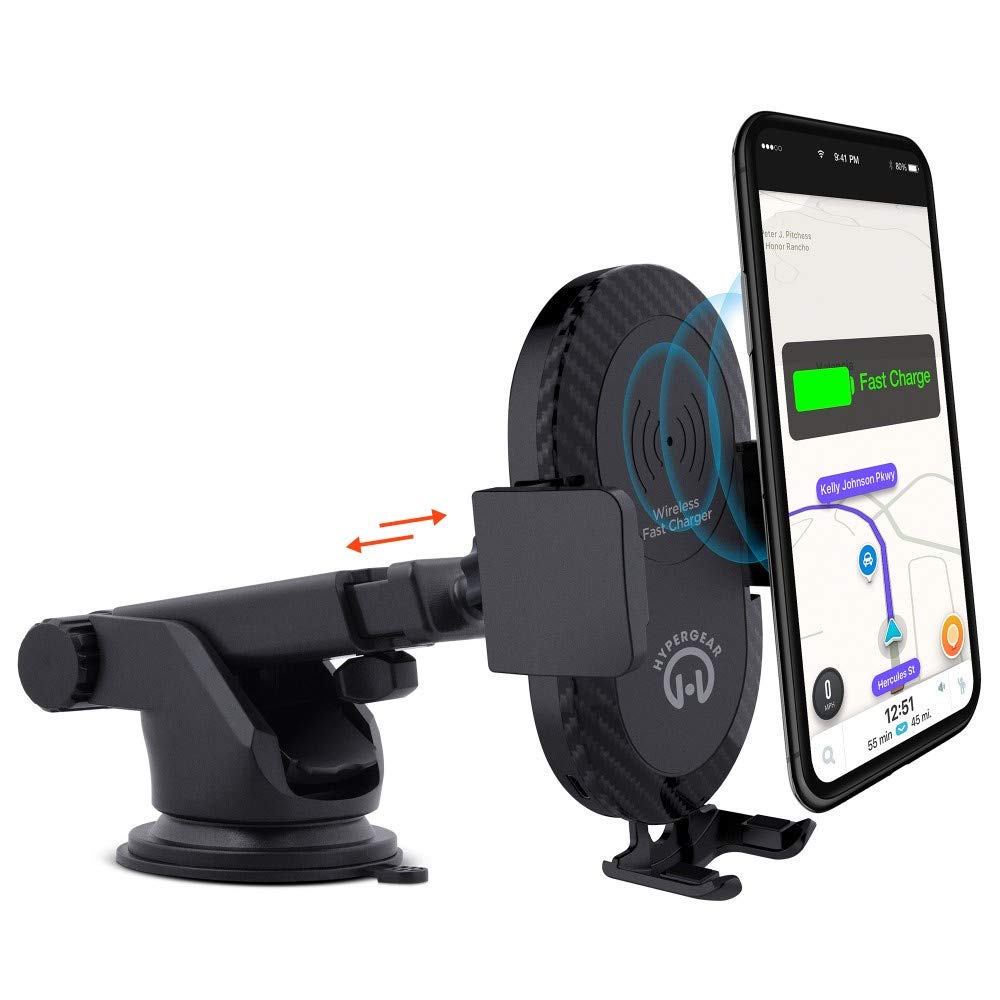
This manual provides instructions for the HyperGear HYG-14590 Wireless Fast Charging Car Dash Mount. This device is designed to securely hold and wirelessly charge Qi-enabled smartphones in your vehicle, offering hands-free navigation and communication.
Ábhar an Phacáiste
Deimhnigh go bhfuil na míreanna uile i láthair sa phacáiste:
- Telescopic Mount
- Fast Charge Car Adapter
- Cábla Micrimhilseogra USB
- Lámhleabhar Úsáideora (an doiciméad seo)
Treoracha Socraithe
- Roghnaigh Suíomh Gléasta: Select a clean, flat surface on your dashboard or windshield. Ensure the location does not obstruct your view nó cur isteach ar rialuithe feithicle.
- Ceangail an Sliabh:
- Clean the chosen surface thoroughly.
- Remove the protective film from the sticky gel suction cup.
- Brúigh an cupán súite go daingean ar an dromchla.
- Engage the 2-step locking lever to secure the mount in place.
- Cumhacht Ceangail:
- Insert the Micro USB cable into the charging port on the mount.
- Plug the other end of the Micro USB cable into the Fast Charge Car Adapter.
- Insert the Fast Charge Car Adapter into your vehicle's 12V power outlet (cigarette lighter socket).
- Adjust the Mount:
- Extend the telescopic arm up to 8 inches as needed.
- Pivot the arm up to 230° to achieve the desired angle.
- Rotate the cradle head 360° to switch between portrait and landscape orientation.
Treoracha Oibriúcháin
- Ag Cur Do Ghléas: Gently open the adjustable padded cradle grips and place your Qi-enabled smartphone into the mount. The grips will automatically secure the device.
- Muirearú Gan Sreang: Once your device is placed in the mount and the mount is powered, wireless charging will begin automatically. Ensure your device is centered on the charging pad for optimal performance.
- Do Ghléas á Bhaint: To remove your device, gently open the cradle grips and lift your smartphone out.
- Úsáid Gan Lámha: The mount allows for hands-free use of navigation, calls, and other applications while driving. Always ensure your device is positioned safely and does not obstruct your view den bhóthar.
Cothabháil
- Glanadh: Use a soft, dry cloth to clean the mount. Do not use abrasive cleaners or solvents.
- Cúram Cupán Súchán: If the sticky gel suction cup loses adhesion, rinse it with warm water and let it air dry. This can help restore its stickiness.
- Stóráil: Nuair nach bhfuil sé in úsáid ar feadh tréimhsí fada, stóráil an gléas in áit fhionnuar tirim amach ó sholas díreach na gréine.
Fabhtcheartú
- Gléas gan mhuirearú gan sreang:
- Ensure your smartphone is Qi-enabled or has a Qi-enabled receiver.
- Verify the Micro USB cable is securely connected to both the mount and the car adapter.
- Check that the car adapter is firmly seated in the vehicle's 12V power outlet.
- Ensure your phone is centered on the charging pad of the mount.
- Bain aon chásanna tiubha fóin a d'fhéadfadh cur isteach ar mhuirearú gan sreang.
- Mount not sticking to surface:
- Clean the dashboard or windshield surface thoroughly before attachment.
- Ensure the 2-step locking lever is fully engaged.
- Rinse the sticky gel suction cup with warm water and air dry to restore adhesion.
- Avoid mounting on textured or porous surfaces.
- Phone not held securely:
- Ensure the adjustable padded cradle grips are properly closed around your device.
- Verify that your phone's size is compatible with the mount's adjustable range.
Sonraíochtaí
| Uimhir Mhúnla | HYG-14590 |
| Branda | HyperGear |
| Teicneolaíocht Nascachta | Gan sreang |
| Cineál nascóirí | USB, gan sreang |
| Gléasanna Comhoiriúnacha | Cellular Phones (Qi-enabled) |
| Múnlaí Fón Comhoiriúnach | iPhone X/8/8 Plus, Samsung Galaxy S9/S9+, S8/S8+, Note 8, and other Qi-enabled devices |
| Gné Speisialta | Muirearú Tapa, Muirearú Gan Sreang |
| Wattage | 10 vata |
| Foinse Cumhachta | Vehicle 12V Power Outlet |
| Cineál Príomh-Ceanglóir Cumhachta | USB Type C (for car adapter) |
| Meáchan Mír | 11.84 unsa |
| Ábhar Imfhálú | Gel (suction cup) |
| Dath | Dubh |
| UPC | 633755145902 |
Faisnéis Bharántas
This HyperGear product comes with a bharántas 30-lá from the date of purchase. This warranty covers manufacturing defects. Please retain your proof of purchase for warranty claims. For further details or to initiate a claim, please refer to the HyperGear official websuíomh nó déan teagmháil lena tacaíocht do chustaiméirí.
Tacaíocht do Chustaiméirí
For technical assistance, product inquiries, or warranty support, please visit the official HyperGear websuíomh nó déan teagmháil lena roinn seirbhíse do chustaiméirí. Is féidir faisnéis teagmhála a fháil de ghnáth ar phacáistiú an táirge nó ar láithreacht oifigiúil ar líne an bhranda.