
Compustar 1WG15R-FM
Lámhleabhar Treorach Cianrialtáin Athsholáthair 1-Bhealach Compustar 1WG15R-FM
Model: 1WG15R-FM
1. Tharview
This manual provides instructions for the Compustar 1WG15R-FM 1-Way Replacement Remote. This remote control is designed to replace an existing 1WG15R-FM 2-Way Remote and is compatible with Compustar ANT-2WFMX antenna systems. It enables remote functions such as locking, unlocking, trunk release, and remote engine start, depending on the features installed in your vehicle's system.
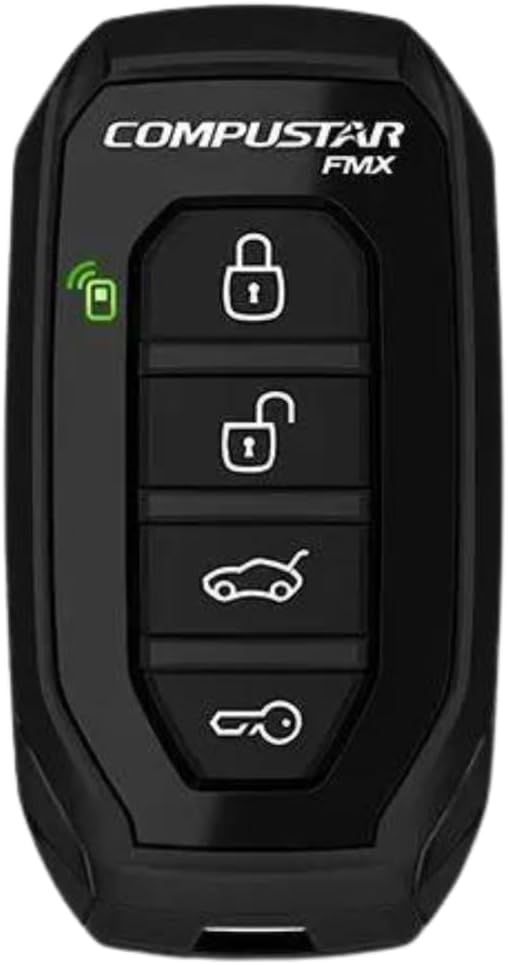
Fíor 1: Tosaigh view of the Compustar 1WG15R-FM remote control.
2. Comhoiriúnacht
It is crucial to verify compatibility before purchasing and attempting to use this replacement remote. This remote is specifically designed to replace a Compustar Model 1WG15R-FM 2-Way Remote. It is nach bhfuil compatible with the 1WG15R-AM model, even if they appear visually similar. This remote requires a compatible Compustar ANT-2WFMX antenna system to function correctly.
- Required Existing Remote: Compustar Model 1WG15R-FM 2-Way Remote
- Required Antenna System: Compustar ANT-2WFMX
- Incompatible Model: Compustar 1WG15R-AM
3. Socrú
The Compustar 1WG15R-FM remote typically requires programming to your vehicle's Compustar system. The exact programming steps may vary depending on your vehicle and the specific Compustar system installed. It is highly recommended to consult a professional installer or refer to the detailed programming guide for your specific Compustar system.
3.1. General Programming Information
While specific steps are best obtained from your installer or the system's manual, general programming often involves placing the vehicle in a programming mode and then pressing buttons on the new remote. If you are replacing an existing remote, all existing remotes may need to be reprogrammed at the same time.
3.2. Flashing the iDatalink BLADE Module (If Applicable)
If your Compustar system utilizes an iDatalink BLADE remote start/security bypass module, it may require flashing or updating its firmware for proper operation or to enable specific features. This process typically involves connecting the module to a computer with internet access and using the iDatalink Weblink Updater software.
Video 1: This video demonstrates how to flash and update an iDatalink BLADE module and Compustar controller. This process is typically performed by a professional installer to ensure compatibility and proper functionality of the remote start system.
4. Treoracha Oibriúcháin
The Compustar 1WG15R-FM remote features a simple four-button layout for controlling your vehicle's functions. The specific actions performed by each button may vary slightly based on your vehicle's system configuration. Always ensure you are within the remote's operating range (up to 3000 feet) for reliable communication.

Fíor 2: Taobh view of the Compustar 1WG15R-FM remote control, highlighting the four function buttons.
4.1. Feidhmeanna Bunúsacha
- Glasáil: Brúigh an Glasáil button (usually the top button with a closed padlock icon) once to lock your vehicle's doors.
- Díghlasáil: Brúigh an Díghlasáil button (usually the second button with an open padlock icon) once to unlock your vehicle's doors.
- Bunscaoileadh: Brúigh agus coinnigh an Trucail button (usually the third button with a car trunk icon) for approximately 3 seconds to open your vehicle's trunk or hatch.
- Tosaigh/Stad Cianda: Brúigh agus coinnigh an Tosaigh cianda button (usually the bottom button with a key icon or car icon) for approximately 3 seconds to remotely start or stop your vehicle's engine.
4.2. Remote Start Operation Details
When using the remote start function, the vehicle's engine will typically run for a preset duration (e.g., 15 or 25 minutes) as configured by your installer. To drive the vehicle after remote starting:
- Brúigh an Díghlasáil button on your remote to unlock the doors.
- Enter the vehicle and insert your key into the ignition.
- Turn the key to the "ON" or "RUN" position (do not turn to "START").
- Press the brake pedal. The remote start system will disengage, and the vehicle will transfer to key control.
If the brake pedal is pressed before the key is turned to the "ON" position, the engine may shut off. In this case, simply start the vehicle with the key as you normally would.
Video 2: This video illustrates the benefits of using Compustar long-range remote starters for warming up or cooling down your vehicle. It highlights the convenience of starting your vehicle remotely to achieve a comfortable cabin temperature before entry.
Video 3: This video demonstrates the basic operation of a Compustar remote, including locking, unlocking, trunk release, and remote engine start. While the remote shown is a Compustar Prime T9, the fundamental button presses and functions are generally applicable to other Compustar remotes like the 1WG15R-FM.
5. Cothabháil
The Compustar 1WG15R-FM remote control is designed for durability. To ensure its longevity and optimal performance:
- Athsholáthar Ceallra: The remote uses a standard coin-cell battery. When the remote's range decreases or it becomes unresponsive, replace the battery. Refer to your system's full manual for specific battery type and replacement instructions.
- Glanadh: Wipe the remote with a soft, dry cloth. Avoid using harsh chemicals or abrasive cleaners.
- Cosaint: Protect the remote from extreme temperatures, direct sunlight, and moisture. Avoid dropping the remote or subjecting it to strong impacts.
6. Fabhtcheartú
If you experience issues with your Compustar 1WG15R-FM remote, consider the following troubleshooting steps:
- Cianda Gan Freagra:
- Seiceáil an ceallraí. Cuir ceann nua ina áit más gá.
- Ensure you are within the remote's operating range (up to 3000 feet). Obstacles and interference can reduce range.
- Verify the vehicle's main Compustar system is powered and functioning.
- Vehicle Does Not Remote Start:
- Ensure all doors, hood, and trunk are securely closed.
- Check if the vehicle's parking brake is engaged (if required by your system).
- Confirm the vehicle is in park (for automatic transmissions) or in reservation mode (for manual transmissions).
- If the remote start was previously working, try reprogramming the remote to the system.
- Oibríocht Neamh-chomhsheasmhach:
- Environmental factors (e.g., strong radio interference, large metal structures) can affect performance. Try operating the remote in a different location.
- Ensure the antenna on your vehicle is not obstructed or damaged.
For persistent issues, it is recommended to contact a certified Compustar installer or technical support.
7. Sonraíochtaí
| Gné | Sonraigh |
|---|---|
| Uimhir Mhúnla | 1WG15R-FM (also referred to as 1WG15RFM) |
| Branda | Compustar |
| Cineál | 1-Way Frequency Modulation (FMX) Replacement Remote Control Transmitter |
| Raon Oibriúcháin | Suas le 3000 troigh |
| Compatible Antenna | Compustar ANT-2WFMX |
| Toisí | 4.75 x 2.5 x 1.5 orlach |
| Meáchan | 1.44 unsa |
| Dath | Dubh |
| Gné Speisialta | Dearadh eirgeanamaíochta |
| Uasfheistí Tacaithe | 1 (in aghaidh an chianrialtáin) |
8. Barántas & Tacaíocht
For detailed warranty information and technical support, please refer to the official Compustar website or contact your authorized Compustar dealer. Warranty terms typically cover manufacturing defects and may vary. Keep your proof of purchase for warranty claims.
oifigeach Websuíomh: www.compustar.com
Tacaíocht Theicniúil: Consult your product packaging or the official websuíomh gréasáin le haghaidh an fhaisnéis teagmhála is déanaí.
Ask a question about this manual
Ask about setup, troubleshooting, compatibility, parts, safety, or missing instructions. Manuals+ will review the question and use this page’s manual context to help answer it.