
Réamhrá
This manual provides comprehensive instructions for the Sharp EN2A27S TV Remote Control. It covers essential information regarding setup, operation, maintenance, and troubleshooting to ensure optimal performance with your compatible Sharp Smart LCD HDTV Television.
Ábhar an Phacáiste
- Sharp EN2A27S TV Remote Control
Note: Batteries are not included and must be purchased separately. Two AAA batteries are required.
Socrú
Suiteáil Battery
- Aimsigh an urrann ceallraí ar chúl an chianrialtáin.
- Sleamhnaigh clúdach urrann na ceallraí síos chun é a oscailt.
- Cuir isteach dhá chadhnraí AAA, ag cinntiú go bhfuil na críochfoirt dhearfacha (+) agus dhiúltacha (-) ailínithe i gceart leis na marcanna taobh istigh den urrann.
- Sleamhnaigh clúdach urrann na ceallraí ar ais ina áit go dtí go gcliceálann sé go daingean.
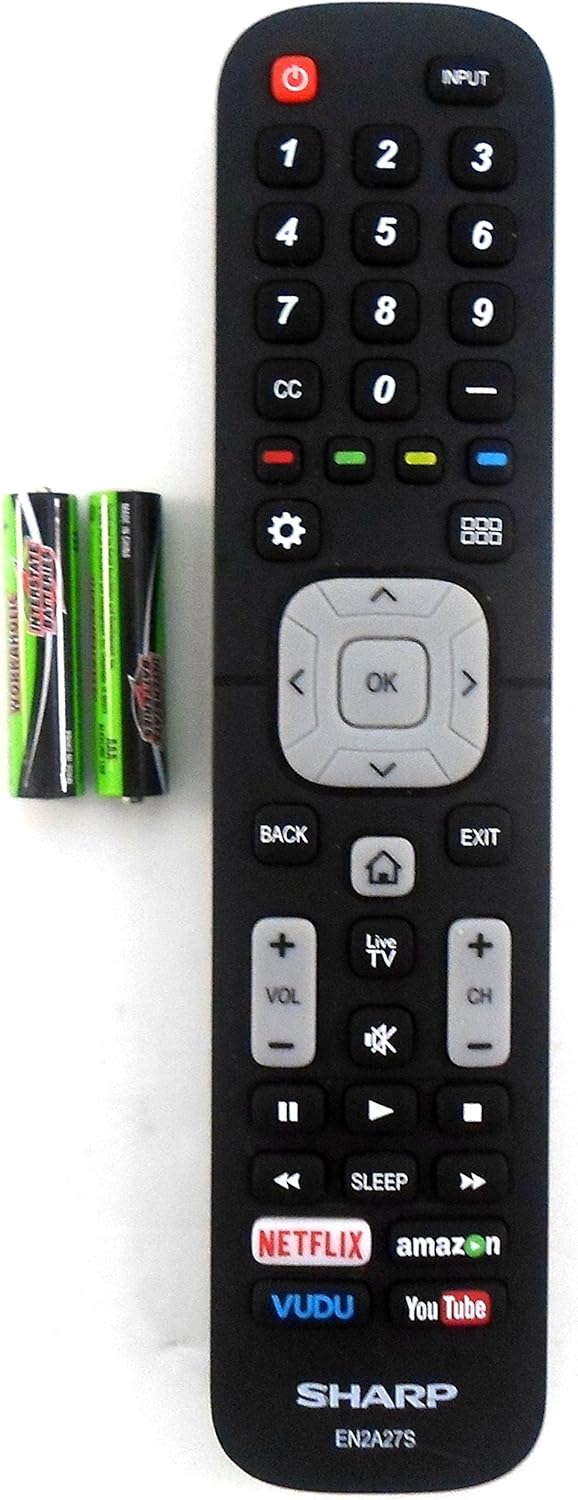
Image: The Sharp EN2A27S remote control shown alongside two AAA batteries, indicating where batteries are inserted for operation.
The remote control is now ready for use with your compatible Sharp TV. No programming is typically required for original Sharp remote controls.
Treoracha Oibriúcháin
The Sharp EN2A27S remote control provides direct access to various functions of your Sharp Smart LCD HDTV. Familiarize yourself with the button layout for efficient operation.

Íomhá: Mionsonraithe view of the lower portion of the Sharp EN2A27S remote, showcasing dedicated buttons for Netflix, Amazon, Vudu, and YouTube.
Príomhfheidhmeanna:
- Cumhacht (Cnaipe Dearg): Casann sé an teilifís air nó as.
- Ionchur: Selects the video input source (e.g., HDMI 1, HDMI 2, AV).
- Líon Cnaipí (0-9): Roghnaigh bealaí teilifíse go díreach.
- CC (Fotteidil Dhúnta): Cuireann sé fotheidil dhúnta ar siúl nó as.
- Cnaipí Datha (Dearg, Glas, Buí, Gorm): Used for specific functions within menus or applications, as indicated on the TV screen.
- Socruithe (Deilbhín Gear): Accesses the TV's main settings menu.
- Grid Icon: Opens the TV's smart hub or app launcher.
- Ceap Loingseoireachta (Suas, Síos, Ar Chlé, Ar Dheis, Ceart go leor): Nascleanúint trí roghchláir agus dearbhú roghanna.
- Ar ais: Filleann sé ar an scáileán nó roghchlár roimhe seo.
- Scoir: Fágann sé an roghchlár nó an feidhmchlár reatha.
- Home (House Icon): Filleann sé ar scáileán baile an teilifíse.
- Teilifís beo: Switches to live television broadcast.
- Imleabhar Suas / Síos (VOL +/-): Coigeartaíonn sé leibhéal toirte an teilifíse.
- Mute (Speaker Icon): Mutes or unmutes the TV's audio.
- Cainéal Suas/Síos (CH +/-): Athraíonn sé bealaí teilifíse.
- Rialuithe Athsheinm (Seinn, Sos, Mear Ar Aghaidh, Athchasadh, Stad): Rialaíonn athsheinm na meán.
- Codladh: Socraíonn sé lasc ama don teilifís chun é a mhúchadh go huathoibríoch.
- Dedicated App Buttons (Netflix, Amazon, Vudu, YouTube): Provides direct access to these streaming applications.
Comhoiriúnacht
The Sharp EN2A27S TV Remote Control is compatible with the following Sharp Smart LCD HDTV Television models:
55H6B, 50H7GB, 50H6B, N6200U, LC-60N6200U, LC-60N7000U, LC-65N7000U, LC-43N7000U, LC-50N7000U, LC-55N7000U, LC-40N5000U, LC-43N5000U, LC-43N6100U, LC-50N5000U, LC-50N6000U, LC-55N620CU, LC-55N5300U, LC-55N6000U, LC-60N5100U, LC-65N5200U, LC-65N6200U, LC-65N9000U, LC-75N620U, LC-75N8000U.
Cothabháil
Glanadh:
- Glan an cianrialtán le héadach bog, tirim.
- Do not use liquid cleaners, sprays, or abrasive materials, as these may damage the remote's surface or internal components.
Cúram Battery:
- Replace batteries when the remote's responsiveness decreases.
- Bain na cadhnraí amach mura n-úsáidfear an cianrialtán ar feadh tréimhse fada chun sceitheadh a chosc.
- Déan cadhnraí úsáidte a dhiúscairt de réir rialacháin áitiúla.
Fabhtcheartú
Cianda Gan Freagra:
- Seiceáil Cadhnraí: Ensure batteries are inserted correctly with the correct polarity (+/-). Replace old or depleted batteries with new ones.
- Líne Radhairc: Ensure there is a clear line of sight between the remote control and the TV's infrared sensor. Obstructions can block the signal.
- Braiteoir cianda: Verify that the TV's remote sensor is not blocked or dirty.
- Cumhacht teilifíse: Deimhnigh go bhfuil an teilifís ar siúl agus nach bhfuil sé i mód fuireachais.
Cnaipí Nach bhfuil ag obair:
- Individual Button Test: If only specific buttons are not working, try pressing them firmly. If the issue persists, the remote may require replacement.
- Cianda Glan: Dust or debris under buttons can sometimes cause issues. Refer to the cleaning instructions in the Maintenance section.
Sonraíochtaí
| Uimhir Mhúnla | EN2A27S |
| Internal Item Number | 8541714996 |
| Branda | Géar |
| Toisí Táirge | 8 x 2 x 0.5 orlach |
| Meáchan Mír | 2.89 unsa |
| Dath | Dubh |
| Líon Uasta na nGléasanna Tacaithe | 1 |
| Gléasanna Comhoiriúnacha | Teilifís |
| Monaróir | OEM Sharp |
Tacaíocht
For further assistance or inquiries regarding your Sharp EN2A27S TV Remote Control, please refer to the support resources provided by Sharp or your television's original documentation. You may also visit the official Sharp website for product information and customer service contacts.