
1. Táirge Tharview
The Sharp EL-531TG-GY is a scientific calculator designed for students and professionals requiring advanced mathematical functions. It features a 2-line display and Multi-Line Playback, facilitating the input and review of complex equations. This model is suitable for general math, algebra, geometry, trigonometry, statistics, biology, chemistry, and general science applications.
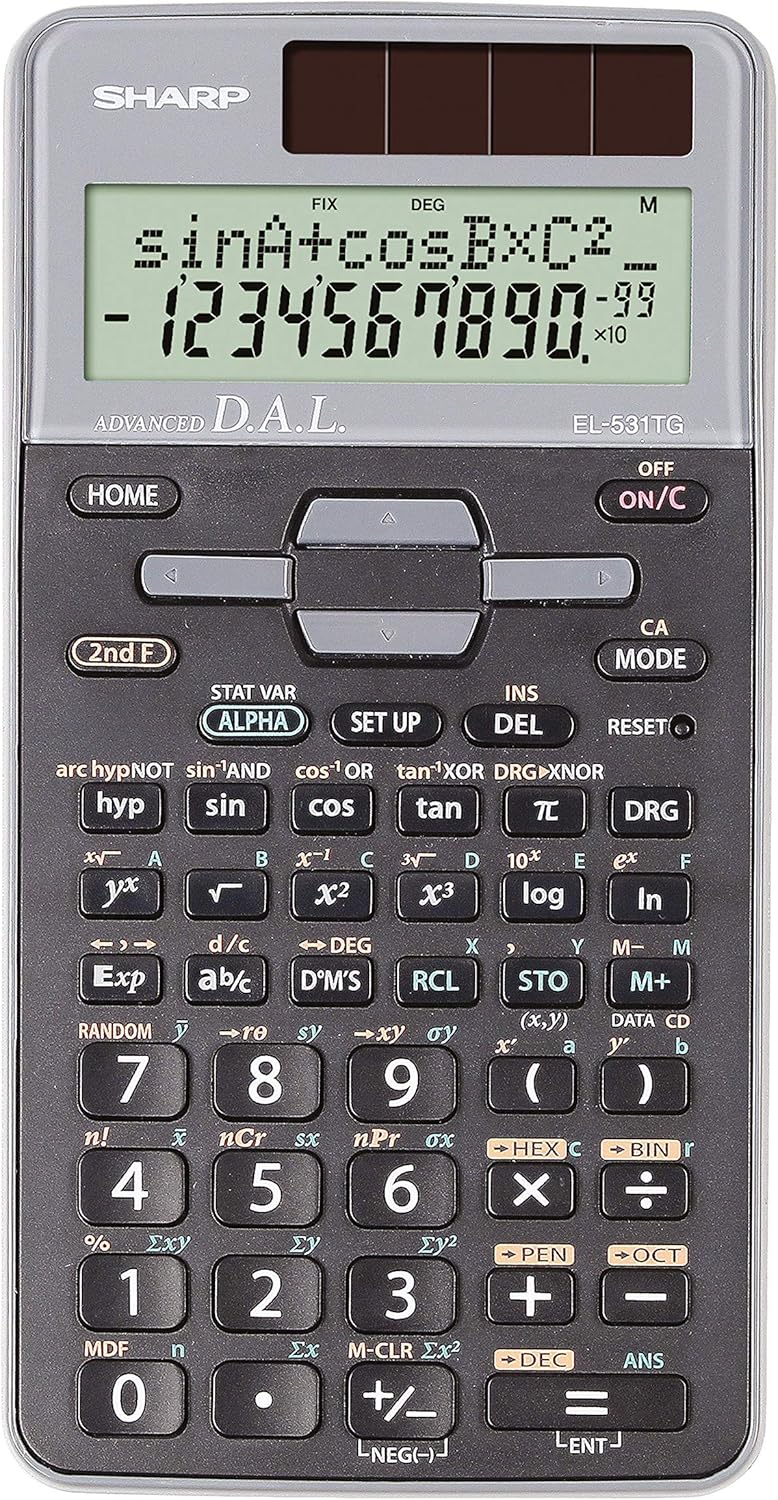
Fíor 1: Tosaigh view of the Sharp EL-531TG-GY Scientific Calculator, showing the display, keypad, and solar panel.
2. Socrú agus Úsáid Tosaigh
2.1 Foinse Cumhachta
The EL-531TG-GY calculator operates using both solar power and a single LR44 button cell battery. The solar panel provides power in well-lit environments, while the battery ensures operation in low-light conditions or when solar power is insufficient. An LR44 battery is included with the calculator.
2.2 Ag Casadh air/As As
- Chun an t-áireamhán a chasadh ON, brúigh an AR/C eochair.
- Chun an t-áireamhán a chasadh AS, brúigh an 2nd F eochair ina dhiaidh sin ag an AS key (which is typically the same as AR/C).
2.3 Initial Display Settings
Upon first use or after a reset, the calculator will typically default to certain settings (e.g., DEG for angle units). Refer to Section 3.3 for details on changing mode settings.
3. Treoracha Oibriúcháin
3.1 Oibríochtaí Bunúsacha Uimhríochta
Cuir isteach uimhreacha ag baint úsáide as an eochaircheap uimhriúil. Bain úsáid as an +, -, ×, agus ÷ keys for addition, subtraction, multiplication, and division, respectively. Press = chun an toradh a fháil.
3.2 Feidhmeanna Eolaíochta
The calculator performs over 273 advanced scientific functions. Many functions are accessed by pressing the 2nd F key before the desired function key.
- Feidhmeanna Triantánacha: Úsáid peaca, cos, tan. Inverse functions (sin⁻¹, cos⁻¹, tan⁻¹) are accessed via 2nd F.
- Feidhmeanna Logartamacha: Úsáid logáil (base 10) and ln (logartam nádúrtha).
- Cumhachtaí agus Fréamhacha: Úsáid x², √, x³, ³√.
- Codáin: Bain úsáid as an dí-chomhshó key for fraction input and conversion.
3.3 Mode Settings (DEG/RAD/GRAD)
To change the angle unit mode (Degrees, Radians, Gradians):
- Brúigh an DRG eochair.
- Brúigh arís agus arís eile DRG to cycle through DEG (Degrees), RAD (Radians), and GRAD (Gradians). The current mode is indicated on the display.
3.4 Feidhmeanna Cuimhne
Tá feidhmeanna cuimhne san áireamhán chun luachanna a stóráil agus a thabhairt chun cuimhne.
- STO (Siopa): Brúigh STO followed by a variable key (e.g., A, B) to store the displayed value.
- RCL (Athghairm): Brúigh RCL followed by the variable key to recall the stored value.
- M+ (Cuimhne Móide): Cuireann sé an luach taispeánta leis an gcuimhne neamhspleách.
- M- (Cuimhne Lúide): Subtracts the displayed value from the independent memory.
3.5 Multi-Line Playback
The 2-line display allows for Multi-Line Playback, enabling users to review previous calculations and expressions. Use the directional arrow keys (up/down) to scroll through past entries and results. This feature is useful for checking work or re-using parts of previous calculations.
4. Cothabháil
4.1 Glanadh
To clean the calculator, wipe the surface gently with a soft, dry cloth. Do not use abrasive cleaners, solvents, or excessive moisture, as these can damage the display or internal components.
4.2 Athsholáthar Ceallra
The calculator uses one LR44 button cell battery. If the display becomes dim or erratic in low-light conditions, the battery may need replacement. To replace the battery:
- Cinntigh go bhfuil an t-áireamhán múchta.
- Aimsigh urrann na ceallraí ar chúl an áireamháin.
- Oscail clúdach an urrann go cúramach.
- Bain an seancheallraí LR44 agus cuir ceann nua isteach, ag cinntiú go bhfuil an polaraíocht cheart (+/-).
- Dún an clúdach urrann ceallraí go daingean.
4.3 Stóráil
When not in use, store the calculator in a cool, dry place away from direct sunlight and extreme temperatures. The hard cover included with the calculator provides protection from scratches and minor impacts.
5. Fabhtcheartú
5.1 Saincheisteanna Taispeána
- Taispeántas Folamh nó Doiléir: Ensure sufficient light for the solar panel. If the issue persists, replace the LR44 battery.
- Erratic Display: This may indicate a low battery. Replace the LR44 battery.
5.2 Torthaí Mícheart
- Check Mode Settings: Verify that the angle unit (DEG, RAD, GRAD) is set correctly for trigonometric calculations.
- Input Error: Review your input using the Multi-Line Playback feature to ensure the expression was entered correctly.
- Memory Contents: If using memory functions, ensure the stored values are correct.
5.3 Calculator Not Responding
If the calculator becomes unresponsive, try performing a reset. Locate the ATHDHÉANAMH button (often a small recessed button requiring a thin object like a paperclip to press). Pressing this button will clear all memory and return the calculator to its factory default settings.
6. Sonraíochtaí

Fíor 2: Tosaigh view of the Sharp EL-531TG-GY Scientific Calculator, illustrating its dimensions.
| Gné | Cur síos |
|---|---|
| Uimhir Mhúnla | SH-EL531TGGY |
| Cineál Taispeána | 2-line LCD with Multi-Line Playback |
| Feidhmeanna | Over 273 advanced scientific functions |
| Foinse Cumhachta | Gréine agus 1 x ceallraí LR44 (san áireamh) |
| Ábhar | Plaisteach |
| Toisí (L x W x H) | 16.1 x 8 x 1.5 cm (thart.) |
| Meáchan | 100 g (thart.) |

Fíor 3: Taobh view of the Sharp EL-531TG-GY Scientific Calculator, showing its slim profile.
7. Barántas agus Tacaíocht
7.1 Faisnéis Bharántas
This product is covered by a manufacturer's warranty. Please refer to the warranty card included with your purchase or visit the official Sharp websuíomh gréasáin le haghaidh téarmaí agus coinníollacha bharántais mionsonraithe a bhaineann go sonrach le do réigiún.
7.2 Tacaíocht do Chustaiméirí
For technical assistance, troubleshooting not covered in this manual, or service inquiries, please contact Sharp customer support. Contact information can typically be found on the Sharp official weban suíomh nó ar phacáistiú an táirge.