
1. Réamhrá
This manual provides essential information for the safe and efficient operation of your Lenco L-30BK Belt Drive Turntable. Please read these instructions thoroughly before using the device and retain them for future reference. The Lenco L-30BK is designed for playing vinyl records at 33 and 45 RPM, featuring a built-in preamplifier and USB connectivity for digitizing your vinyl collection.
2. Faisnéis Sábháilteachta
- Foinse Cumhachta: A chinntiú go bhfuil an soláthar cumhachta voltage matches the requirements specified on the unit. Use only the provided power adapter.
- Uisce agus Taise: Ná nochtaigh an t-aonad do bháisteach, taise, ná leachtanna ag sileadh/splancadh. Ná cuir rudaí atá lán le leachtanna, amhail vásaí, ar an aonad.
- Aeráil: Cinntigh go bhfuil aeráil leordhóthanach ann. Ná bac na hoscailtí aerála.
- Teas: Coinnigh an t-aonad ar shiúl ó fhoinsí teasa amhail radaitheoirí, cláir teasa, sornáin, nó fearais eile (lena n-áirítear ampleachtaitheoirí) a tháirgeann teas.
- Glanadh: Díphlugáil an t-aonad ón asraon balla sula ndéantar é a ghlanadh. Bain úsáid as éadach bog, tirim. Ná húsáid glantóirí leachtacha ná glantóirí aerasóil.
- Ag seirbhísiú: Ná déan iarracht an táirge seo a sheirbheáil ort féin. Déan gach seirbhísiú a tharchur chuig pearsanra seirbhíse cáilithe.
- Socrúchán: Place the turntable on a stable, level surface to prevent vibrations and ensure proper playback.
3. Ábhar Pacáiste
Seiceáil le do thoil go bhfuil na míreanna go léir atá liostaithe thíos san áireamh sa phacáiste:
- Lenco L-30BK Turntable Unit
- Clúdach deannaigh
- Ardán
- Creasa Tiomáint
- Sleamhnán
- Cuibheoir Cumhachta AC
- Cábla USB
- Cábla Fuaime RCA
- Lámhleabhar Treoraithe
- Pick-up Needle (pre-installed on cartridge)
4. Táirge Tharview
Familiarize yourself with the components of your Lenco L-30BK turntable.

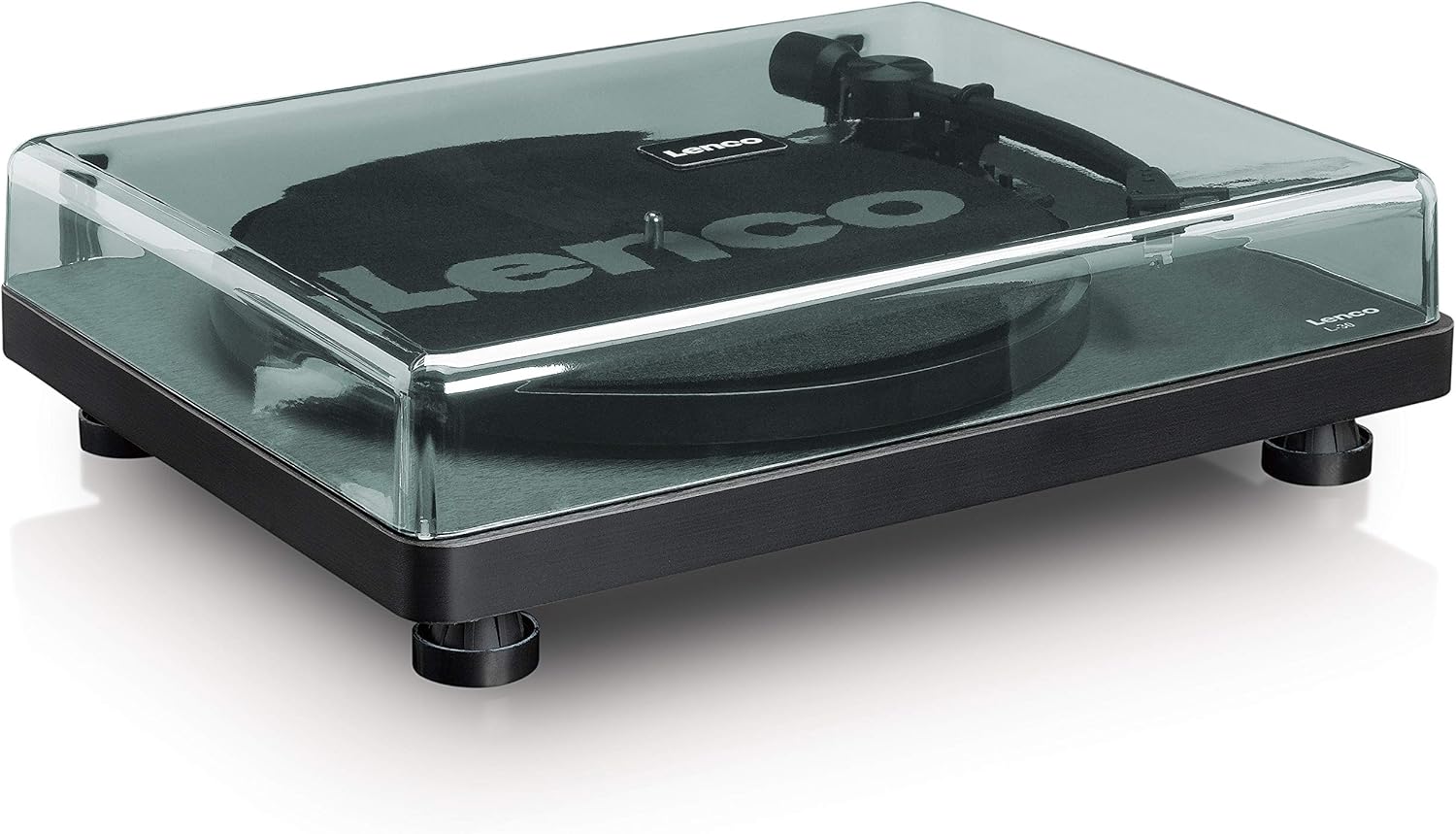
Fíor 4.1: Tosaigh view of the Lenco L-30BK Turntable with the dust cover open, revealing the main components including the platter, tonearm, and control buttons.

Fíor 4.2: Rear panel connections of the Lenco L-30BK, including RCA audio outputs (L/R), USB port, DC12V power input, and the main power switch.
Príomh-chomhpháirteanna:
- Platter: The circular platform where records are placed.
- Tonearm: Holds the cartridge and stylus, which reads the grooves of the record.
- Cartridge and Stylus: Converts physical vibrations into electrical signals. The L-30BK features a Movable Magnet Sensor (MMC) with an individually replaceable stylus.
- Roghnóir Luas: Switch to select between 33 and 45 RPM playback speeds.
- Múchadh Auto: Automatically stops the platter rotation at the end of a record.
- Clúdach deannaigh: Cosnaíonn sé an rothchlár ó dheannach nuair nach bhfuil sé in úsáid.
- RCA Audio Outputs (L/R): Chun ceangal le cábla seachtrach ampardaitheoir nó cainteoirí gníomhacha.
- USB Port: For connecting to a computer to digitize vinyl records.
- Ionchur Cumhachta DC12V: Chun an adapter cumhachta a nascadh.
5. Socrú
5.1 Díphacáil agus Socrúchán
- Bain an rothchlár as a phacáistiú go cúramach.
- Place the unit on a stable, level surface, away from direct sunlight, heat sources, and excessive dust or vibrations.
- Suiteáil an clúdach deannaigh trína insí a ailíniú leis na sliotáin ar chúl an chlár rothlach.

Fíor 5.1: The Lenco L-30BK Turntable with its protective dust cover closed, ready for placement.
5.2 Suiteáil Pláta agus Crios
- Cuir an pláta ar fhearsaid an chlár rothlach.
- Locate the drive belt, typically found underneath the platter or separately packaged.
- Carefully stretch the drive belt around the motor pulley and the inner rim of the platter. Ensure the belt is not twisted.
- Cuir an mata sleamhnáin ar bharr an phláta.
5.3 Ceangal Fuaime
The L-30BK has a built-in preamplifier, allowing direct connection to most audio systems.
- Connect the RCA audio cable (red for right channel, white for left channel) from the AUDIO OUT jacks on the rear of the turntable to the LINE IN or AUX IN jacks on your ampardaitheoir nó cainteoirí gníomhacha.
5.4 Ceangal Cumhachta
- Connect the DC12V power adapter to the DC12V POWER input on the rear of the turntable.
- Breiseán an t-oiriúntóir cumhachta isteach i soicéad balla oiriúnach.
5.5 USB Connection (for Digitization)
- To digitize your vinyl records, connect the USB cable from the USB port on the rear of the turntable to an available USB port on your computer (PC or Mac).
6. Treoracha Oibriúcháin
6.1 Cumhachtú Amach/Amach
- Flip the ON/OFF switch on the rear panel to the 'ON' position to power on the turntable.
- Flip the switch to 'OFF' when not in use.
6.2 Taifead a Sheinm
- Place a record on the platter, ensuring it is centered.
- Select the appropriate speed (33 or 45 RPM) using the speed selector switch. For 45 RPM singles, place the included adapter on the spindle if needed.
- Ardaigh an lámh ton ag baint úsáide as an luamhán ciú.
- Manually position the tonearm over the desired starting groove of the record.
- Gently lower the tonearm using the cueing lever. The stylus will descend onto the record, and playback will begin.
- At the end of the record, the auto shut-off function will stop the platter rotation. Lift the tonearm and return it to its rest.

Fíor 6.1: Proper technique for lowering the tonearm onto a record for playback.
Fíor 6.2: mionsonraithe view of the Movable Magnet Sensor (MMC) cartridge and stylus assembly.
6.3 Digitizing Records via USB
The L-30BK allows you to convert your vinyl records into digital audio files ag baint úsáide as ríomhaire.
- Ceangail an seinnteoir le do ríomhaire ag baint úsáide as an gcábla USB a sholáthraítear.
- Download and install audio recording software such as Audacity (available online for free) on your computer.
- Open the recording software and select the USB Audio Device as the input source.
- Start recording in the software, then begin playing your record on the turntable as described in section 6.2.
- Once the record finishes, stop the recording in the software and save your digitized audio file.
7. Cothabháil
7.1 Glanadh an Chláir Tharraingthe
- Díphlugáil an seinnteoir rothlach ón asraon cumhachta i gcónaí sula ndéantar é a ghlanadh.
- Use a soft, dry, lint-free cloth to wipe the cabinet and dust cover.
- Ná húsáid glantóirí scríobacha, céirithe ná tuaslagóirí mar d’fhéadfadh siad damáiste a dhéanamh don chríoch.
7.2 Stylus Care and Replacement
- The stylus is a delicate component. Avoid touching it with your fingers.
- Clean the stylus regularly using a soft brush, gently brushing from back to front.
- The stylus should be replaced after approximately 300-500 hours of playback, or if you notice a degradation in sound quality.
- To replace the stylus, carefully pull the old stylus assembly forward and down from the cartridge. Insert the new stylus assembly by pushing it upwards and backwards into the cartridge until it clicks into place.
8. Fabhtcheartú
If you encounter problems with your turntable, refer to the following common issues and solutions:
| Fadhb | Cúis Féideartha | Réiteach |
|---|---|---|
| Gan chumhacht | Power adapter not connected; Power switch off; Wall outlet faulty. | Ensure power adapter is securely connected; Turn power switch to 'ON'; Test wall outlet with another device. |
| Gan fuaim nó toirt íseal | RCA cables not connected correctly; Amplifier/speakers off or volume low; Input selected incorrectly on amplitheoir. | Check RCA cable connections; Turn on amplifier/speakers and adjust volume; Select correct input source on your audio system. |
| Fuaime saobhadh | Dirty stylus; Damaged stylus; Dirty record; Turntable not on a stable surface. | Clean the stylus; Replace the stylus if damaged; Clean the record; Ensure turntable is on a stable, level surface. |
| Scipeáil taifead | Dirty or scratched record; Stylus worn or damaged; Turntable not level; External vibrations. | Clean the record; Replace the stylus; Ensure turntable is level; Place turntable away from sources of vibration. |
| Fadhbanna taifeadta USB | USB cable not connected; Incorrect input selected in software; Software not installed. | Check USB cable connection; Select 'USB Audio Device' as input in recording software; Install Audacity or similar software. |
9. Sonraíochtaí
| Ainm an tSamhail | L-30BK |
| Branda | Lenco |
| Cineál Tiomána | Céide Creasa |
| Luasanna | 33 1/3, 45 RPM |
| Réamhamplitheoir | Tógtha-i |
| Cineál Cartúis | Movable Magnet Sensor (MMC) |
| Nascacht | USB, RCA Audio Out |
| Uath-mhúchadh | Tá |
| Trastomhas Platter | 300 mm |
| Ábhar | Wood (Enclosure) |
| Dath | Dubh |
| Meáchan Mír | 3.28 cileagram |
| Toisí (L x W x H) | 41L x 32W x 12H ceintiméadar |
| -Comhartha-go Torann Cóimheas | 60 dB |
| Imltage | 240 Volta |
| Foinse Cumhachta | Corded Leictreach |
10. Barántas agus Tacaíocht
Lenco products are manufactured to high quality standards. In the event of a defect, your product is covered by the terms of the warranty in your country of purchase. For detailed warranty information, please refer to the warranty card included with your product or visit the official Lenco website. For technical support or service inquiries, please contact Lenco customer service through their official channels.