
Instapark PWT-07
Instapark PWT-07 Digital Programmable Water Timer User Manual
Model: PWT-07
Réamhrá
This manual provides detailed instructions for the setup, operation, maintenance, and troubleshooting of your Instapark PWT-07 Digital Programmable Water Timer. Please read this manual thoroughly before using the device to ensure proper function and longevity.
Eolas Sábháilteachta
- Use only 1.5V AA alkaline batteries. Do not mix old and new batteries, or different battery types.
- Cinntigh go bhfuil urrann na ceallraí dúnta go daingean chun an rátáil uiscedhíonach IP66 a choinneáil.
- Do not expose the timer to extreme temperatures or direct sunlight for prolonged periods, which may affect battery life and device performance.
- Disconnect the timer from the faucet and drain it before freezing temperatures to prevent damage.
- This device is designed for outdoor use with standard ¾” (GHS) threaded faucets.
Ábhar an Phacáiste
Deimhnigh go bhfuil na míreanna uile i láthair sa phacáiste:
- Instapark PWT-07 Water Timer
- Lámhleabhar Úsáideora (an doiciméad seo)
- Cárta Bharántas
Note: 2 AA alkaline batteries are required and not included.
Gnéithe Táirge
- Single-station digital programmable faucet water timer.
- Impulse solenoid valve for reliable operation.
- Compatible with standard ¾” (GHS) threaded outdoor hose faucets.
- User-friendly interface with a single oversized rotary dial and 4 pushbuttons.
- Large, easy-to-read LCD display (2.1” x 1”).
- Rátáil uiscedhíonach: IP66.
- Built-in rain delay function (24, 48, or 72 hours).
- Manual watering option without interrupting programmed schedules.
- Detachable battery compartment for easy battery replacement.
- Low power consumption, up to 4,000 on/off cycles per battery set.
Socrú
1. Suiteáil Battery
The Instapark PWT-07 requires two (2) 1.5V AA alkaline batteries (not included).
- Aimsigh urrann na ceallraí ar chúl an lasc ama.
- Slide the battery compartment cover downwards to open.
- Cuir isteach dhá chadhnraí alcaileacha AA nua, ag cinntiú go bhfuil an polaraíocht cheart (+/-).
- Sleamhnaigh clúdach urrann na ceallraí ar ais ina áit go dtí go gcliceálann sé go daingean.
- The LCD display should illuminate, indicating successful battery installation. If the display shows a low battery indicator, remove the batteries, wait for the screen to go completely dark, then reinsert them.
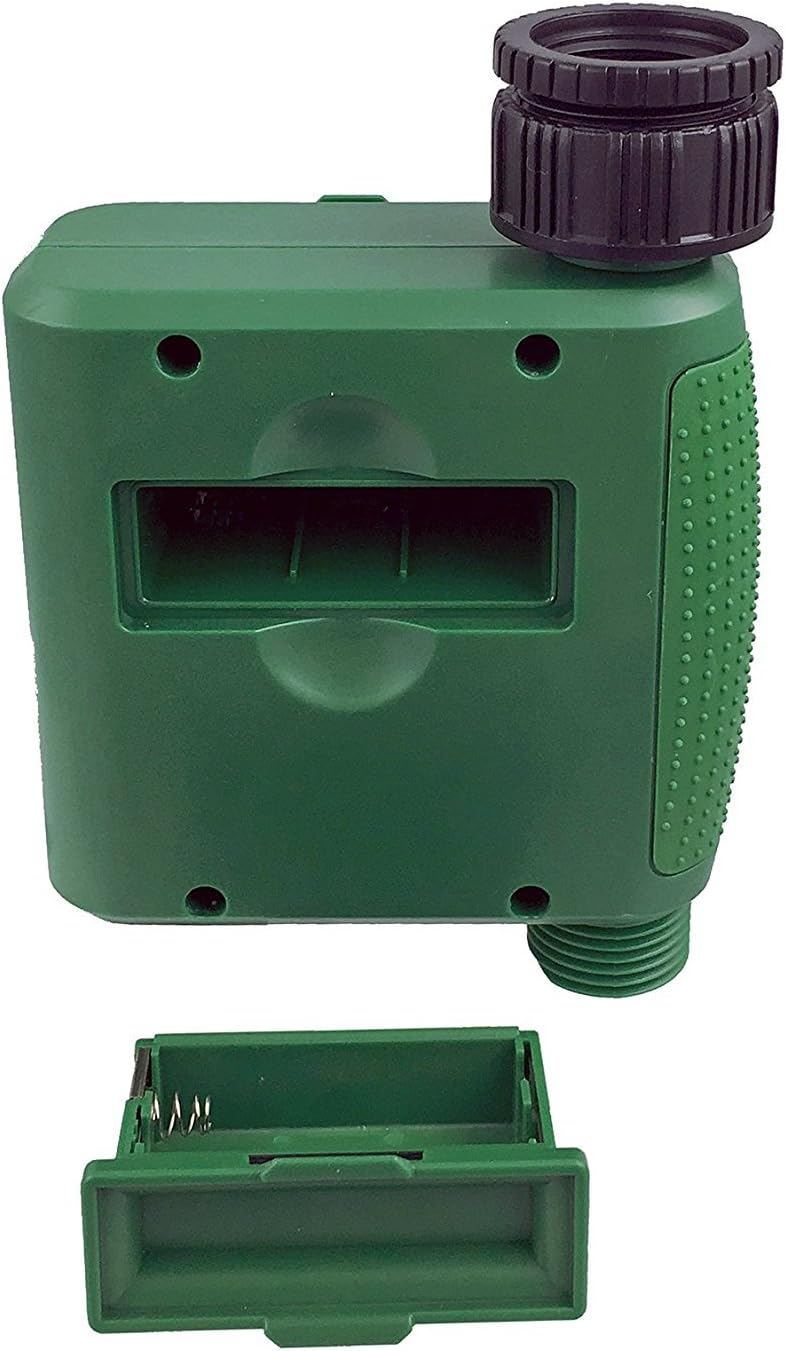
Fíor 1: Urrann na ceallraí agus an clúdach bainte.
2. Mounting the Timer
Attach the timer to your outdoor faucet:
- Ensure the faucet is clean and free of debris.
- Screw the timer's inlet (top connector) onto a standard ¾” (GHS) outdoor hose faucet. Hand-tighten only to prevent damage. Do not overtighten.
- Connect your garden hose or irrigation system to the timer's outlet (bottom connector). Hand-tighten securely.
- Turn on the faucet fully. The timer is designed to operate under pressure.

Figure 2: Instapark PWT-07 mounted on a faucet.
Treoracha Oibriúcháin
The timer features a large rotary dial and four buttons: SET, +, -, agus LÁMHLEABHAR.

Figure 3: Control panel and LCD display.
1. Setting Current Time
- Cas an dhiailiú rothlach go SET Clog.
- Bain úsáid as an + agus - buttons to adjust the current hour. Press SET a dheimhniú.
- Bain úsáid as an + agus - buttons to adjust the current minute. Press SET a dheimhniú.
2. Programming Watering Schedule
The timer allows you to set a start time, duration, and frequency for watering.
Socraigh Am Tosaigh:
- Cas an dhiailiú rothlach go TÚS AMACH.
- Bain úsáid as an + agus - buttons to set the desired watering start hour. Press SET a dheimhniú.
- Bain úsáid as an + agus - buttons to set the desired watering start minute. Press SET a dheimhniú.
Set How Long (Duration):
- Cas an dhiailiú rothlach go CÉ FAD.
- Bain úsáid as an + agus - buttons to set the watering duration (from 5 seconds to 360 minutes). Press SET a dheimhniú.
Set How Often (Frequency):
- Cas an dhiailiú rothlach go Cé chomh minic.
- Bain úsáid as an + agus - buttons to select the watering frequency (e.g., every 10 seconds, 30 seconds, 1 minute, 3 minutes, 5 minutes, 1 hour, 2 hours, 4 hours, 12 hours, 1 day, 2 days, 3 days, 4 days, 5 days, 6 days, 7 days). Press SET a dheimhniú.
After setting all parameters, turn the rotary dial to Rith to activate the programmed schedule.
3. Uisce a Dhéanamh de Láimh
To water manually without affecting your programmed schedule:
- Ensure the dial is set to Rith or AS.
- Brúigh an LÁMHLEABHAR cnaipe. Taispeánfaidh an taispeáint fad réamhshocraithe uisciúcháin láimhe.
- Bain úsáid as an + agus - buttons to adjust the desired manual watering duration.
- Brúigh SET to start manual watering. The timer will run for the selected duration and then automatically shut off.
- To stop manual watering prematurely, press the LÁMHLEABHAR cnaipe arís.
4. Feidhm Mhoill Báistí
The rain delay function allows you to pause your watering schedule for a set period without losing your program settings.
- Ensure the dial is set to Rith.
- Brúigh agus coinnigh an - button for 3 seconds. The display will show "DELAY" and a default delay duration.
- Bain úsáid as an + agus - buttons to select a delay duration of 24, 48, or 72 hours.
- Brúigh SET to activate the rain delay. The timer will resume its programmed schedule after the delay period ends.
- To cancel the rain delay, press and hold the - cnaipe arís ar feadh 3 soicind.
Cothabháil
- Athsholáthar Ceallra: Replace batteries when the low battery indicator appears on the LCD. Always use new AA alkaline batteries.
- Glanadh: Glan an t-amadóir le fógraamp éadach. Ná húsáid glantóirí nó tuaslagóirí scríobach.
- Geimhreadh: Before the first frost, disconnect the timer from the faucet. Remove the batteries and store the timer indoors in a dry, frost-free location. Failure to do so may result in damage from freezing water.
- Scáileán Scagaire: Periodically check the filter screen inside the inlet connector for debris. Clean if necessary to ensure proper water flow.
Fabhtcheartú
| Fadhb | Cúis Féideartha | Réiteach |
|---|---|---|
| Timer does not turn on / LCD is blank. | Cadhnraí marbha nó suiteáilte go mícheart. | Replace with new AA alkaline batteries, ensuring correct polarity. If still blank, remove batteries, wait for screen to fully clear, then reinsert. |
| Water does not turn on at scheduled time. |
|
|
| Water does not turn off. |
|
|
| Uisce ag sceitheadh ó naisc. |
|
|
| Low battery indicator flashes even with new batteries. | Firmware not booting correctly after battery change. | Remove batteries, wait for the LCD screen to go completely dark (may take a few minutes), then reinsert new batteries. |
Sonraíochtaí
| Múnla | PWT-07 |
| Foinse Cumhachta | 2 x 1.5V AA Alkaline Batteries (not included) |
| Cineál comhla | Comhla Solenoid Impulse |
| Brú Uisce Oibre | 14.5 go 116 psi |
| Reatha Fuireachas | <100 µA |
| Watering Frequency Settings | 10s, 30s, 1m, 3m, 5m, 1h, 2h, 4h, 12h, 1d, 2d, 3d, 4d, 5d, 6d, 7d (16 settings) |
| Watering Duration Settings | 5s, 10s, 15s, 20s, 25s, 30s, 35s, 40s, 45s, 50s, 55s, 1-360m |
| Formáid Taispeána Ama | 24-uair |
| Rátáil uiscedhíonach | IP66 |
| Ábhar | ABS Plaisteach |
| Toisí Táirge | 4.25"D x 6"W x 2.6"H |
| Meáchan Mír | 14.2 Unsa |
Barántas agus Tacaíocht
The Instapark PWT-07 Digital Programmable Water Timer is backed by a standard 1-year manufacturer's warranty from the date of purchase. This warranty covers defects in materials and workmanship under normal use.
For warranty claims, technical support, or any questions regarding your product, please contact Instapark customer service. Please have your purchase receipt and product model number (PWT-07) available when contacting support.
Contact information for Instapark customer service can typically be found on the manufacturer's websuíomh gréasáin nó do dhoiciméid cheannaigh.
Ask a question about this manual
Ask about setup, troubleshooting, compatibility, parts, safety, or missing instructions. Manuals+ will review the question and use this page’s manual context to help answer it.