
1. Réamhrá
Thank you for choosing the Baseus Encok S16 Neck Hung Bluetooth Wireless In-Ear Earphone. This manual provides detailed instructions for setup, operation, and maintenance to ensure optimal performance and longevity of your device. Please read this manual thoroughly before use.
2. Ábhar Pacáiste
Deimhnigh go bhfuil na míreanna uile i láthair sa phacáiste:
- 1 x Baseus Encok S16 Wireless Earphone
- 1 x Cábla Muirir
- 1 x lámhleabhar úsáideora
- 1 x Cárta Baránta

Image: Contents of the Baseus Encok S16 earphone package, showing the earphones, charging cable, user manual, and warranty card.
3. Táirge Tharview
The Baseus Encok S16 earphones feature a neck-hung design for comfortable and secure wear. Key features include:
- Fosúchán Maighnéadach: Earbuds can be magnetically joined when not in use, preventing tangling and loss.
- Adjustable Coils: The earphone line length can be adjusted by sliding for a customized fit.
- Fuaim Ard-Dílseachta: Equipped with a dynamic speaker unit, composite diaphragm, and independent tune trope structure for clear audio.
- Cumhacht Éifeachtach: Utilizes a British CSR chip and 120mAh battery for low power consumption and extended battery life.
- Comhoiriúnacht Uilíoch: Smartly matches with smartphones and tablet PCs, compatible with all Bluetooth 4.0 enabled devices.

Image: Close-up of the Baseus Encok S16 earbuds demonstrating their magnetic connection capability.
4. Socrú
4.1 Muirearú na gCluasán
- Connect the provided charging cable to the charging port on the earphone's control unit.
- Ceangail an ceann eile den chábla luchtaithe le foinse cumhachta USB (m.sh., port USB ríomhaire, oiriúntóir balla USB).
- Lasfaidh an solas táscaire le linn muirir agus múchfaidh sé nó athróidh sé dath nuair a bheidh sé luchtaithe go hiomlán.
- De ghnáth tógann lánmhuirearú thart ar 1.5 go 2 uair an chloig.
4.2 Péireáil Bluetooth
- Cinntigh go bhfuil na cluasáin luchtaithe go hiomlán.
- Press and hold the Power button on the control unit until the indicator light flashes red and blue alternately, indicating pairing mode.
- Ar do ghuthán cliste nó ar do ghléas atá cumasaithe le Bluetooth, téigh go dtí na socruithe Bluetooth.
- Cuardaigh le haghaidh available devices and select "Baseus Encok S16" from the list.
- Once connected, the indicator light will flash blue slowly or turn solid blue.
- Má iarrtar ort pasfhocal a chur isteach, cuir "0000" isteach.
5. Treoracha Oibriúcháin
5.1 Bunrialuithe
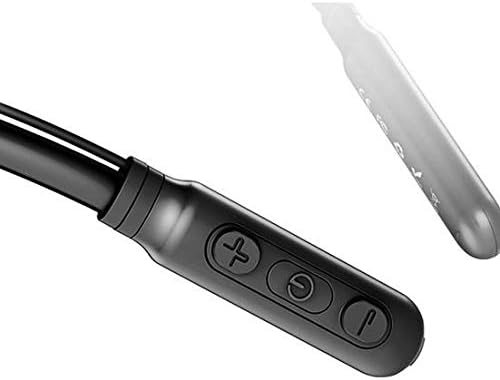
Image: Close-up of the Baseus Encok S16 earphone's inline control unit, showing the power/multi-function button, volume up, and volume down buttons.
| Cnaipe | Feidhm |
|---|---|
| Cnaipe Cumhachta (Lár) |
|
| Imleabhar Suas (+) |
|
| Imleabhar an Dúin (-) |
|
5.2 Ag Caitheamh na gCluasán
Place the neckband around your neck, ensuring the control unit is easily accessible. Insert the earbuds comfortably into your ears. Adjust the earphone line length using the sliding coils for a secure and comfortable fit.
6. Cothabháil
- Clean the earbuds and control unit regularly with a soft, dry cloth.
- Avoid exposing the earphones to extreme temperatures, humidity, or corrosive liquids.
- Store the earphones in a cool, dry place when not in use. The magnetic earbuds can help prevent tangling during storage.
- Do not attempt to disassemble or repair the earphones yourself, as this will void the warranty.
7. Fabhtcheartú
| Fadhb | Réiteach |
|---|---|
| Ní féidir cumhacht a chur ar | Ensure the earphones are fully charged. Press and hold the Power button for 3 seconds. |
| Ní féidir péireáil leis an ngléas |
|
| Gan fuaim nó toirt íseal |
|
| Ceangal eadrannach |
|
8. Sonraíochtaí
| Gné | Sonraigh |
|---|---|
| Branda | Baseus |
| Uimhir Mhúnla | FWP-E-S16 |
| Teicneolaíocht Nascachta | Bluetooth |
| Leagan Bluetooth | 4.0 (compatible with devices enabling Bluetooth 4.0) |
| Fachtóir Foirme | In Ear, Neck Hung |
| Cineál Rialaithe | Voice Control, Touch (via buttons) |
| Cumas Battery | 120mAh |
| Meáchan | 30 gram |
| Comhpháirteanna San áireamh | Wireless Earphone, Charging Cable, User Manual, Warranty Card |
9. Barántas agus Tacaíocht
This product comes with a Limited Warranty. Please refer to the included Warranty Card for detailed terms and conditions regarding coverage and duration.
For technical support or warranty claims, please contact your retailer or visit the official Baseus websuíomh gréasáin le haghaidh faisnéise seirbhíse do chustaiméirí.
Uimhir Aitheantais Trádála Dhomhanda (GTIN): 06953156264489