
1. Réamhrá
The CLEAN REMOTE CR3BCB is a durable, spillproof television remote control designed for ease of use. Its ergonomic design and simplified button layout make it ideal for controlling basic TV functions. This manual provides instructions for setting up, operating, maintaining, and troubleshooting your CR3BCB remote control.
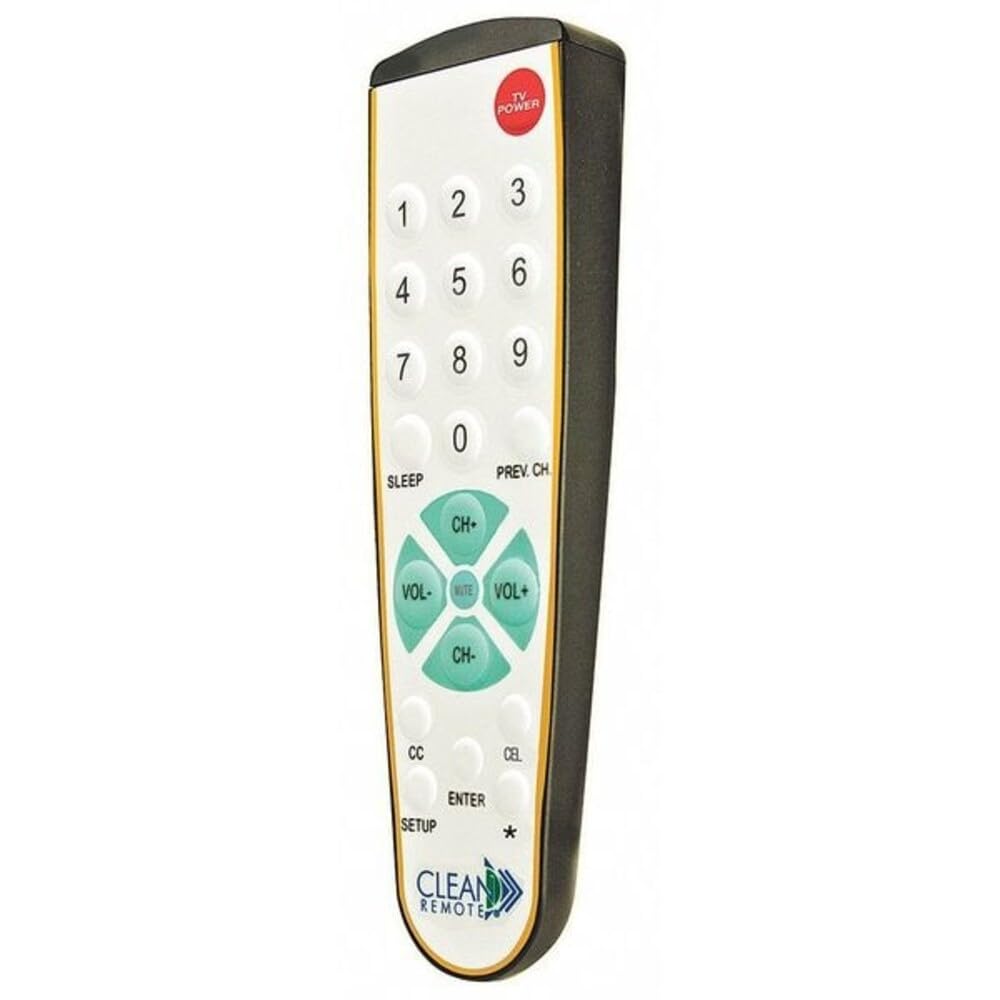
Tosaigh view of the CLEAN REMOTE CR3BCB, showing the numerical keypad, channel and volume controls, and power button.
2. Socrú
2.1. Suiteáil Battery
- Aimsigh an urrann ceallraí ar chúl an chianrialtáin.
- Sleamhnaigh clúdach na ceallraí síos agus bain é.
- Cuir isteach dhá (2) chadhnraí alcaileacha AAA, ag cinntiú go bhfuil na críochfoirt dhearfacha (+) agus dhiúltacha (-) ailínithe i gceart leis na marcanna taobh istigh den urrann.
- Cuir clúdach na ceallraí ar ais ina áit trína shleamhnú ar ais go dtí go gcliceálann sé go daingean.
2.2. An Cianrialtán a Chlárú
The CLEAN REMOTE CR3BCB is a universal remote that can be programmed to control most televisions. Follow these general steps for programming:
- Turn on the television you wish to control.
- Brúigh agus coinnigh an SETUP button on the remote until the indicator light (usually near the POWER button) illuminates.
- Cé go bhfuil an SETUP button, enter the 3-digit code for your TV brand. (Refer to the included code list, if available, or try common codes for your TV brand).
- If the indicator light turns off, the code has been accepted. Release the SETUP cnaipe.
- Déan tástáil ar an gcianrialtán trí bhrú ar an gcnaipe CUMHACHT button. If the TV turns off, the remote is programmed.
- If the TV does not respond, repeat steps 2-5 with a different code for your TV brand.
Auto Code Search (if direct code fails):
- Cas air an teilifís.
- Brúigh agus coinnigh an SETUP an cnaipe go dtí go lasann an solas táscaire.
- Brúigh an CH+ (Channel Up) button repeatedly, slowly, until the TV turns off.
- Once the TV turns off, immediately press the SETUP button again to lock in the code.
- Test the remote's functions.
3. Treoracha Oibriúcháin
The CLEAN REMOTE CR3BCB features a simplified layout for common television functions:
- CUMHACHT: Casann sé an teilifís air nó as.
- Ceap Uimhreacha (0-9): Cuir isteach uimhreacha cainéal go díreach.
- CH+ / CH-: Athraíonn sé an cainéal teilifíse suas nó síos.
- VOL+ / VOL-: Méadaíonn nó laghdaíonn sé toirt an teilifíse.
- Mute: Cuireann sé fuaim na teilifíse ar tost nó ar ais í.
- Codladh: Activates the TV's sleep timer function (if supported by the TV). Pressing repeatedly may cycle through sleep timer options.
- CH ROIMHE SEO: Filleann sé ar an roimhe seo viewcainéal ed.
- CC (Fotteidil Dhúnta): Toggles closed captions on or off (if supported by the TV broadcast/content).
- teilifís: Switches the remote's control mode to TV (if it was previously set to control a cable box, though this model is primarily for TV).
- ISTEACH: Confirms selections or completes channel entry.
4. Cothabháil
4.1. Glanadh
The CLEAN REMOTE CR3BCB features a spillproof design, making it easy to clean. To clean the remote:
- Wipe an dromchla le bog, damp éadach.
- For stubborn stains, a mild soap solution can be used.
- Ensure no excessive liquid enters the battery compartment.
- Do not use abrasive cleaners or solvents, as these may damage the remote's finish or buttons.
4.2. Athsholáthar Ceallraí
Replace batteries when the remote's performance degrades or the indicator light does not illuminate when a button is pressed. Follow the battery installation steps in Section 2.1.
5. Fabhtcheartú
| Fadhb | Cúis Féideartha | Réiteach |
|---|---|---|
| Remote not working / TV not responding | Dead or incorrectly installed batteries. Remote not programmed correctly. Obstruction between remote and TV. | Check battery orientation and replace if necessary. Re-program the remote (see Section 2.2). Ensure a clear line of sight to the TV's IR sensor. |
| Limited functionality after programming | Incorrect TV code used. | Try other codes for your TV brand or use the auto code search feature (see Section 2.2). Some advanced TV functions may not be supported by this simplified remote. |
| Tá cnaipí greamaitheach nó neamhfhreagrach | Dirt or residue under buttons. | Clean the remote thoroughly (see Section 4.1). |
6. Sonraíochtaí
- Branda: CLEAN cianda
- Ainm an tSamhail/Uimhir: CR3BCB
- Cineál: Television Remote Control, Spillproof
- Ábhar: Plaisteach
- Dath: Black Case/White Keypad with Gold Trim
- Críochnaigh: Micro-Texture Case
- Toisí (L x W x H): 7.93" x 2.5" x 1.31" (7-15/16" x 2-1/2" x 1-5/16")
- Gné Speisialta: Eirgeanamaíochta
- Uaslíon Gléasanna a dTacaítear: 1
- Gléasanna Comhoiriúnacha: Teilifís
- Teicneolaíocht Nascachta: Infridhearg
- Button Quantity: 25
- Cineál Rialaitheora: Rialú Cnaipe
- Raon uasta: 10 Mhéadar
- Cineál Battery: Alkaline (2x AAA, not included)
- UPC: 709317695991
- Tír Bhunaidh: tSín
7. Faisnéis Bharántas
Specific warranty details for the CLEAN REMOTE CR3BCB are not provided in this manual. For information regarding warranty coverage, terms, and conditions, please refer to the product packaging or contact CLEAN REMOTE customer support directly.
8. Tacaíocht do Chustaiméirí
If you encounter issues not covered in this manual or require further assistance, please contact CLEAN REMOTE customer support. Contact information can typically be found on the product packaging or the official CLEAN REMOTE websuíomh.