
1. Réamhrá
The Edifier P180 is a stereo earbud headset designed for clear audio and convenient communication. Featuring an inline microphone and control, it offers a comfortable listening experience for various devices.

Figure 1: Edifier P180 Wired Earbud Headset
2. Cad atá sa Bhosca
- Edifier P180 Earbud Headset
- Cábla
3. Príomhghnéithe
- Classic Comfort: Ergonomic design for comfortable wear without irritating the ear canal.
- Cáilíocht Fuaime Sármhaith: Equipped with 16mm neodymium magnetic monomers for high-fidelity audio playback.
- Integrated Microphone and Control: 3.5mm stereo earphones with a built-in microphone and remote button for mobile phone communication.
- Feidhmiúlacht: Single button control for picking up/hanging up calls and skipping songs (device dependent for iOS/Android).
- Dearadh Buan: Constructed with quality materials for longevity.

Figure 2: Ergonomic design for comfortable fit.
4. Socrú
- Díphacáil: Carefully remove the Edifier P180 headset from its packaging.
- Iniúchadh: Check the earbuds and cable for any visible damage.
- Ceangail: Insert the 3.5mm audio jack into the headphone port of your compatible device (smartphone, tablet, computer, etc.). Ensure the jack is fully inserted for proper audio and microphone function.
- Post: Place the earbuds comfortably in your ears. The ergonomic design is intended to rest well without causing irritation.
5. Treoracha Oibriúcháin
The Edifier P180 features an inline control button for easy management of calls and music playback.
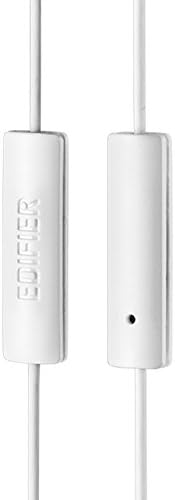
Figure 3: Inline microphone and control button.
- Glaonna Freagartha / Críochnaithe: Press the control button once to answer an incoming call. Press it again to end an active call.
- Ceol a Sheinm/Ag Sosú: Press the control button once to play or pause audio playback.
- Rianta gan bacadh: Double-press the control button to skip to the next track. Triple-press to go to the previous track (functionality may vary by device and operating system).
- Cúntóir Gutha: Long-press the control button to activate your device's voice assistant (e.g., Siri, Google Assistant).
Físeán 1: Táirge oifigiúil thartview of the Edifier P180 Classic Earbud Headsets, demonstrating features and usage.
6. Cothabháil
- Glanadh: Gently wipe the earbuds and cable with a soft, dry cloth. Avoid using harsh chemicals or abrasive materials.
- Stóráil: When not in use, store the headset in a clean, dry place, away from extreme temperatures and direct sunlight. Avoid tangling the cable.
- Seachain Taise: Do not expose the headset to water or excessive moisture, as this can damage the internal components.
7. Fabhtcheartú
- Gan Fuaim:
- Cinntigh go bhfuil an seac 3.5mm curtha isteach go hiomlán i gcalafort fuaime do ghléis.
- Seiceáil socruithe toirte do ghléis.
- Test the earbuds with another device to rule out a device-specific issue.
- Micreafón nach bhfuil ag obair:
- Cinntigh go bhfuil an seac 3.5mm curtha isteach go hiomlán.
- Seiceáil socruithe ionchuir micreafóin do ghléis.
- Déan tástáil ar an micreafón le gléas nó feidhmchlár eile.
- Fuaim Eadra:
- Check the cable for any kinks or damage.
- Cinntigh go bhfuil an seac fuaime glan agus saor ó smionagar.
8. Sonraíochtaí
| Gné | Sonraíocht |
|---|---|
| Uimhir Mhúnla | P180 |
| Freagra Minicíochta | 20 Hz - 20,000 Hz |
| Cluasáin Jack | 3.5 mm Jack |
| Teicneolaíocht Nascachta | Sreangaithe |
| Meáchan Mír | 1.76 unsa (50 gram) |
| Toisí Táirge | 2.01 x 5.59 x 0.91 orlach |
| Ábhar | Neoidimiam |
| Cineál Rialaithe | Inline Control Button |
| Impedance | 32 Óm |
| Rialú Torainn | Leithlisiú Fuaime |
9. Barántas & Tacaíocht
The Edifier P180 headset is backed by a Barántas 1 bhliain. For any support inquiries or warranty claims, please refer to the contact information provided with your purchase or visit the official Edifier websuíomh.