
1. Réamhrá
This manual provides detailed instructions for the installation, operation, and maintenance of your ASUS X99-DELUXE motherboard. The ASUS X99-DELUXE is an ATX motherboard designed for high-performance computing, supporting Intel LGA 2011-3 processors and DDR4 memory.

Fíor 1: Barr-síos view of the ASUS X99-DELUXE Motherboard, showing the CPU socket, RAM slots, and heatsinks.
2. Príomhghnéithe
- ASUS OC Socket: Designed to enhance 8-core CPU and DDR4 performance beyond standard X99 expectations.
- Tacaíocht Cuimhne DDR4: Features a special memory overclocking design, supporting DDR4 memory speeds up to 3200MHz (O.C.).
- Dual M.2 X4 Support: Provides two M.2 slots with PCIe 3.0 x4 interface, enabling data transfer speeds up to 32Gb/s for compatible NVMe SSDs.
- Fan Extension Card: Includes an extension card for advanced PC cooling management.
- Uasmhéadú 5-Bhealach: Utilizes Dual Intelligent Processors 5 for system optimization, including performance tuning, power saving, digital power control, and fan control.
- BIOS UEFI: Features a media-acclaimed Unified Extensible Firmware Interface (UEFI) BIOS for intuitive system configuration.
- SATA Express: Supports SATA Express for storage speeds up to 10Gb/s.
3. Socrú agus Suiteáil
Sula dtosaíonn tú ar an suiteáil, cinntigh go bhfuil do chóras múchta agus dícheangailte ón bhfoinse cumhachta. Láimhseáil an máthairchlár ag a himill chun urscaoileadh statach a sheachaint.
3.1. CPU Installation (LGA 2011-3 Socket)
- Carefully open the CPU socket retention mechanism.
- Ailínigh an marc triantánach ar an LAP leis an marc comhfhreagrach ar an soicéad.
- Cuir an LAP go réidh isteach sa soicéad gan é a bhrú.
- Close the retention mechanism to secure the CPU. Ensure no pins are bent during this process.

Fíor 2: Uilleach view of the ASUS X99-DELUXE Motherboard, highlighting the LGA 2011-3 CPU socket.
3.2. Suiteáil Cuimhne (DDR4)
The motherboard supports DDR4 memory modules. Refer to the motherboard manual for specific memory configurations and supported speeds.
- Oscail na gearrthóga ag an dá cheann den sliotán DIMM.
- Ailínigh an eangach ar an modúl cuimhne DDR4 leis an eochair sa sliotán DIMM.
- Cuir an modúl go daingean isteach sa sliotán go dtí go mbeidh na gearrthóga ag teacht ina n-áit.
3.3. Suiteáil Gléas Stórála (M.2, SATA)
Install M.2 SSDs into the dedicated M.2 slots and SATA drives to the SATA ports. The motherboard supports SATA 3 (6Gb/s) and SATA Express.
3.4. Forimeallaigh a nascadh
Connect your display, keyboard, mouse, and other peripherals to the rear I/O panel. The motherboard provides various USB ports, Ethernet ports, and audio jacks.
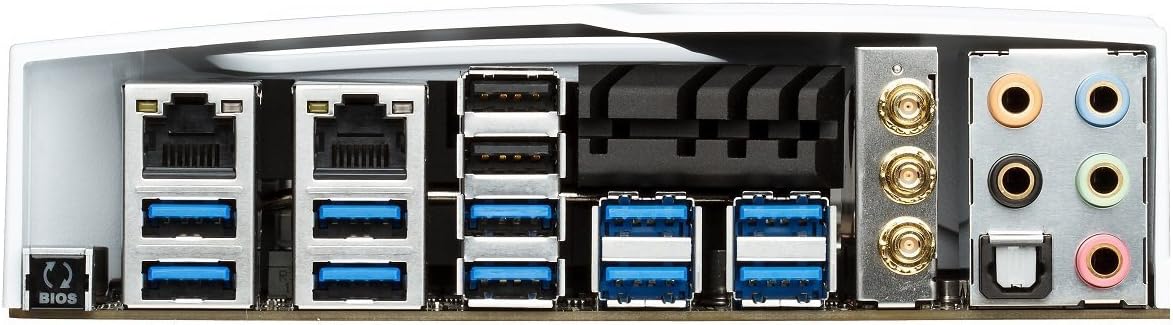
Figure 3: Rear I/O panel of the ASUS X99-DELUXE Motherboard, showing USB ports, Ethernet, and audio jacks.
4. Treoracha Oibriúcháin
4.1. UEFI BIOS Configuration
The UEFI BIOS allows you to configure system settings, boot options, and hardware parameters. To enter the BIOS, press the DEL eochair le linn tosaithe an chórais.
- Mód EZ: Provides a simplified interface for basic settings.
- Mód Casta: Offers comprehensive control over all motherboard features, including overclocking and fan control.
4.2. Suiteáil Tiománaithe
After installing your operating system (e.g., Windows XP, as listed in specifications, and newer OS versions), install the necessary drivers for the motherboard chipset, audio, network, and other integrated components. These are typically provided on a support DVD or available for download from the ASUS websuíomh.
4.3. 5-Way Optimization
The 5-Way Optimization feature, accessible through ASUS software, automatically tunes your system for optimal performance, power efficiency, digital power delivery, and fan acoustics based on your usage. It is recommended to manage overclocking and fan settings directly within the BIOS for more precise control.
5. Cothabháil
Cuidíonn cothabháil rialta le fad saoil agus oibriú cobhsaí do mháthairchláir a chinntiú.
- Baint deannaigh: Glan deannach ón máthairchlár agus ó chomhpháirteanna fuaraithe go tréimhsiúil ag baint úsáide as aer comhbhrúite. Cinntigh go bhfuil an córas múchta agus díphlugáilte sula ndéantar é a ghlanadh.
- Seiceálacha Ceangail: Verify that all cables and components are securely seated.
- Nuashonruithe BIOS: Seiceáil tacaíocht ASUS website for the latest BIOS updates to improve compatibility and performance. Follow update instructions carefully.
6. Fabhtcheartú
If you encounter issues with your ASUS X99-DELUXE motherboard, consider the following troubleshooting steps:
- Gan Chumhacht/Gan Tosaithe:
- Cinntigh go bhfuil na cáblaí cumhachta go léir (ATX 24-bioráin, LAP 8-bioráin) ceangailte go daingean.
- Deimhnigh go bhfuil an t-aonad soláthair cumhachta (PSU) ag feidhmiú i gceart.
- Seiceáil nasc lasc cumhachta an phainéil tosaigh leis an máthairchlár.
- Gan Taispeáin:
- Confirm the graphics card is properly seated in its PCIe slot and has adequate power.
- Cinntigh go bhfuil cábla an mhonatóra ceangailte go daingean leis an gcárta grafaicí.
- Déan tástáil le cábla taispeána nó monatóir difriúil más féidir.
- Éagobhsaíocht/Tuairteanna Córais:
- Check RAM modules for proper seating; try reseating them or testing one module at a time.
- Ensure CPU cooler is correctly installed and making good contact with the CPU. Monitor CPU temperatures.
- Athshocraigh socruithe BIOS go dtí na socruithe réamhshocraithe.
- Bent CPU Socket Pins:
Bent pins in the CPU socket can cause severe system malfunctions or prevent booting. This type of damage is typically not covered under warranty. Exercise extreme caution during CPU installation to avoid bending pins.
7. Sonraíochtaí
| Catagóir | Sonraíocht |
|---|---|
| Branda | ASUS |
| Ainm an tSamhail | X99-DELUXE |
| Soicéad LAP | LGA 2011-3 |
| Próiseálaithe Comhoiriúnacha | Intel Core i7 (LGA 2011-3) |
| Cineál Sliseanna | Tiománaí Intel X99 |
| Teicneolaíocht Cuimhne RAM | DDR4 |
| Luas Clog Cuimhne | Up to 3200 MHz (O.C.) |
| Sliotáin Cuimhne Ar Fáil | 8 |
| Uasmhéid Cuimhne RAM | 64 GB |
| Comhéadan Cárta Grafaice | PCI Express |
| Total PCIe Ports | 5 |
| Líon Iomlán Calafoirt SATA | 8 |
| Caighdeán Bus Córais Tacaithe | SATA 3 |
| USB 2.0 Calafoirt | 2 (internal headers, total ports may vary) |
| Iomlán calafoirt USB | Various (including USB 3.0 on rear I/O) |
| Líon na gCalafort Eitirnéad | 1 (Dual Gigabit LAN) |
| Cineál Príomh-Ceanglóir Cumhachta | 24-Pin ATX |
| Gléasanna Comhoiriúnacha | Ríomhaire Pearsanta |
| Ardán | Windows XP (and newer OS versions) |
| Meáchan Mír | 4.44 Punt (thart ar 2.01 kg) |
8. Barántas agus Tacaíocht
Le haghaidh eolais faoi bharántas agus tacaíocht theicniúil, féach ar shuíomh oifigiúil ASUS. websuíomh gréasáin nó déan teagmháil le seirbhís do chustaiméirí ASUS. Coinnigh do chruthúnas ceannaigh le haghaidh éilimh bharántais.
Tacaíocht ASUS Websuíomh: https://www.asus.com/support/
Note: Damage resulting from improper installation, misuse, or unauthorized modifications may void your product warranty.