
Réamhrá
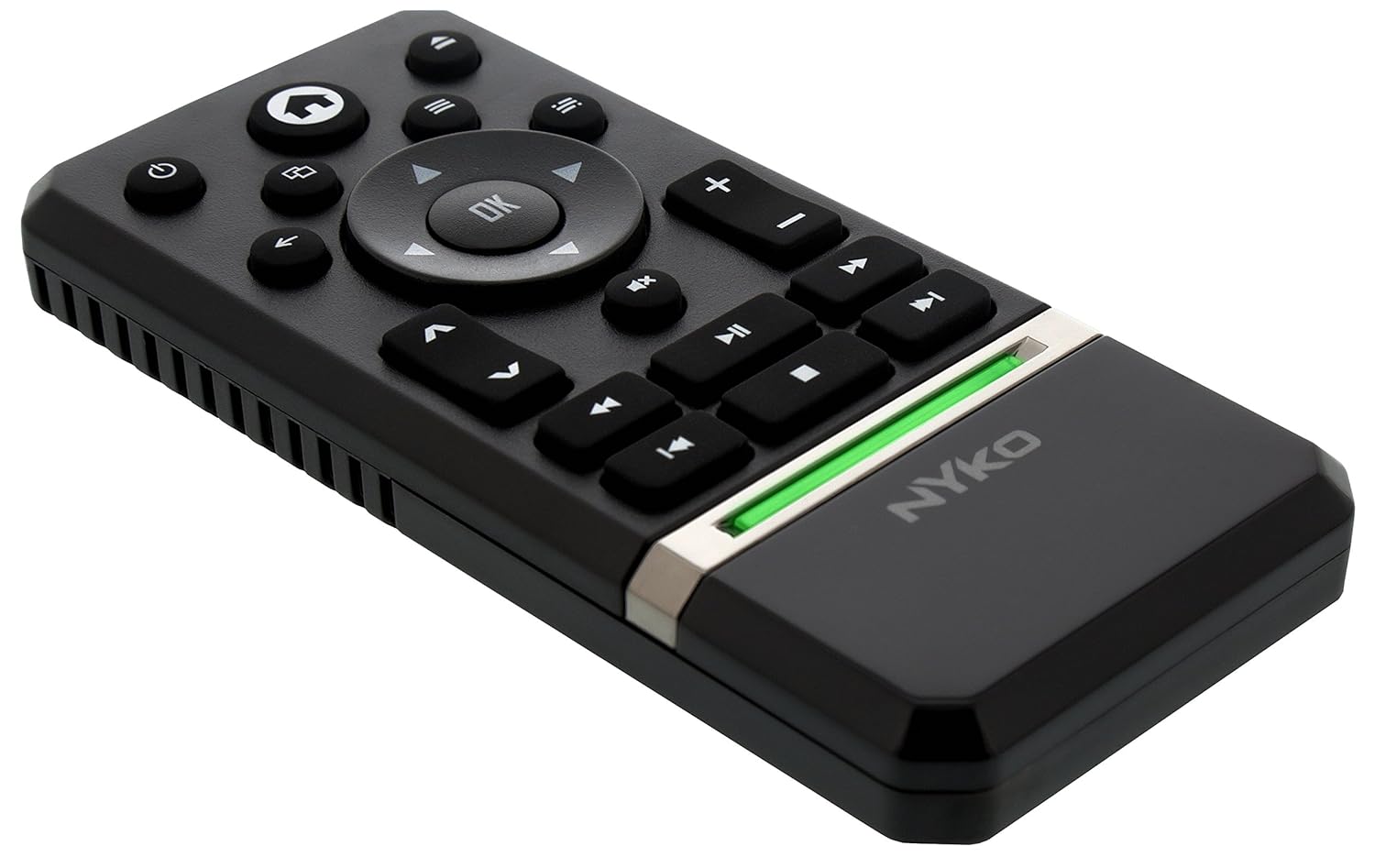
The Nyko Media Remote for Xbox One provides convenient control over your Xbox One console and various media applications. This remote simplifies navigation and playback of streaming content and physical media, offering dedicated buttons for common functions. It also features the ability to power your Xbox One on and off, and control basic functions of your television.

Image: Nyko Media Remote for Xbox One, front view.
Ábhar an Phacáiste
- Nyko Media Remote for Xbox One (Model: 86116)
- Nóta: Níl cadhnraí AAA san áireamh agus ní mór iad a cheannach ar leithligh.

Image: Nyko Media Remote for Xbox One in its retail packaging.
Socrú
1. Suiteáil Battery
- Aimsigh urrann na ceallraí ar chúl an chianrialtáin.
- Sleamhnaigh clúdach na ceallraí síos le hoscailt.
- Insert two (2) AAA batteries, ensuring correct polarity (+/-) as indicated inside the compartment.
- Cuir clúdach na ceallraí ar ais trína shleamhnú suas go dtí go gcliceálann sé ina áit.
Íomhá: Cúl view of the remote with the battery cover removed, illustrating the AAA battery placement.
2. Ceangal Tosaigh
The Nyko Media Remote uses infrared (IR) technology. No manual pairing is required for the Xbox One. Simply ensure a clear line of sight between the remote's IR emitter and the Xbox One's IR receiver.
For TV control functions (volume, channels, power), your TV must be configured to respond to the Xbox One's IR signals, typically through the Xbox One's OneGuide settings. The remote sends commands to the Xbox One, which then relays them to your TV via its IR blaster (if configured) or Kinect sensor.
Treoracha Oibriúcháin
The Nyko Media Remote provides comprehensive control for your Xbox One and various media applications. Refer to the diagram below for button identification and their primary functions.

Íomhá: Tosaigh view of the Nyko Media Remote, displaying all control buttons.
Feidhmeanna Cnaipe:
| Cnaipe | Feidhm |
|---|---|
| Cnaipe Cumhachta (⏻) | Powers the Xbox One console on or off. |
| Cnaipe Baile (⌂) | Returns to the Xbox One Home screen. |
| View Cnaipe (🗀) | Accesses additional information or options within an app or game. |
| Cnaipe Roghchláir (☰) | Opens context-sensitive menus or options. |
| Pad Treo (D-Pad) | Nascleanúint trí roghchláir agus ábhar. |
| Cnaipe OK | Confirms selections. Can also function as Play/Pause in some apps. |
| Cnaipe Ar Ais (←) | Téann sé ar ais go dtí an scáileán nó an roghchlár roimhe seo. |
| OneGuide Button (📱) | Launches the Xbox OneGuide for live TV and media. |
| Imleabhar Suas/Síos (⏸ / ⏷) | Adjusts the television volume (requires TV setup via Xbox One). |
| Cnaipe Balbhaithe (🔇) | Mutes or unmutes television audio. |
| Channel Up / Down (▲ / ▼) | Changes television channels (requires TV setup via Xbox One). |
| Athchasadh Fast (⏪) | Rewinds media playback. |
| Súgradh/Sos (⏯) | Plays or pauses media playback. |
| Fast Ar Aghaidh (⏩) | Fast forwards media playback. |
| Rian Roimhe Seo (⏮) | Léimeann sé go dtí tús an riain reatha nó an riain roimhe sin. |
| Stop (⏹) | Stopann sé athsheinm meán. |
| An Chéad Rian Eile (⏭) | Skips to the next track or chapter. |
Media and App Control:
The remote is designed for seamless control of various Xbox One applications, including:
- OneGuide
- Netflix
- Hulu Plus
- Físeán Meandaracha Amazon
- Other streaming services and Blu-ray/DVD playback
Dedicated playback buttons (Play, Pause, Fast Forward, Rewind, Stop, Skip) provide intuitive control for movies, music, and other media.
Cothabháil
Athsholáthar Ceallra:
When the remote's performance diminishes or it stops responding, it is likely time to replace the batteries. Follow the "Battery Installation" steps in the Setup section to replace the two AAA batteries.
Glanadh:
To clean the remote, gently wipe it with a soft, dry cloth. Avoid using harsh chemicals, abrasive cleaners, or excessive moisture, as these can damage the remote's finish or internal components.
Fabhtcheartú
- Cianda Gan Freagra:
- Ensure fresh AAA batteries are correctly installed.
- Verify there is a clear line of sight between the remote and the Xbox One console. Obstructions can block the infrared signal.
- Move closer to the Xbox One console. The remote has a maximum effective range of approximately 9 meters (25 feet).
- TV Control (Volume, Channel, Power) Not Working:
- Confirm that your Xbox One's OneGuide settings are properly configured for your television. The remote sends commands to the Xbox One, which then controls the TV.
- Ensure any necessary IR blasters or Kinect sensors are correctly set up and positioned.
- Intermittent Response:
- This can sometimes occur due to weak batteries or environmental interference. Replace batteries and ensure a clear line of sight.
Sonraíochtaí
| Gné | Sonraigh |
|---|---|
| Branda | Niko |
| Ainm an tSamhail | Meáin Chianda |
| Uimhir Mhúnla | 86116 |
| Teicneolaíocht Nascachta | Infridhearg (IR) |
| Gléasanna Comhoiriúnacha | Xbox One, Television (via Xbox One IR blaster/Kinect) |
| Cineál Battery | 2 x cadhnraí AAA (gan a bheith san áireamh) |
| Raon uasta | Suas le 9 méadar (25 troigh) |
| Meáchan Mír | 0.1 punt (thart ar 45 gram) |
| Dath | Liath Dorcha |
| Gnéithe Breise | Ergonomic design, dedicated media playback controls. |
Barántas agus Tacaíocht
Nyko products are designed for quality and reliability. For specific warranty details, please refer to the documentation included with your purchase or visit the official Nyko website. The product includes warranty information in multiple languages.
Tacaíocht do Chustaiméirí:
- Ríomhphost: customer.support@nyko.com
- Fón: +1-888-400-6956
- Clárú Ar Líne: www.nyko.com
- Eolas Breise: http://uqr.me/nykotechnologies/qr/83215

Íomhá: Cúl view of the product packaging, detailing features and customer support contact information.