
Edifier R1600TIII
Edifier R1600TIII Active Bookshelf Speakers User Manual
Model: R1600TIII
Réamhrá
Go raibh maith agat as an gceannachasing the Edifier R1600TIII Active Bookshelf Speakers. This manual provides detailed instructions for setting up, operating, and maintaining your speakers to ensure optimal performance and longevity. Please read this manual thoroughly before use and retain it for future reference.
Treoracha Tábhachtacha Sábháilteachta
- Léigh na treoracha seo go cúramach.
- Coinnigh na treoracha seo le haghaidh tagartha sa todhchaí.
- Éist le gach rabhadh.
- Lean na treoracha go léir.
- Ná húsáid an gaireas seo in aice le huisce.
- Glan ach amháin le éadach tirim.
- Ná bac aon oscailtí aerála. Suiteáil de réir threoracha an mhonaróra.
- Ná suiteáil in aice le haon fhoinsí teasa cosúil le radaitheoirí, cláir teasa, soirn, nó gaireas eile (lena n-áirítear ampleachtaitheoirí) a tháirgeann teas.
- Cosain an téad cumhachta ó bheith ag siúl air nó á phionnadh, go háirithe ag plocóidí, gabhdáin áise, agus an pointe a dtéann siad amach as an ngaireas.
- Ná húsáid ach ceangaltáin/gabhálais atá sonraithe ag an monaróir.
- Díphlug an gaireas seo le linn stoirmeacha tintreach nó nuair nach bhfuil sé in úsáid ar feadh tréimhsí fada ama.
- Déan gach seirbhísiú a tharchur chuig pearsanra seirbhíse cáilithe. Tá gá le seirbhísiú nuair a dhéantar damáiste don ghaireas ar bhealach ar bith, amhail corda soláthair cumhachta nó breiseán damáiste, doirteadh leacht nó rudaí tar éis titim isteach sa ghaireas, bhí an gaireas faoi lé báisteach nó taise, ní oibríonn sé de ghnáth. , nó gur thit.
Ábhar an Phacáiste
Seiceáil ábhar do phacáiste le do thoil. Má tá aon earraí ar iarraidh nó má tá damáiste déanta dóibh, déan teagmháil le do mhiondíoltóir.
- Edifier R1600TIII Active Bookshelf Speakers (1 pair)
- Cianrialú Gan Sreang
- Cábla Ceangal Cainteoir
- Cábla Fuaime RCA go RCA
- Cábla Cumhachta
- Lámhleabhar Úsáideora (an doiciméad seo)
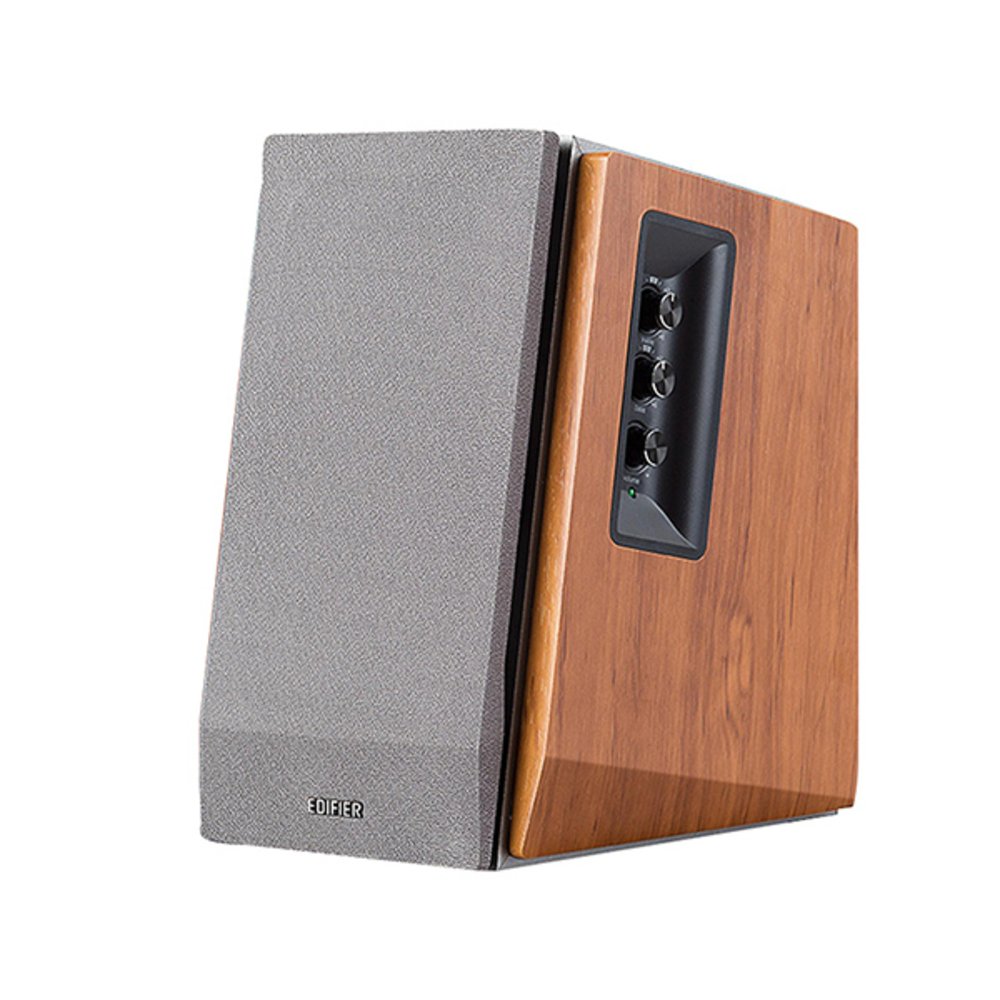
Image: Edifier R1600TIII Active Bookshelf Speakers. This image shows the two speakers, typically one active (with controls) and one passive, connected by a cable. The speakers feature a classic wooden finish and front-facing drivers.
Táirge Tharview
The Edifier R1600TIII is a 2.0 active bookshelf speaker system designed to deliver high-quality audio. It features a total output of 60 Watts and offers versatile connectivity options including RCA and Bluetooth.
Rialuithe agus Naisc
- Rialuithe Painéil Taobh: The active speaker features rotary controls for Volume, Bass, and Treble adjustments.
- Cianrialú Gan Sreang: Adjust volume and mute functions conveniently from a distance.
- Ionchuir RCA: Two sets of RCA inputs for connecting to various audio sources like PCs, TVs, or MP3 players.
- Nascacht Bluetooth: Seamlessly connect your Bluetooth-enabled devices for wireless audio streaming.
Socrú
1. Socrúchán Cainteoir
Place the speakers on a stable, flat surface such as a bookshelf or desk. For optimal stereo imaging, position the speakers equidistant from your listening position and angle them slightly inwards towards you.
2. Na Cainteoirí a nascadh
- Identify the active speaker (with controls and power input) and the passive speaker.
- Connect the speaker connection cable from the active speaker's output to the passive speaker's input. Ensure a secure connection.
3. Foinsí Fuaime a Cheangal
You can connect audio sources via RCA cables or Bluetooth.
Ceangal RCA:
- Using the provided RCA to RCA cable, connect one end to the RCA input ports on the active speaker (Input 1 or Input 2).
- Connect the other end of the cable to the audio output ports of your source device (e.g., PC, TV, MP3 player).
Ceangal Bluetooth:
- Cinntigh go bhfuil na cainteoirí ar siúl.
- Select the Bluetooth input mode on the speakers (usually by pressing the volume knob or a dedicated input button until the indicator light shows blue).
- On your Bluetooth-enabled device, search for "Edifier R1600TIII" in the Bluetooth settings.
- Select the speaker to pair. Once paired, the indicator light will remain solid blue.
4. Ceangal Cumhachta
- Connect the power cable to the active speaker's power input.
- Plug an cábla cumhachta isteach i asraon balla.
- Turn on the power switch, usually located on the rear panel of the active speaker.
Treoracha Oibriúcháin
Rialuithe Bunúsacha
- Rialú Toirte: Rotate the master volume knob on the side panel or use the volume buttons on the remote control to adjust the overall sound level.
- Rialú Dord: Rotate the bass knob on the side panel to increase or decrease the low-frequency output.
- Rialú Treble: Rotate the treble knob on the side panel to increase or decrease the high-frequency output.
- Roghnú Ionchuir: Press the master volume knob on the side panel or the input button on the remote to cycle through available inputs (RCA 1, RCA 2, or Bluetooth).
- Balbhaigh: Press the mute button on the remote control to silence the audio. Press again to unmute.
Ag baint úsáide as an Cianrialú Gan Sreang
The wireless remote control allows convenient adjustment of volume and mute functions. Ensure the remote has working batteries and is pointed towards the active speaker for best performance.
Cothabháil
- Glanadh: Wipe the speaker cabinets with a soft, dry cloth. Do not use liquid cleaners or abrasive chemicals.
- deannach: Glan deannach de ghreillí agus dromchlaí an chainteora go rialta chun carnadh a chosc.
- Timpeallacht: Avoid exposing the speakers to extreme temperatures, humidity, or direct sunlight.
- Stóráil: Má tá tú ag stóráil na gcainteoirí ar feadh tréimhse fada, dícheangail iad ón gcumhacht agus stóráil iad in áit fhionnuar, thirim.
Fabhtcheartú
| Fadhb | Cúis Féideartha | Réiteach |
|---|---|---|
| Gan fuaim |
|
|
| Droch-chaighdeán fuaime / Saobhadh |
|
|
| Fadhbanna nasc Bluetooth |
|
|
Sonraíochtaí
- Múnla: R1600TIII
- Aschur Cumhachta Iomlán: 60 Watt (RMS)
- Cineál Cainteoir: Active Bookshelf
- Méid an chainteora: 4 n-Orlach (Fo-fhuaimeoir)
- Modh Aschuir Fuaime: Steirió
- Teicneolaíocht Nascachta: RCA, Bluetooth
- Teicneolaíocht Chumarsáide Gan Sreang: Bluetooth
- Modh Rialaithe: Remote Control, Side Panel Knobs
- Gléasanna Comhoiriúnacha: Karaoke device, Home cinema, Game console, MP3 player, Desktop computer, Projector, Television
- Ábhar: Adhmad
- Dath: Bán
- Toisí Táirge (L x W x H): 290 x 39.3 x 30.8 cm (11.4 x 15.5 x 12.1 orlach)
- Meáchan Táirge: 7.38 kg (16.27 lb)
- Foinse Cumhachta: Corded Leictreach
- Gnéithe Speisialta: Nascacht Bluetooth
- Uiscedhíonach: Tá (Note: While listed as waterproof, it is generally recommended to protect electronic devices from water exposure.)
Barántas agus Tacaíocht
The Edifier R1600TIII speakers come with a Barántas Teoranta. Please refer to the warranty card included in your package or visit the official Edifier websuíomh le haghaidh téarmaí agus coinníollacha mionsonraithe.
For technical support, service, or further inquiries, please contact Edifier customer service through their official websuíomh nó an fhaisnéis teagmhála a chuirtear ar fáil i ndoiciméadacht do tháirge.
Ask a question about this manual
Ask about setup, troubleshooting, compatibility, parts, safety, or missing instructions. Manuals+ will review the question and use this page’s manual context to help answer it.