
Réamhrá
Thank you for choosing the Beetel M53 CLI Corded Phone. This manual provides detailed instructions for setting up, operating, and maintaining your new telephone. Please read this manual carefully before use to ensure proper functionality and to maximize your experience with the product.
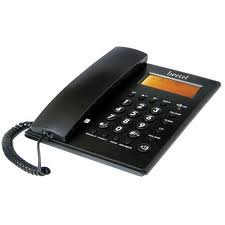
Figure 1: Beetel M53 CLI Corded Phone. This image displays the main unit of the Beetel M53 corded phone, showcasing its compact design and keypad.
Socrú
Follow these steps to set up your Beetel M53 CLI Corded Phone:
- Ceangail an Fón Póca: Plug one end of the coiled cord into the handset and the other end into the jack labeled MÁS LÁIMHE ar thaobh bhunáit an ghutháin.
- Ceangail an Corda Líne: Breiseán ceann amháin den sreang teileafóin isteach sa seac atá lipéadaithe LÍNE ar chúl bhunáit an ghutháin. Breiseán an ceann eile isteach i seac balla do ghutháin.
- Ceangal Cumhachta: The phone is powered via the telephone line. No external power adapter is required for basic operation.
- Taispeántas Tosaigh: Upon successful connection, the 12-digit green/orange backlit LCD will display the current time and date.

Figure 2: Connection Diagram. This diagram illustrates how to connect the handset and the telephone line cord to the Beetel M53 phone base.
Treoracha Oibriúcháin
Glaonna a Dhéanamh agus a Fháil
- Chun Glao a Dhéanamh: Ardaigh an handset nó brúigh an Cainteoir button. Dial the desired telephone number.
- Chun Glao a Fháil: Nuair a bhíonn an fón ag glaoch, ardaigh an gléas láimhe nó brúigh an cnaipe Cainteoir cnaipe.
- Chun Glao a Chríochnú: Cuir an gléas láimhe ar ais ar an gcliabhán nó brúigh an cnaipe Cainteoir cnaipe arís má tá cainteoir teileafóin in úsáid agat.
Caller ID (CLI) Features
The Beetel M53 supports FSK/DTMF compatible caller ID and Centrex enabled CLIP (Calling Line Identification Presentation).
- Incoming Call Display: The 12-digit LCD will display the incoming number, new call indicator, total calls, and repeat calls.
- Incoming Memory: The phone stores up to 80 incoming call records.
- Outgoing Memory: The phone stores up to 24 outgoing call records.
- Checking Calls: Bain úsáid as an UP/SÍOS navigation buttons to scroll through incoming and outgoing call records.
- Erasing Calls: Cé go viewing a call record, press the Scrios cnaipe chun é a scriosadh.
- Glaoigh ar ais: Cé go viewing an incoming call record, press the GLAOCH AR AIS button to dial the number.
LCD Display and Clock
- The 12-digit green/orange backlit LCD provides clear visibility of numbers, time, and date.
- The real-time clock displays the year, date, and month.
- To set the time and date, refer to the specific instructions in the full manual (if available, otherwise this feature is typically automatic or set via network).
Speakerphone Facility
Chun an fón cainteoir a úsáid, brúigh an Cainteoir button during a call or before dialing. Press it again to end the call or switch back to the handset.
Áireamhán Bunúsach
The phone includes a basic calculator function. To access it, press the CALC button (if present, or refer to specific key mapping). Use the numeric keypad for input and the designated function keys for operations.

Figure 3: LCD Display. This image shows the 12-digit LCD of the Beetel M53, illustrating how caller ID information and the real-time clock are displayed.
Cothabháil
- Glanadh: Glan an fón le clúdach bog, damp éadach. Ná húsáid glantóirí nó tuaslagóirí scríobach.
- Seachain Leachtanna: Coinnigh an fón ar shiúl ó uisce agus ó leachtanna eile.
- Teocht: Seachain an fón a nochtadh do theocht mhór nó do sholas díreach na gréine.
- Stóráil: If storing the phone for an extended period, disconnect it from the telephone line.
Fabhtcheartú
| Fadhb | Réiteach Féideartha |
|---|---|
| Uimh ton dhiailiú | Check if the telephone line cord is securely connected to both the phone and the wall jack. Test with another phone if available. |
| Níl ID glaoiteora le feiceáil | Ensure you have subscribed to Caller ID service from your telephone service provider. Verify the phone is connected correctly. |
| Tá an taispeáint bán nó doiléir | Check line connection. The display is line-powered. If the issue persists, contact customer support. |
| Ní féidir liom an glaoiteoir a chloisteáil / Ní féidir leis an nglaoiteoir mé a chloisteáil | Adjust volume. Check handset cord connection. If using speakerphone, ensure microphone is not obstructed. |
Sonraíochtaí
| Gné | Cur síos |
|---|---|
| Branda | Beetel |
| Múnla | M53 |
| Cineál Teileafóin | Corded |
| Ábhar | Plaisteach |
| Foinse Cumhachta | Corded Electric (Line Powered) |
| Cineál Córais Freagartha | Digiteach |
| Aitheantas an ghlaoiteora | Yes (FSK/DTMF compatible, Centrex enabled CLIP) |
| Incoming Call Memory | 80 taifead |
| Outgoing Call Memory | 24 taifead |
| Taispeáint LCD | 12-digit, Green/Orange Backlit |
| Clog | Real time clock with year, date, and month display |
| Gnéithe Breise | Speakerphone, Basic Calculator |
Barántas agus Tacaíocht
Your Beetel M53 CLI Corded Phone comes with a standard manufacturer's warranty. Please retain your purchase receipt for warranty claims. For technical support, service, or warranty inquiries, please contact Beetel customer service through their official websuíomh nó an fhaisnéis teagmhála a cuireadh ar fáil le do dhoiciméid cheannaigh.
Le haghaidh tuilleadh cúnaimh, tabhair cuairt ar Beetel Store on Amazon.