
1. Réamhrá
This manual provides essential instructions for the safe and efficient operation of your Sharp CD-DH950P 240W Mini-Component System. This system features a 5-disc CD changer, a cassette deck, an iPod/iPhone docking station, a USB host for digital audio playback, and an AM/FM tuner. Please read this manual thoroughly before using the system and retain it for future reference.
2. Faisnéis Sábháilteachta
- Foinse Cumhachta: Ceangail an t-aonad le hasraon AC den toirt shonraithe amháintage.
- Aeráil: Cinntigh go bhfuil aeráil leordhóthanach ann. Ná bac na hoscailtí aerála.
- Uisce agus Taise: Ná nochtaigh an t-aonad do bháisteach, taise, ná leachtanna ag sileadh/splancscáileán.
- Teas: Coinnigh an t-aonad ar shiúl ó fhoinsí teasa amhail radaitheoirí, cláir teasa, sorn, nó fearais eile a tháirgeann teas.
- Glanadh: Unplug the unit from the wall outlet before cleaning. Use a soft, dry cloth.
- Ag seirbhísiú: Ná déan iarracht an táirge seo a sheirbheáil ort féin. Déan gach seirbhísiú a tharchur chuig pearsanra seirbhíse cáilithe.
3. Ábhar Pacáiste
Deimhnigh go bhfuil na míreanna seo a leanas i do phacáiste:
- Main Unit (CD-DH950P)
- Cainteoir Clé
- Cainteoir Ceart
- Cianrialú le Cadhnraí
- AM Lúb Antenna
- Antenna Sreang FM
- Corda Cumhachta
4. Socrú
4.1 Na Cainteoirí a Cheangal
Connect the speaker wires from the main unit to the corresponding terminals on the back of each speaker. Ensure correct polarity (red to red, black to black) for optimal sound quality. The left speaker connects to the left speaker output, and the right speaker to the right speaker output.
4.2 Na hAntainí a Cheangal
- Antenna FM: Connect the supplied FM wire antenna to the FM antenna terminal on the rear of the main unit. Extend the wire for better reception.
- AM antenna: Connect the supplied AM loop antenna to the AM antenna terminals on the rear of the main unit. Position the antenna for best reception.
4.3 Ceangal Cumhachta
Plug the power cord into the AC IN jack on the rear of the main unit, then plug the other end into a standard AC wall outlet.
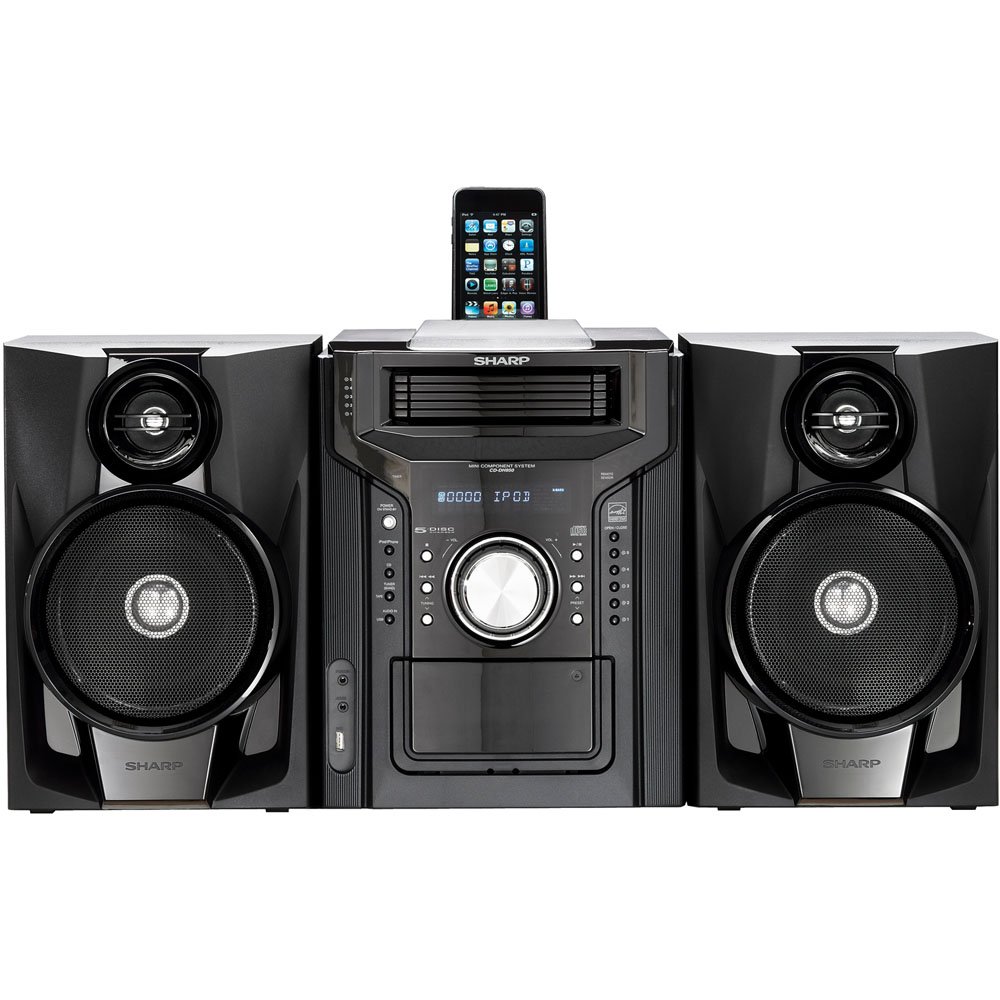
Fíor 4.3.1: Tríd is tríd view of the Sharp CD-DH950P Mini-Component System, showing the main unit flanked by two speakers, with an iPhone docked on top of the main unit.
5. Treoracha Oibriúcháin
5.1 Cumhacht Ar Siúl/Múch agus Rialú Toirte
- Brúigh an CUMHACHT an cnaipe ar an bpainéal tosaigh nó ar an gcianrialtán chun an t-aonad a chasadh air nó as.
- Rothlaigh an TOIRT cnaipe ar an bpainéal tosaigh nó bain úsáid as an VOL +/- cnaipí ar an gcianrialtán chun an leibhéal fuaime a choigeartú.
5.2 Athsheinm CD
This system features a 5-disc CD changer.
- Brúigh an OSCAILTE/DÚN cnaipe chun an tráidire CD a oscailt.
- Place up to five CDs on the disc trays, label side up.
- Brúigh OSCAILTE/DÚN arís chun an tráidire a dhúnadh.
- Brúigh an CD cnaipe chun an fheidhm CD a roghnú.
- Brúigh an IMIR/SOS cnaipe chun athsheinm a thosú.
- Bain úsáid as an SKIP buttons to navigate between tracks or discs.
5.3 Cassette Deck Operation
- Brúigh an TAPE OPEN/CLOSE button to open the cassette deck.
- Cuir isteach téip caiséad.
- Brúigh an TÉIP button to select the cassette function.
- Brúigh IMIRCE chun athsheinm a thosú.
- To record, ensure the source is selected (e.g., CD, Tuner) and press the TAIFEAD button on the cassette deck.
5.4 iPod/iPhone Docking
The system includes a top-mounted docking slot for compatible iPod and iPhone devices (30-pin connector).
- Carefully place your iPod or iPhone into the docking slot.
- The system will automatically switch to iPod/iPhone mode or you may need to press the iPod / iPhone cnaipe.
- Use the system's controls or your device's controls to play music. The device will also charge while docked.
5.5 USB Host Playback
Connect a USB storage device containing MP3 or WMA audio files to the USB port on the front panel.
- Cuir an gléas USB isteach sa phort USB.
- Brúigh an USB button to select the USB function.
- Use the playback controls to navigate and play files.
Tiúnóir 5.6 AM/FM
- Brúigh an Tuner button to select AM or FM radio.
- Bain úsáid as an TIÚIN +/- cnaipí chun stáisiún a thiúnadh de láimh.
- To auto-scan, press and hold the TIÚIN +/- cnaipí.
- To store a preset, tune to the desired station, then press CUIMHNEACH agus uimhir réamhshocraithe ina dhiaidh sin.
5.7 Ionchur Fuaime
Connect an external audio device (e.g., MP3 player, smartphone) to the AUDIO IN jack on the front panel using a 3.5mm stereo cable.
- Connect your device to the AUDIO IN jack.
- Brúigh an FUAIM IN cnaipe chun an fhoinse seo a roghnú.
- Rialú athsheinm ó do ghléas ceangailte.
6. Cothabháil
6.1 Glanadh an Aonaid
Wipe the exterior of the unit with a soft, dry cloth. Do not use abrasive cleaners, waxes, or solvents. Ensure the unit is unplugged before cleaning.
6.2 CD and Cassette Care
- Láimhseáil dlúthdhioscaí ag a n-imeall chun méarloirg agus scríobtha a sheachaint. Glan dioscaí le héadach bog, saor ó lint ón lár amach.
- Store cassette tapes away from strong magnetic fields and direct sunlight.
7. Fabhtcheartú
| Fadhb | Cúis Féideartha | Réiteach |
|---|---|---|
| Gan chumhacht | Corda cumhachta gan cheangal; Asraon cumhachta lochtach | Cinntigh go bhfuil an corda cumhachta plugáilte isteach go daingean; Bain triail as asraon difriúil |
| Gan fuaim | An toirt ró-íseal; Níl na cainteoirí ceangailte; Roghnaíodh an fhoinse mícheart | Méadaigh an toirt; Seiceáil naisc na gcainteoirí; Roghnaigh an fhoinse ionchuir cheart |
| CD gan seinm | Disc inserted incorrectly; Disc is dirty or scratched | Insert disc correctly (label side up); Clean or replace disc |
| Fáiltiú raidió lag | Antenna nach bhfuil suite i gceart; Comhartha lag | Adjust position of AM/FM antennas; Try auto-tuning or manual fine-tuning |
| iPod/iPhone not charging/playing | Device not properly docked; Device not compatible (e.g., newer connector) | Re-dock the device; Note that this system uses a 30-pin connector, newer devices may require an adapter (not included) |
8. Sonraíochtaí
- Branda: Géar
- Múnla: CD-DH950P
- Cumhacht Aschuir Iomlán: 240 Watts RMS (85W/ch FTC)
- Cumraíocht an Chainteora: 2.1 Cainéal
- Formáidí Fuaime Tacaithe: CD, MP3, WMA
- Cóimheas Comhartha-go-Torann: 100 dB
- Gléasanna Comhoiriúnacha: MP3 Player, Smartphone (via 30-pin dock or USB/Audio In)
- Toisí (L x W x H): 27.6 x 13.6 x 13.5 orlach
- Meáchan Mír: 24.4 Punt
- UPC: 074000369863, 074000369290
9. Faisnéis Bharántas
This product is covered by a 1-year limited warranty from the date of purchase. Please refer to the warranty card included with your product for full terms and conditions, or contact Sharp customer service for details.
10. Tacaíocht
For further assistance, technical support, or service inquiries, please contact Sharp customer service. Contact information can typically be found on the Sharp official websuíomh nó sa doiciméadacht a cuireadh ar fáil le do tháirge.


