
1. Réamhrá
The Polk Audio SWA500 Power Amplifier is engineered to provide dedicated power for Polk Audio CSW Series built-in subwoofers. This Class D digital amplifier delivers 500 watts into 4 ohms, ensuring robust and distortion-free bass performance. Its design prioritizes long-term reliability and efficient operation. This manual provides essential information for the safe and effective installation, operation, and maintenance of your SWA500 amplitheoir.
2. Treoracha Tábhachtacha Sábháilteachta
- Read these instructions thoroughly before operating the amplitheoir.
- Coinnigh na treoracha seo le haghaidh tagartha sa todhchaí.
- Tabhair aird ar na rabhaidh uile ar an táirge agus sa lámhleabhar seo.
- Follow all instructions for safe use and installation.
- Ná húsáid an gaireas seo in aice le huisce nó le taise.
- Glan ach amháin le éadach tirim.
- Ná bac aon oscailtí aerála. Suiteáil de réir threoracha an mhonaróra.
- Ná suiteáil in aice le haon fhoinsí teasa cosúil le radaitheoirí, cláir teasa, soirn, nó gaireas eile (lena n-áirítear ampleachtaitheoirí) a tháirgeann teas.
- Ná scrios an cuspóir sábháilteachta atá ag an breiseán polaraithe nó cineál talaimh. Tá dhá lann ag breiseán polaraithe le ceann amháin níos leithne ná an ceann eile. Tá dhá lann agus an tríú bonn talaimh ag breiseán de chineál talaimh. Soláthraítear an lann leathan nó an tríú prong ar mhaithe le do shábháilteacht. Mura bhfuil an breiseán a cuireadh ar fáil oiriúnach do do asraon, téigh i gcomhairle le leictreoir chun an t-asraon seanchaite a athsholáthar.
- Cosain an téad cumhachta ó bheith ag siúl air nó á phionnadh, go háirithe ag plocóidí, gabhdáin áise, agus an pointe a dtéann siad amach as an ngaireas.
- Ná húsáid ach ceangaltáin/gabhálais atá sonraithe ag an monaróir.
- Díphlug an gaireas seo le linn stoirmeacha tintreach nó nuair nach bhfuil sé in úsáid ar feadh tréimhsí fada ama.
- Déan gach seirbhísiú a tharchur chuig pearsanra seirbhíse cáilithe. Tá gá le seirbhísiú nuair a dhéantar damáiste don ghaireas ar bhealach ar bith, amhail corda soláthair cumhachta nó breiseán damáiste, doirteadh leacht nó rudaí tar éis titim isteach sa ghaireas, bhí an gaireas faoi lé báisteach nó taise, ní oibríonn sé de ghnáth. , nó gur thit.
RABHADH: Chun an baol dóiteáin nó turraing leictreach a laghdú, ná nochtaigh an gaireas seo don bháisteach nó don taise.
3. Socrú agus Naisc
Sula ndéanann tú aon naisc, déan cinnte go bhfuil amplifier is powered off and unplugged from the AC outlet. The SWA500 is designed to power up to two Polk Audio CSW Series subwoofers of the same model.
3.1. SPEX Circuit Card Installation
The SWA500 amplifier utilizes SPEX circuit cards to optimize its performance for specific CSW subwoofer models. Ensure the correct SPEX card for your subwoofer model is inserted into the designated slot on the rear panel of the amplifier. These cards provide custom frequency shaping for optimal bass response.
3.2. Naisc Painéal Cúil
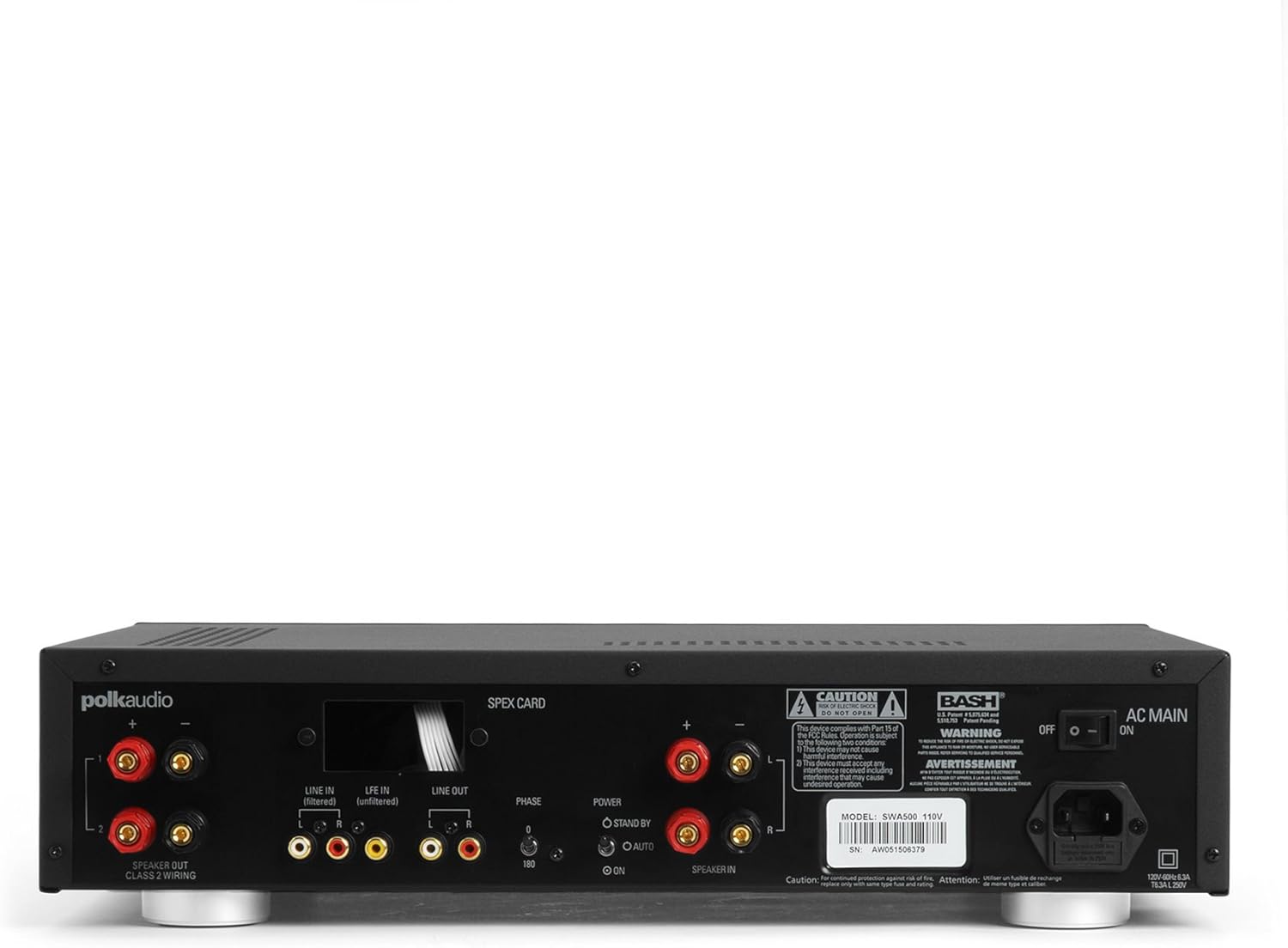
Figure 1: Rear panel of the SWA500 amplifier, illustrating various connection points including Line In, Line Out, Speaker Out, SPEX Card slot, Phase switch, Power mode switch, and AC Main input.
- Line In (Filtered/Unfiltered): Connect your audio source (e.g., AV receiver's subwoofer output) to the appropriate Line In jacks using RCA cables. The "Filtered" input applies a low-pass filter, while "Unfiltered" bypasses it, useful if your source provides its own filtered signal.
- Líne Amach: These RCA outputs can be used to pass the audio signal to another amplifier or device.
- Cainteoir Amach: Connect your Polk Audio CSW subwoofer(s) to these terminals using appropriate speaker wire. Ensure correct polarity (+ to + and - to -). The SWA500 supports Class 2 wiring.
- Athraigh Céime: Adjust this switch (0° or 180°) to optimize the subwoofer's phase with your main speakers for seamless sound integration.
- Athraigh Mód Cumhachta: Select between "ON" (always on), "AUTO" (turns on when an audio signal is detected), or "STANDBY" (low power mode, awaiting signal).
- Príomhlíonra AC: Connect the supplied power cord to this input and then to a suitable AC power outlet.
4. Oibríocht
Once all connections are made and the amplifier is plugged in, you can begin operating your SWA500.
4.1. Rialuithe Painéal Tosaigh

Figure 2: Front panel of the SWA500 amplifier, featuring the Power button, Protection indicator, Low Pass Filter control, and Volume control.
- Cnaipe Cumhachta: Brúigh chun an amplifier on or off. The power indicator light will illuminate when the unit is on.
- Táscaire Cosanta: This light illuminates if the amplifier enters protection mode due to overheating or an electrical fault. If this occurs, turn off the amplifier, check connections, and allow it to cool before restarting.
- Low Pass Filter (80Hz - 120Hz): This knob adjusts the upper frequency limit of the subwoofer's output. Adjust this to blend the subwoofer's sound seamlessly with your main speakers. Start with a setting around 80Hz and adjust by ear.
- Volume (Min - Max): This knob controls the overall output level of the subwoofer. Adjust to achieve the desired bass intensity relative to your main speakers.
4.2. Initial Sound Adjustment
Begin with the Low Pass Filter set to a mid-point (e.g., 100Hz) and the Volume knob at a low setting. Play a familiar piece of music or movie scene. Gradually increase the Volume until the bass is noticeable but not overpowering. Then, fine-tune the Low Pass Filter and Phase switch to achieve the most natural and integrated sound with your main speakers. The goal is for the subwoofer to enhance the low frequencies without drawing attention to its location.
5. Cothabháil
- Glanadh: Disconnect the power cord before cleaning. Use a soft, dry cloth to wipe the exterior surfaces of the amplifier. Do not use liquid cleaners or aerosol sprays.
- Aeráil: Cinntigh go bhfuil na hoscailtí aerála ar an amplifier are not blocked. Proper airflow is crucial for preventing overheating and maintaining long-term reliability.
- Stóráil: Má stóráil an amplifier for an extended period, unplug it from the power outlet and store it in a cool, dry place, away from direct sunlight and extreme temperatures.
6. Fabhtcheartú
If you experience issues with your SWA500 amplifier, consult the following troubleshooting guide:
| Fadhb | Cúis Féideartha | Réiteach |
|---|---|---|
| Gan solas táscaire cumhachta | Power cord not connected; AC outlet not active; Power switch off. | Ensure power cord is securely connected. Check AC outlet with another device. Press the front panel power button. |
| Gan aon fhuaim ón bhfo-fho-woofer | Incorrect input connection; Speaker wires loose or incorrect polarity; Volume too low; SPEX card missing or incorrect; Amplifier in standby/auto mode without signal. | Verify RCA input connections. Check speaker wire connections and polarity. Increase volume. Ensure correct SPEX card is installed. Set Power Mode switch to "ON" for testing. |
| Distorted or poor quality sound | Volume too high; Incorrect Low Pass Filter setting; Phase mismatch; Damaged speaker wire or subwoofer. | Reduce volume. Adjust Low Pass Filter. Toggle Phase switch (0°/180°). Inspect speaker wires and subwoofer for damage. |
| Protection indicator illuminated | Overheating; Short circuit in speaker wiring; Amplocht lifier. | Múch amplifier and allow to cool. Check speaker wiring for shorts. If problem persists, contact customer support. |
7. Sonraíochtaí
- Múnla: SWA500
- Aschur Cumhachta: 500 vata in 4 óm
- AmpCineál lifier: Aicme D Digiteach
- Comhoiriúnacht: Designed for Polk Audio CSW Series built-in subwoofers (requires specific SPEX circuit card)
- Scagaire Pas Íseal: Adjustable (Front Panel)
- Rialú Toirte: Adjustable (Front Panel)
- Rialú Céime: 0°/180° (Rear Panel)
- Modhanna Cumhachta: ON, AUTO, STANDBY (Rear Panel)
- Toisí Táirge: 1 x 1 x 1 orlach (tuairim is leith, de réir na sonraí a cuireadh ar fáil)
- Meáchan Mír: 12.25 punt
- Monaróir: Fuaim Polk
- Dáta Ar Fáil den Chéad Uair: 18 Aibreán, 2005
8. Barántas agus Tacaíocht
For specific warranty information, please refer to the warranty card included with your product or visit the official Polk Audio websuíomh. Coinnigh d’admháil ceannaigh mar chruthúnas ceannaigh le haghaidh éilimh bharántais.
If you require technical assistance or have questions not covered in this manual, please contact Polk Audio customer support. Contact information can typically be found on the official Polk Audio websuíomh nó ar phacáistiú do tháirge.
Polk Audio Official Websuíomh: www.polkaudio.com