
Réamhrá
Go raibh maith agat as an gceannachasing the Optimus F-1760 16-inch Wave Oscillating Stand Fan. This manual provides important information regarding the safe operation, assembly, maintenance, and troubleshooting of your fan. Please read these instructions thoroughly before use and retain them for future reference.

Image: The Optimus F-1760 stand fan positioned in a bedroom, showcasina dhearadh agus a mhéid i gcoibhneas le troscán.
Treoracha Tábhachtacha Sábháilteachta
Agus fearais leictreacha á n-úsáid, ba cheart réamhchúraimí bunúsacha a leanúint i gcónaí chun an baol dóiteáin, turrainge leictrigh agus gortaithe do dhaoine a laghdú, lena n-áirítear na nithe seo a leanas:
- Léigh na treoracha go léir sula n-úsáideann tú an lucht leanúna seo.
- Ná húsáid an lucht leanúna seo ach amháin mar a thuairiscítear sa lámhleabhar seo. D’fhéadfadh úsáidí eile nach moltar tine, turraing leictreach nó díobháil do dhaoine a chur faoi deara.
- To protect against electrical shock, do not place fan in window, immerse unit, plug or cord in water or spray with liquids.
- Tá géar-mhaoirseacht riachtanach nuair a bhíonn aon fhearas in úsáid ag leanaí nó in aice leo.
- Unplug fan from outlet when not in use, when moving fan from one location to another, and before cleaning.
- Do not operate fan in the presence of explosive and/or flammable fumes.
- Ná cuir lucht leanúna nó aon chuid in aice le lasair oscailte, cócaireacht nó fearas teasa eile.
- Do not operate fan with a damaged cord or plug, or after the fan malfunctions or has been dropped or damaged in any manner.
- Seachain teagmháil le páirteanna gluaisteacha.
- Chun dínascadh, grip breiseán agus tarraing ón asraon balla. Ná yank ar chorda.
- Bain úsáid as i gcónaí ar dhromchla tirim, cothrom.
- Ná crochadh nó suite lucht leanúna ar bhalla nó ar uasteorainn.
- Ná bí ag feidhmiú gan gríoscáin lucht leanúna i gceart.
- This product employs overload protection (fuse). A blown fuse indicates an overload or short-circuit situation. If the fuse blows, unplug the product from the outlet. Replace the fuse as per the servicing instructions (follow product marking for proper fuse rating) and check the product. If the replacement fuse blows, a short-circuit may be present and the product should be discarded or returned to an authorized service facility for examination and/or repair.
Socrú agus Tionól
The Optimus F-1760 fan requires minimal assembly. Ensure all components are present and undamaged before proceeding.
- Bun-thionól: Attach the weighted base legs to the main pole. Ensure they are securely fastened to provide stability. The base is designed to be sturdy, with weights at the ends of the feet.
- Coigeartú Airde: The fan's height can be adjusted. Loosen the height adjustment knob on the pole, extend or retract the pole to the desired height, and then securely tighten the knob.
- Ceangaltán Ceann Fan: Ensure the fan head is securely attached to the top of the pole. The motor housing and fan blade are plastic, while the grill is metal.
- Socrúchán: Place the fan on a dry, level surface. Ensure there is adequate space around the fan for proper air circulation and oscillation.
Treoracha Oibriúcháin
The Optimus F-1760 fan offers multiple control options and features for customized comfort.
Painéal Rialúcháin
The fan features a 4-position push-button switch on the pole for basic operation.
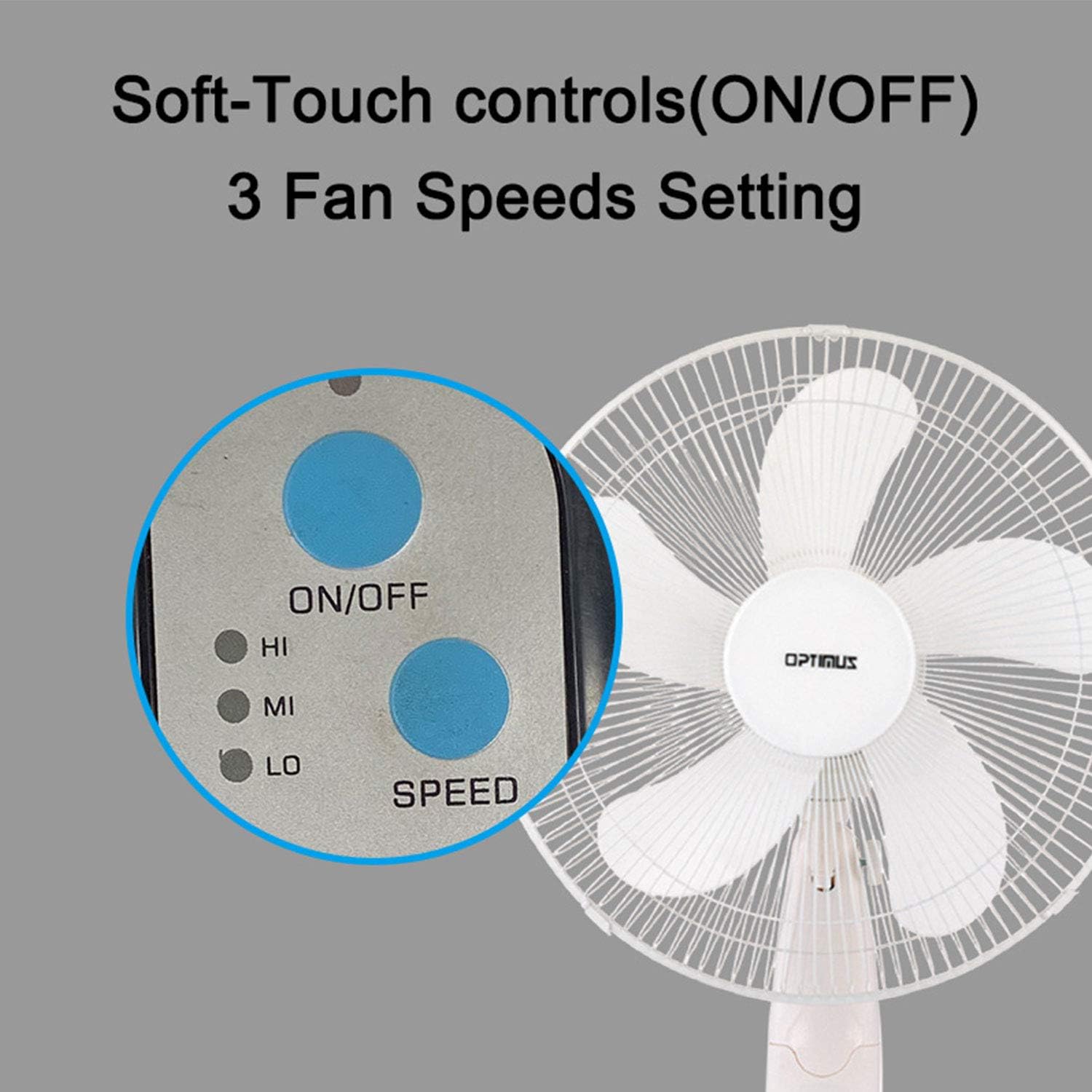
Image: The fan's soft-touch control panel, showing buttons for ON/OFF and SPEED, with indicators for High (HI), Medium (MI), and Low (LO) fan speeds.
- AR/AS: Brúigh chun an fean a chasadh air nó as.
- Socruithe Luais: Select from Low, Medium, or High speeds. The 3-speed, energy-saving, whisper-quiet operation motor provides efficient airflow.
Cianrialú
The fan comes with a remote control for convenient operation from a distance. (Batteries not included).

Image: The remote control for the fan, featuring buttons for Mode, Time, Speed, and ON/OFF functions.
- AR/AS: Casann an gaothrán air nó as.
- LUAS: Cycles through the three fan speeds (Low, Medium, High).
- MODE: Selects between different wind modes.
- AM: Activates and sets the shut-off timer.
Modhanna Gaoithe
The fan offers three distinct wind modes to suit your preference:

Image: The fan's control panel highlighting the MODE button and indicators for Normal, Natural, and Sleep wind modes.
- Mód Gnáth: The fan blows at a constant speed based on your selected setting.
- Mód Nádúrtha: The fan speed fluctuates to mimic a natural breeze.
- Mód Codlata: The fan operates at a lower, quieter speed, ideal for sleeping, with gentle speed variations.
Ascalaithe
The F-1760 features unique wave oscillation for comprehensive air distribution.

Image: A diagram illustrating the fan's capability for both vertical (up/down) and horizontal (left/right) wave oscillation, providing wider air coverage.
- Up/Down & Left/Right Wave Oscillating: Activates a unique oscillation pattern that moves the fan head both horizontally and vertically, distributing air throughout the room.
- To stop oscillation, press the oscillation button again.
Feidhm Uaineadóir
Socraigh an lucht leanúna chun múchadh go huathoibríoch tar éis tréimhse shonraithe.

Image: The fan's control panel showing the TIME button and indicators for 1 hour (1H), 2 hours (2H), and 4 hours (4H) timer settings. The fan can be programmed for up to 7 hours.
- The timer can be set for 1, 2, 4, or up to 7 hours. Press the TIME button repeatedly to cycle through the desired duration.
Cothabháil agus Glanadh
Cuidíonn glanadh rialta le feidhmíocht an lucht leanúna a choinneáil agus a shaolré a shíneadh.
- Roimh Glanadh: Díphlugáil an luchtóir ón asraon leictreach i gcónaí sula ndéantar é a ghlanadh.
- Glanadh Taobh amuigh: Bain úsáid as bog, damp éadach chun dromchlaí seachtracha an lucht leanúna a ghlanadh. Ná húsáid glantóirí scríobacha ná tuaslagóirí.
- Glanadh Gríl: The metal grill can be cleaned with a soft brush or vacuum cleaner to remove dust. For thorough cleaning, the grill may need to be carefully removed.
- Glanadh Blade: If necessary, the fan blades can be cleaned. Ensure the fan is completely off and unplugged. The care instructions specify "Hand Wash" for components.
- Stóráil: Nuair nach bhfuil sé in úsáid ar feadh tréimhsí fada, stóráil an lucht leanúna in áit fhionnuar tirim, más féidir ina phacáistiú bunaidh.
Fabhtcheartú
| Fadhb | Cúis Féideartha | Réiteach |
|---|---|---|
| Ní chasann an lucht leanúna air. | No power supply. Blown fuse. | Ensure the fan is plugged into a working outlet. Check the fuse in the plug and replace if necessary (refer to safety instructions for fuse replacement). |
| Fan operates but air movement is weak. | Low speed setting. Dust accumulation on blades/grill. | Increase the fan speed. Clean the fan blades and grills as per maintenance instructions. |
| Níl an rialú iargúlta ag obair. | Dead batteries. Obstruction between remote and fan. | Replace batteries in the remote control. Ensure a clear line of sight between the remote and the fan's receiver. |
| Fan changes speed automatically or unexpectedly. | Interference from other remote controls (e.g., TV remote). | This fan may respond to frequencies from other remote controls. Try operating the fan manually or repositioning the fan/other devices to minimize interference. |
| Fan makes clicking noises during oscillation. | Normal operation of oscillation gears. | A slight clicking noise from the oscillation gears can occur during normal operation. If the noise is excessive or new, ensure the fan head is securely attached. |
| Fan feels unstable. | Base not properly assembled or tightened. Uneven surface. | Ensure all base components are securely fastened and the fan is placed on a firm, level surface. |
Sonraíochtaí
- Ainm an tSamhail: F-1760
- Branda: Optimus
- Trastomhas lucht leanúna: 16 orlach
- Dearadh Fan Leictreach: Fan Urlár
- Foinse Cumhachta: Corded Leictreach
- Wattage: 60 vata
- Imltage: 6 Volta
- Líon na lanna: 3
- Socruithe Luais: 3 RPM (Low, Medium, High)
- Modh Rialaithe: Cianda, Brúigh Cnaipe
- Gnéithe Speisialta: Up/Down & Left/Right Wave Oscillating, Adjustable Height, Timer Function (up to 7 hours), Wind Modes (Normal, Natural, Sleep)
- Úsáid Laistigh / Lasmuigh: Laistigh
- Meáchan Mír: 9.9 punt
- Comhpháirteanna san áireamh: Táirge, Lámhleabhar
Faisnéis Bharántas
This Optimus F-1760 fan comes with a Barántas teoranta 1 bliana from the date of purchase. This warranty covers defects in materials and workmanship under normal use. It does not cover damage resulting from misuse, accident, alteration, or unauthorized repair. Please retain your proof of purchase for warranty claims.
Tacaíocht do Chustaiméirí
For technical assistance, warranty claims, or questions regarding your Optimus F-1760 fan, please contact Optimus customer service. Refer to the product packaging or the official Optimus websuíomh gréasáin le haghaidh an fhaisnéis teagmhála is déanaí.