
1. Réamhrá agus Tharview
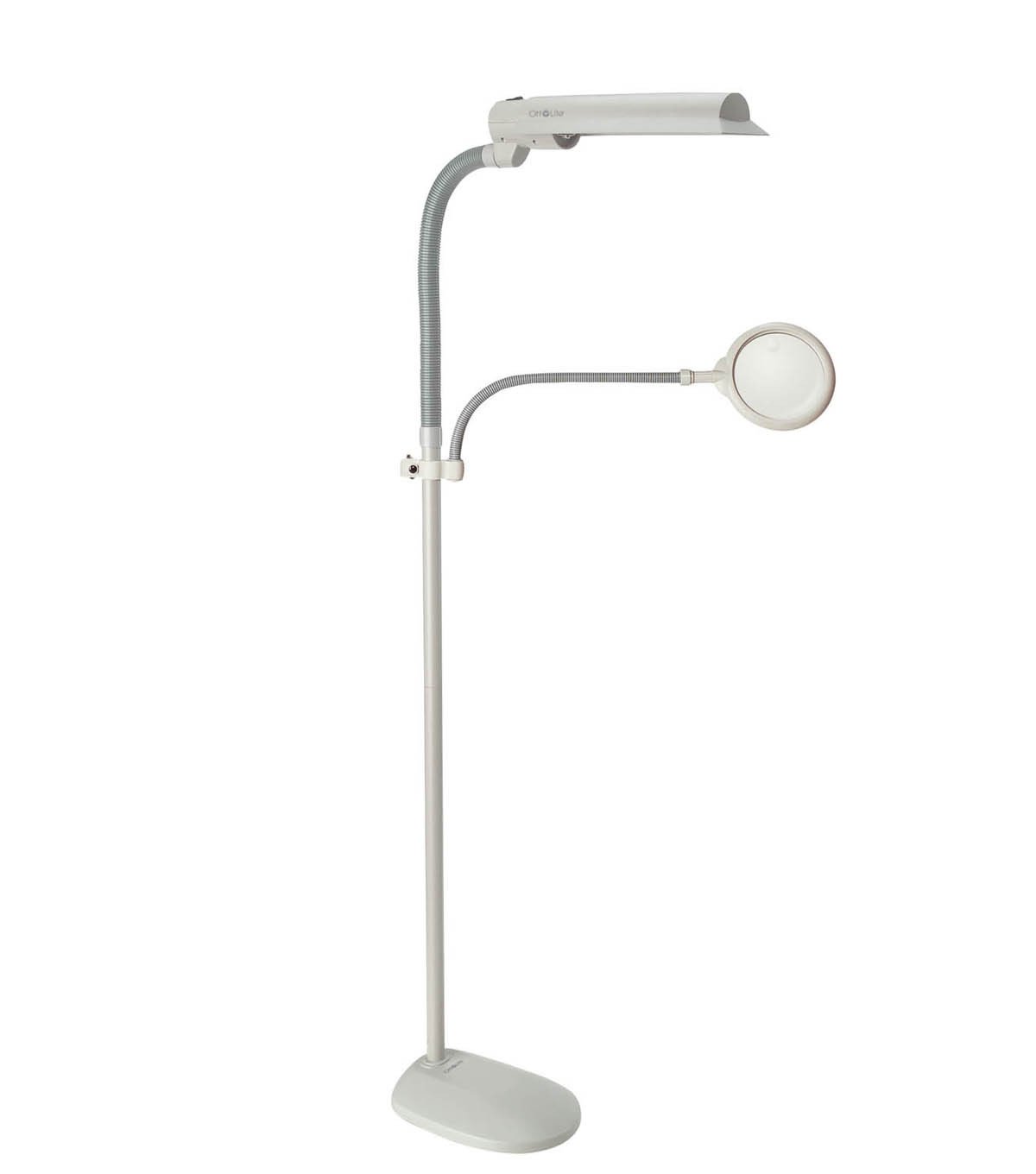
The OttLite W9437T Easy View Urlár Lamp is designed to provide exceptional lighting for various tasks, reducing eye fatigue and enhancing visibility. Featuring OttLite 508 Technology, this lamp offers a precise balance of contrast and brightness, ensuring accurate color rendition and clear detail without harsh glare or distortion. It includes an energy-efficient 18-watt bulb and a 3X optical-grade magnifier for intricate work.
Íomhá 1.1: The OttLite W9437T Easy View Urlár Lamp with its adjustable lamp head and flexible magnifier arm, positioned over a sewing project. A woman is using the magnifier to examine her work.
Príomhghnéithe:
- OttLite 508 Technology: Provides a balanced spectrum of light for true colors and clear details.
- 3X Optical-Grade Magnifier: 6-inch diameter magnifier with a flexible gooseneck arm, extending 16 to 22 inches for hands-free viewing.
- L inchoigeartaitheamp Ceann: Wide-wing shade rotates to direct light precisely where needed.
- bolgán atá tíosach ar fhuinneamh: Includes an 18-watt HD bulb, rated to last up to 10,000 hours.
- Airde Inchoigeartaithe: Lamp height can be adjusted from 50.75 to 62 inches.
- Dearadh Cobhsaí: Features a sturdy 10.5-inch wide base for stability.
2. Socrú agus Tionól
Carefully unpack all components from the packaging. Ensure all parts are present before beginning assembly. No tools are typically required for basic assembly.
Céimeanna Tionóil:
- Attach the Pole to the Base: Securely screw the main pole section into the lamp's base until it is firm and stable.
- Ceangail Lamp Ceann: Ceangail an lamp head assembly to the top of the main pole. Ensure it clicks or screws into place securely.
- Ionsáigh bolgán: Carefully insert the provided 18-watt HD bulb into the lamp head socket. Do not overtighten.
- Attach Magnifier Arm: Connect the flexible gooseneck arm of the magnifier to the designated port on the lamp pole or head.
- Suíomh: Cuir an lamp on a flat, stable surface. Adjust the height of the pole and the position of the lamp head and magnifier arm as desired for your workspace.
- Ceangal Cumhachta: Plug an téad cumhachta isteach i asraon caighdeánach leictreach.
3. Treoracha Oibriúcháin
The OttLite W9437T is designed for ease of use, providing optimal lighting and magnification for various tasks.
Ag baint úsáide as an Lamp:
- Cumhacht ar siúl / as: Locate the power switch, typically on the lamp head or pole, and press it to turn the lamp ar nó as.
- Treo Solais a Choigeartú: The wide-wing shade can be rotated to direct the OttLite illumination precisely onto your work area.
- Coigeartú Airde: An lamp pole allows for height adjustment. Loosen the locking mechanism (if present), adjust to the desired height, and then secure it.
Ag baint úsáide as an Formhéadaitheoir:
- Suíomh: Use the flexible gooseneck arm to position the 3X optical-grade magnifier directly over the area you wish to view go mion.
- Oibríocht Gan Lámha: The flexible arm allows for hands-free magnification, ideal for intricate crafts, reading fine print, or detailed tasks.
Físeán 3.1: This video demonstrates the benefits of OttLite's 508 Technology, showcasing how it provides true color and clear detail compared to standard lighting, reducing eye strain and improving visibility for various tasks.
4. Cothabháil
Proper maintenance ensures the longevity and optimal performance of your OttLite lamp.
Athsholáthar Bleibíní:
- An lamp uses an 18-watt HD bulb (replacement type B), designed to last up to 10,000 hours.
- To replace the bulb, ensure the lamp is unplugged and cool.
- Carefully remove the old bulb by twisting it counter-clockwise.
- Insert the new 18-watt HD bulb by aligning the pins and twisting clockwise until secure.
Glanadh:
- Díphlugáil an l i gcónaíamp roimh ghlanadh.
- Scrios an lamp's surfaces with a soft, dry, or slightly damp éadach.
- Ná húsáid glantóirí nó tuaslagóirí scríobach, mar d'fhéadfadh siad damáiste a dhéanamh don chríochnú.
- For the magnifier lens, use a soft, lint-free cloth specifically designed for optical surfaces.
5. Fabhtcheartú
If you encounter issues with your OttLite W9437T lamp, féach ar na céimeanna coitianta fabhtcheartaithe seo a leanas:
- Lamp Gan Casadh air:
- Cinntigh go bhfuil an corda cumhachta plugáilte go daingean isteach i soicéad leictreach atá ag obair.
- Seiceáil an bhfuil an lasc cumhachta sa suíomh 'AR'.
- Verify that the bulb is correctly installed and not loose. If the bulb is old, consider replacing it.
- Caochadh Solais:
- Cinntigh go bhfuil an bolgán scriúdaithe isteach go docht.
- If flickering persists, the bulb may be nearing the end of its life and requires replacement.
- Magnifier Distortion:
- Ensure the magnifier lens is clean and free of smudges or dust.
- Adjust the distance between the magnifier and the object for optimal focus.
If these steps do not resolve the issue, please contact OttLite customer support for further assistance.
6. Sonraíochtaí
| Gné | Sonraigh |
|---|---|
| Uimhir Mhúnla | W9437T |
| Ainm an Bhranda | OttLite |
| Lamp Cineál | Urlár Lamp |
| Foinse Solais | 18-watt HD Bulb (Type B) |
| Saolré Bleibíní | Suas le 10,000 uair an chloig |
| Formhéadaitheoir | 3X Optical-Grade, 6-inch diameter |
| Magnifier Arm Extension | 16 go 22 orlach |
| Airde Inchoigeartaithe | 50.75 go 62 orlach |
| Bunábhar | Plaisteach |
| Ábhar Scáthaigh | Plaisteach |
| Meáchan Mír | 10 Punt |
| Foinse Cumhachta | Corded Leictreach |
| Dath | Dove Liath |
| UPC | 761712103686 |
7. Barántas agus Tacaíocht
Your OttLite W9437T Easy View Urlár Lamp comes with a manufacturer's warranty to ensure your satisfaction and product reliability.
- Lamp Barántas: 2 bhliain ó dháta an cheannaigh.
- Bulb Warranty: 1 bhliain ó dháta an cheannaigh.
For warranty claims, technical support, or any questions regarding your product, please contact OttLite customer service through their official websuíomh nó an fhaisnéis teagmhála a cuireadh ar fáil le do dhoiciméid cheannaigh.


